


Desertcart purchases this item on your behalf and handles shipping, customs, and support to Japan.
🎮 Elevate your gaming & streaming setup with flawless 4K & Dolby Atmos magic!
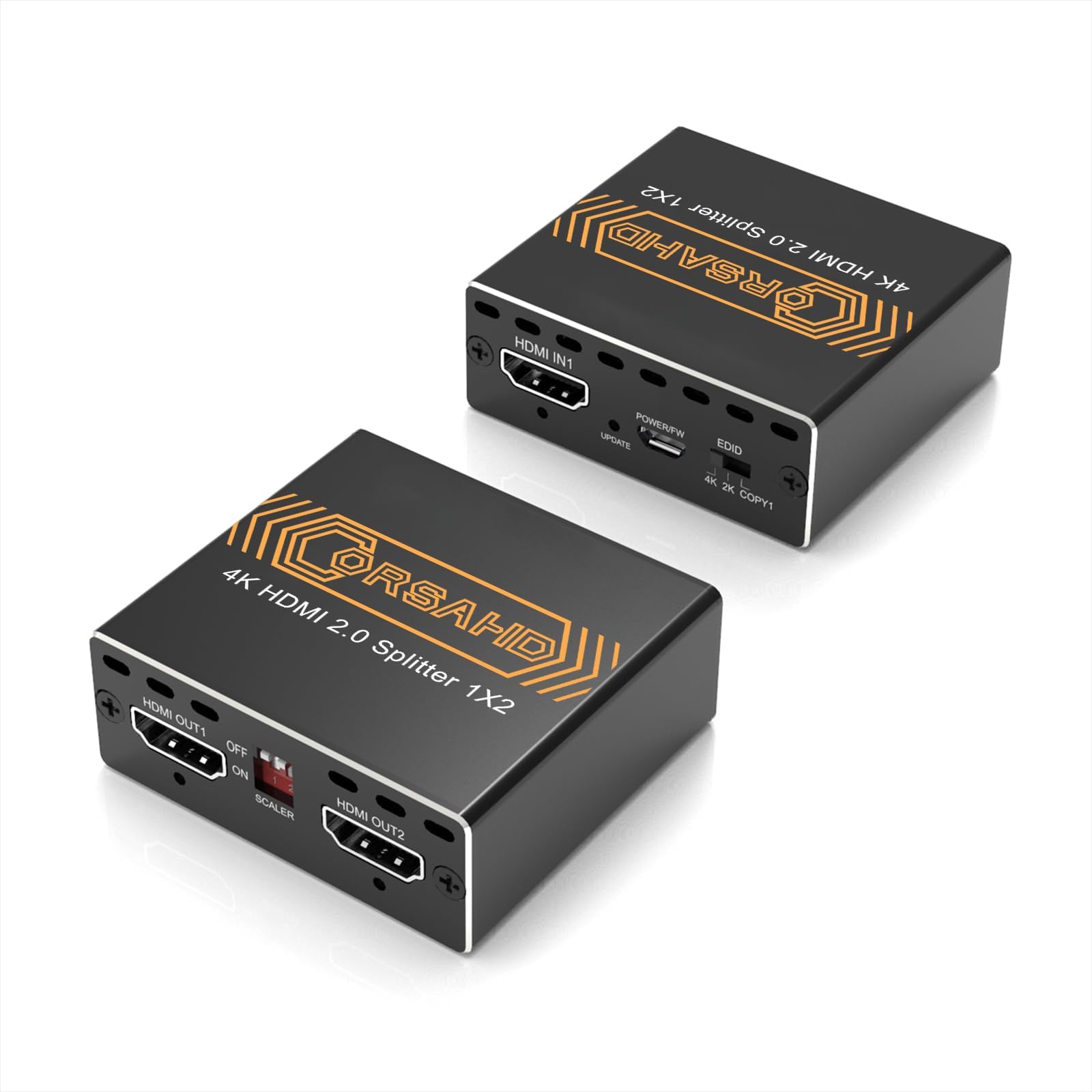
The CORSAHD 4K@60Hz HDMI Splitter 1x2 delivers ultra-high-definition 4K video at 60Hz with 4:4:4 color sampling and 18Gbps bandwidth. It supports advanced audio formats including Dolby Atmos and 7.1 channel surround sound, while bypassing HDCP 2.2/2.3 for seamless content duplication. Designed for gamers and streamers, it mirrors one HDMI source to two displays with EDID management and downscaling options, compatible with major consoles and UHD TVs. Plug-and-play ease ensures professional-grade performance without hassle.


| ASIN | B0CLL5GQXT |
| Audio Output Mode | Multi-Channel |
| Best Sellers Rank | #86 in Audio & Video Selector Boxes |
| Brand | CORSAHD |
| Built-In Media | HDMI 2.0 Splitter |
| Cable Type | HDMI |
| Color | Black |
| Compatible Devices | Gaming Console, Monitor, Television |
| Connector Type | HDMI |
| Connector Type Used on Cable | HDMI |
| Customer Reviews | 4.2 out of 5 stars 171 Reviews |
| Manufacturer | CORSAHD |
| Mfr Part Number | CO-SP12H2 |
| Model Number | CO-SP12H2 |
| Number of Items | 1 |
| Number of Ports | 3 |
| UPC | 605129034600 |
| Unit Count | 1 Count |
L**N
This Is The HDCP Bypass For The PS3
If Yu Looking For A LEGIT HDCP Bypass. This Is The One To Buy. Easy To Use And Affordable (especially For My PS3 Gamers Trying To Hook It Up To The Stream) Just Make Sure Ya HDMI From The Game Console Is Plugged In The Out1., And Ya Capture Card HDMI Is Plugged Into The HDMI-In (1 Or 2) *The PS3 Audio Will Make A Crazy STATIC Noise When Yu Try And Run Any Game. TO FIX DO THIS: Go To The Sound Settings. 1. TURN OFF The Audio Multi-Output. 2. Go To Audio Output Settings: choose HDMI: Select MANUAL : TURN OFF The First Box (Dolby Digital 5.1 Ch): THEN SELECT Linear PCM 2 Ch. 96 KHz: A Warning Will Come Up About Damaged Speakers. Just Select OK. Then Select Enter Again. And Yu Are Good From There. Read The Instruction Manual For What Type Of Video Output Yu Want As Far As 1080p., 4K Etc. Picture Quality Does What It Needs To Do. Hope This Helps Anybody.!
K**E
Works for PS3 video and audio
I use this to record my PS3 gameplay. Even with CFW the HDCP is in the hardware of the PS3 so there’s no way to disable it with firmware tools. This little device works perfectly. The video quality is good and I personally had great audio, even though I saw some reviews saying the audio was bad.
K**R
Works to bypass PS3 HDCP, but cheaply built
I bought this HDMI splitter to bypass the PS3's built-in HDCP that prevents you from capturing PS3 gameplay footage with a capture card. This splitter works for that purpose, which is enough to satisfy me, but it feels very cheap. The on/off switch is so poorly designed and hard to reach that I struggle to use it and I think I damaged it on maybe my third or fourth time flipping the switch.
C**L
Get this. You will not regret it.
I have been fighting for months trying to find a workaround for hdcp to help covert my grandparents VHS tapes to the modern digital age. Saw this was rated fairly high and gave it a shot. Boy was it worth the purchase. Immediately worked! Plugged in my HDMI VHS system into my elgato HD60 Pro capture card, and not a single hiccup occured! Worked right out of the box. Would recommend to anyone who is trying to do the same. Best purchase ever!
T**T
Only works hdmi to hdmi.
Doesn't power on. Won't stay powered on. I had to make some adjustments. However it doesn't seem to work with hdmi to display port on a 1080p monitor, or a 4k 120hz monitor. Works with hdmi to hdmi cable on A 32" and a 27" Dell monitor and Asus.
B**N
Recommended
Exactly what I needed and pretty good quality
E**K
GET THIS FOR PS3 TO BYPASS HDCP (Works as of February 2026)
This is exactly what I needed for PS3 content creation to bypass the HDCP. HDMI cable from PS3 goes to the splitter’s HDMI IN. A second HDMI cable goes to the HDMI Out2 of the splitter and goes to your TV/ Monitor. A third HDMI cable goes to the HDMI Out1 of the splitter and the other end goes to your capture device’s HDMI In. From there it should be captured and displayed on OBS or whatever capture software you use. Just make sure the splitter is powered on using the little USB cable, set the EDID on the splitter to COPY1, leave off the scaler and you’re good to go.
C**L
Perfect for PS3 recording.
Perfect, allowed me to capture my PS3 using a capture card and looks crystal clear with an optional no downscaling or upscaling mode for those who are like me and prefer native resolution, over a device that scales the image up.
S**O
Works with PS3
Worked instantly with my PS3 to bypass the HDCP Lockout prior to connecting it upto my scalar.
Trustpilot
3 days ago
1 month ago