📡 Unlock the airwaves like a pro—never miss a signal again!
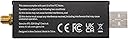
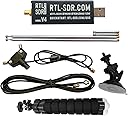
The RTL-SDR Blog V4 is a cutting-edge software defined radio receiver featuring the R828D tuner, 1 PPM TCXO for exceptional frequency stability, and a built-in HF upconverter. It covers an expansive frequency range from 500 kHz to 1.7 GHz with up to 3.2 MHz instantaneous bandwidth. Housed in a thermally optimized aluminum case, it offers improved filtering, ESD protection, and an activatable bias tee for powering active antennas. This bundle includes a versatile dipole antenna kit, making it perfect for both terrestrial and satellite signal reception across multiple platforms including Windows, macOS, Linux, Android, and Raspberry Pi.
| ASIN | B0CD7558GT |
| Best Sellers Rank | 36,733 in Business, Industry & Science ( See Top 100 in Business, Industry & Science ) 257 in Interfaces |
| Box Contents | RTL-SDR Dongle, Antenna Set |
| Brand | RTL-SDR Blog |
| Brand Name | RTL-SDR Blog |
| Colour | black |
| Compatible Devices | Computer, laptop, smartphone |
| Connectivity technology | USB |
| Customer Reviews | 4.4 out of 5 stars 1,576 Reviews |
| Frequency | 500000 KHz |
| Hardware Interface | Radio Frequency |
| Item Dimensions L x W x H | 19L x 5W x 24H centimetres |
| Item Weight | 245 Grams |
| Manufacturer | RTL-SDR Blog |
| Manufacturer Part Number | rtlsdr_v4_with_antenna |
| Model Number | rtlsdr_v4_with_antenna |
| Network Connectivity Technology | USB |
| Number of Items | 1 |
| Power Source | USB powered |
| Product Features | Advanced Tuning Capabilities, Improved Antenna, Temperature Compensated Oscillator |
| Product Warranty | 2 years warranty on manufacturing defects |
| Product dimensions | 19L x 5W x 24H centimetres |
| Radio Bands Supported | Multi-band |
| Special feature | Advanced Tuning Capabilities, Improved Antenna, Temperature Compensated Oscillator |
| Tuner Type | Digital |
| Tuner technology | Digital |
| UPC | 783495030867 |
| Unit Count | 1.0 count |
J**C
Highly Recommended - Perfect for beginners and experts!
A little on the pricey side but honestly completely worth the money! Comes with a very easy to use and mount dipole, extremely simple to set up even for beginners. When set up correctly has very good signal receiving quality. The USB itself is tiny but the dipole can get extended to whatever length needed (well, until you can't extend it anymore!). Build quality is really good and it functions amazingly; I haven't even used this with a standard SDR program yet, but my own Python script I have been writing for direction finding and signal analysis - works perfectly (as long as you have the correct drivers&libraries installed!). This is definitely something beginners can use as well as people more experienced too - highly recomend!
A**R
Fab
Great products
E**A
✅️ device as described.
Great device and easy install and setup in Linux on Raspberry Pi 5, drivers avaliable github respiratory. Got quite good coverage with supplied antenna. Tracking over 100 vessels on first try. The chip runs at 50°C so use extra USB2 or 3, 0.5m cable between the chip and the pc.
C**G
Promising so far
Works quite well but find audio not very clear. But early days for me to get to grips with it
C**S
Decent little SDR dongle
If you’re buying this then you probably know what you want but in a nutshell this single works well with almost all operating systems and SDR applications. I was impressed with the included accessories. Easy to set up. Good value for money. Stays fairly cool during operation with its metal casing. Good reception, better than my handheld scanner in the same location.
C**S
Good if you know how to install
I was a little hesitant after reading other reviews saying how hard it is to install the drivers, but it's actually not difficult at all once you know how to do it. In short, the drivers come with your SDR software. For example, I'm using SDR# from AirSpy. When you download the application, there is an install-rtlsdr.bat file to run first. Then a zadig.exe file to actually select and install the driver. Then, finally, you can run SDR# and use the USB stick. If that sounds like a lot, there is a very helpful youtube video called "Installing SDR# and configure to use with RTL-SDR" that will show you how in under 4 minutes. Also something to note, my pc didn't recogise the USB stick when it was plugged into a USB 3 port (blue ones), but worked fine in a USB2 port (regular black/white ones). That may be worth checking too if you're having issues.
M**Y
Aerial damaged on arrival
I bought this device to monitor oil level in home assistant as oilpal no longer supply this aervice. It was easy to set up and after a few minor technical issues I have it all working. I bought the version with two aerials supplied. Unfortunately one of them was broken on arrival and the other is way too big to be installed in the house. I contacted seller but received no response. I am using with an aerial that I had on the now obsolete modem that was originally sending data to oilpal. I would recommend the device, but don't bother with the aerials. Get that separately.
M**N
Wonderful value pack.
Just a great piece of kit for the price. Unbeatable really
J**O
Top
Produit conforme livré a la date prévue, fonctionne parfaitement sur Windows 11
A**.
Great Product
This RTL-SDR works as advertised, and is genuine, despite what other comments may suggest. (You can check the RTL-SDR website for what makes one genuine, and for me, it checked all the boxes.) It works great with several common SDR applications such as SDR++. If you want an RTL-SDR V4, then this is the one to get, just note that you will need to buy a better antenna, as the ones provided aren't the greatest.
L**R
Fun! Avoid on amd pcs
I absolutely love the dongle for listening to the local emergency services. The sticky cup works extremely well. Some major things to know though: -this will not work with some AMD processors. It does not work with any of my AMD processors. It acts like it works , but it's constantly failing/flaky/glitchy. I tried all the different USB powered hub blah blah blah configurations. But nope, moving them to intel machines made all the difference. Super reliable on the Intel machines - even the ones that are old. - windows updates will sometimes update the driver disabling it. So you have to use a program to reinstall the driver. Very annoying since Windows 11 requires you to allow updates at least once a month. -The usb end of the dongles is also fragile, and can lose signal if they're jiggled . So putting them on a hub where they are upright is best. Or in an upright USB port on your computer works too. -They get pretty warm, so you're probably not going to want to put them next to each other. -Having one V3 and V4 works better than two of the same kind. Then you don't have to go into the settings and rename it with a special program. And they just work better together. I use sdrtrunk on pc and trunkrecorder on a potato - works great on both. Better signal than my bearcat. Was easy to set up to upload to openmhz and broadcastify.
D**E
No es lo que esperaba porque con esa antena no capta nada
S**O
RTL-SDR Blog V4 R828D
Very good
Trustpilot
1 month ago
1 week ago