🔗 Connect & Conquer: Elevate your display game!
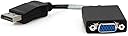
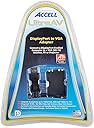
The Accell DP to VGA Adapter is an active adapter that allows seamless connection from DisplayPort to VGA displays, supporting resolutions up to 1920x1200 @60Hz without the need for additional drivers or power. It's certified for AMD Eyefinity technology, making it ideal for multi-display setups, all while being compact and portable.


| ASIN | B003HC85D2 |
| Best Sellers Rank | #925 in VGA Cables |
| Brand | Accell |
| Built-In Media | Adapter |
| Color | Black - DisplayPort connector |
| Compatible Devices | Television |
| Connector Type | DisplayPort |
| Customer Reviews | 4.3 out of 5 stars 237 Reviews |
| Finish | Matte |
| Global Trade Identification Number | 00132018559505, 00806291850382 |
| Item Dimensions | 2 x 7.8 x 10.2 inches |
| Item Weight | 0.09 kg |
| Item dimensions L x W x H | 2 x 7.8 x 10.2 inches |
| Manufacturer | Accell |
| Mfr Part Number | B101B-003B |
| Model Number | B101B-003B |
| Number of Items | 1 |
| Number of Ports | 1 |
| Package Quantity | 1 |
| Specific Uses For Product | personal |
| UPC | 826388105744 172302812282 887608882630 887472349833 012301983999 631058197376 132018559505 851975713354 808111658369 809385170120 777787391491 163120318100 804066539425 806291850382 031112595849 809185320893 168141628351 999996700172 |
| Unit Count | 1 Count |
| Warranty Description | 2 years |
G**G
Perfect for using old monitors with a new PC
I bought a shiny new, rocket fast PC for Christmas ... but it didn't have any VGA outputs to which I could connect my two 19" VGA LCD monitors (it also couldn't use my laser printer or run several of my software packages, but that's for another review) ... instead, it had a DVI port, an HDMI port, and a DisplayPort ... the PC came with a DVI-to-VGA adapter, and I had read in the specs that I could connect monitors to any two of the three ports, but the salesman at the big box electronics store (think: "unsurpassed purchase") told me that my only option for the second monitor was a USB display adapter, which disappointed me so much that I almost didn't buy the PC. But, after a little more research, I found this adapter on Amazon for about half what the USB adapter would have cost ... ordered it, and anxiously hooked it up when it arrived ... it worked perfectly, and the PC automatically sensed the second monitor, so I was up and running within about 5 minutes of opening the package! So I'm now controlling both monitors with the same graphics adapter, as I had planned. The only "issue" I can note is that I occasionally get a pop-up error saying that the displayport cannot set the resolution on the monitor, but the monitor is running at its max resolution (1280x1024) and everything seems fine, so I just ignore the message. FYI, I'm running Windows 7 Home Premium 64 bit, ATI Radeon HD 5750 1GB graphics OEM adapter (thus only 3 ports), Intel i7 870, 8GB RAM. Post a comment with your question if I can provide any more information. Cheers!
L**T
This is the ticket for Eyefinity
If you're looking for something to work with eyefinity but are confused by the massive amounts of completely WRONG information out there, buy this item and stop worrying about it, then tell your friends. Here's a quote from me discussing this displayport adapter on overclock dot net. Will I be able to tell the difference between this VGA adapter and a DVI one? No. Speaking from experience, because I own one. I also can easily spot the difference between native dvi and native VGA, but displayport to VGA is absolutely indecipherable from DVI in my experience. edit: Also, if you are using an adapter to allow a 3rd monitor to be connected, $30 DP > DVI connectors aren't going to cut it. It HAS to be an active adapter and as i'm sure you know those run for about $100. VGA adapters also have to be active but there are differences: Converting from DP to Analog (VGA) is much easier to process than DP to any other digital interface, such as DVI or HDMI. This means that DP to VGA adapters can be self powered, and very cheap. Mine is this one and it works flawlessly. If there was any way that I could prove my position on image quality I would love to, but it has to be perceived. All I can say is rest assured I am completely anal about pixels bleeding due to low signal quality, etc. and after running a VGA connected LCD for years I am very familiar with the exact symptoms that are factored in to what is considered a "low quality" VGA connection. I'm not sure what kind of magic DP conjures up, but the difference between my VGA connection and the identical screen right next to it using dvi is completely indistinguishable.
P**R
Perfect eyefinity solution for a great price!
I previously bought a brand new active displayport to DVI adapter ($45 off ebay, but it normally goes for more like $90), and while it did work, it constantly would shut off when going into games and changing resolutions etc, so I had to turn the monitor power off and back on to get that screen to show up again. I never could find a way to fix it and after checking online I saw many others having this same problem. The solution: Get this displayport to VGA adapter for $25. it is cheaper and works perfect, I have never had the screen go blank or had to cycle the power on it. Although it's analog rather than digital it still looks and works great. And since I am using analog for one of the other displays as well it's nice and balanced with HDMI in the middle and VGA on left and right sides. I am using this for eyefinity on an Alienware m17x-r2 laptop, works great and highly recommended if you are interested in eyefinity. Save yourself the time and trouble and don't even mess with the displayport to DVI/HDMI adapters.
J**M
Work Great- no problems with install or ops
I bought this adapter just before I disposed of an older Compaq monitor. I'm really glad I was lazy about it, because that monitor is now running just fine alongside a 23" Vizeo and a 20" Samsung. Right-- three monitors total and the old Analog Compaq is maxed at 1024 x 768, the Vizeo at 1920 x 1200 and the Samsung at 1600 x 900. I think that running with three different resolutions is pretty impressive! Connection was dead easy- power down, plug in and restart. I have one desktop extended across the three monitors out of an ATI Radeon HD5770, all with cables direct to the card, except the Compaq which of course runs through the adapter. I had a 9 pin extension cable that I thought I would use/need, but the cable run didn't require it-- that was a good thing because this connection will not accept the older 9 pin VGA cables. So long as you are working with VGA HD-15 cable connections an extension should not be a problem.
Z**L
Works great 99% of the time
This was cheap, and works as advertised. Somehow, miraculously, it looks like DVI or some other digital connection, not having the typical VGA blur. However, I have had my DisplayPort link glitch out twice, only allowing ridiculously low resolutions. This was fixable simply by unplugging and replugging it, so no harm done. If you want something for 1080p or smaller and don't want to pay $100+ for an adaptor for eyefinity, it's great!
C**A
NOT USB for those who seek it
I dunno how or why this has creeped into a search for USB components, and the picture is massively misleading. The way the wire is angled makes it look very much like a USB adapter. And if your not paying attention like I was you will buy this, and then get it in the mail a few days later then *face palm*, sad but true. After getting them I came back to the listing convinced they must have sent me the wrong thing. But reading more throughly through the description, it specifies that its not usb but in sooo many words so to speak. Kinda leads ya on.. But like I said paying better attention then going on to read the reviews I seen that I wasn't the only one who made the same exact mistake. I am sure on the flip side this product is perfect for what it was designed for, but the shere fact that its misleading, funny thing is they still make money off the deal as I essentially am paying a restock fee (i think), then had to cover whatever they didn't after the limit to ship it back to them. For me bought 2 of them had only 8 dollars to work with towards shipping it back.. bah, just agrivated I wasted 50 or so dollars, to then waste the gas to go to UPS and ship it back, to now have to sit and wait for my refund.. even more frustrated by the fact that in order to get what I wanted originally the cheapest thing was 59$ for just one.. so having to pay double for what I thought otherwise I got a sweet deal on pisses me off to.. ah well, what ya gonna do. enough crying from me.
R**R
Just what I needed
I have an AMD Radeon HD 5770 video card, which can support 3 monitors natively. I was already using the two DVI ports, but needed a way to add my TV so it could double as a monitor as well. I originally purchased a passive displayport to HDMI adapter ( High Quality Black DisplayPort Male to HDMI Cable Male - 6 Feet / 2M ), but that didn't work. I found out that you have to have an active converter not the passive one that I had. So I purchased this device. I got it, connected it, and all was well. It works like a charm. I connected it from the video card to my Samsung TV and it looks great. Just plug and watch. It was that simple to setup. I highly recommend this for someone that is in the situation that I was in.
J**G
worked fine for one year then failed
I used the Accell for one of four monitors on a dell 9700 desktop. The other three monitors used USB to RS232 or DVI. The Accell display port adaptor worked fine for a year. Then, for two months, I noticed a change of background color on the monitor screen. Two days ago the monitor went black while the monitor controls worked. I have spare monitors so I could check all cables and adaptors to the non-working monitor and spares. The problem was the Accell adaptor that had failed. I have a spare Moread adaptor that I installed. The monitor works perfectly again. I will buy a different replacement adaptor just because I got surprised with the Accell after a year. Price was fine, but not for 1.2 years use.
M**X
Excelente prodcuto
Lo utilice para conectar un monitor vga a una r9 390 Nitro y sin problemas, simplemente enchufar y disfrutar. Lo utilizo para conectar 3 pantallas a la tarjeta de video. Excelente tiempo de entrega.
R**R
Excellent piece of hardware
Does exactly what I asked of it. A surprising number of competitor products fail to work correctly. I am currently running an Acer 24 inch monitor (1920 by 1200 pixels, 24 bit colour, 60fps) using this device - with a video signal sent from my AMD (ATI) 5870 Radeon desktop graphics card. If you're after Eyefinity, or have a series 5 or newer graphics card with DisplayPort output, but an older VGA monitor, this bit of kit will sort you out. Thumbs up.
O**O
Funciona
Conecté la torre con el display port y el VGA a la pantalla y funcionando sin problemas. Recomendado cien por cien.
S**N
問題なく使用可
動作に問題ありません。 DisplayPortが余っていて、古い液晶モニタの再利用なんかに最適。
A**R
Für Eyefinity geeignet
Dieser aktive Adapter von Display Port auf VGA hat sofort funktioniert, um neben LED-Monitor (per HDMI) und PlasmaTV (per DVI-auf HDMI) auch den Beamer (nun per DP auf VGA) dauerhaft an meine HD5850 anzuschließen. Direkt nach dem Einbau waren alle 3 Bildschirme zeitgleich und dauerhaft verfügbar. Zuvor musste ich immer einen "Bildschirm" in der Windows-Anzeigensteuerung deaktivieren, da standardmässig nur 2 zeitgleich nutzbar sind, was dank dieses Adapters, der durch moderne Technik nicht mal einen gesonderten USB Stromanschluss braucht, nicht mehr nötig ist. An der Bildqualität gibt es nichts auszusetzen und das Kabelstück am Adapter ist schön flexibel. Unter den Adaptern, die ich in Erwägung gezogen hatte, scheint dies einer der "preiswerteren" zu sein und ich bin zufrieden, das der Accell B101B-003B problemlos funktioniert hat.
Trustpilot
2 weeks ago
2 days ago