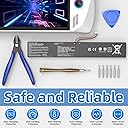
![C41N2208 Battery for ASUS ROG Ally (2023) RC71L PC71L - 15.48V 4780mAh Gaming Handheld Replacement Battery Mod Kit, [NOT for Ally X (RC72LA) & Xbox Ally X (RC73XA)]](https://m.media-amazon.com/images/I/61X+9LgfPuL._AC_SL3840_.jpg)





Desertcart purchases this item on your behalf and handles shipping, customs, and support to Japan.
⚡ Power Up Your ROG Ally with Pro-Level Endurance!
The C41N2208 Battery is a high-capacity 15.48V 4780mAh lithium-ion replacement mod kit exclusively for the original White ASUS ROG Ally (2023) RC71L/PC71L models. It nearly doubles your handheld gaming time with a 74Wh cell, includes all necessary tools for installation, and features a professional-grade Battery Management System ensuring safe, stable, and long-lasting performance. Note: Requires minor internal case modification and is incompatible with newer Ally X models.


| ASIN | B0CKX3GFLH |
| Antenna Location | Gaming Controller |
| Battery Capacity | 4780 milliamp_hours |
| Battery Cell Composition | Lithium Ion |
| Battery Cell Type | Lithium Ion |
| Battery Weight | 1 g |
| Best Sellers Rank | #102,828 in Toys & Games ( See Top 100 in Toys & Games ) #512 in Hobby Remote & App Controlled Vehicle Batteries |
| Brand | YXKC |
| Compatible Phone Models | Not compatible with the Black ASUS ROG Ally X (2024, Model RC72LA) or the latest ROG Xbox Ally X (2025/2026, Model RC73XA), Only compatible with the original White ASUS ROG Ally (2023) Series, Model RC71L / PC71L (Z1 / Z1 Extreme processors) |
| Customer Reviews | 4.3 out of 5 stars 46 Reviews |
| Included Components | C41N2208 Battery |
| Item Dimensions | 1 x 1 x 1 inches |
| Manufacturer | Dongguan Mingyiyuan Electronics Co.,Ltd |
| Model Name | C41N2208 |
| Model Number | C41N2208 |
| Number of Batteries | 1 Lithium Ion batteries required. (included) |
| Recommended Uses For Product | Gaming Controller |
| Reusability | Rechargeable |
| Unit Count | 1 Count |
| Voltage | 15.48 volts |
| Warranty Description | 30 days refund and 12 months replacement |
F**N
Z1 (better than NEW)
Couldn’t be happier my device turned on so fast it feels snappier. I love this. I love how the product bring the clippers too and a couple screws. Bits for me to work with everything was easy work wasn’t hard. Definitely would recommend for anyone who buys a preowned z1.
D**O
Best cheap mod for ally
Install is a little off-putting especially cutting the plastic but worth it in the end. After adding and resetting my ally did notice that battery never reached 100% but did charge all the way up to 99%. The side cutters were especially nice and better than most freebies I've gotten. Price for double the battery life is a crazy good deal too.
M**N
Cheap Upgrade
Easy to install, cheaper and higher capacity than the JSAUX kit. Seems I may have gotten lucky on actual capacity, we'll see how that changes in the future as it gets used more.
K**E
Significantly more battery life, and fits with only minor modifications, comes with tools
I got this to replace the battery in my old well used ROG Ally that had a rather bad original battery with only about 50% health. This is a huge improvement, probably not quite double the original battery when it was new, but at least 3x what my old worn out battery could do. Depending on what I am playing I can get something like 2 - 4+ hours of gaming with the new battery. I was a bit hesitant about having to modify the casing of my ally to fit the larger battery, but it was not bad at all. This is a mod that I think most people can do and tools are included. The included instructions are not very good, but it is easy enough to just figure it out. You just remove a few screws and pry open the ally, it comes apart pretty easy, then you just unplug and take out the old battery (it is held in by a couple of screws). Then take the included nippers and nip off whatever bits of plastic that seem like they will get int the way of the new larger battery. Mostly the bits of plastic in the middle on both the front side and the back side of the case. I just snipped down the little hollow square things on the front of the case and a few other bits, make sure to snip away some bits near the bottom middle screw hole. Just keep trying to insert the new battery and close up the case to see if you have removed enough for it to fit without excessive bulging and pressure on the battery. Then once it seemed like I got it cut down enough I added a bit of thin self adhesive foam pad to the center area just to make sure that the plastic does not cut into the battery. I used a foam pad that I had, the included bit of foam is not adhesive and not great. This battery does not screw down like the original, but it does not really seem like that matters much, as you have to make this battery fit, as long as you do not really overdo it the new battery will be such a tight fit that it is not going to move around anyway. It ended up working out well, it fit with little to no budge and it did not seem to effect the structural strength of the Ally much. The new battery did add a noticeable bit of weight, but it does not bother me when using the Ally. I was seeing people other reviews and elsewhere online doing crazy things like cutting and adding an extra aluminum plate when they did this mod, but I think that is 100% complete unnecessary. The original battery has a bit of metal frame on it and it screws down just to increase the structural strength of the device, I do not think that it has any impact on cooling or anything like that. As things like that do nothing for cooling unless they are connected to stuff with thermal paste or pads and anyway an aluminum plate is going to do basically nothing for cooling without fins to increase the surface area. So all you are doing by adding a plate is making this mod much harder by making it necessary to remove even more of the original plastic to fit the plate and the battery. An aluminum plate would not help cooling, if anything it could make it worse just by adding an extra layer that heat and air has to get around. If the plate was screwed down with the battery screws it might help structural strength, but it does not seem like it needs more structural strength to me, so doing that seems pretty pointless. I have only been using this for about a month so I cannot really comment on general battery quality, but it's working well so far. I cannot tell that the larger battery has made the Ally any hotter or anything like that and I have not had any issues with chassis strength, I have not tried really wrenching on it but it does not feel noticeably less sturdy just during normal handling. So I highly recommend this for anyone with an aging Ally battery.
C**I
Worth it.
After owning my ASUS ROG Ally for two years, I felt the battery life was definitely lagging, especially compared to the newer Ally X(which I also bought, because I liked the Ally so much). Deciding the time was right for an improvement, I opted for this74wh battery upgrade. Since my two-year ownership meant my warranty was already done (and this modification voids it anyway), I felt comfortable taking the plunge. The installation process itself requires some case modification (clipping away small plastic pieces), which I managed to complete in under 15 minutes. However, before installation, I took an extra step. I noticed the OEM battery had aluminum plate and tape for heat management. Being concerned about maximizing heat protection, I decided to purchase a 0.5mm aluminum plate to stick to the backside of this new battery and aluminum tape for the top side. A quick search online confirmed I wasn't the only one who felt the need to add this extra heat dissipation layer. While this is above and beyond what the instructions require, I recommend it for peace of mind. After installing the battery and my custom heat solution, I charged the device fully and put it through a rigorous drain test. The results exceeded my expectations. I was able to play games for over 3 hours straight before the device completely shut down on its own, which is a massive improvement over my degraded original battery. This battery is definitely worth the upgrade if you are comfortable taking a few minutes to clip plastic, remove the old battery, and insert the new one. The bump to 74wh makes a noticeable difference in playtime. While you don't have to follow my lead and add the aluminum plate and tape, I strongly suggest it as a measure to maintain internal heat stability. This is a highly recommended upgrade for long-term ROG Ally owners.
B**T
Double battery life
Doubles battery life depending on settings and game, to me I can’t really tell a difference in weight of console still feels same to me, holds 99% of charge after disconnecting charging and when it hits 6% it turns off you will have to cut a lot of plastic to fit the battery it has paper instructions but are not to clear so best to watch a YouTube video
G**R
A well worth upgrade!
Great upgrade for the Ally Z1/Z1E. This kit does not come with rubber gloves, so either make sure that you ground yourself or you pick up a pair. It’s very nice that everything else is included. The included instructions are not great, so either find some online or use YouTube to guide you. If you choose to stick with the original backplate, you will need to cut away a lot of plastic. This will add some weight, but the placement of the battery will balance out nicely, putting the weight on your palms. Performance is amazing, and is well worth the price and effort. Remember that this will void your warranty. On silent TDP I now get between 5-6 hours of play time!
S**E
AVOID at all cost
I followed the instructions to a tee and the fit was TERRIBLE. I understood it would be a tight fit, but after removing all the extra plastic the battery still wouldn’t fit down properly. I do NOT recommend this for anyone.
Trustpilot
3 days ago
2 weeks ago