Desertcart purchases this item on your behalf and handles shipping, customs, and support to Japan.
🖱️ Protect your touch, perfect your style.
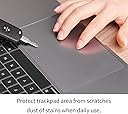
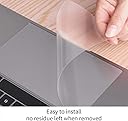
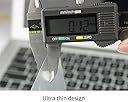
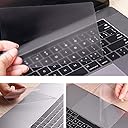
The CaseBuy 2PCS MacBook Air 15 inch Trackpad Protector Cover offers ultra-thin, fingerprint and scratch-resistant protection designed exclusively for 2023-2026 MacBook Air 15.3" models with M2 to M5 chips and Touch ID. Made from triple-layer electrostatic polyethylene terephthalate, it ensures seamless adhesion without residue, preserving the original trackpad feel and appearance. Easy to install and backed by a risk-free replacement warranty, it’s the essential accessory for professionals who demand both style and durability.


| ASIN | B0C9MYTSLR |
| Additional Features | Fingerprint Resistant, Scratch Resistant, Ultra Thin |
| Best Sellers Rank | #5,230 in Electronics ( See Top 100 in Electronics ) #1,476 in Laptop Accessories |
| Brand | CaseBuy |
| Color | Clear |
| Compatible Devices | 2026-2023 MacBook Air 15.3" with Apple M5 M4 M3 M2 Chip A3448 A3114 A2941 A3241 with Touch ID |
| Customer Reviews | 4.3 out of 5 stars 4,489 Reviews |
| Enclosure Material | Polyethylene Terephthalate |
| Finish | Clear |
| Item Dimensions L x W | 5.79"L x 3.62"W |
| Item Type Name | macbook air 15 inch trackpad protector |
| Manufacturer | CaseBuy |
| Material | Polyethylene Terephthalate |
| Mfr Part Number | macbook air 15 inch trackpad protector |
| Model Name | MacBook Air 15 inch |
| Model Number | macbook air 15 inch trackpad protector |
| Number of Items | 2 |
| Pattern | Clear |
| Size | MacBook Air 15"(2023-2026) |
| Special Feature | Fingerprint Resistant, Scratch Resistant, Ultra Thin |
| Theme | macbook air 15 inch trackpad protector |
| Unit Count | 2 Count |
M**I
Ghost in the machine (in a good way)
This trackpad protector is so thin and has such seamless adhesion that I constantly forget I even installed it. The easy to install process was a breeze—no bubbles or annoying edges—and the appearance and color match my MacBook so perfectly that it’s basically invisible. It doesn't interfere with gestures or clicking at all, maintaining the original image quality and feel of the hardware while keeping it safe from oils and scratches. If you want protection that doesn't ruin the aesthetic of your laptop, this is a total win. It just works exactly as it should, which is the highest compliment I can give a piece of plastic.
G**A
Great trackpad protector
This is a nice little protector that works great for the price. Is also very easy to apply. There were some bubbles at first but most of them have been smoothed out. I don't really mind though because I barely notice them and the cover is doing its job fine so far. It's very easy to wipe off fingerprint smudges and dust. Also doesn't hinder my mobility of the trackpad and despite what others have said, I don't find the glossy texture weird or off-putting. Some also don't like that it's thin, but I kinda like it. Doesn't make the trackpad feel bulky or slow its movement down. But that's my personal preference and if yours lines up with mine then I think you'll be okay with picking this cover. My best advice is to apply this when your Macbook Air is turned off, make sure you've wiped off the entire trackpad before starting, and take it from the bottom left corner and work your way up. Slowly pull it evenly over the trackpad and as you're doing it, run a debit/credit card over it to eliminate the bigger bubbles. The trick is to be very slow and careful. Then when you see everything is even you can run the card over it again to smoothen out any residual bubbles. If there are some, don't worry too much. They fade over time. My friend taught me that trick and it works very well. Just be patient because if you're like me who couldn't be patient to save her life, then you may wind up some bubbles at the end. They can fade though, so no worries. And they're really not noticeable, at least mine aren't. Basically what I'm saying is, give this cover a try and chances are, you'll find it was worth it.
C**T
Great product--just take your time fitting it.
After developing an irritation in my fingertips from using the MacBook’s trackpad (had to research this, and glad I’m not the only one!) I decided to purchase a cover for it. This one is relatively cheap, and works! There is a gap all around the edge of the cover about the thickness of my fingernail, which actually helped with the fitting of it. Note that the cover has two protective films, and these are labelled so that you know which to remove first. This would be my suggestion for fitting - Dry fit the cover, to get an idea of the placement. - Clean the trackpad, then clean it again. Even small dust particles will affect the overall finish. - Peel off the first protective film, and HOLD ONLY THE EDGES OF THE COVER. Keep your fingers away from the sticky surface to avoid fingerprints - Judge the distance from the edge of the trackpad (I used my fingernail, knowing that it would be the same distance from the edge on the other side of the pad, and as I am right handed, found it easier to work from the right) and lay down the first half inch or so, gently pressing into place. - Using the cardboard sleeve that the cover is packed in, smooth out the cover as you slowly lay it down onto the trackpad, working about a half inch at a time. This will help avoid large bubbles, but don’t press too hard at this point, - When the cover is in place, check for any small bubbles and squeeze them out to the edges. - Remove the second protective film, and use the cardboard to smooth over the cover, from the middle out, which will help stick it down, and also remove any remaining bubbles of air. - Enjoy! After reading through other reviews, I don’t understand why there are so many problems with air bubbles. Unless the product is flawed already, or the trackpad not completely clean, the bubbles are introduced during fitting, as the cover is just a thin, very flat sheet of plastic. It feels quite nice to the touch, with almost the same texture as the trackpad. The size and shape are pretty much spot on and, after fitting, I can’t even see that there is a cover in place. The thickness brings the trackpad about level with the palm rest. There is no change to the way the track responds, but I have the type that clicks when pressed—I don;t know how it reacts to the type you simply ‘tap to click’. Just take your time fitting it—it’s a great product (and no, I’m not getting anything for this review--it’s my own, unbiased opinion).
S**C
Quality
Good quality
E**N
GREAT LITTLE THING! Def recommend.
UPDATE: Do not buy this! I literally cannot get it off. It’s like I applied it TOO precisely and now I can’t get a corner to grab. I’ve noticed some issues with my track pad already such as issues with it recognizing a simple tap to click on things, and this is a BRAND NEW laptop. I’m so pissed off right now. I’ve tried everything to get it off and it just will not come off. I actually bought this months ago when I first got my new laptop and I completely forgot I had it until tonight. But I just put it on and I'm so happy I bought this little thing! Who knew something so simple and small could be so helpful. For once, it definitely gives me piece of mind knowing my track pad is protected from scratches and other wear and tear. And it was super, super easy to install! I normally have so much trouble applying screen protectors, but this was super easy to line up and there are NO BUBBLES... can you believe that?! I can't... I'm still shocked LOL. Highly recommend this! Oh and it hasn't affected the track pad at all so far. My mouse and touch commands still work perfectly and normally.
I**R
CaseBuy MacBook Air 13.6
Great trackpad protector! It fits my MacBook Air perfectly and does not affect the sensitivity of the trackpad at all. The surface feels smooth and protects against scratches and fingerprints. Installation was quick and easy. Very happy with this purchase and highly recommend it!
S**Y
There Is No Adhesion
I hate to give negative reviews but... I've placed a lot of screen protectors on cell phones in the past 15-20 years (my own, my two daughters - a couple of cell phones for the 16 year old of course, a wife and a friend) and seldom ever had a problem. This trackpad protector has next to no adhesion at all. I realize it is suppose to be removable but there is no reason there couldn't be a bit more "stickum". I placed the first one (of two) and when I went to remove #2 tab the entire thing came up. I'm wondering what the heck happened here. I was totally shocked the entire trackpad protector came up. Before I realized what was happening I had half the protector off the trackpad. I tried re-installing it but of course there were several dust "mites" then. Tried the second one and basically the same thing. When the protector started separating this time I pushed it back down but of course there were two dust spots where it had lifted. I'm sorry but I cannot recommend this product.
J**.
Does the job
It definitely does the job but mine bubbled and stayed bubbled. I followed all the steps too.
A**R
Great product, easy to apply!
I love when a product is easy to use and great all around. There are instructions, and also little tabs that note when to remove them (before applying/after applying). It is sooooooo easy and I am usually horrible with this stuff. 10/10!
K**M
Thank you
Thank you
A**R
No problem
No Special 、Good Product
E**O
Excelente
No es tan fácil de instalar pero si sirve
D**T
Funcional
Esta muy bueno, cubre perfectamente, no se siente, no cambia la velocidad del puntero. Cumple con lo que promete. Solo para colocarlo si hay que limpiar bien para que no se formen burbujas.
Trustpilot
1 month ago
3 weeks ago