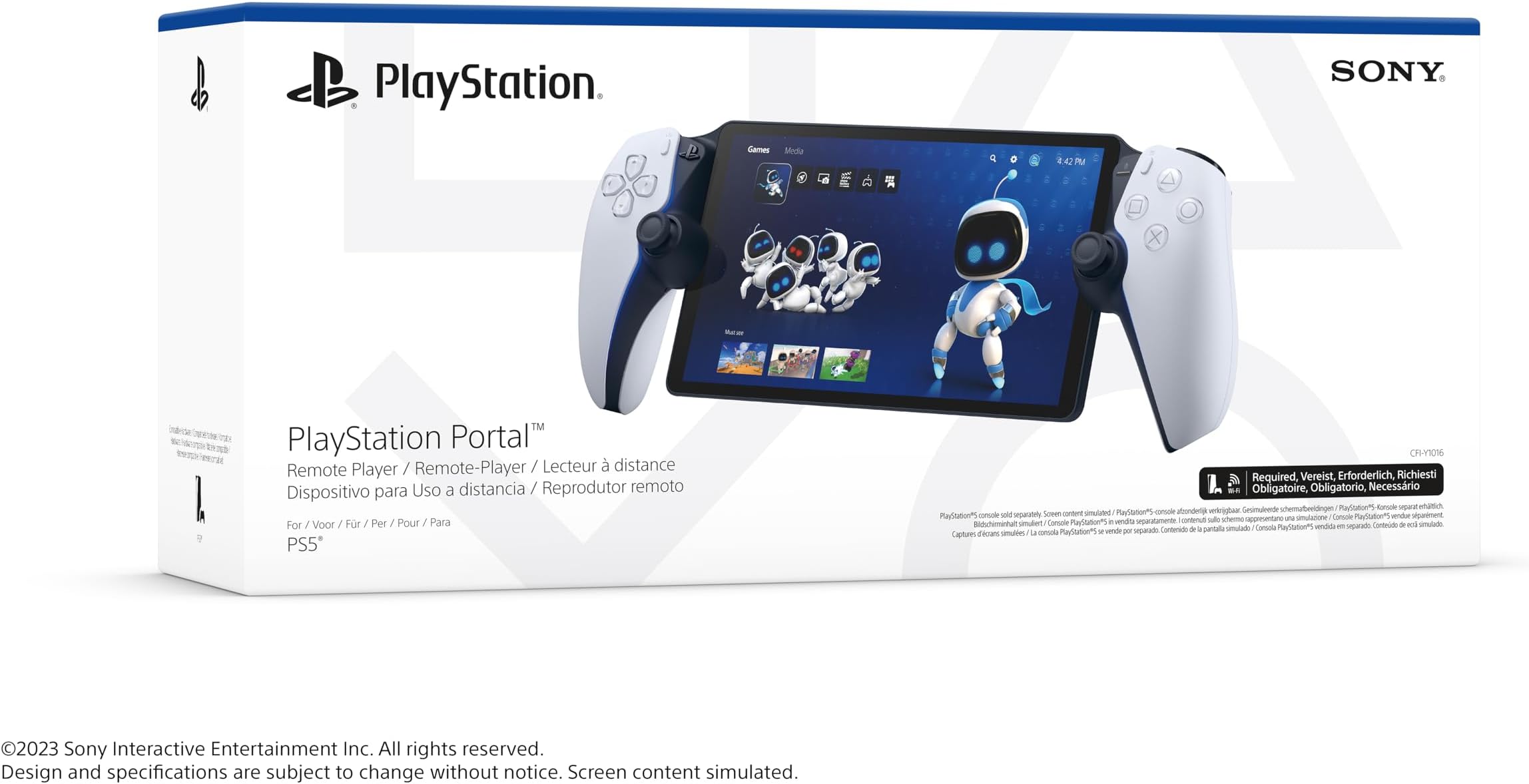
PlayStation Portal Remote Player
Product ID: 564954525
⚡60fps smooth gameplay
📶Wi-Fi 6 optimized remote play
📺8-inch 1080p LCD screen
Buy anything from 5,000+ international stores. One checkout price. No surprise fees. Join 2M+ shoppers on Desertcart.
Desertcart purchases this item on your behalf and handles shipping, customs, and support to Japan.
🎮 Your PS5, untethered and unstoppable.
The PlayStation Portal Remote Player is a sleek handheld device that streams your PS5 games over home Wi-Fi in stunning 1080p at 60fps. Featuring an 8-inch LCD screen and full DualSense controller support, it delivers console-quality gaming without needing a TV. Perfect for multi-room play or on-the-go streaming, it offers seamless setup and immersive haptic feedback, making it the ultimate companion for PS5 owners seeking freedom and flexibility.
| ASIN | B0CJJCZMKJ |
| Batteries | 1 Lithium Ion batteries required. (included) |
| Best Sellers Rank | 198 in PC & Video Games ( See Top 100 in PC & Video Games ) 42 in PlayStation 5 Consoles, Games & Accessories |
| Customer reviews | 4.4 4.4 out of 5 stars (3,809) |
| Delivery information | We cannot deliver certain products outside mainland UK ( Details ). We will only be able to confirm if this product can be delivered to your chosen address when you enter your delivery address at checkout. |
| Item model number | 1243094 |
| Language | English |
| Product Dimensions | 33.7 x 15 x 9.5 cm; 540 g |
| Release date | 15 Nov. 2023 |
G**D
Flawless for me.
I have my PS5 wired to my router. It's not using the Virgin Media router for WiFi. I have theirs in "modem mode" and use a £90 TP-Link Wi-Fi 6 router with 4 aerials on it. I don't have a fancy mesh setup or anything like that, it's just a regular router you'd buy if upgrading from your ISP's with no tech skills required. So this isn't some elitist ultimate experience that is only available to network professionals. I have not, and flat out refused, to change any settings on PS5 - e.g. changing the resolution to 1080p and any of that nonsense people suggest. The device is worthless if every time you use your console on the TV, you have to keep switching your resolution back and forth, so I point blank refused to do it. It's set to 4K, 120hz and HDR as per normal. I have got in the habit of putting my PS5 in rest mode rather than shutting down, and enabled the network connection when in rest mode - that way your PS5 turns on when you turn on the Portal. Performance for me is flawless. I've been all around the house with it (modest 3 bed semi) and no issues. I'm used to streaming, having used Geforce Now extensively, and Nvidia Gamestream - so I know what good streaming is like. With it running over your local network rather than the web (unlike GF Now) this is obviously the optimum streaming experience. I am playing in May '24, and I gather there was a major patch that "significantly" improved the performance of the device a month or so earlier. So my experience may differ from early adopters. I don't see compression artefacts, judder, stutter, latency or disconnects. It all just works perfectly; like owning a "PS5 Switch". It's particularly good for older games, or those running in performance mode, as the 1080p Portal Screen means they run at native resolution, so it looks better than playing the game on your TV, albeit minus HDR. Something like RDR2 which has poor resolution on PS5 (compared to XSX) would definitely be better on Portal than on your TV. For the ultimate latency test I tried AC Unity, which is an old 30fps PS4 game running at 1080p. This game is now in its element on Portal. It looks amazing even compared to modern games, and whilst 30fps isn't ideal for streaming, it's actually great to play and doesn't feel laggy at all. Obviously 60fps games will feel even better. The screen is very bright and I haven't touched any brightness settings, so that's how it came out of the box. It also seems to have less glare than my iPad screen that I'd previously used for PS remote play. That's despite having a tempered glass screen protector on it. I gather the sticks are shorter than on a regular PS5 pad, but I haven't actually noticed when playing. Sound is excellent. Better than my Switch OLED even! More like my old 14" portable TV's of yesteryear than a handheld console! So yeah, this really is the "ultimate Switch"! Because my PS5 turns on with the Portal, and because it runs so flawlessly, it really is like having a Switch but with PS5 graphics. Currently playing AC Liberation which I also own on Switch, but clearly the experience is a million times better on my Portal, and looks better than if I were using my big OLED TV. 99% of the time when I use my Switch in handheld mode, I'm in the house and connected to my home Wi-Fi. Sure in the Switch TV commercials it shows cherry picked trendy and attractive actors pretending to play it at a basketball court or skatepark, but let's be brutally honest..........who really plays at such places? We all mostly use the Switch in handheld mode whilst we or our partner is watching/hogging the TV or a movie in the same room. That makes this the perfect device, and more akin to whatever the Nintendo Switch 3 will be like in 2030! Albeit you have your entire Playstation collection at your fingertips, anywhere in the house! I took it to a relatives house who had good Wi-Fi broadband, and it played exactly as it did in my house, even though my PS5 was miles away. If you take it on holiday and **IF** you have good Wi-Fi and internet at your destination, then it will be perfectly useable and like taking your PS5 and TV on holiday. I tried connecting to my mobile phone as a hot spot at home, but the 5G signal here is terrible and whilst it was playable, it would occasionally stutter. In an area with good coverage, I think it would also be perfectly good. Easy 5/5 stars for me based on what I wanted it for, and how well it does it. This is my primary way of playing PS5 now and has made me want to buy all third party games for my PS5 rather than XSX or PC, simply because I have this device and the capability it offers.
R**B
Ultimate accessory for your PS5!
Absolutely fantastic! I can now play my PS5 on the go and play without taking over the TV from the rest of the house. The battery life is excellent and the screen quality is also very good, I've had no issues with glare or being unable to see the screen in daylight. Also had this connected to hotel Wi-Fi and streamed from my PS5 flawlessly. I would recommend tweaking the settings of your router and PS5 if you experience any lag. I did and some simple changes fixed it completely. Only downside is you are unable to stream Netflix or watch YouTube, if they fix that with an update then the PS Portal will be the ultimate streaming device.
L**B
My son is over the moon!
Great price and excellent addition to the ps5. Great graphics and controller. Secure delivery also.
S**N
For PS5 owners with strong home Wi-Fi who want to game away from the TV
The PlayStation Portal delivers exactly what it promises - seamless PS5 remote play in a dedicated handheld form factor. The 8-inch LCD screen is crisp and vibrant, while the full DualSense controller layout feels natural and responsive for extended gaming sessions. Performance over Wi-Fi is impressive when your connection is solid. Games stream smoothly with minimal input lag, making it genuinely viable for most titles beyond just turn-based games. The 1080p resolution looks sharp on the device's screen size. Build quality feels premium with comfortable ergonomics that work well for longer play sessions. Battery life hits around 7-8 hours depending on usage, which is respectable for a streaming device. The main limitation is its total dependence on Wi-Fi and your PS5 being powered on. No local game storage or cloud streaming means it's purely a remote play device. Connection quality can make or break the experience. For PS5 owners with strong home Wi-Fi who want to game away from the TV, the Portal excels at its specific purpose. Just don't expect it to replace your main console or work reliably outside your home network.
M**Y
A must for PS5 gamers when TV is being used
I’ve been using the PlayStation Portal for a few weeks now, and I’m genuinely impressed. The 8-inch screen is bright and sharp, the controls feel exactly like a DualSense controller, and the overall build quality is excellent. Playing my PS5 games from anywhere in the house without needing the TV has been a game changer. The setup was quick and straightforward, and the connection has been smooth on a strong Wi-Fi network. Games look fantastic, and the haptic feedback and adaptive triggers make the experience feel just like playing directly on the PS5. It’s not a standalone handheld, so you’ll get the best experience if you already own a PS5 and have reliable internet. However, for anyone who shares a TV with family or simply wants more flexibility, the Portal is a brilliant accessory. Overall, I highly recommend the PlayStation Portal. It does exactly what it’s designed to do, and it does it exceptionally well. Worth every penny for PS5 gamers.
A**E
Great
Great device. If you want a stable connectionypu have to change some settings on your PS5 and to connect it to the internet through a cable. There are plenty of YouTube videos explaining this. After doing this, I easily connected it to my PS5. At the beginning you will have to do some updates but that's 10 minute time. Enjoy your device. As you can see no lag and I am on home WiFi. I haven't tested yet on public WiFi or my 5G phone connection.
E**T
Not worth it
This is not worth it. It’s very bad and it’s not working well whenever My Son uses it it always glitches. If your network connection is not good it’s very laggy
L**S
Amazing
Amazing piece of tech. You don't need any extra fast Internet. All you need is a reliable and steady wi-fi signal. It works great with my 45mb broadband.
R**O
PS Portal
Recomendo a loja, chegou com uma semana de antecedência. Produto novo e lacrado. Parabéns ao pessoal da Salva Smart. Quanto ao produto, comprei já sabendo de suas propostas. Precisei aumentar a minha internet de casa, de 300MG para 500Mg, pois no meu quarto que é sobrado tinha muitos travamentos. 500 megas resolveu. Valer a pena a compra do Ps Portal é uma questão muito pessoal, sinceramente para um aparelho que reproduz imagem custar mais de 1,500 reais não acho que é para qualquer usuário. Pra quem não é entusiasta e não é colecionador, acredito que 1,000 reais está muito bem pago. Não me arrependo da compra, mas hoje depois de testar o aparelho e ver como funciona e quais são suas funcionalidades, não compraria. Gastem 1,500 reais em jogos e esperem baixar para no mínimo 1,000.
G**I
Seyahat eden ama oyundan vazgeçemeyenlerin dermanı
Ürü hızlı ve sağlam bir şekilde elime ulaştı. Kurulumunda bir iki aksaklık oldu ama olsun. İlk olarak ben kurulumda hata yaptım sonrasında da cihaz bağlantıda sorun yaşadı ama en nihayetinde ps5ime bağlandı. Şu an için evin başka bir köşesinde oynuyorum ama seyahatlerimde bavula ilk koyacağım şey olacak bu güzel makine. Param var ve nereye harcasam diye düşünüyorsanız düşünmeyin ve bunu alın
L**N
El compañero ideal
PlayStation Portal se ha posicionado como el aliado definitivo para los jugadores de PS5 que desean llevar su experiencia más allá de la pantalla principal. Con su diseño elegante, materiales de alta calidad y una pantalla impresionante, este dispositivo portátil ofrece una experiencia premium en todos los aspectos. Destaca su pantalla de 8 pulgadas con resolución Full HD, que garantiza imágenes nítidas y vibrantes. Además, la compatibilidad con la tecnología háptica DualSense es un verdadero punto fuerte: las vibraciones y sensaciones táctiles se trasladan perfectamente, ofreciendo una inmersión total incluso en formato portátil. Una de las grandes novedades recientes es su actualización para jugar en la nube. Los usuarios de PS Plus Premium ahora pueden disfrutar de juegos directamente desde los servidores de PlayStation, sin necesidad de tener una PS5, ampliando enormemente su versatilidad y atractivo. Por otro lado, la duración de la batería es su principal punto débil. Aunque depende del tipo de juego y la configuración de brillo, generalmente es necesario cargarla cada dos sesiones de juego, lo que puede resultar inconveniente para largas jornadas de uso. En cuanto al lag, destacar que se ha reducido mucho a medida de las diferentes versiones y se nota una mayor fluidez con respecto al servicio de juego remoto con un teléfono móvil. Salvo que juegues muy alejado del wifi, la experiencia es casi nativa. A pesar de este detalle, el PlayStation Portal brilla por su portabilidad, la calidad de los materiales y la capacidad de llevar la experiencia de PS5 a cualquier rincón de tu hogar (o incluso más allá, con la nube). Es una excelente opción para los amantes de PlayStation que buscan flexibilidad sin renunciar a la calidad.
C**U
Playstation portal
Tout d'abord déçu par la qualité d'image comme, apparemment, beaucoup de monde. J'ai fini après quelques recherches à trouver la solution à mon problème. Il vous suffit de brancher votre ps5 par un câble ethernet à votre box internet et tout de suite, la qualité d'image devient nickel! Qualité toute relative puisque ça reste du hd, donc ne vous attendez pas à la qualité du 4k oled. Cela dit, la fluidité est au rendez-vous et la jouabilité reste correct. Le prix reste un peu élevé pour le concept étant donné que ce n'est pas une console à part entière mais plutôt un partage d'écran avec (obligatoirement) votre ps5 allumée. Ça n'en reste pas moins une bonne alternative quand vous n'avez qu'une télé à partager. Je recommande.
I**L
Geniune product.
Got gift for my friend and its geniune product.
Trustpilot
2 weeks ago
1 month ago