Desertcart purchases this item on your behalf and handles shipping, customs, and support to Japan.
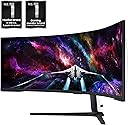
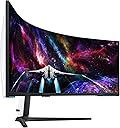
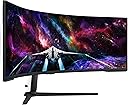
๐ฎ Dominate your digital realm with the worldโs first Dual UHD curved powerhouse!
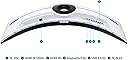
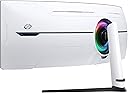
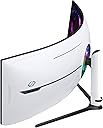
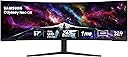
Samsungโs 57" Odyssey Neo G9 is the worldโs first Dual 4K UHD curved gaming monitor featuring a 1000R curve, 240Hz refresh rate, 1ms response time, and Quantum Matrix Technology with 2392 local dimming zones. It delivers stunning visuals with DisplayHDR 1000, seamless multi-device connectivity via DisplayPort 2.1 and HDMI 2.1, and immersive CoreSync lighting, all wrapped in an ergonomic design tailored for pro gamers and multitaskers craving ultra-wide, ultra-fast performance.
| ASIN | B0CDQM55C9 |
| Adaptive Sync | FreeSync Premium |
| Additional Features | 1000R Curved Screen, AMD FreeSyncโข Premium Pro, Adaptive Sync, Auto Source Switch+, Black Equalizer, Eye Care, Flicker-Free, Picture By Picture, Quantum Matrix Technology, VESA DisplayHDR 1000 |
| Aspect Ratio | 32:9 |
| Best Sellers Rank | #5,682 in Electronics ( See Top 100 in Electronics ) #215 in Computer Monitors |
| Brand | Samsung |
| Brightness | 420 cd |
| Color | Black & White |
| Color Gamut | 99 |
| Compatible Devices | Desktop, Gaming Console, Laptop |
| Connectivity Technology | HDMI |
| Contrast Ratio | 1,000,000:1 |
| Customer Reviews | 4.3 out of 5 stars 550 Reviews |
| Display Resolution Maximum | 7680 x 2160 pixels |
| Display Technology | VA |
| Display Type | LED |
| Hardware Connectivity | DisplayPort, HDMI, USB |
| Image Contrast Ratio | 1,000,000:1 |
| Included Components | DisplayPort Cable, HDMI Cable, Power Cable, USB Cable |
| Item Dimensions D x W x H | 19.7"D x 52.3"W x 24"H |
| Item Weight | 41.9 pounds |
| Manufacturer | Samsung |
| Model Name | FBASAMLS57CG952 |
| Model Number | FBASAMLS57CG952 |
| Mounting Type | VESA Mount |
| Native Resolution | 7680x2160 |
| Number of Component Outputs | 3 |
| Picture Quality Enhancement Technology | Quantum Matrix Technology, DisplayHDR 1000 |
| Pixel Pitch | 0.18 |
| Power Consumption | 140 watts |
| Refresh Rate | 240 hertz |
| Resolution | Dual 4K |
| Response Time | 1 milliseconds |
| Screen Finish | Matte |
| Screen Size | 57 inches |
| Screen Surface Description | Matte |
| Shape | Curved |
| Specific Uses For Product | Gaming |
| Total Number of HDMI Ports | 3 |
| Total USB 2.0 Ports | 2 |
| Total Usb Ports | 2 |
| UPC | 887276756738 |
| Unit Count | 1 Count |
| Viewing Angle | 178 degrees |
| Voltage | 240 volts |
| Warranty Description | 1 Year Manufacturer |
| Warranty Type | 1 Year Manufacturer Warranty |
O**N
Best Monitor EVER
If you are looking for a monitor for productivity/working and gaming, this is unequivocally without hyperbole the best monitor that you can buy, and for a great price. I purchased it recently and have nothing about amazing things to say. The size of this thing is so perfect that once you start using it you'll never want to go back to any other sized monitor. And the resolution and pixel density is absolutely stunning, this thing looks better and more dense than most 27 or 32 inch monitors which is a feat with how big it is. I use mac and although you can only get max 120 HZ, you still can get full native resolution 7680 x 2160 as long as you use DP2.1, which is more than enough for just working which I presume is what most mac users will be doing. The brightness, colors, contrast and HDR on this thing is also amazing everything looks so vibrant and this monitor has an extremely high max brightness. And for work it is SO convenient having literally two 32 inch screens side by side and having this much screen space, you can have so many applications open at once. As long as you have the money to afford this monitor, the desk space to have the monitor on your desk (which is important because the stand takes up a lot of space and this monitor is very heavy so I wouldn't trust it with an arm), and a rig that can run this at full resolution with good FPS/refresh rate, it is an absolute no brainer in my opinion and is one of my favorite purchases that I've ever made. The build quality does feel a bit flimsy I will admit, but honestly it doesn't matter when the monitor works and performs as well as it does. Just make sure out the box that you calibrate the picture settings, enable HDR, set your Display port/HDMI input to 2.1 (by default it is on 1.4), and tweak the settings to your liking. For me I am using original picture mode, 50 brightness, 50 contrast, 10 sharpness, 22 color, local dimming on HIGH (very important setting), contrast enhancer off, active HDR tone mapping, natural color tone, and native color space settings with the rest of settings on default. Make sure to DISABLE any eye care settings for best quality.
R**D
Buy it! Randy seal of approval ๐
I already owned the Samsung Q 60 r 4k HDR hdtv\monitor, and I wondered if I should spend the extra coin on this masterpiece ๐ค. I am so glad that I did! The curved feature makes it so I don't feel the need to buy vr goggles which would be uncomfortable because I wear glasses. The 8k is an adventure that I will be ready for in the future. The mini led 240 hz and all the other features make my old dvds look like bluray. Which is very important to me because I'm a serious dvd and bluray collector. I love watching three different 4k hdr displays simultaneously, multi tasking at its finest! PIP is back! I saved $500 off the Samsung price on their website, and Samsung wanted to charge me hundreds for delivery... Thank you Amazon for charging me so much less than Samsung it was so expensive but I got a sweet deal! Wait until you can afford it but definitely get it, Randy seal of approval! Life changing device don't show your friends that you bought it they might rob your house... There is no camera embedded in it like a smart TV that watches you...
C**M
exceeds expectations
I've had this monitor for around 7 months and it's exceeded already high expectations. it's great as a full monitor, which is what i did for the first several months. assuming you have the gpu power for it. then i started using it as 2 monitors. one resolution is 2560x3260 which is perfect for my secondary screen. the main is 5120x2160. also perfect size because it limits frame loss due to the full res. though the full res is beautiful and game changing. it's more than a lot of games need. having both options at the flip of a switch is fantastic. which brings me to branching out to having consoles on the main and my pc on the secondary. if i turn on the console the monitor pops up with a notice if i want to switch to the other input. underrated and unexpected plus. you can even choose which audio source you want to listen to of the 2 (or more) on screen. i believe you can use up to 3 but i haven't tested that yet. also note only one DP slot. i had problems initially with using a dp only.
A**R
Wow... It's so nice. Samsung 57 + Linux
My old widescreen crapped out so I needed another one. My old one started flickering AFTER black Friday and Cyber Monday... So turns out it was still on sale for the same price. This monitor is huge and amazing. I use it for work mostly with my laptop (which does do the full resolution though the hdmi. I use the PIP with KVM to show on screen my personal PC for youtube or looking up stuff NOT on my work PC. I tried it some with my gaming PC from Lenovo i9 RTX 4080 Super and I would get about 180 FPS in COD with medium settings. I use Zorin OS (Linux) for my personal PC and it's also an i9 3090 and it also does the full resolution and works GREAT! The monitor: It is huge. Picture is best I have seen and near oled quality. I like the simple controls and easy setup. I got a desk arm ULTRARM MA20P-S and it works great. I was a bit worried it would not hold it up, but this arm is great quality. The stand for the 57 is nice but the legs are so long... I almost kept it on the stand it came with but figured I would try the arm and it works great. For 1600 you can't go wrong with this monitor. Side note: It does take some time to get used to, even coming from another ultrawide. Figuring out where to put things on the screen and how to layout for best work use. But all in all, I love it. Using the PIP for my personal PC saves me another monitor, however I do still need to use one other monitor because I always leave teams and outlook up on the side. I would buy this one again, without blinking. Hope this helps.
S**N
Best monitor for the next 5-10 years. UPDATE: Or is it?
Expensive? Yes, but it's also the best monitor you can get and that you will need until some 4D future "display". Why best monitor? Perfect size. bigger will NOT be better. This is maximum in width and perfect vertical size you will ever want. Resolution? Finally crispy txt, no compromise, maximum resolution that you will ever want, more pixel will NOT look any better than this. Refresh rate? 240hz, more than you need, everything above 120hz is done deal. Display? Its a micro led screen, closest to OLED without having to think every time you use a monitor if that taskbar is going to burn in. Too many zones to notice any blooming. Immersion? Again, Samsung gave you maximum there too, 1000R. This is it. All in one, all the best monitor and it performs just like that, I love it. So why 4 stars then? Because... Samsung. I don't understand the top management not firing weak people that dont see the big picture. Such a big monster monitor, it will take all the space on the table and more, you will not be able to have a tower next to it... yet again somehow someone thought shipping SHORTEST dp cable ever would be totally ok, to be expected for a monster $2500 monitor. It's a 3ft cable! 3ft! You preorder a $2500 monitor, get excited, wait for it.... get it and you will NOT be able to set it up that day. You have to spend another $30 for a cable and wait more so you can finally set it up the way you like it, meaning without a desktop tower sitting on the monitor so cable reaches it. Such a cheap way to take away customer satisfaction which is so important nowdays as products become more and more similar and overall experience is the only thing to make yourself stand out. EDIT: Still great monitor if it was not Samsung. This brand is seriously losing it on QC. When you turn the monitor on, it makes popping sound. Imagine those old mechanical clocks you hate... well now you have one built in I guess. It pops every few seconds and it's so annoying every time it pops you think about $2500 you spent on it. And yes, returned it, bought one from Samsung.com so they get the hit if they send me another annoying one. The new batch is coming at the end of December, hopefully its because they are woking on the issues.
B**N
Outstanding productivity monitor for Mac users (not just gamers)
I took a chance on this monitor hoping it would work well with my setup, and Iโm very glad I did. I donโt game at all. This is used 100% for business and productivity. My setup: โข MacBook Pro M2 Max โข 32GB RAM, 1TB SSD โข macOS Tahoe 26.2 โข OWC Thunderbolt Dock โข Apple wireless keyboard with Touch ID and Apple Mouse Connection-wise, you can use HDMI, but I strongly recommend DisplayPort to USB-C. In my case, I already had the OWC Thunderbolt dock from a previous setup, so this was an easy upgrade. I only needed to buy a DisplayPort-to-USB-C cable. The result is exactly what I wanted: one cable to the MacBook, running in clamshell mode at all times. The monitor drives full native resolution at 120Hz, which is perfect for macOS. Everything is smooth, sharp, and stable. I did need to update the firmware. Fair warning: the firmware update failed a few times (three, to be exact). After resetting the monitor and trying again, it succeeded on the fourth attempt. My advice: be persistent, once it updates, everything works as expected. As for daily use: this monitor is awesome. The amount of screen real estate completely changes how you work. I can keep multiple applications and windows visible at the same time without constantly switching between desktops or displays. That alone has been a huge productivity boost. The image quality is excellent. Crisp text, very bright, and incredibly immersive. For serious work, this feels far more efficient than running dual or even triple monitors. Bottom line: if youโre a Mac user looking for a high-end productivity display and are willing to spend a little time dialing it in, this monitor is absolutely worth it. Once set up, itโs rock solid and a joy to use.
Y**B
Insane monitor, it's expensive but it's worth it.
The Good - A few days in and it's phenomenal. Picture is great, the 2 screen no border experience is exactly what I was looking for in a gaming monitor. Connectivity - My video card is an Asus Tuf 5070ti and it's able to push around 80 to 90 FPS even with 2 additional 32" 4k monitors attached. Did I mention it's HUGE?? Controls are pretty good, the bottom button feels durable and easy to use. Durability as a whole - seems decent. Gaming performance is over the top, only limitation on hitting the full 240 fps is my video card. The Oks - it's awkward to handle at such a huge size, be careful about touching the screen as with all LCDs. that's particularly hard when you are trying to mount it on an arm. It's not so much that it's heavy, but there's very little grabbing area at the top.
K**.
Beautiful Monitor, Firmware has Room for Improvement
I can't help but love this monitor. There are few flaws but nothing that detracts from the experience when using this beast for work or play. My work laptop is using integrated intel graphics, and has no problem running the full resolution albeit at a refresh rate of 60Hz. My gaming PC, equipped with a Nvidia 4080 runs full resolution at 120Hz. A few examples of gaming performance on the 4080 running max resolution: Forza Horizon 5 locked at 60 fps no problem. Final Fantasy XIV variable from 60 to 85 fps. Typically around 80Hz. Games that support the ultrawide display are gorgeous. Having so much displayed in your field of view really helps with emersion in the game. The quality of the screen really shines. Deep blacks, with little halo effect. Color reproduction is really good. Brightness can be blinding, I typically have brightness set to about 15 out of 50. Text is sharp. For work, having this much real estate to play with is great. I went from running 3 27" monitors to this single setup. No breaks for bezels, and being able to throw windows around anywhere is a game changer. When working with large datasets, or those horrible spreadsheets that are 50 columns wide, max the window and see everything at once. I see the other reviews where people are experiencing flickering, strange gray lines, or bad pixels, but luckily I have had none of those issues. For the bad: The 3' Display Port cable that comes in the box. This is unacceptable as half that length is just getting it from the input on the monitor through the cable management, so you only have maybe 18" to play with getting it to your device. At this price point, Samsung could do better. Only 1 display port on the monitor. HDMI works fine, but I would have liked at least 2 display ports. Not a deal breaker, but a "would have been nice" item. Firmware really needs some work. When waking the computer from sleep mode, the monitor does not come off standby mode automatically unless you have Auto Source Switch+ turned on. But if the work laptop wakes while I am in the middle of a game, I really don't want the monitor to switch automatically to the new input, so I like to keep that off.
A**A
Fantastic monitor for productivity
This monitor is amazing! It replaced my dual screen setup, and while in terms of screen space I have neither gained, nor lost, it does have flexibility to split my screen into 3 or 4, which is very handy. Though I believe it is marketed as a gaming monitor, I use this monitor almost entirely for productivity, and a little bit of media. The curvature is great for me, no eye strain and I do not have to swivel my neck around which is great as I have some neck issues. Text, and I work with text all day long plus some, is very clear. The instructions for assembly were clear, and while I could do most myself, I did need to get someone to help me actually lift it out of box and onto my desk. It is heavy! I have a sit-stand add-on on my desk and this monitor is too heavy for the sit-stand to "lift" (maybe I can adjust with settings though I suspect I exceed the weight limit). A sit-stand desk may be better in that case. Also be prepared to have a lot of room to set up and breakdown materials, as this is a big monitor in a big box with a lot of protective wrapping. I am so pleased I went with this size. It was expensive ($2,199 at time I purchased, though $1,998 at the time I am writing this review) however I have zero regrets. It was well worth it as it has really boosted my productivity, and even made my day job more pleasurable. I'd recommend this even for the non-gamers amongst us who are more interested in productivity uses. If you work in a relatively boring office environment though, be prepared for people to ask when your space suit is coming back from the dry cleaners. The rear of the monitor definitely has a futuristic look.
R**K
Great Item
Great Monitor
M**.
Impressive display. A real pleasure to use
I've had this monitor for 3 months now and I am very pleased. I really have no significant complaints. The only down side so far for me is that my video card supports a max of 120hz at 7680x2160. That's no fault of the monitor but rather a limitation of my RTX 4080 Super. Beyond that, there are only positives. Most of my time is not spent gaming so it's important that the monitor does well at non-gaming tasks, which is really does. Text is beautifully crisp, colors are vivid - just a pleasure to use every day. Gaming performance is excellent - best screen I've had to date. Just beautiful. Overall, a monitor I can easily recommend based on my experience to date. Well worth the money.
A**I
Amazing but not smart and you have to do the setting from keys under the screen not convenient
Great but not smart screen
A**R
Not very good.
The screen is not circular. It has a very aggressive curve in the middle, but then the curve tapers off and the panel becomes completely flat on the sides. This makes it very difficult for my eyes and brain to get used to it, and can easily trigger dizziness and headaches. Other wide screen monitors have consistent curve throughout the whole screen width, which makes it much easier to get used to it over a few days. It has a poor quality VA panel with a very pronounced color shift depending on the angle you look at it. The curve in the middle helps with this, but the flat parts of the panel on the sides will show different color saturation than the middle. Also, the top part of the panel has nice and rich colors, while the bottom part of the panel has washed out colors. This is because the screen height causes your eyes to look at the top and bottom of the screen at different angles. It is NOT officially on Nvidia's G-Sync compatible list, and it shows. There is a lot of flickering/flashing with G-sync engaged in the native resolution of 7680x2180, making it unusable. Once you lower the resolution to the regular 4K, the flickering/flashing goes away. Speaking of the regular 4K resolution of 3840x2180, it does a pretty poor job of scaling the screen automatically to 16:9. In many cases, it just stretches the screen to fill the whole width of the panel. It has an option to force aspect ratio and size of the screen, but it maxes out at 27-inch equivalent, which results in black bars on top and bottom of the screen. Waking up from sleep is a big issue. I heard this mentioned in reviews, but I didn't really appreciate the magnitude of this problem. You have to either restart your computer (and risk losing data in your open applications) or disconnect and then re-connect the cable from your video card (and risk damaging your video card) multiple times a day every time your monitor goes to sleep. After 4 or 5 firmware upgrades this problem still persist, so it looks like it is some sort of hardware issue that cannot be fixed in firmware. This monitor has to be turned on all the time your computer is on, and you need to manually power it down and up when you stop and start your computer.
Trustpilot
3 days ago
2 weeks ago