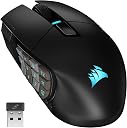
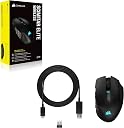
🔥 Own the game with precision, power, and style 🎯
The Corsair SCIMITAR ELITE RGB Wireless MMO Gaming Mouse features a blazing 26,000 DPI optical sensor, 16 programmable buttons with an adjustable side panel for personalized comfort, and an industry-leading 150-hour battery life. With ultra-responsive SLIPSTREAM wireless technology and full iCUE software integration, it’s engineered for professional-grade MMO and MOBA gaming performance.
| ASIN | B0CCB195GM |
| Antenna Location | Gaming |
| Are Batteries Included? | Yes |
| Are Batteries Required | Yes |
| Battery Average Life | 120 hours |
| Best Sellers Rank | 1,040 in PC & Video Games ( See Top 100 in PC & Video Games ) 58 in PC Gaming Mice |
| Brand | Corsair |
| Brand Name | Corsair |
| Button Quantity | 16 |
| Colour | Black |
| Compatible Devices | Personal Computer |
| Connectivity technology | Bluetooth, USB |
| Customer Reviews | 4.0 out of 5 stars 289 Reviews |
| Enclosure Material | Plastic |
| Global Trade Identification Number | 00840006600329 |
| Hand Orientation | Right |
| Hardware Platform | PC |
| Included Components | Allen Key, CORSAIR SCIMITAR ELITE WIRELESS Gaming Mouse, Safety Leaflet, USB Charging and Data Cable, USB Wireless Transceiver |
| Item Dimensions L x W | 11.9L x 7.4W centimetres |
| Item Weight | 114 Grams |
| Manufacturer | Corsair |
| Manufacturer Part Number | CH-9314311-EU |
| Model Name | SCIMITAR ELITE WIRELESS |
| Model Number | CH-9314311-EU |
| Mouse Maximum Sensitivity | 26000 Dots per Inch |
| Movement Detection | Optical |
| Movement detection technology | Optical |
| Network Connectivity Technology | Bluetooth, USB |
| Number of Batteries | 1 Lithium Polymer batteries required. (included) |
| Number of buttons | 16 |
| Operating System | Windows 11 |
| Power Source | Battery Powered |
| Product Features | LED Lights, Programmable Buttons, Rechargeable, Wireless |
| Product Finish Type | Rough |
| Product Warranty | 2 year manufacturer |
| Range | 150 hours |
| Special feature | LED Lights , Programmable Buttons, Rechargeable, Wireless |
| Style Name | Wireless |
| Theme | MMO, MOBA |
| UPC | 840006600329 |
| Unit Count | 1.0 count |
A**S
An excellent mouse with a long battery life, plenty of customisation. ABOVE ALL COMFORTABLE!
Corsair SCIMITAR ELITE RGB WIRELESS MMO Gaming Mouse (what a mouthful - talk about a long name) -It feels well built and nice in the hand -lots of buttons and customisation via the app -so far the mouse wheel feels smooth -battery life (via inbuilt battery) is miles ahead of my old RAT 9 wireless mouse -flexibility of bluetooth or wireless receiver (the usb dongle is neatly hidden in the bottom of the mouse - nice touch) -ergonomics are pretty good and i love that the buttons have different textures to tell them apart without looking. The side buttons can also be slid closer and further from your thumb and locked in place. -usable for me as an adult with small baby hands Negatives - I miss my pinky and thumb rests from the RAT 9. The corsair has an indented place for the pinky but its not quite as comfortable though Im glad its there. Not something you find on all gaming mice. -The iCue software took 3 attempts to install for me. Could have been my AV detecting registry entries being made. -the inbuilt battery is a double edged sword - much larger capacity and charge at the cost of some effort to replace later down the line. Ive made my peace with this but worth thinking about.
C**.
Great MM) mouse - very well built, adjustable for different hand sizes, and really good software.
I purchased this MMO mouse to replace my unreliable Razer 'Naga'. This unit us lighter, has a noticeably better battery, contains a storage space for the RF dongle (very useful for long term use), has FAR better software than the Razer equivalent and is compatible with the really nice 'iCue' colour co-ordination for peripherals software. The RF mode has great response time for games, switching between it and the energy-saving bluetooth mode is instant. There's multiple DPI settings you can flick through with one button. Highly recommended . Assuming this lasts better than the Razer Naga did, it represents pretty great value - even at the relatively steep £80 GBP price point.
G**E
Battery Life Abysmal
3 stars because although it's a really lovely mouse, 150 hours battery life is a big hairy lie 😂 I only play FFXIV with a mouse and keyboard on PC and the mouse is actually turned off when I play controller based games as I use Steam Big Picture Mode on a TV and I've probably gotten maybe 30/40 hours playing time out of it, on FFXIV I only play a few times a week now and that's only for raid night which is 2 hours. Great quality feel and the mouse was on a good deal at the time, feels nice in my hands etc but battery life is a joke. My Steel series Aerox 9 lasts longer than that 😂
R**E
Great mouse
cant go wrong with this, the software as usual from corsair isn't the greatest but once its set up its all positive.
J**T
Its alright.
So Corsair do need to learn something with this, the next firmware or ICUE update needs to show a % or estimated battery capacity and duration as well as a mandatory forced low battery notification, as this mouse gives zero warning and just outright dies (an indication saying 'high' or 'medium' or 'low' isnt really all that helpful. If you don't have ICUE installed and use this then there is no notification or warning or anything, it'll just die. Also the charging process is a pretty rubbish. You can't charge it on just a wall plug or anything, it has to be plugged in to a PC that's On or a USB hub connected to said On PC.... if you don't it won't start Charging..... it'll just flash all manner of colours till you turn it off. Apart from Charging and the Battery Notifications, it works fine and functions fine,
R**.
A lovely upgrade from my old mouse!
I used a regular mouse for years and it was ok, I looked at different upgrades over the time and have to say I am so happy with this mouse. It may cost alot but in my eyes it is worth every penny. At first it was weird and took some time to get used to but I don't regret it at all. Brilliant mouse and fully recommend :)
F**N
Well constructed but useless software renders the mouse useless
The mouse is light, and glides well. Has many buttons - but I cannot assign anything to them due to the useless nature of iCue which continues to be broken in the later versions. Having tried many methods (save re-installing my OS!) it now remains as a light paperweight. I know a lot of people have had success with this mouse, but for me it is a fairly light paperweight. Unfortunately trying to get this to work means I missed the returns window. Ended up getting the Redragon 811 wireless and although not as smooth (getting teflon glides) assigning the buttons worked first time (and have dedicated forward/back buttons was nice to have back!).
J**B
After 5 months of usage: Good ideas, poorly executed.
On paper this seemed like the perfect mouse for me: wireless and rechargable with plenty of programmable macro buttons and easy to switch from the USB receiver to Bluetooth mode to go between my PC and laptop. The software is also much better than I've heard people say although I am used to Corsair's iCUE having used their excellent K70 keyboard for years. However, I found when I first started using this mouse that the range and connection stability of the wireless USB receiver is far inferior to that of the wireless Logitech G604 I had previously, with signal cutting out frequently when the receiver is plugged into my computer just under my desk (a location my Logitech mouse's receiver had no trouble with), requiring me to plug it into a USB hub on top of my desk to maintain a stable connection. In addition to this, for the price this is an extremely cheap feeling mouse. The scroll wheel is mushy and the left and right clicks bend and creak if pressed in certain places, sometimes making it hard to tell if they've even been properly pressed or not. The adjustable function of the macro button panel is also certainly just a gimmick, and just leaves extra gaps to pick up dust and dirt in the mouse. Unfortunately after 5 months of using the mouse it doesn't seem like these were just a surface level issues, as the scroll wheel is already starting to die, intermittently failing to register scrolls and often even briefly scrolling in the opposite direction when it's moved. Overall I'm pretty disappointed with this mouse, and will certainly be seeking a refund if the scroll wheel continues to have issues. It's a shame as I love Corsair's keyboards, but I would recommend anyone seeking an MMO type mouse with lots of macro buttons in this price range to instead consider the Logitech G600 which, while a bit of an older product and lacking wireless capabilities, I have owned previously and lasted me multiple years of heavy use.
B**W
Droga i ma taką samą wadę co model na kablu.
Przyzwyczaiłem się do myszy z 12+ programowalnymi przyciskami i już miałem 2x Scimitar ale na kablu. W obu był ten sam problem z rolką - przeskakiwała po roku pracy. Czyszczenie pomagało na 2-3 tygodnie, a w końcu nie dało się z tym nic zrobić. Po tym kupiłem Razer Naga - 2 padły po kilku miesiącach pracy. Myślałem, że model bezprzewodowy Scimitar Elite będzie lepiej zaprojektowany. Nie było problemu przez kilka miesięcy ale wczoraj już musiałem ją czyścić od strony rolki i spodziewam się tych samych problemów w niedalekiej przyszłości. Nie rozumiem jak model, który jest na rynku tyle czasu, nie został poprawiony ale wyszły już chyba 4 wersje tej myszki. Szczególnie w tak drogim modelu bezprzewodowym, coś takiego jest niedopuszczalne. Dodatkowy problem to konieczność ładowania co 3-4 dni.
K**U
Top für Star Citizen mit Joystick Maus Setup
Die Tasten liegen wenn die Position eingestellt ist sehr gut am Daumen. Durch die Rifellungen an den 2 Tasten weiß man immer wo man gerade mit dem Daumen ist ohne hinschauen zu müssen. Ich war auf der Suche nach einer Maus mit vielen Tasten da es in Star Citizen sehr oft Wechsel zwischen Laufen und Fliegen gibt. Da ich kein Bock darauf hatte permanent zwischen joystick und Maus zu wechseln habe ich mein Setup durch die Maus hier zu *links* Joystick & *rechts* Maus ändern können egal welches Schiff ich gerade fliege. Die Tasten sind für alle Modi fürs Fliegen u. Mining oder Salvagen zu genüge da. Man kann ganz einfach die auf der Tastatur Standard Tasten einfach als Makro auf die Maus legen. Die Maus macht einen sehr guten Eindruck in der Hand. Das was mir ein wenig gefehlt hat ist eine Daumenablage wie man die von der Logitech g502 kennt aber das ist weniger ein Problem als ein Luxusdenken. Was mich eher gestört hat war der Ladestand der Maus... Als fast ausschließlicher Corsairnutzer für PC und externer Hardware (Corsair Virtuoso) finde ich es einfach schlecht programmiert das man für die Maus sowie auch fürs virtuoso lediglich den Akkustand Hoch-Mittel-Niedrig angezeigt bekommt... Warum gibt's keine Prozentanzeige Corsair?! Bitte patcht es mal rein... Der Sensor läuft bei mir auf 1800dpi den ich nie wechseln weil ich keinen Bedarf dafür hab. Corsair hat für den Untergrund der Maus extra eine "Einlesefunktuon" die bei Hartplastik sowie auf einem weichen Mauspad alles wunderbar erkannt hat. Find ich klasse Das Mausrad fühlt sich Wertigkeit an und die Raster sind spürbar aber geben nicht zu viel Widerstand zum Rollen. Ich empfinde meine Hände als durchschnittlich Groß und denke das die Maus bei großen Händen doch etwas unangenehm werden kann. Alles in allem aber ein solides Produkt was mich jetzt seit 4 Monaten begleitet. Hoffentlich halten die Tasten so lange wie sich sich auch Wertigkeit anfühlen
M**O
Perfetto.
Utilizzo questo mouse ormai da piu di un anno ed è semplicemente il miglior acquisto che ho fatto. Veloce, preciso e la batteria ha un'ottima durata. Il tastierino laterale è regolabile e comodissimo e collegato all'app da il meglio di se anche dal punto di vista estetico grazie alle sue luci RGB. Lo comprerei altre 100 volte.
J**A
El mejor para MMO, pero ármate de paciencia con el iCUE
Llevo unos días dándole caña en el WoW y en comodidad no tiene rival. Si vienes de un ratón normal, el panel de 12 botones laterales te cambia la vida para las macros, y el detalle de poder mover el bloque de botones hacia adelante o hacia atrás con la llavecita que trae es un puntazo para que te encaje perfecto con el dedo pulgar. En mano se siente robusto y la batería de momento aguanta el tipo de sobra usándolo sin el cable. Ahora bien, el ratón es un cañón, pero el software de Corsair (iCUE) es otra historia. Sigue siendo igual de pesado que siempre. Configurar las asignaciones de los botones laterales, las luces y los perfiles no es nada intuitivo al principio y te va a tocar trastear un buen rato hasta dejarlo a tu gusto. Además, consume bastantes recursos del PC para ser un simple programa de periféricos. Si buscas un ratón para juegos con muchas habilidades, compratelo sin dudar porque el sensor y los clicks van de locos, pero asume que la primera tarde te tocará pelearte un poco con el programa para dejarlo fino.
D**L
Differnet from normal schimitar
Itz much better then the normal schimitar tho ive just had it for a few days now. i like the fact i can be with wire or wireless, Wire is when itz loading,
Trustpilot
1 month ago
1 month ago