Desertcart purchases this item on your behalf and handles shipping, customs, and support to Japan.
⌨️ Elevate your workspace—wireless freedom meets sleek precision
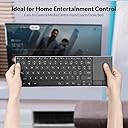
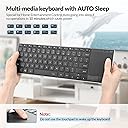
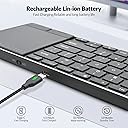
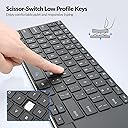
The Rii 2.4G Wireless Keyboard combines Bluetooth 5.1 and 2.4GHz RF connectivity for versatile device pairing, featuring a rechargeable battery and integrated touchpad. Crafted from premium aluminum alloy, it offers a portable, durable design compatible with Windows, Mac, Linux, iOS, Android, and smart TVs. Perfect for professionals seeking seamless multi-device control and media navigation in one sleek package.


| ASIN | B0CCD27546 |
| Additional Features | Rechargeable |
| Antenna Location | Everyday Use |
| Best Sellers Rank | #351 in Computer Keyboards |
| Brand | Rii |
| Built-In Media | USB Cable |
| Button Quantity | 80 |
| Color | Black |
| Compatible Devices | Laptop, PC, Smart TV, Tablet |
| Compatible Operating System Family | Linux, MacOS, Windows |
| Connectivity Technology | Bluetooth |
| Customer Reviews | 3.8 out of 5 stars 330 Reviews |
| Enclosure Material | Aluminum |
| Hand Orientation | Ambidextrous |
| Item Dimensions L x W x H | 13.98"L x 4.42"W x 0.65"H |
| Keyboard Backlighting Color Support | Single Color |
| Keyboard Description | Multimedia |
| Keyboard Layout | QWERTY |
| Keyboard Plate Material | Aluminum |
| Language | English |
| Manufacturer | Rii |
| Minimum Required Operating System Version | Mac OS 10.12 Sierra, Ubuntu 20.04 Focal Fossa, Windows 10 |
| Model Name | K22S-Black |
| Model Number | K22S-Black |
| Number of Items | 1 |
| Number of Keys | 104 |
| Number of Packs | 1 |
| Number of Sections | 2 |
| Power Source | Battery Powered |
| Recommended Uses For Product | Everyday Use |
| Series Number | 22 |
| Special Feature | Rechargeable |
| Style Name | K22S-Black |
| Switch Type | Scissor-Switch |
| Unit Count | 1 Count |
| Warranty Description | 2 Year Manufacturer |
M**.
Great living room media keyboard
This keyboard has worked great for me so far. I’ve been using the original batteries for months and they’re still going strong. The built-in mouse pad and volume controls can be a little sensitive, but honestly, I’d rather have them work a little too well than have to fight with them. I mainly keep this in the living room for when I have my PC hooked up to the TV, and it works really well as an all-in-one media keyboard. Not many wireless keyboards have the built-in mouse pad, so having everything in one device is really convenient. I also have a Logitech K400, and while they function pretty similarly, this one honestly feels a bit more premium to me. Overall, it’s a great value for what you get and does exactly what I need it to do.
M**M
Good luck finding something better! I'm a fan.
TLDR: buy it, and while you're using it to find something better you'll probably fall in love with it. It's a great value at the price, I got mine for under 30 dollars, and the build quality is quite good. I read over the reviews, and I see what people are saying, but I have only had minor issues with double keys and such but only while it was on my lap. I put it on a table and stopped having that issue. It worked in bluetooth and 2.4ghz modes. One thing that totally annoys me is the scroll (on the edge of trackpad, or two finger) works like you're touching the scroll bar, and not like you're touching a phone screen or tablet (any touch screen). This may have been normal in the 90s, but I feel it is reversed by modern standards. Windows 11 gave me no option in the settings to change it. You can change it in the registry pretty easily though. Search "reverse scroll direction registry edit" and choose the "windowscentral" link, and there are very straight forward instructions for how to make this change. Once that was done I have ZERO complaints about this keyboard, and quite a lot of praise.
T**P
Great Keyboard, keeping it, but it doesn't work well with the latest Samsung TV's.
Quality enough that I will use this on my laptop and tablet but not so great with the Samsung Smart TV This was recommended by a famous Youtuber's she's into chickly keys and tests a ton of keyboards. I wanted this to be able to type quickly on YouTube videos search and generally move around on the TV but Samsung wasn't having it. Keypad will not recognize. I took this to work used it and it's a fantastic keyboard enough that I decided to keep it. I'm a keyboard nut, I have about 30 of them, I don't know why, I know it's an illness. It's solid, you could toss this thing across the room and it would probably break the wall. Disappointed about Samsung seems like they did this on purpose, and they don't sell a keyboard for it which puzzles me.
K**L
Piece of E-Waste
After about three weeks the wireless started cutting out, at month, the track pad stopped working. By month two it's completely dead. Waste of money.
A**M
Great keyboard ruined by bad wireless connectivity
I'd give this between 2 and 3 stars. The keyboard looks and feels great. It's very sturdy feeling and has full-size keys which made it much better to type on than other options like the K400 or Rapoo E900T which are much smaller. But, like others here, I can't get the thing to work properly at anything more than a few feet away from my Mac. I wanted to use this for couch and bed TV use and as soon as I got comfortable the connection would start to fail. The pointer had an unusable amount of delay, along with the scrolling. Which is such a shame because the keys are great, the trackpad is smooth and responsive (within functional range of 3-5ft), and feels premium while not being expensive. I got both white and black - both did not connect to my computers at all using the 2.4ghz dongle. I assume that if you don't have a lot of RF already around you, this could work beautifully. But, like other reviews state, it becomes useless when the bluetooth connection starts to fail. For now, I'm sticking with the Rapoo E900T. It's got a smaller keyboard with smaller keys, the track pad isn't as smooth or responsive, and is made of aluminum rather than steel. However, it stays connected even at distances of about 25 feet (the furthest I can go with it in my living room while still having line of sight to my TV). It also has 3 separate bluetooth profiles which you can seamlessly switch from for three devices. It's still not the best experience, but I'd give the Rapoo a solid 3.5 just because it functions as advertised.
J**Y
Affordable Premium Feel Keyboard Touchpad Combo Compared to Logitech Price
've been a longtime user of the Logitech K400 but needed a keyboard with both Bluetooth and a 2.4 GHz receiver for greater flexibility. This setup allows my home theater PC to leverage Bluetooth connectivity while keeping the receiver as a spare for other devices I manage. At a similar price point to the K400, I find this keyboard's key feel superior. It offers a more tactile, laptop-like keypress, which is a significant improvement over the K400's softer membrane keys. The Rii's touchpad is noticeably more sensitive, allowing for faster cursor movement and appears to feature better sensors overall. While I can't yet speak to its long-term durability since it's a recent purchase, my K400 has been reliable for years, enduring heavy use and some pretty rough handling, and it still functions well. Based on my experience so far, if I needed a second keyboard, I'd likely opt for the Rii again. I also have the Rii handheld keyboard with a touchpad that resembles a game controller. While compact and functional, its touch sensor feels similar to the K400's and is too small for extended productive use. Overall, Rii seems to have established a solid niche in media-focused keyboards with versatile connectivity options. I hope they continue to balance quality with affordability.
M**D
Decent wireless keyboard with one major flaw
All in all, this is a decent wireless keyboard supporting both Bluetooth and proprietary 2.4Ghz wireless. There is no noticeable lag using the included 2.4Ghz dongle. I did not test the Bluetooth connection. The trackpad is responsive and the keys are halfway decent for a chiclet-style keyboard. I personally could not see using this as a primary keyboard for typing longer documents, but for occasional use it is more than serviceable. If chiclet keys are your thing, then you'll love it. Build quality is good and it feels sturdy in day to day use, while still being light weight. Charging is via USB-C and it seems to last for a good while on a charge. The mouse buttons are a bit unusual in that they pivot from the upper edge of the button, so the feel and pressure required to activate varies depending on where you press (along the bottom edge, where a small ridge is present, seems to be the intent of the designer.) It is instantly recognized by Windows 11 and Linux (it's a generic keyboard, so no surprise here) and all functions work as expected with one exception. Literally my only gripe: whoever decided that touching the capacitive volume controls at the top of the trackpad should *also* trigger a mouse click needs to have their head examined. This is infuriatingly annoying for a keyboard that many might be tempted to buy for their HTPC. Why this design decision was given the green light and allowed into the final product is beyond me. I am still debating if I return it for this reason alone. Please please PLEASE release a firmware update correcting this behavior (or open source your firmware to allow others to do so). Taps in the upper centimeter of the trackpad should *not* perform volume adjustment *and* mouse click. If you don't anticipate ever needing the volume buttons, then this may not be an issue for you and this will be a great wireless keyboard.
L**A
*Highly recommend. Smooth usage after a few adjustments. *
My main goal was for keys and touch pad to work smoothly with the quick speed that I work. I needed a separate key board to use at home with my Dell laptop so I could raise the screen to eye level due to neck and shoulder pain caused by constantly looking down at my laptop. Easy to connect out of box. Put USB receiver found in the side of the keyboard into my laptop and flipped the on/off button on the top. That’s it. No website or download or extra steps to connect. TOUCHPAD- I had to adjust the touchpad settings via the settings-accessibility-mouse on my laptop but once I fine tuned that to my preference, I had no issue. Fine tuning was necessary! The separate right/left click buttons at the bottom of the pad works better than other set ups I have tried. KEYS- I wish the keyboard had backlighting and there was a function lock on light but my deal breaker was ease of use. There IS a caps lock light at the top of the touchpad. Keys are good size, spacing and click feel. I found it to be an easy transition for me to continue working quickly….based on years of laptop typing. If you are used to a larger desk top key board you might feel differently. All the function keys do what I need. No microphone quick key for meetings but in my case I can use my laptop keyboard right in front of me. Sound of keys is not silent but I’m not working near anyone else that would be bothered by the normal level of keyboard sound. I have tried four different brands of keyboards and this is the one I’m happy to use daily from day one. I HIGHLY RECOMMEND.
Trustpilot
2 weeks ago
1 week ago