Desertcart purchases this item on your behalf and handles shipping, customs, and support to Japan.
🔌 Plug into the future of smart living—fast, local, and effortlessly connected!
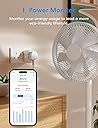
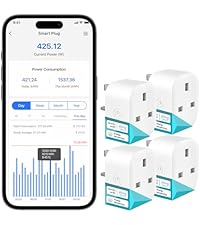
The Meross MSS315 Matter Smart Plug Mini is a compact, high-performance smart plug supporting 13 amps and 240V, designed for seamless integration with all major smart home platforms via the universal Matter protocol. It features built-in energy monitoring with real-time and historical data accessible through the Meross app, supports voice commands across Apple HomeKit, Alexa, and Google Home, and offers reliable local network control even without internet. Easy to set up with QR code pairing, it’s perfect for millennial professionals seeking efficient, connected, and eco-conscious home automation.


| ASIN | B0CCXQMVHS |
| Amperage | 13 Amps |
| Best Sellers Rank | 4,407 in DIY & Tools ( See Top 100 in DIY & Tools ) 28 in Smart & Remote Controlled Plugs |
| Brand | meross |
| Colour | White |
| Connector Type | Two-prong plug |
| Connector type | Two-prong plug |
| Country Of Origin | China |
| Customer Reviews | 4.3 out of 5 stars 1,043 Reviews |
| Included Components | User Manual x 1 ,Smart Plug x 1 |
| Item Dimensions D x W x H | 61D x 33W x 48H millimetres |
| Manufacturer | meross |
| Manufacturer Part Number | MSS315 |
| Material | Polycarbonate (PC) |
| Model Number | MSS315 |
| Number Of Wires | 3 |
| Number of Items | 1 |
| Number of Poles | 2 |
| Plug Type | Type A |
| Product Grade | Good |
| Product Warranty | 2 year manufacturer |
| Product dimensions | 61D x 33W x 48H millimetres |
| Specification Met | CE |
| Unit Count | 1.0 count |
| Voltage | 240 Volts |
T**N
Just scan the QR code to pair
Just bought 10 of these to replace my Kasa sockets that tp-link have decided not to support, their loss as I will never buy anything from tp-link as they could have OTA updated their sockets but decided not to. Reading the reviews, many good folk are making hard work of pairing these meross sockets as all you need to do is scan the QR code on the side of the meross socket (each one has its own sticker) then watch as it pairs automatically. All the main players (SmartThings, Google assistant, HomeKit etc..) are able to scan a QR code to add a matter device, there is no need to for any extra steps that some folk are adding probaly out of habit from the old way of adding devices. Just scan & wait - thats it. So I added mine via the SmartThings app, I dont want the meross app, all works brilliantly without the meross app. I added a matter device, scanned the code and waited 30 secs for the pairing to complete. But I want voice commands via Google Assistant, so now that you have your socket added in SmartThings you can drill down into the socket, click the three dots and select `Share with other services` which will connect the device to G-assistant (or other services you have connected with). You have to give the socket its name again, It would have been nice to import the name from SmartThings but its a minor annoyance, then your socket will appear in G-Assistant under devices & you can voice control it with the name you gave it! Meross are first to market with these sockets, I paid ~ £15 each and they have power moitoring so im happy with that but we can expect the price to fall. The whole process was simple and effortless, please dont feel the need to add extra steps from the days of old, just add matter -> scan the qr code and wait. I recommend these sockets, they work locally and are responsive (I can see the speed difference when using smart buttons to toggle them) my older kasa cloud sockets have to do an internet roundtrip to toggle, these little beuts are local & super fast. Meross, well done for getting there first, im a fan & will be buying more.
M**N
fast easy to use and great suport
work very well great showing how much power the item you have plugged in is using easy to connect to alexa fast conection and responce I did have one prob with one plug after a power cut it would not reconnect i sent a email to Meross support and got a responce with in a couple of hours and had the problum sorted and the plug working again very happy with the suport i recived from them
B**G
Well Made, and Responsive, but Pairing is Awful
This is a review of the more recent MATTER version of these mini plugs, not the "Works with HomeKit" variety which have been around for longer. I have a Thread/Matter network and my main smart home driver is Apple Home, with some Alexa-based devices. So these new Matter mini plugs seemed like a great forward-facing choice over the older HomeKit versions, allowing me to automate from/with different brands. Unfortunately they have been a little problematic. There is not yet a great deal of forum chatter about these plugs, since at time of writing they have not been available for long. When setting up the plugs the Meross app finds them and pairs very quickly, with no issues. It was when trying to pair them in the Apple Home app that the real fun started. These devices need a 2.4 GHz Wi-Fi network to connect to, and you need to disable the 5 GHz side on your router while you pair (you can do this for Eero by going to Trouble-Shooting in the app, where you can pick "my device won't connect" and turn off 5 GHz for ten minutes). So I did that, then put one of the plugs into pairing mode. This involves holding the side button until the plug resets, and the LED alternates orange and green. Apple Home spotted the plug and asked for the Matter code, scanned successfully, identified that it was a plug, started pairing. Oh dear. The mini plug exits the pairing state before Apple Home can complete the process, resulting in a failed pairing. This happened with both plugs, and it was the same on multiple attempts. The Meross app had already updated them to the latest firmware version, although there was nothing in the update notes which explicitly mentioned pairing. The problem appeared to be the private Wi-Fi used by my phone. One my second attempt the next day as well as turning off 5 GHz Wi-Fi temporarily, before attempting to pair I went to my phone’s Wi-Fi settings and turned off Private Wi-Fi Address and Limit IP Address Tracking. THEN I held the plug power button for five seconds, waited for the LED to flash amber/green, and finally scanned the QR codes to pair. It worked. However I’ve now added another four units, and using that method doesn’t make any difference. I’m at a total loss here. It’s like they just eventually decide to pair when they feel like it. Quite a lot of faffing, but when it’s done it’s done. It’s just getting to that point is a trial and there’s no obvious and reliable way to ensuring pairing works first time, which is frustrating. In terms of build and functionality the plugs are great. They have a small form factor, they feel well made, and they include energy monitoring (plus bill forecasting) via the Meross app. Matter doesn't yet support communication of energy consumption, but I expect if the Matter standard ever develops that far it shouldn’t be difficult for Meross to make the mini plug's consumption data available across Matter. Despite the fussing about trying to troubleshoot (don’t even bother with Meross support, save yourself the time), they seem like great little bits of kit. Response time is pretty much instant from both Home and the Meross app, once they’re paired, and I’ve not had a single “no response” in Home as yet.
M**D
Good smart plug, works as expected
Using this Meross Matter plug for few months now. Setup was very easy and connected quickly with Google Home. Response is fast and no issues till now. I am using it for lights and it works perfectly. Energy monitoring is also useful to check usage. Size is compact, not blocking other sockets. Overall good product, worth buying 👍
A**I
Top Customer Service
It's a really good and reliable smart plug, works exactly how you would like it to. My plug stopped working after like 6 months, where it was stuck on the 'On' state, it was responding but the switch itself wasn't cutting off the power to the plug attached to it. However I reached out to Meross support and they quickly sorted out the issue and sent me a replacement. Simply due to their quick response and replacement I will be buying from them again.
T**S
Did not work
I followed the instructions to the letter, but could not get this device to connect to my phone, or WiFi network. Even after changing settings in my router, to limit it to 2.4GHz only WiFi. Not being able to figure out what was wrong, and the Meross on-line help system being hopeless, I decided to buy a Tapo P110M, which was half the price. To my surprise the Tapo device worked, and connected to my phone as expected. Completing the settup was quick and easy, and you can test the plug ON/OFF and energy monitoring, directly from the app. So I'm switching to Tapo from now on.
F**S
Works well with HomeKit
Very easy to setup with HomeKit, shows current energy usage, and works as intended.
K**L
Got there in the end with Apple Homekit. .
So initially I had some problems. Trying to connect to Apple HomeKit was challenging to say the least. I had one plug connect straight away but the other three just would not pair to Apple Home. In the end, I installed the Meross app and found that the three plugs that weren’t connecting were due a firmware upgrade. I upgraded the firmware for each and all three then connected to Apple Home.. I did have to switch the plugs off and switch on the back on for them to pair successfully. So it’s critical that you install the app to make sure that the firmware for each plug is up-to-date and ensure that when using your iPad or iPhone that your devices are on the 2.4 GHz network and not 5 GHz. The simplest way is to disable 5 GHz and then you can reenable 5 GHz once you have got the plug successfully paired.
D**D
Fantastic product that doesnt take 2 spaces on an extension board.
works first time with matter on home assistant. Will be buying more. Have tested on kettle for last few months and doesn't get hot under such a heavy load.
M**E
Super produit
Utilisation depuis plusieurs années, rien à dire , fonctionne super bien , application gratuite et facile .
B**Z
Très utile pour le confort de vie et le suivi de consommation. Très bon SAV sous garantie 2 ans.
J'utilise 7 prises Meross pour commander à distance mes appareils (pompe piscine, TV, Ordinateurs, Lampes) et en contrôler la consommation. L'appairage sur le téléphone est simple et intuitif, rapide, et après une panne secteur ou WiFi, la remise en service est automatique sans souci. La version MSS310 permet de contrôler la consommation de l'appareil et en conserve l'historique sur le téléphone.. Au bout d'un an, l'une des prises dysfonctionnait en s'éteignant et s'allumant par à-coups, j'ai contacté Meross, fourni mon numéro de commande Amazon, j'ai fourni une vidéo d'une lampe connectée à la prise, et le service client, très aimable, m'a envoyé une prise de remplacement. Je suppose que ce service est basé à l'étranger, l'échange Mail est en Anglais (merci les traducteurs en ligne), et les temps de réponses sont de un ou deux jours, mais ils répondent !!! Je garde donc une très bonne impression de Meross et suis très satisfait de mes produits, malgré la panne.
C**A
WLAN Steckdose
👍
M**T
Bon
Bon
Trustpilot
2 weeks ago
3 days ago