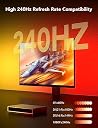
๐จ Light up your game with AI precision and pro-level style!
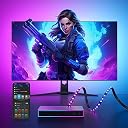
The Govee AI Sync Box and Monitor Backlight is a cutting-edge RGBIC LED strip lighting system designed for 27-34 inch monitors. It delivers ultra-accurate color matching with near-zero delay by processing HDMI signals, supports high refresh rates and resolutions including 4K HDR10, and integrates AI-driven lighting effects that respond dynamically to your gameplay. Compatible with major titles and voice assistants like Alexa and Google Assistant, it creates a fully customizable, immersive 360ยฐ lighting environment for the ultimate gaming and entertainment setup.
| ASIN | B0C4YHWQG6 |
| Additional Features | 99% Color Accuracy, AI Lighting Effect, Dimmable, Dreamviews, High FPS and Resolution Support |
| Brand | Govee |
| Brand Name | Govee |
| Color | RGBIC |
| Connectivity Protocol | Bluetooth, Wi-Fi |
| Connectivity Technology | Wi-Fi |
| Control Method | Voice |
| Controller Type | Voice Control |
| Customer Reviews | 4.1 out of 5 stars 120 Reviews |
| Form Factor | Monitor Backlight |
| Included Components | HDMI Box, Strip Lights, HDMI Cable X 2, Power Adapter, User Manual |
| Indoor Outdoor Usage | Indoor |
| Indoor/Outdoor Usage | Indoor |
| Item Length | 34 inches |
| Item Weight | 2.8 pounds |
| Light Color | RGBIC |
| Light Source Type | LED |
| Manufacturer | Govee |
| Manufacturer Part Number | H6602113 |
| Material Type | Plastic |
| Model Number | H6602 |
| Number of Items | 1 |
| Number of Light Sources | 1 |
| Number of Packs | 1 |
| Power Source | AC/DC |
| Product Style | Modern |
| Seasons | Christmas |
| Special Feature | 99% Color Accuracy, AI Lighting Effect, Dimmable, Dreamviews, High FPS and Resolution Support |
| Theme | Christmas |
| UPC | 810088345869 |
| Unit Count | 1 Count |
| Voltage | 12 volts_of_direct_current |
| Water Resistance Level | Not Water Resistant |
| Wattage | 48 watts |
| Wireless Communication Technology | Wi-Fi |
| hanging_pattern_layout | Linear |
T**N
Works well
Works well. Wish it came in a larger size (as it does in Europe). Only drawback is that it can only be used if you have an external HDMI source. If you are using a "smart" TV with everything built-in, you'll probably want to go with one of the models with a camera.
A**R
Capable of 4k@120hz with a splitter!
If you like being immersed in your games or while watching television or a movieโฆ then this is a must have! The bad reviews come from those who have to hire an electrician to screw in a light bulb. If you can set up a tv you can set this up with no problems. 4K 120hz is very possible you will need an HDMI splitter with manual a resolution switch ezcoo has them. Certified HDMI 2.1 8k@60hz 4k@120hz is required for this set up on all ports! Then use the interweb to properly set up. Worked right out of the box without the app! I still DLed the app for cell phones only. It does not work with the pc app, which gives you the ability to customize your lighting even further.
O**N
BEST ADDITION TO GAMING SETUP!!!
This has to be the coolest thing I have bought for my gaming setup, it has everything from the lights being able to sync with the screen, to being able to customize a different light pattern through the app whenever you get a win or kill in a game (it only works with some games tho) and also works for things like playing movies or anything like that too. There is also an option to just use a custom lighting styles/patterns to match whatever you want. Best addition to gaming setup ever.
B**N
Really cool until it stops working right...
About exactly 1 year from purchase, I started getting weird visual artifacts and flickering pixel/lines that won't stop until I unplug and replug my AI box... This occurs every time I turn my setup on. Sometimes multiple times. It seems to be getting worse. I have followed all instructions to update the boxes' firmware through the app, but it just doesn't seem to want to work. I don't know what the problem is, but it seems like a malfunction. One year for how much I spent seems like it wasn't even worth it in the end, as cool as the effect can be with some shows and movies...
J**O
I love the govee system
really like this syncbox. Big fan of the govee system. I've owned these for about 6 months now and am very happy with the purchase. Not as good as Phillips Vue but also marginally more affordable.
D**Y
Buyer Beware! Incompatibilities & doesn't support light bars!
I've enjoyed my Govee products but I'm very disappointed with this one. I owned the Govee Dreamview G1 prior to purchasing this. I wanted to upgrade that product with this AI Sync box. Here's some things you should know that may not be immediately evident to you. 1) This sync box appears to only be compatible with the led light strip it comes with. I already had a light strip mounted to the back of my monitor from my purchase of the Govee Dreamview G1. I was under the assumption this would be compatible. I'm sure it could be with a future software/firmware update, but I wouldn't hold my breath on that. So if you have any desire to use your previous monitor backlighting, this might not be for you. 2) You might have seen the Govee AI Sync Box advertised elsewhere powering 2 Govee light bars. You may already own some Govee light bars. This sync box will NOT work with Govee light bars. I had intended to use the 2 light bars that came with my Govee Dreamview G1 with this, but that's not happening. You might buy this product now, with the intention to get the light bars later. If so, this product is not for you. What's the problem? Connecting the light bars to the sync box requires that you have a sync box with 2 USB ports on the back and this one only has one. Yes, there are in fact 2 different models of this AI Sync Box, not just two different packages of it. This, to me, was the most deceptive part as there is no clear indication that this product could not be upgraded to support light bars and there is another packaged version of this product that includes light bars, giving you the impression that you could add them to this sync box at a later date, or not buy them if you already own them. Because of these facts, and the high price of the product, I have to give this a one star review, especially when it comes to value for the money.
K**X
Doesn't pass through any HDMI signal
Updating my review from a 1 star to a 3 star. Update: after spending a lot of time and extra money, I was finally able to get it working. I had to purchase a HDMI splitter. OK. But the first I bought was actually a switch, not a splitter, so I ordered a switch. Ok, but the switch i bought was the older HDMI, not 2.1, and the older doesn't pass through higher resolution feeds to the monitor, so I had to order another splitter. Ok. I also ordered 3 new, short HDMI 2.1 cables. Phew, days later, at least $100 poorer, I almost got it working. I had to feed the main HDMI from the computer into the splitter, then an out from the splitter to my monitor and another out to the Govee box. But that's not all, I had to turn off HDR on the monitor. Doing so tells the computer which tells the Govee there's no HDR. Then it worked! Also, after I could them turn HDR back on via the monitor and it still worked. So, $100 or so and days of frustration later, it seems to be working. I've updated my rating from the 1 star (doesn't work at all) to 3 stars (works but OMG what a PITA and doesn't work out of the box unless you're on old equipment) Original review: I'm a fan of Govee. I have backlights on my main TV, and various other Govee lights that sync. This one, just not working for me. Set up was straightforward. Put the lights on your monitor. Check. Easy for me as it's a brand new monitor. Plug the lights into the unit. Check. Easy as there's only one place for it to go. Plug your computer HDMI into one of the 3 HDMI inputs. Check. Use one of the provided shorter HDMI cables from the units output to the monitor input. Check. Unit powers on fine. Lights power on fine. I already had the Govee app, adding the new device was simple. It actually already recognized it so basically just click a button. Check. But it simply doesn't pass any video through to the monitor. None. I tried both provided HDMI cables. Tried all 3 inputs on the sync box. Now, while my monitor is new my PC isn't. It's over 3 years old. I'm not crushing in the hardware, definitely not to or the line stuff either. So not sure what the story is, though I've since read several other complaints of people that have the same problem. The fix? Spend more money for an HDMI splitter so your original PC feed can go to both the monitor and the sync box. Honestly very disappointed, but I've already opened it, installed it, so I likely won't return it, but I'll think twice about buying Govee again without a longer review process. And no, I didn't recommend this, especially if you're using an LG monitor because half the issue I've read revolve around users with an LG. Not sure if it's coincidental or bad luck.
K**N
Great product! However, unfair pricing for whatโs given.
Works fantastically! However, HDR has issues and I constantly need to reconnect the power to fix the issue. Also the colors are close, but definitely not 100%.
Trustpilot
2 weeks ago
2 months ago