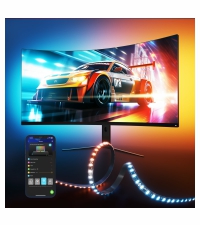
Desertcart purchases this item on your behalf and handles shipping, customs, and support to Japan.
🎮 Light up your game — don’t just play, immerse!
The Govee Gaming Light for Monitor G1 is a cutting-edge RGBIC LED backlight designed for 27-34 inch monitors, featuring 108 high-density LEDs with VibraMatch technology for ultra-fast, pixel-perfect color synchronization. Compatible with curved screens and capable of syncing with multiple Govee devices and Razer Chroma, it offers 123 preset scenes and 11 music modes for personalized ambiance. Easy to install and control via the Govee app, it transforms your gaming setup into a vibrant, immersive experience.


| ASIN | B0C4NC62C6 |
| Best Sellers Rank | #21,844 in Tools & Home Improvement ( See Top 100 in Tools & Home Improvement ) #209 in LED Strip Lights |
| Brand Name | Govee |
| Color | Multicolor |
| Customer Reviews | 4.2 out of 5 stars 782 Reviews |
| Included Components | Control Box*1, LED Strip Lights*1, Power Adapter*1, User Manual*1 |
| Item Type Name | LED PC Backlight |
| Light Source Special Features | Dimmable |
| Light Source Type | LED |
| Light Source Wattage | 18 watts |
| Manufacturer | Govee |
| Manufacturer Part Number | H6609112 |
| Material | Plastic |
| Material Type | Plastic |
| Model Number | H6609 |
| Mounting Type | PC Monitor Mount |
| Number of Items | 1 |
| Number of Light Sources | 108 |
| Number of Packs | 1 |
| Power Source | AC/DC |
| Shade Material | Plastic |
| Shape | strip |
| Style Name | Modern |
| UPC | 810088345852 |
| Unit Count | 1 Count |
| Voltage | 12 volts_of_direct_current |
| Wattage | 18 watts |
A**D
This is the one you want for 27-34" monitors!
Does what Samsung's Odyssey CoreSync+ SHOULD do: The Govee G1 is a great match for a 34" ultrawide, not too complicated to setup, and the LED strips are plenty bright. There is a minimal delay in the snyc lighting, as expected, though it keeps up with most scenes to really add to immersion. During setup, you initially connect to the controller via Bluetooth to setup the WiFi, then you enable the local LAN/API control to work with Dreamview in their desktop application. Just make sure if you're using a modem and an additional wifi/switch, that you connect to the 2.4ghz WiFi band on the same router/modem you're computer is connected to. The only time I get a little flickering from the LED strips is in certain game menus (maybe one LED will flicker a bit when highlighting am option), but that's not an issue.
T**T
Go with Govee
I use Govee in my entire house, my favorite spot however is my desk. I do wish they would stick better for longer however I rig it up to ensure I don’t see any cables or anything. I have Alexa hooked up to all of my Govee lights with different scenes to allow full creative freedom. The colors are objectively excellent! I like the ability to have variable brightness depending on the vibe and that’s something I don’t take lightly. At the end of the day if you are looking at Govee vs other players in the industry just go with the trusted brand in Govee because they are incredible and I’ve really loved having them. I’ve always used LED colored lights but since making the switch it’s made my house much more enjoyable with Govee. I will be a buyer for the foreseeable future!
A**R
Pretty Great But The Desktop App Needs Some Changes.
The Good: Okay so first impressions are everything. They are very bright and vibrant. They are much different and brighter than their other RGB strips they offer. I also really love how easy these were to install on my monitors. I wish it came with a few more clips but I made it work! I love the saturation of the colors these strips can produce. It really makes the colors on your screen pop. I have always loved RGB lights and bright saturated colors. I have gone through numerous other brands but none of them had Dreamview on them. It's totally worth it if your PC can handle it. It really changes your gaming/movie experience in an amazing way. It adds so much depth. I have them set up to both my PC's. I am adding my PC setups here so you can get an idea with how well Dreamview will work for you. I have a pretty decent workstation PC. My Workstation Specs AMD Ryzen 5800x 64 GB of Ram Gigabyte RTX 4080 I am an EDM Artist, Professional Songwriter, Composer and Avid Gamer. Again, it totally makes gaming, watching videos & movies and even music production way more immersive for me. It's super fun to use with Nintendo Switch games like Luigi's Mansion IT FOLLOWS LUIGI'S FLASHLIGHT which was super neat. Rainbow Road in Mario Kart is insane! The Legend of Zelda Tears of the Kingdom, Even Pikman 4 and Paper Mario Origami King looks fantastic with these light for another layer of immersion and a pleasant gaming experience. Diablo 4, Destiny 2 and Elden Ring absolutely Slap with these lights. I also watched John Wick 3 with these, I put a fan on my desk and felt like I was on the run with John. I can play in 4k and not run into any real issues until I sync up more than two of Govee’s light up on the Desktop App. Now if you aren't going to use Dreamview Go for it I support it 100% and you can set such a mood and vibe with these lights. There are lots of new presets in the phone app. its safe to say if you are looking at these you want the Dreamview. It does sync to Razer Chroma as well. I've not used it outside of brief testing with my chroma profile for like 10 minutes and it was neat. The Frustrating: So here is where I found some problems with them. Please don't be discouraged, this is just my experience and yours will be different. I have a triple monitor Dual PC set up. The second PC struggles with syncing the lights gaming at 1080p. We usually play Destiny 2 so it doesn't take that much processing or resources. My partner thought they were super cool on mine so I ordered some for her to use on the other PC. Mind on both PC's the desktop app is installed on M.2 SSD Drives. This PCs specs are a Ryzen 5 5600X 32 GB ram RTX 3060 TI It is very laggy on these specs even running it in admin mode and only one light is synced to this computer. If I have all 4 Lights synced up to my main workstation dreamview on the Desktop app It lags everything tremedously. I have a set of the curtain lights and all my monitors have the G1 strips on them. Now when I connect anymore than Two lights Games get super laggy Even Destiny 2 for example. When I write music it also effect's how my VSTS run. I would like to add that we also have the TV Backlight 3 set up with our Govee Recessed lights we installed in the ceiling and I don’t get any latency with that and there is no software outside the phone app there. I don't know if I missed this but you can't sync individual monitors for sync. Only your main display will sync to it. It would be a solid 5 stars but the lag coming from the other PC that isn't as equipped my main workstation is super discouraging. I know if I didn't have my current workstation and I was still on the other pc mainly I would drive myself crazy trying to get that latency down or maybe not even use the Dreamview. If there was a way for Govee reconstruct or recode the software to take advantage of the GPU put the workload there and utilize the graphics card this will take most of the work off the CPU if you have a multi light set up. Not only that but utilizing Nvidia or AMD software to make colors more accurate and you would be able to individually sync each monitor’s picture as well. This would be a solid update for people who own multiple lights and want to run Dreamview constantly like me. But I am no coder or software engineer. I know you can get access to the API for more in depth customization, but I am not really that confident in my abilities in that area. But I hope this gets looked at by Govee to figure out how to make these lights run better for people who don't have Similar speced PC setups. It can ruin immersion when there is a 3-5 second latency (this is about what is was on my second PC) while your gaming. I hope I didn't ramble on too long I really hope this helps. Again, if you want them get them this is just my experience, and it shouldn't reflect on your decision to pick them up! It still makes whatever you’re doing on your computer 100 times better.
K**Y
Nice syncing lights
Great LED light strip, syncs well with my monitor/pc! Very durable, easy to install and setup, looks great behind my desk.
J**R
Great Product, Easy Install
Love these lights. The dreamview app can be a little finnicky when your computer sleeps. But the actual dreamview effects are really nice. You get nice, reactive, ambient lighting. Installation was what you would expect when using led strip lights... fiddling with the exact placement and getting the corners to lay down. The nice thing is this set has 4 actual strips with corners built in, no led strip origami required to go around your monitor. The laydown clips they provide are ok if your LED routing is perfect, but if there is any tension on the corner wiring they will just pop off, your much better using a thin strip of gorilla tape or something. But its by no means a deal killer. Great product. I would buy it again.
M**E
Amazing effect at it's best, frustration at it's worst
This is a tough product to rate. When it's working optimally it's incredible but it has a lot of quirks. I will probably focus mostly on the negative as I think there are plenty of reviews on here focusing on the positive. CONNECTION One of my biggest gripes is this is marketed and sold as a monitor backlight, as in, for a PC, but does not connect physically to said PC or monitor for that matter. In order to get this working on the PC you need to first connect to your phone via the app (why?) go through connecting the lights to your WiFi network. Then run the software on the PC to connect your PC and the lights wireless over WiFi. There is no wired connection, it is not even an option. Why when this product is designed specifically for PC use is it not plug and play via USB? I legitimately cannot think of a good reason for this and when setting it up I was honestly shocked. It would not even have dawned on me that this would work only wireless. To me this is at best completely unnecessary and at worst a detriment to performance and ease of use/setup. WHITE White backgrounds seem to be handled with some shade of blue, it's possible these RGB LEDs are just not good at creating white as there is no separate dedicated white LED (included closeup of LED). This can be kind of annoying on websites or in some media you may watch - it's admittedly not the biggest deal but worth noting. There are a fair amount of options in the app but no color calibration and nothing I could find to change color temperature of the color white unfortunately. BLACK Dark scenes and even straight black images the LEDs will display a dark blue. Why? Why they would not turn off completely or just significantly dim I do not understand, this is very odd behavior to me and is more of a big deal than the issue with white as a lot of the media you will display has dark scenes which will just have dark blue backlight on your wall. TURN OFF So going with if this was just connected via USB this thing does not seem to know when the monitor is blank and will just stay on instead. There is a setting in the PC app where you can check "After the screen is locked, the lights will automatically dim", this does not seem to work at all however. They don't turn off nor dim. You can turn them off in the app but I have woken up in the middle of the night to them doing a rainbow light show after doing it this way- it seems the physical button on the controller does seem to permanently keep them off. And this turning back on admittedly might be a quirk with it and SignalRGB. SignalRGB As mentioned, the app does not play well with SignalRGB. SignalRGB will auto add it to their software when you install GoveeDesktop and will cause problems. Make sure you disable it in SignalRGB and even then you may have some weird behavior with the two- just FYI. The app also mentions this when it detects you have SignalRGB installed so it's not Govee's fault, just of note. I think this product would be significantly better with a physical connection to the computer to allow: -Less latency -Setup without a phone and phone app -More information to the app on what the computer is doing (monitor turning off for instance). A lot of streaming sites will not work such as Netflix- I imagine this is similar to how screen recording or even screenshots are blocked and again is not the fault of Govee, just of note. Physical setup is easy, the strips have full length VHB tape and there are some clips included to tie down the corners which work excellent. I haven't tried any other settings in app besides Dreamview because I feel like that is the key reason to buy this product over something else. With all that said, I will not be returning this despite its flaws. Coming from a cheap strip light with one of those generic, ubiquitous, flat remotes I was previously using, having the effect of color spilling past the sides of your monitor is incredibly cool. I got this for $45 with coupon which I would definitely consider worth it.
M**N
Solid purchase
Great product, the light syncing is a little delayed but it’s still super immersive and it’s great for movies! Easily one of the best additions to the gaming/studio set up for the price.
E**V
Good for basic TV lighting, terrible for PC screen sync
Good only for a TV without screen sync... - High latency, which is very noticeable when screen content changes. - No USB data connection (only power), so the lights don't turn off when the PC shuts down. Almost impossible to fix. - No dedicated white LED, so white colors look unnatural. They probably used a cheap LED strip here. - The wires between the strip segments are very stiff and stick out at the corners. The included adhesive clips are too weak to hold them in place. - Requires a smart home mobile app just to set it up. This is super weird for a gaming PC setup and only makes sense for basic smart home lighting. - Bad software with missing features. You can't make the lights turn off when the screen is black, and there is no auto-off when the PC goes to sleep. This product is definitely not for a gaming PC. It is only fine if you want to control it from your phone and run it on a basic smart home schedule. For PC gaming, I highly recommend a DIY setup: Nollie1 controller + SK6812 LED strip + L-shape connectors + JST wires + SignalRGB app. It only needs a USB port, has zero latency, and looks much better.
A**N
SUPER
la luz se ve increible los colores son muy precisos y tambien la sincronizacion
A**I
رهيبة
الاضاءة رهيبة وجودتها رهيبة وفيها خاصية التزامن مع اللي ينعرض على الشاشة ، لكن شاشات ال٢٧ انش بيواجهون صعوبة شوي في تركيبها
D**N
Cool asf
Made my setup look so much cooler. The colour sync mode is sick
M**S
Perfecto pero fallo en la descripción
Vendedor profesional, el mismo día devolví mi paquete y en 5 días ya tenía el dinero de la devolución en mi cuenta; gracias por su amabilidad eh integridad.Lo recomiendo en plenitud.
S**D
Nice colour
I’m not sure if it works with tv colour thu I tried to sync it and i am so confused
Trustpilot
1 day ago
5 days ago