Desertcart purchases this item on your behalf and handles shipping, customs, and support to Japan.
🚀 Elevate your display game with 8K clarity and HDR brilliance!
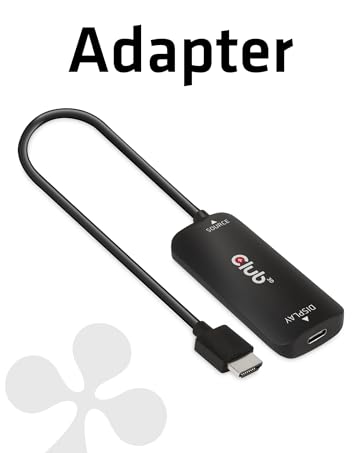
The Club 3D CAC-1088 is a premium active DisplayPort 1.4 to HDMI adapter that delivers stunning 8K@60Hz and 4K@120Hz video output with HDR10+ support. It ensures smooth playback of HDCP-protected content, requires no external power or drivers, and supports high-fidelity multi-channel audio passthrough—perfect for professionals and enthusiasts demanding top-tier visual and audio performance.


| ASIN | B0C4FTWLCJ |
| Best Sellers Rank | #105 in Computer DisplayPort Cables |
| Brand | Club 3D |
| Brand Name | Club 3D |
| Cable Type | DisplayPort HDMI |
| Color | Black |
| Compatible Devices | Laptop, Desktop PC |
| Compatible Phone Models | No Compatible Phone Models |
| Connectivity Technology | Displayport 1.4 to HDMI |
| Connector Gender | Male-to-Male |
| Connector Type | Displayport 1.4 to Hdmi |
| Customer Reviews | 3.9 out of 5 stars 31 Reviews |
| Frequency | 60 hertz |
| Global Trade Identification Number | 00841615102983 |
| Included Components | Displayport 1.4 to HDMI Cable |
| Indoor Outdoor Usage | Indoor |
| Item Shape | Adapter |
| Item Weight | 51 g |
| Manufacturer | Club 3D |
| Model | CAC-1088 |
| Model Name | CAC-1088 24030410 |
| Number of Items | 1 |
| Number of Pins | 39 |
| Other Special Features of the Product | high speed, 8K, 1.4 |
| Part Number | CAC-1088 |
| Special Feature | high speed, 8K, 1.4 |
| Specification Met | True |
| UPC | 841615102983 |
| Unit Count | 1 Count |
| Warranty Description | No Warranty |
M**R
Functions great, no problems
This cable saved me some headache. Device: Lenovo Thinkpad X1 Carbon Gen7 DOCK + Samsung 4k OLED TV OS: CachyOS I needed to connect my laptop while docked to my TV however most TVs have HDMI only so to use my Lenovo dock (DP only) I needed this exact cable. Not much to say, it's a very simple device, the refresh rates are accurate. On my machine going 4K dropped the refresh rate to about 60Hz so be mindful. On my windows machine (yuck) it is able to handle 4K 120Hzs so be mindful of your particular setup. 10/10 would buy again
D**7
It works! Using it as a tool to help me with bitstreaming audio...
Some important context: I don't have a monitor for my PC, I use a TCL75Q825 TV as my display, that TV only supports upto HDMI 2.0b. Also, I have an older but still good Integra DHC-80.3 receiver, which only supports upto HDMI 1.4a. So, the issue of course was that if I were to try to connect my RTX 4070 Ti directly to my receiver via the HDMI, I could bitstream HD audio such as DTS-HD, Dolby TrueHD, and etc., but my display output would be limited to 4K 30hz, and no HDR. So, for about a year now, I have been using a direct connection from the 4070 Ti hdmi port to my TV, thus allowing 4K 60hz w/ HDR 10, and then I would use the i-gpu in my 13700K processor w/ the motherboards on-board HDMI port to connect to the receiver. Naturally, Windows 11 detects a dual display configuration, and I had it setup as Extend my Display, with my 4070 Ti set as my main display. This allowed me to watch my 4K HDR mkv movie files in all their glory, whilst the i-gpu's "display" aka the DHC-80.3, was set as my default audio device, which allowed me to bitstreaming the uncompressed HD audio from those mkv movie files. But, the annoying part was that there was always this annoying 2 second audio delay EVERY time ANY audio was started and then stopped. So, I'm like, "What if this would work better if I could simply bitstream the audio via the 4070 ti? Well, it works, perfectly! And no more sound delay! I connected this DP 1.4 to HDMI adapter to a display port on the 4070 Ti and that HDMI end directly to my TV, and then the now freed up HDMI port on the 4070 Ti was used to connect an HDMI cable to the DHC-80.3 receiver. So now, I don't have to utilize the 13700k's i-gpu at all, which not only helps with my audio delay issue, but also helped with some other minor issues that utilizing the i-gpu at the same time as the 4070 Ti can cause. I kept researching and looking at the tens and tens of these adapters that show up on Amazon. Sure, some of them were like half the price, but the negative reviews on some of those made me hesitate to get them, often times, in my experience, at least with electronics, it usually is a "You get what you pay for" type of deal.
D**C
Dont waste your time or money
Id give this minus 3 stars if I were able. This piece of junk advertises 8k60z and it wont even recognize my flagship 8K Sony Z9j on 4k30hz. I bought Club 3D way back in the past and forgot what pieces of junk they are, but I was quickly reminded with this. Needless to say its being immediately returned for a refund. You can keep your junk Club 3D
K**N
ACTUALLY WORKS
I have a Sim rig and I have three TVs that have the capability of doing 4K 120 Hz. Long story short I tried a ton of adapters and this is the only solution that actually works. No fluff no BS, yes they’re expensive but it is for good reason. Because they just work.
M**H
Works great, I would buy again if needed.
I have used this adapter for quite a while now, and I can say that I am very happy with it. A power surge damaged my HDMI connector on my computers GPU, and this adapter made my PC useable again. Picture and sound quality are perfectly fine when adding this to my 6 foot HDMI cable going from the PC to TV.
J**Z
Smooth functionality
I had cheap dongle I was already using before that was finicky. I didn’t have confidence about its longevity so I went ahead and ordered this one from Club 3D. I have zero issues with this dongle. It works smoothly with any resolution and color space I can throw at it. Windows HDR calibration also worked correctly through it - that was another quirk with my old dongle. It’s too bad none of these dongles support VRR. I don’t know why that’s the case. HDMI standards are confusing. Anyway I’m happy with this purchase. It’s the best cable of this type that I’ve used
R**A
It came opened.
It came opened. It works, but it came opened. Why was the bag it came in ripped open, Amazon?
M**E
Usually works
Sometimes have weird issues where it constantly flickers the display on and off and requires I power cycle the monitor to make it stop. Its better than all the other adapters I've tried and no other graphical issues. Sharp text and graphics.
J**U
Golden standard of high res HDR cable adapters
There is nothing on the market that performs as well as this. Every other cheaper solution doesnt work well. Shell out the extra dollars and just install and forget. No screwing around! Edit: This thing supports 4K 144Hz HDR RGB 4:4:4 DisplayPort to HDMI over a 2.5 foot HDMI cable with perfection. It is world class premium and while it is expensive I strongly recommend it.
Trustpilot
3 weeks ago
1 week ago