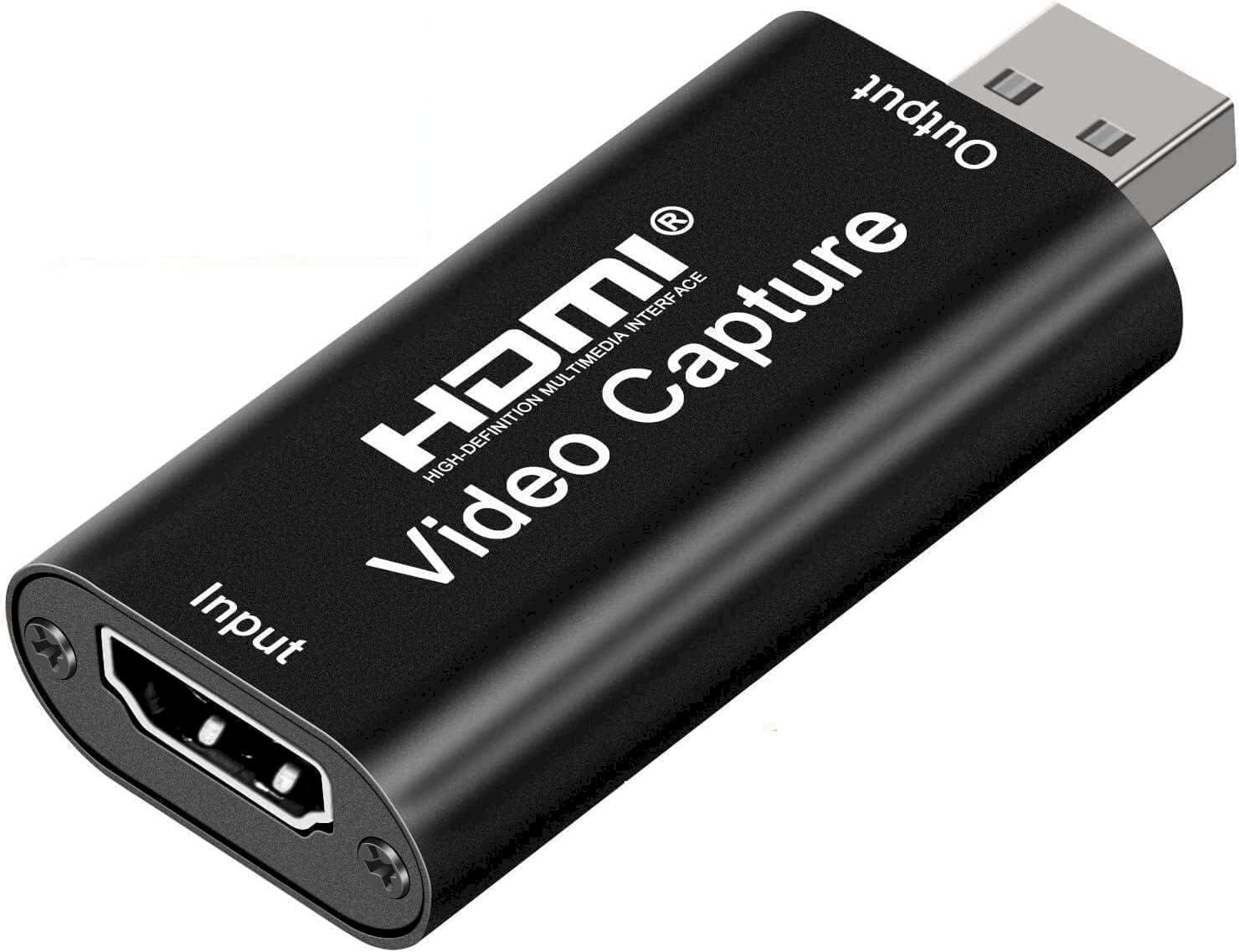
🎬 Capture Every Frame, Own Every Stream!
The Audio Express AXHDCAP is a budget-friendly 4K HDMI to 1080p USB 2.0 video capture card designed for seamless streaming, recording, and live broadcasting. It supports ultra-low latency real-time preview, broad OS compatibility, and plug-and-play ease, making it ideal for content creators, gamers, and professionals seeking reliable, high-quality video capture without breaking the bank.


| ASIN | B0C2MDTY8P |
| Best Sellers Rank | #2 in Internal TV Tuner & Video Capture Cards |
| Brand | Audio Express |
| Color | Black |
| Customer Reviews | 4.3 4.3 out of 5 stars (1,153) |
| Date First Available | April 16, 2023 |
| Item Dimensions LxWxH | 2.5 x 1.5 x 1 inches |
| Item Weight | 0.352 ounces |
| Item model number | AXHDCAP |
| Manufacturer | Audio Express |
| Operating System | Android (for devices with OTG support), Linux (various distributions), Windows (Windows 10 and later), macOS (macOS 10.13 High Sierra and later) |
| Product Dimensions | 2.5 x 1.5 x 1 inches |
| Series | AXHDCAP |
B**T
Surprisingly Good for the Price, But Expect Some Minor Lag
For a capture card priced under $10, I wasn’t expecting perfection, but this device delivers decent 1080p video while maintaining a compact form factor. It’s not flawless, but for the cost, it performs surprisingly well. The main drawback is the input delay. When connected directly to my TV, there is no noticeable lag. However, when routing the signal through this device, there is a slight but perceptible delay. Disabling the Buffer feature in OBS helped reduce it somewhat, but the lag remains noticeable enough to be frustrating for gaming. I tested it on another Windows 11 machine and encountered the same issue. However, direct connections to a TV exhibited no delay, suggesting the device itself introduces some latency. Despite this, it is still a solid budget option. If you require real-time responsiveness, particularly for gaming or streaming, a higher-end capture card would be a better choice. Use Case Recommendation: This device is excellent for capturing HDMI video on a laptop using OBS or other free capture/webcam software. It’s a great alternative to using a dedicated monitor, allowing you to display an HDMI source on your laptop screen. For example, you can resize the video feed to a corner while taking notes or attending a lecture. Final Verdict: ✅ 10/10 for laptop setups – Ideal for secondary video display and casual use. ⚠️ 4/5 for streaming – Works fine for capturing footage, but input lag makes it less ideal as a primary video source for real-time applications. Check out the attached video for a real-time demonstration of how it looks and sounds in OBS with video buffering turned off and hardware decoding enabled.
B**R
Affordable Stream Setup, Worked Great for Years, So I Bought a Backup
This capture card is one of those rare finds that just works. I’ve been using it for years for streaming, and it’s been rock solid the whole time, no weird setup issues or complicated software. It’s truly plug-and-play and takes up almost no space in my setup, which is a huge plus. For the price, the value is unbeatable. It performs just as well as some of the higher-end models I’ve tried, but at a fraction of the cost. I even picked up a second one as a backup because I trust it that much. If you want something affordable, compact, and incredibly easy to use, this is it.
A**O
Good video capture card
Title: Solid Performance with Room for Improvement I recently purchased the Audio Express AXHDCAP 4K HDMI Video Capture Card, and overall, I'm quite satisfied with its performance. The video quality is impressive, capturing crystal-clear visuals in 4K resolution. Setting up the card was straightforward, and it seamlessly integrates with various recording and streaming software. The real-time capture feature works well, and I appreciate the low-latency design, ensuring minimal delay in the video feed. The card is robust and feels well-built, promising durability over time. However, there are a few areas where I believe improvements could be made, the documentation provided could be more detailed, especially for users who may be new to video capture cards. Despite these minor drawbacks, the Audio Express AXHDCAP 4K HDMI Video Capture Card delivers on its primary function – capturing high-quality video. If you're looking for a reliable and efficient capture card without the need for extensive software features, this card is a solid choice. I'd rate it four stars for its performance and potential for improvement.
A**.
Works great
Works great for video and audio. Used OBS Studio, and also QuickTime. Used for many hours at a time with no problem. I have also used one of these with FFmpeg and it worked great (a little tricky to figure out 1st), but haven't tried this one with it. I'm pretty sure it'd work.
P**.
Check location in your devices and then select a media player to use properly for laptop
It was a little hard to get it to work with my laptop, but I finally figured it out. I wanted to use it to connect my Firestick to my laptop for more hands free if I was laying in bed watching videos from my fav streaming services. So I bought this to plug the stick into and use with the laptop. At first it was not showing or coming up. I had to search for where it was. I eventually found it under my camera options named USB Video. From there I had trouble figuring out how to use it. I ended up using my VLC Media player and under the media tab, selecting open capture device, then knowing the name under the camera option, I was able to select it under the video device name in the drop down and viola. Now it works as firestick should. I do have to open the VLC player and to the select capture device when I want to use it, but it works for what I needed it to.
M**N
Great Product
Good value.
G**T
Needed gadget
This device was a must for us to digitize old 8mm recordings. Worked really well.
N**R
Properly working
A**R
Good
A**R
Unfortunately the product didn’t work.
K**N
I bought this because a friend recommended it. After weeks of testing I can say that I'm happy with its performance. Just make sure not to have anything knock or nudge it while it is plugged in because it could loosen the connection between device and PC leading to sound loss (until you unplug then plug it back in.) I use it with OBS for streaming on YouTube.
R**T
Video working but facing issues with audio capture, it's not working at all
Trustpilot
2 weeks ago
1 month ago