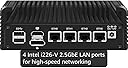
🚀 Power your network with the ultimate mini firewall powerhouse!
The CWWK Firewall Mini PC Intel N Series N100 is a compact, high-performance micro router appliance featuring four 2.5GbE Intel i226-V LAN ports, DDR5 memory compatibility, and dual 4K display outputs. Designed for advanced firewall and routing tasks with AES-NI encryption and OPNsense support, it offers modular M.2 expansion for NVMe storage and WiFi 6 connectivity. Ideal for professionals seeking a silent, customizable, and future-proof network solution.


| ASIN | B0C1TVXQ93 |
| Additional Features | Microphone |
| Aspect Ratio | 16:9 |
| Best Sellers Rank | #26,933 in Computers & Accessories ( See Top 100 in Computers & Accessories ) #774 in Mini Computers |
| Brand | CWWK PC |
| Built-In Media | Power supply |
| CPU Model | Celeron |
| CPU Model Number | N100 |
| Color | N100 4LAN |
| Compatible Devices | Devices capable of running OPNsense, OpenWrt, Ubuntu, Windows, or ESXI |
| Connectivity Technology | Bluetooth, HDMI, USB, Wi-Fi |
| Cooling Method | Passive, no fan |
| Customer Reviews | 4.1 out of 5 stars 64 Reviews |
| Display Resolution Maximum | 4096x2160 pixels |
| Display Type | UHD |
| Graphics Card Description | Integrated |
| Graphics Card Interface | Integrated |
| Graphics Coprocessor | Intel UHD Graphics |
| Graphics Description | Integrated |
| Graphics Ram Type | SODIMM |
| Hard Disk Description | SSD |
| Hard Disk Interface | Serial ATA |
| Hardware Interface | Bluetooth, HDMI, USB |
| Human-Interface Input | Dial |
| Item Weight | 1.68 Kilograms |
| Keyboard Description | QWERTY |
| Keyboard Layout | QWERTY |
| Manufacturer | CWWK |
| Memory Clock Speed | 4800 MHz |
| Memory Slots Available | 1 |
| Memory Speed | 4800 MHz |
| Memory Storage Capacity | 32 GB |
| Model Name | N100 |
| Model Number | N100 |
| Native Resolution | 4k |
| Number of Component Outputs | 2 |
| Operating System | ESXI, OPNsense, OpenWrt, Unbutun, Windows |
| Personal Computer Design Type | Mini PC |
| Power Consumption | 15 Watts |
| Power Plug Type | Type A - 2 pin (North American) |
| Processor Brand | Intel |
| Processor Count | 4 |
| Processor Series | Celeron |
| RAM Memory Technology | DDR5 |
| RAM Type | SODIMM |
| Ram Memory Maximum Size | 512 GB |
| Resolution | 3840 x 2160 |
| Specific Uses For Product | Firewall/Netgate/Softrouting/NAS/VPN |
| Style Name | Minimalist |
| Total Expansion Slots Quantity | 3 |
| Total Number of HDMI Ports | 1 |
| Total Usb Ports | 4 |
| Video Output | HDMI, DisplayPort |
| Video Output Interface | HDMI, DisplayPort |
| Video Processor | Intel |
| Wireless Compability | 802.11ax |
| Wireless Network Technology | Wi-Fi |
| Wireless Technology | Bluetooth, Wi-Fi |
K**.
Great for opnsense
Purchased the barebone kit with my own memory and NVMe drive (Silicon Power 256GB NVMe M.2 PCIe Gen3x4 2280 SSD and Crucial RAM 8GB DDR5 4800MHz CL40 Laptop Memory). The mini pc was packaged well and plastic wrapped. I have installed opnsense and am using it as a firewall/router. The memory and ssd were very easy to install, just unscrew the bottom cover. Installation of opnsense went smoothly. It detected the USB boot drive right away, I didn't even have to go into the bios. Everything has been running smoothly. It feels a little warm, but not hot. I would definitely recommend it.
M**Y
Great low-power router
This thing sips electricity, especially if you tune the bios settings and tweak your OS to utilize power saving features of the hardware. Despite being quite efficient this thing has good performance and supports a large amount of RAM / Storage. The built in Ethernet interfaces are a bit quirky and require a relatively new Linux kernel to support them properly. I had to use the unstable version of Debian in order to get the appropriate Ethernet drivers because they are not yet part of the stable kernel. Using an unstable OS isn't ideal but I haven't experienced any crashes or other issues and the thing has been rock solid for over a month now acting as my main firewall / gateway my home and home office networks. The 2.5gbit Ethernet is a nice upgrade over my previous router, especially since my previous router could barely sustain ~500mbit throughput with any sort of firewall and routing rules enabled. This router easily sustains 2+gbit on my internal network and maxes out my 1gbit cable internet connection (sustaining over 960mbit throughput on a speed test) while the cpu utilization stays in the 3% to 5% range and most of the time is spent in low-power sleep states. I have not done extensive testing of the current draw, however, I haven't seen it use more than 15 watts even running a bunch of stuff like extensive firewall configuration in nftables, a wireguard vpn and multiple services and containers such as home assistant, a video streaming server for my security cameras, ubiquiti unifi controller, mariadb, a git server, samba file server and more.
O**R
Capable Hardware, But Lacks Support
This is a solid little device for experimenting with firewall solutions or running a home network firewall. It performs well for the price point, though there are some compatibility quirks and support issues to be aware of. Hardware Quality: The build quality is surprisingly sturdy for the price. It includes a fan at the bottom for cooling the RAM and NVMe drive, which is essential - though only time will tell how long the fan lasts. The 2.5Gb LAN ports are a valuable feature at this price point and provide excellent throughput for home network applications. RAM and Storage: I installed 32GB of DDR5 RAM, which proved to be overkill even while running IPS, VLANs, and many other services. Interestingly, Intel's specifications list the i3 N305 as not supporting 32GB of RAM, but it worked flawlessly on my system. For most users running OPNsense, 8GB to 16GB would be perfectly adequate. A 128GB NVMe drive was more than sufficient for the operating system and configuration files. OPNsense Compatibility Warning: There is a known Intel bug that affects OPNsense on this CPU architecture (this is not the fault of the device itself, but rather a compatibility issue between Intel processors and OPNsense). The symptoms include system freezes or kernel panics. The fix involves disabling C-States in OPNsense by adding specific tunables to the system configuration. If you encounter stability issues, search for "OPNsense Intel C-States fix" or use AI assistance to walk you through the configuration changes - it's not immediately obvious if you're unfamiliar with BSD system tuning. I had read that updating the BIOS might help with CPU compatibility, but the manufacturer never responded to my inquiries and there were no BIOS updates available on their website (which is poorly organized and difficult to navigate). Alternative Operating Systems: Before finalizing my OPNsense setup, I tested Ubuntu MATE on this device and it ran great without any issues. In hindsight, I wish I had tried Proxmox first - running OPNsense as a virtual machine might have provided more flexibility and potentially avoided the compatibility issues altogether. I might still do so since I may be able to import my OPNsense config backup. A new project in my future! Overall Recommendation: This is a fun device for experimenting with firewall solutions or serving as a dedicated firewall for a home network. While it could technically handle small business use, I would recommend going with a device from a more established manufacturer for business-critical applications, particularly for better support and documentation. The three-star rating reflects the lack of manufacturer support and information - it's a bit of a mystery black box. The hardware itself is capable, but you're largely on your own for troubleshooting.
A**N
Great product, seller extremely helpful
I bought the barebones kit and ddr5 ram separately. Extremely easy to open (4 screws) and install. If you have never installed sodimms you have to put the ram in at an angle like nvme and then push it down. 16g crucial ddr5 5600 cas 46 actually runs at 5600 cas 40 so that was a nice little boost. No memory errors. System booted right into bios no issues. There are a lot of options in the bios which is nice. Installing proxmox was easy. The only thing I got was acpi errors at boot, but it didn’t effect proxmox from starting up and running normally. I think the Linux kernel might not have the updated intel n100 hardware accounted for yet, but it didn’t have any actual effect on proxmox running without issue. Bios is from April of this year out of the box. Had some questions and the seller responded in a few hours, really responsive and knowledgeable. If you buy one of these mini pc’s CWWK is the way to go. I think they are actually the manufacturer of the hardware. Prices were great too compared to the other companies that clone their stuff and resell like Maginsok and Kingnovy. Overall would recommend the entire experience and hardware.
R**E
Severe thermal issue due to quality control/design issue
I purchased this for Opnsense/pfsense and was initially surprised by how hot it was getting. I was experiencing spikes in temperature reaching over 80C. The spikes are indicative of a lack of thermal inertia (maybe lack of contact with the heatsink?). For a 15W device, this was very surprising even passively cooled so I took upon myself to take that little thing apart and redo the Thermal interface. I couldn't tell what the problem was just by looking at it but after repasting it with a very viscous (Arctic MX5) thermal compound and looking at the design, it became obvious that there is a gap between the CPU and the copper shim which was meant to be filled with thermal paste. The mounting screws of the motherboard are too far away from the CPU to apply any compression between the CPU and the cooling element. Unfortunately the thermal paste from factory was abundant but also of very low viscosity which means that it could just reflow itself out of place. After using the the viscous compound, the temperature spikes disappeared and the device now never exceed 45C in the same location/thermal environment. I think using the CPU heatsink mounting holes to attach the motherboard to the frame/heatsink and add more compression would have significantly improved the tolerance. Gravity also plays a role as the PCB may bow down around the CPU and increase the CPU/heatsink gap.... This could explain some of the negative reviews here with people observing early failures and poor thermals.
A**R
Great for OPNSense.
Replaced my ISP router along with dedicated WiFi APs. I am using OPNsense. Runs hot but has no problem with my household's 1Gbps internet traffic.
C**V
Unreliable hardware
It would be great if all the NICs work. the 3rd NIC was dead from the start, the forth one gives lights but can’t be configured. So it is dead and does not get recognized by OS. I guess 2 out of 4 is the quality I bought. Correction. They are all dead. “No carrier”. Wish I could return it. But I had it too long before I could configure it as a firewall.
M**.
N305 Barebones: Beefy soft router
Equipped mine with an AZW 512GB 2280 NVMe, 32GB of Crucial 4800 DDR5, no WiFi. OS: VyOS 1.4 (Linux 6.6.22) Pros: * Silent * Easy to open up and install WiFi/NVMe/RAM. * Has 2 NVMe M.2 M key ports. (But I've only used the one on the side.) * Easily saturates a gige connection. * Runs VyOS like a champ. * Has an 80mm fan mount with filter on bottom. Can probably fit a 10mm thick fan in there. Cons: * No console port (there is a header). * Runs quiet warm (not painfully hot) to the touch. * The RAM & NVMe ventilation is on the bottom of the case. * NVMes do not get attached to case heat sink, would be wise to add your own heatsink or fan. Misc: * Second NVMe M.2 slot is on an "H Board", which is daughter board that's pretty floppy and weird. You can get better H-Boards. I haven't used it. If you want to use this as a NAS there's a 4x single lane NVMe slot version that would offer a lot storage (no idea how you're meant to get the heat out though). There's a bank of internal ports including a SATA connector, HD Power, Comm port, a "Mini fan header" (JST MX 1.25 4 Pin Connector), and a 5 pin USB2 header. I've read there's an additional fan connector on the other side. With the case on a wire mesh rack, no cooling modifications and under a regular nerd household load I'm seeing CPU temps between 38°C-44°C, NMVe is usually around 42°C-50°C. As a soft router, I love this thing. For other purposes I'd want more cooling in the bottom half.
Trustpilot
2 months ago
1 month ago