Buy anything from 5,000+ international stores. One checkout price. No surprise fees. Join 2M+ shoppers on Desertcart.
Desertcart purchases this item on your behalf and handles shipping, customs, and support to Japan.
🔒 Elevate your security game with ultra-clear vision and smart alerts — because peace of mind is priceless.
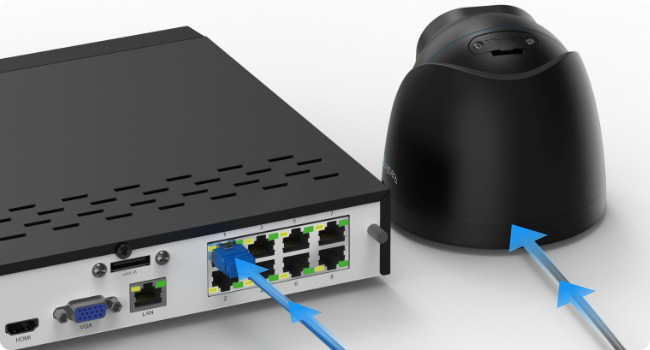
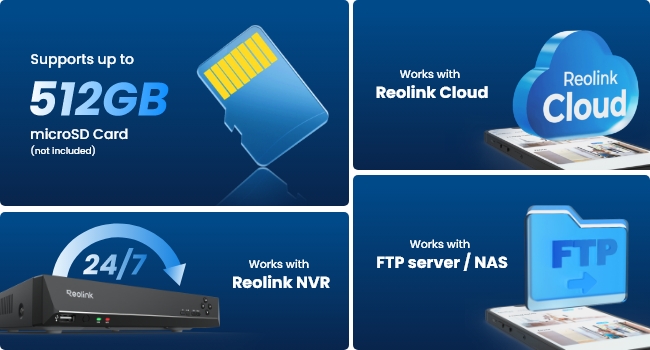
The Reolink RLC-820A is a professional-grade 4K PoE security camera featuring ultra-high-definition video, AI-powered human, vehicle, and pet detection, and IP67 waterproof rating. It supports multiple recording options including microSD, NVR, FTP, and cloud storage, with real-time motion alerts and audio recording. Designed for easy plug-and-play installation via Power over Ethernet, it delivers reliable, all-weather surveillance ideal for both home and business environments.


| Brand | Reolink |
| Connectivity technology | Wired |
| Indoor/Outdoor usage | Outdoor |
| Model name | RLC-510A-B |
| Recommended uses for product | Indoor Security, Outdoor Security |
| Special feature | Motion Sensor |
A**E
Amazing video quality and they also have night mode an people and car detection
⭐⭐⭐⭐⭐ After months of research and hesitation, I finally pulled the trigger on this Reolink 8CH 4K system, and I can confidently say it's one of the best purchases I've ever made for my home. The peace of mind it provides is absolutely priceless. Setup & Installation (It's easier than you think!): I'm not a professional, but the Plug-and-Play (PoE) design made installation surprisingly straightforward. Running the Ethernet cables was the hardest part, but once that was done, each camera powered up instantly the moment I plugged it into the NVR. No separate power adapters for each camera is a massive win. The system recognized the cameras immediately, and I was watching a live feed in under 10 minutes. Video Quality (Breathtaking): The 4K/8MP resolution is not a marketing gimmick. The clarity is stunning. I can read license plates on the street, identify faces with perfect clarity, and see every detail in my backyard, day or night. The night vision is equally impressive, providing a bright, clear black-and-white image without any annoying "white-out" from the IR lights. The color night vision on the included models (if applicable) is a fantastic bonus, allowing you to see actual colors in low light. The NVR & 2TB HDD: The Network Video Recorder is solid and silent. The 2TB hard drive offers plenty of storage; with all four cameras running 24/7, I get about two weeks of recordings before it starts overwriting. The mobile app (Reolink App) is excellent—it's intuitive, reliable, and I get instant push notifications for any motion detected. I can check in on my property from anywhere in the world with a crystal-clear live view. Final Verdict: If you're on the fence, just get it. You get professional-grade quality without the professional-grade price or complexity. For the features, ease of use, and incredible video quality, this Reolink system offers unbeatable value. A flawless 5-star product.
S**B
It is really very easily to install, no technical knowledge needed.
My old CCTV professionally installed about 8 years ago decided to stop working. Faced with replacing I was hesitant in buying a kit as I’d seen the complicated setup of the software on the old system by a trained engineer. I needn’t have been the setup of this system is superb, completely idiot proof. Load the smartphone app, run it, scan the QR code and hey presto you’re there. Log onto a PC use the password created and again, hassle free. Fortunately the old system was an NVR so I was able to make use of existing professional cabling and the weatherproofing caps were identical. The mounting brackets don’t lock the camera, goes on with a light twist hence comes off in similar fashion. This needs redesigning it is totally ridiculous, move the camera for an adjustment and the camera comes off in your hand. Four cameras up and positioned in just 2-3 hours. The app I found a little over complicated and descriptions in translated English which I now understand why some people give poor reviews on quality. Changing the “Clear and fluent” settings will satisfy your image quality issues. I found I couldn’t watch remotely on my smartphone by default. Hidden in the trouble shooting an instant remedy, UID in the Network settings only found on the PC not the smartphone. It defaults to recording everything 24/7 and it does seem over complicated to set up for home alarm use. I did it in the end, the way you can set it to give choice to what you want to capture, all, people,vehicle and animals is terrific but that translated English doesn’t help. The same with playback, it’s unique and takes time to fully understand. Once it is understood by you it is very easy. The quality of image is outstanding and setup is so easy it exceeds 5 stars so despite the issues I had with the app I have no qualms in thoroughly recommending it. I will be adding two more cameras and probably add a doorbell when my heavily increased annual Ring subscription comes to an end.
B**A
Great picture quality with lots of recording options
I was looking for a security camera system which (i) didn’t need to have batteries charged, (ii) wasn’t storing camera data on a third party storage facility, and (iii) didn’t rely on Wi-Fi connectivity. The RLK8-800D4 provides all of that. Pros: - Plug and play simplicity - Good quality cameras with good range of adjustment and field of view - Waterproof covers for the ethernet connections - Apps for phones, computers and tablets plus a built-in web server interface - Lots of flexibility in what and how you record, with many options for storage, notifications etc. - Easy to export and download local copies of high quality 4K footage with optional audio Cons: - The various apps all differ in what they allow you to do and use inconsistent terminology (e.g. High or Low image quality is also called Clear or Fluent) - The web interface doesn’t scale well on phones - The fixed camera tails are rather unwieldy - The cameras cannot be locked in position and can thus easily be re-adjusted by anyone unless you glue them in position - No easy way to scrub through playback footage other than varying the speed of replay up to 16x The unit is initially set to record 24/7 constantly which will fill up the 1TB hard drive in about a week – this is “timer” mode. You can unset this and use “alarm” mode instead which only records detected motion (along with a configurable pre and post motion buffer period) which should give months of recording before starting to overwrite the disk. The dome cameras can be installed vertically or horizontally – I have mine all fixed vertically to brick walls. There is enough lateral and vertical movement and field of view to capture footage of the house doors below the cameras on the same vertical plane (see my photos). The cameras have fixed non-removeable tails about 60cm long which are 20mm thick at the widest point. You can drill directly behind the camera to pass the tail the through the wall and thus hide the tail and all the wiring completely. You will need a 25mm hole and 25mm round PVC conduit to allow the tail to pass through a standard 30 cm cavity wall. The tail can then be easily connected to the ethernet cable inside the house. I recommend using the supplied protectors which make the ethernet connection much less liable to be pulled apart. These are fitted over the ethernet cable terminations before you plug them into the tails. They use rubber sealing washers and a split rubber grommet and therefore do not require the cables to be cut or re-terminated. The computer and phone apps work fine but take some getting used to. By default they use Reolink's remote servers to give you access to the system wherever you are via an automated UID login and Reolink's private protocol. You can disable this by turning off the UID in the advanced networks settings (which kills the apps) and instead just use the control unit's web interface. This is accessed on your local network by entering the control unit IP address into your browser. The web interface lets you store the unit in a non-accessible location without an attached monitor and administer it from a browser on a computer on your LAN. It seem to have all the facilities of the local control unit app, including renaming the cameras and formatting the hard drive, neither of which are possible on the computer and phone apps. You can of course also expose the web interface to the internet if you use a dynamic DNS service and port forward it externally. You can even install a proper TLS cert via the web interface - I used the one provided by NO-IP as part of their DDNS service (just be sure to create a PEM cert with the full chain embedded, named as a .pem file with the the private key named as a .key file). The only downside is that the web interface is designed for computer or tablet screen access and scales poorly on phones (the camera images get badly stretched). On the whole I am very pleased with the system. I hope to use it in “set and forget” mode for many years.
K**H
Good piece of kit .
I have 4 of these , the app is easy to use. The picture is great during the day. I don't need to run a HDD to record as the memory card does it for that .... ( That was bought separately) . You also get sound as well . The ir for night time could be a bit more powerful for my liking ,but at end of the day it's poe , it's easy to install . Mine have been up for a while now and I have had no issues with them .
J**.
Cameras for Frigate: Easy Setup, Great Quality
Excellent cameras, fully compatible with Frigate. I've been using these with my Frigate setup for a while and they've worked flawlessly. Picture quality is great, and the built-in web interface makes configuration straightforward. Remote access is available via the Reolink app and account, but for those preferring tighter network control, an IoT network without internet access and a VPN offers a secure alternative
J**Y
Good value for money but some small changes would make a huge difference
The manufacturing costs for this product have clearly been allocated to the build quality of the camera itself, and the picture quality that it delivers. I can't fault these, and I like the fact that it will work with an app without any cloud accounts needing to be created, and can function completely locally if required to. The options for black turret cameras are also quite limited so it's good to see the colour options offered here. The casing of the camera and the gimbal housing is metal which was unexpected but welcome, the base of the mount is plastic which is necessary for the way the camera twist-locks into place, and the mounting plate that goes onto the surface the camera is being installed on is also a high quality metal part. The SD card slot door can be completely removed from the device, and the tiny screws that secure it are not captive, and no spare screws are provided with the camera. If these screw were captive and the card door was tethered to the camera body in some way this would be a huge improvement especially when you consider that this area is likely to be accessed while the camera is installed in position, probably outdoors. A quick fix would be to put some additional screws in the box. The resistance built into the camera body to panning the gimbal and rotating the camera inside the housing seems weak - it feels too easy to move the camera when it's installed. Time will tell whether this is a problem - if the camera moves around by itself due to vibrations or wind then I will try some dots of silicone or similar to lock it in place. Increasing the resistance in this area would be good, or providing a way to use a security screw to lock everything in place once the position is set. A way to lock the camera onto the base would also be welcomed, it can just be twisted off but this shouldn't be an issue if you've mounted it in a suitable location. The infrared LEDs that the camera uses for illumination in the dark chuck out quite a lot of visible red light as well, which can draw attention to the camera. More expensive cameras in my experience have IR LEDs that are almost invisible, but this is a very minor point. Finally, all the items that break out from the cable are the same length which makes it difficult to get everything through the hole in the base. Staggering the length of the cables on each part (ethernet, reset button, power input) would make installation easier. It's also not possible to get the cap for the data cable through the hole if anything else is already going through there so I had to cut it off, and the waterproofing gland for the network cable is a bit of a gimmick and low quality. It's also very long so I had issues getting it to fit into the void behind the surface I was mounting the camera to, in the end I gave up on the gland as it's in a dry location and doesn't need it. For £70 you're getting what you are paying for and I am happy with the product so far, but a few changes would improve the installation experience.
S**M
Good product
Great system, really easy to set up and operate. Good cameras. No negative comments
Z**E
A big let down in quality and reliability
What is the most important feature on a cctv system? Its reliability and in the case of this system is a big problem. I have spend £800 in buying this system with added cameras and water proof housings. Also selling a 8 way 8K NVR system with only 2GB hard drive space is a joke. The install was on top of that. It worked ok for 4 months and then started to develop faults freezing and the nvr crashing. The windows monitoring software also freezes nearly daily and needs a reboot of the reolink software. Now the whole NVR keeps crashing without booting back up staying stuck on the main Reolink logo screen. On reolink's website it states that it could be several reason and I tried them all from disconnecting the hard drive and cameras then rebooting, to USB stick download of and install of newer firmware. Got it to work again once but it did not last long until it crashed again. If reolink should read this "reliability, install and forget is the most important feature". In my opinion it is worse then Swann cctv reliability wise (remote monitoring and windows software is a bit better but not much then swann). It still falls short of trust it to monitor you property. Companies are only interested in selling you new equipment but do not like support it and the same can be said about installers. All they want you to do is buy a new system even if the fault is just simple. Back to the drawing board. P.S. if something works stop sending updates for it to work better because it never really works. I think updates are only designed to slow everything down and cause the systems to crash. I can't recommend this reolink system.
V**O
Absolute garbage! I am furious that I wasted so many hours on this product!
Interface is very poor and like Windows 95. Each one of them, because there are multiple inconsistent mobile and desktop apps, web interfaces and whatever is displayed through HDMI. All with different sets of features and options under different names and submenus. It shows in their terrible documentation which has 20 variants of instructions for the same thing depending on which UI you are using. Also, half of them end up with "The page you were looking for doesn't exist". From the start you cannot use keyboard or some normal USB-dongle mouse - only the crap that they include in the package is supported. You need to enter credentials for your account through on-screen keyboard with a mouse! Settings are laughable... Detection, timers etc. Let's set a time-zone - what about daylight saving time? Sure, just set this time table manually to have DST! I guess they never heard of network time protocol. Mounting is not stable. Backplate do not hold the camera, which can easily fall off by a gentle force using one finger. The cameras are huge, yet the picture is bad. Midday there is a lot of sun on one of my trees, so it adjusts to that. Everything else, like an actual sidewalk where people and cars are is black and unrecognizable. My PC displays multiple high-quality streams from YT, Netflix and H265 Blu-ray rips, but for some bizzare reason HD playback from NVR is not supported. How cool is that? NVR firmware update came out after a few hours of configuration and the whole NVR was reset to the factory state! I had to go back to disconnect everything and connect it to the display and back I am at garbage onscreen keyboard with mouse configuration. After all of this I decided to return it. So, I want backup of my recordings. How hard is that? Web interface - not possible, please install PC client. Ok I already have this. Half an hour later after searching I have what I need... Only to crash NVR after downloading 8 files! And it is fully reproducible each time I try to download multiple recordings. I need ~150 files, so I cannot reboot after each 8 files... Next step is trying with HDMI + mouse interface. Of course, everything is different and I cannot search and copy short clips of movement - they are all 1 hour, 2.67 GB recordings, 1.5 TB total. I don't want that and give up... Finally, I want to erase the drive so no one can access my private footage... There is only a 3 second quick format option, so everything is still there to recover... I have to disassembly the drive to make full erase by myself!
M**B
Wie erhofft.
Einfache Installation. Gute App. Gutes Bild.
A**B
Prima proces en product
Snel geleverd en goed verpakt. Voldoet aanm v erwachtingen.
M**H
Great camera but not automatic directions
Camera is manually adjustable but not via software. Great pictures, easy installation
F**D
Super
Qualité super, application top, Home assistant les prends en charge....
Trustpilot
2 weeks ago
2 days ago