Desertcart purchases this item on your behalf and handles shipping, customs, and support to Japan.
⚡ Elevate your home network to pro-level speed and security — don’t get left buffering!
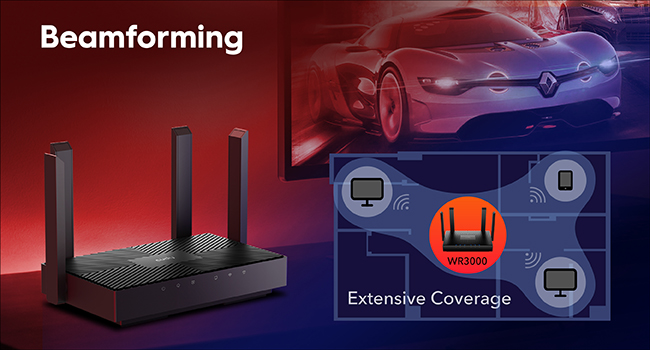
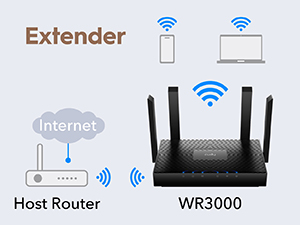
The Cudy AX3000 WR3000 V2.0 is a cutting-edge Wi-Fi 6 router delivering combined speeds up to 3 Gbps with 160 MHz channels and 1024-QAM. It supports 5 versatile modes including mesh networking for seamless whole-home coverage, and features four gigabit Ethernet ports for wired reliability. Advanced OFDMA and MU-MIMO technologies maximize network capacity for up to 256 devices, while integrated VPN and DNS over TLS ensure secure remote access and privacy. Managed via a 29-language app with cloud control, this router is designed for demanding homes and professionals seeking fast, secure, and flexible connectivity.


| Antenna Location | Business, Home, Indoor |
| Antenna Type | Fixed |
| Asin | B0BRK3CYY3 |
| Best Sellers Rank | #1,754 in Computers & Accessories (See Top 100 in Computers & Accessories) #79 in Computer Routers |
| Brand | Cudy |
| Built In Media | Ethernet Cable, Installation Guide, Power Adapter, WR3000 |
| Color | Black |
| Compatible Devices | Personal Computer, Security Camera, Smart Television, Smartphone, Tablet |
| Connectivity Protocol | Wi-Fi |
| Connectivity Range | 1400 square_feet |
| Connectivity Technology | Ethernet, Wi-Fi |
| Control Method | App |
| Controller Type | App Control |
| Coverage | Wide with good performance |
| Customer Reviews | 4.3 4.3 out of 5 stars (1,174) 4.3 out of 5 stars |
| Data Transfer Rate | 3000 megabits_per_second |
| Frequency | 5 GHz |
| Frequency Band Class | Dual-Band |
| Global Trade Identification Number | 06971690792831 |
| Item Dimensions L X W X H | 7.22"L x 4.29"W x 1.38"H |
| Item Highlight | 2402+574Mbps WiFi6, 4x GbE Ports, 130 m², 1.2 GHz Dual-Core CPU, Multiple Modes, VPN Server & Client, App & Cloud Control |
| Item Weight | 252.5 g |
| Lan Port Bandwidth | 10/100/1000Mbps |
| Manufacturer | Shenzhen Cudy Technology Co., Ltd. |
| Maximum Upstream Data Transfer Rate | 2402 megabits_per_second |
| Mfr Part Number | WR3000 |
| Model Name | WR3000 |
| Model Number | WR3000 |
| Number Of Antennas | 4 |
| Number Of Items | 1 |
| Number Of Ports | 4 |
| Operating System | Cudy OS |
| Other Special Features Of The Product | Access Point Mode, Beamforming, Internet Security, Remote Access, WPS |
| Ram Memory Installed | 128 MB |
| Router Firewall Security Level | Medium to High |
| Router Network Type | router, access_point, repeater |
| Security Protocol | WPA3 |
| Unit Count | 1 Count |
| Voltage | 12 volts_of_direct_current |
| Warranty Description | 2-Year Warranty |
| Wi Fi Generation | Wi-Fi 6 |
| Wireless Compability | 802.11ax |
User
Nice Wifi 6 router
Nice router with many features. Fast connections, compatible with all of my devices and easy setup. Love the UI (logged in from laptop using browser). I did not use the app for the phone, altho I may some day. I find the browser UI preferable to the functionality in an app as it has all the advanced features I was looking for. Super happy with this purchase.
User
A great unit especially for the price.
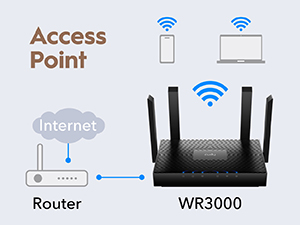
The router is incredibly fast and was very easy to set up. I have not had any issues connecting to it even on another floor. I use it as an access point, and it is just like i am near the actual router.
User
Probably the Easiest Router Setup I've Ever Done
Probably the Easiest Router Setup I've Ever DoneThis Cudy AX3000 practically jumped out of the box and set itself up. I've installed plenty of networking equipment, and I don't think I've ever had a router that was this aggressive about simply wanting to get online and work.The setup interface was excellent. The nomenclature was clear, everything was where I expected it to be, and I didn't run into confusing menus or unnecessary complications.From opening the box to having the network completely set up, running, and secured took me less than ten minutes. That includes waiting for my internet provider's modem to refresh and recognize the new router.Any easier and you'd turn it on and the thing would start talking you through the setup itself.No problems, no issues, and no fighting with the interface. It just wanted to work. Excellent first impression and easily one of the simplest router installations I've done.
User
A very good router though storage a limiting factor for advanced tinkers.
Bought to bridge from my ISP modem. It seems to run a custom version of OpenWRT out of the box. They gave the option to flash to the vanilla version which I did so I could customize it a bit.Flashing was not too difficult and took less than 2 minutes to do after initializing. And of course, before attempting to flash please read the documentation first (hint: you need ethernet, WiFi will be disabled).So far it's been pretty good. WiFi 6 with good speeds both on 2.4 and 5GHz bands. I run in WPA3/WPA2 mixed modes for older device support.The wonderful maintainers for this model on OpenWRT is quite active and has released this year's version.The router only has 4 Ethernet ports at the back, 1 will be occupied for the WAN, this leaving with 3 for your devices. If you have more than 3 then you'll need to invest in a switch.I just wished it had a bit more space (both RAM and flash storage). That's one of my cavets. So only can be used as a little access point.For the money it's worth it. A lot powerful, modern and versatile than the TP-Link Archer AC series.
User
Value for money
I will recommend this. Light and easy to setup and works very well. No issues till now.
User
White + V1 = OpenWrt-OK. Black/non-V1 = no OpenWrt. Mine shipped black V2 — buy WR3000 S/H/P
Quick rule of thumb for OpenWrt buyers, learned the hard way:White + V1 → good for OpenWrt. Black + anything other than V1 → not good for OpenWrt.The unit shipped to me was the WR3000 V2, and it was black (not the white router I was picturing). Mainline OpenWrt is a no‑go on the V2 — if flashing OpenWrt is the whole reason you're buying, this revision is a dead end.In fairness, the listing looks like it's been updated since I ordered — the title now spells out "WR3000 V2.0" and the photos appear to show the black unit. So read the current title carefully: if it says V2 (or V3), assume no OpenWrt.Want a Cudy in this family that's actually OpenWrt‑friendly? Buy one that only has a V1 as of today (July 2026): WR3000S, WR3000H, or WR3000P — all three are V1‑only, so you're far less likely to get blindsided, unlike the plain WR3000 (V1/V2/V3) and the WR3000E (V1/V2). Caveat even on those: "V1‑only" doesn't guarantee identical internals — Cudy has quietly swapped parts on some V1 boards (the flash chip especially) without a new version number, so check the full label on the bottom (model + region + version, e.g. "WR3000 EU 2.0") and confirm current OpenWrt support before you flash.Now the fair part — on stock firmware, it's a decent box for the price.The stock firmware is actually a custom OpenWrt base, but Cudy locks it down — no SSH option, so you don't get OpenWrt's under‑the‑hood access even though it's sitting right there underneath.The Cudy web GUI is simple, and yet it does most of what a typical user actually wants without fuss.It ships with mesh turned on, but I found no setting to choose the mesh type — so it's clearly meant to just auto‑mesh with other Cudy routers (turnkey Cudy Mesh) rather than let you tune it.So if you're not chasing OpenWrt and just want a solid Wi‑Fi 6 router that plays nicely with other Cudy gear, this is a reasonable buy.Bottom line: white + V1 = go for OpenWrt; black + not‑V1 = don't. But as a plug‑and‑play stock router for the price, it's genuinely fine.
User
Strong 5g signal and speed.
Matches description. Strong performance with 5g speeds much improved over previous Cudy router. On setup when first installed recommend using Reset feature on Router after powering up before using setup software. Prior Cudy router had 4 LAN outputs so had to adjust hardwire house network for 3 LAN outputs on this router.
User
Nice price, very good range, very stable, great menu drive (GUTS)
I bought this to feed my Verizon home internet in to and get more ports. That dumb cube has only 2 hardwire ports on it so I needed something to get me more plugs, and broadcast the wifi from my Verizon out to the rest of the house. It is a nice price and really broadcasts out well. I am extremely happy with my purchase. The menu inside the guts of this thing is very well designed and easy access to what is needed, be it ports, settings, whatever. I love the Cudy's setup inside over everything I have seen prior. I didn't bother taking photos of this, but it's very small footprint makes it very handy to put anywhere you wish. The 4 antennas gives it the good broadcasting we all know and love to use the wifi. Internet speeds stay up really well, and consistently match the Cubes speeds apples to apples. I wouldn't hesitate to pull the trigger on this one if your looking for a great wifi device as this one is excellent - highly recommended!
User
Perfetto come access point, velocità WiFi 6 da urlo a un prezzo ridicolo
Ho comprato questo Cudy WR3000 principalmente per usarlo come access point aggiuntivo nella mia rete di casa. Il router principale è un Fritz! e il segnale non arrivava bene in garage e in giardino, così l’ho collegato via cavo Ethernet e l’ho messo in modalità AP. Configurazione fatta in 5 minuti dall’interfaccia web, tutto in italiano e senza manuali strani.Da allora è una bomba: sul 5 GHz prendo 850-900 Mbps stabili anche a 8 metri di distanza con due muri in mezzo, e il 2.4 GHz tiene senza problemi tutte le lampadine, telecamere e sensori. Con 25-30 dispositivi connessi contemporaneamente non fa una piega, zero lag nemmeno quando scarico file grossi o guardo Netflix in 4K.Il beamforming e l’OFDMA si sentono davvero, il segnale è pulito e potente. Niente surriscaldamento, niente riavvii random, funziona e basta. Per 39 euro è un affare pazzesco, meglio di tanti extender o repeater di marche più blasonate che ho provato prima.Se vi serve espandere la rete senza spendere 100-150 euro, prendetelo a occhi chiusi. Io l’ho già consigliato a due amici. 5 stelle meritate al 100%! 👍
User
⭐️⭐️⭐️⭐️⭐️ Einfach unglaublich – Top-Router zum unschlagbaren Preis!
Ich bin absolut begeistert von diesem Router! Die Einrichtung war kinderleicht, selbst für jemanden, der kein Technikprofi ist. Innerhalb weniger Minuten war alles angeschlossen und konfiguriert. Besonders beeindruckt hat mich, wie unkompliziert sich OpenVPN und WireGuard einrichten lassen. So sind jetzt alle meine Geräte automatisch über den VPN geschützt, ohne dass ich auf jedem Gerät extra etwas installieren muss – genial!Auch die WLAN-Leistung ist spürbar besser als bei meinem bisherigen Router vom Internetanbieter (ein teureres Markenmodell). In den Räumen, wo ich vorher schon gutes Signal hatte, ist es jetzt einfach noch etwas stärker und stabiler – auf allen Geräten volle Balken!Für diesen Preis ist das einfach unschlagbar und starke Leistung, einfache Bedienung und moderne Sicherheitsfunktionen in einem Gerät. Ich kann diesen Router wirklich jedem empfehlen, der eine zuverlässige, schnelle und sichere WLAN-Lösung sucht.
User
Great budget option
Great!
User
Sem dúvidas é o melhor
Excelente
User
Stary dom (bunkier)
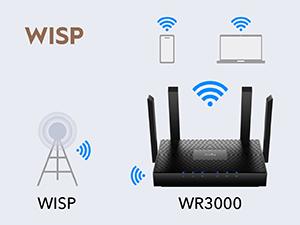
Zamontowany jest w starym domu z grubymi ścianami. Wszystkie routery jakie miałem do tej pory miały problemy i zastanawiałem się nad zakupem kilku i utworzeniu mesh, a tu się okazało że ten wystarczy. Działa bardzo szybko. Na plus jest zaskakująco mały. Ma delikatne oświetlenie które jest ciężko zobaczyć z daleka co jest dla mnie plusem. Wypróbowałem też WISP i bardzo mi się podoba ta opcja, choć na początku wydawało mi się że nie działa, a tu po połączeniu z źródłem, router musiał wykonać restart (co nie było oczywiste, czy zakomunikowane, dlatego uważałem że nie działa)
Trustpilot
3 weeks ago
2 months ago