🚀 Power your rig with ASUS Maximus VIII Hero — where elite gaming meets pro-grade precision!
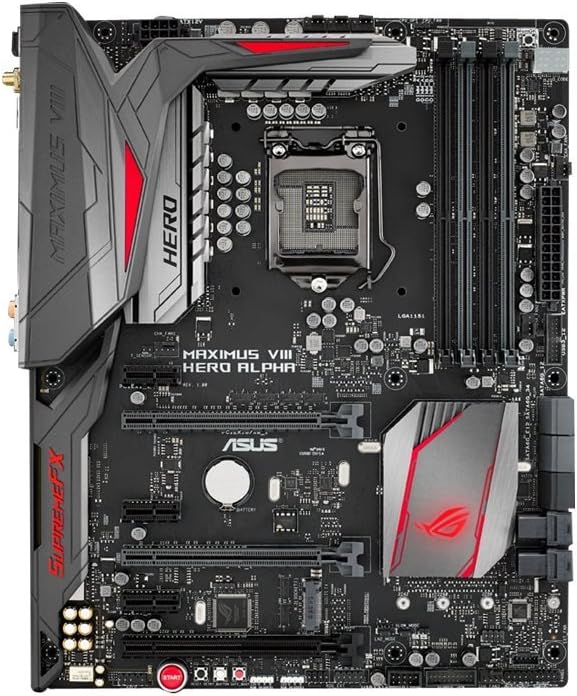
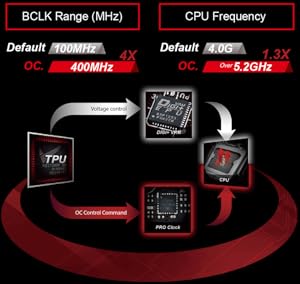
The ASUS Maximus VIII Hero/Alpha is a high-performance ATX motherboard designed for 6th-gen Intel Core processors with LGA1151 socket. It supports ultra-fast DDR4 memory up to 3733 MHz (OC), offers 4K resolution output via DisplayPort and HDMI, and features advanced five-way optimization for seamless overclocking. Enhanced SupremeFX 2015 audio and Intel Gigabit Ethernet with LANGuard and GameFirst technology deliver immersive sound and lag-free networking, making it a top choice for serious gamers and professionals.


| Asin | B017RI8UYA |
| Available Memory Slots | 4 |
| Best Sellers Rank | 228,216 in Computers & Accessories (See Top 100 in Computers & Accessories) 2,222 in Motherboards |
| Box Contents | 12 ROG cable stickers^3 ROG fan stickers^2 RGB extension cables^6 SATA cable^ Door hange |
| Brand Name | ASUS |
| Chipset Family | Intel Z |
| Chipset Type | Intel Z170 |
| Compatible Devices | Personal Computer |
| Compatible Processors | Celeron,Core i3,Core i5,Core i7 |
| Cpu Model | Core i7 |
| Customer Reviews | 4.3 4.3 out of 5 stars (206) 4.3 out of 5 stars |
| Global Trade Identification Number | 00889349254967, 04712900254969, 05054629969380 |
| Graphics Card Interface | PCI Express |
| Item Weight | 2.24 kg |
| Main Power Connector Type | 24-Pin |
| Manufacturer | Asus |
| Manufacturer Part Number | MAXIMUS VIII HERO ALPHA |
| Memory Clock Speed | 2133 MHz |
| Memory Storage Capacity | 64 GB |
| Model Name | MAXIMUS VIII HERO ALPHA |
| Model Number | MAXIMUS VIII HERO ALPHA |
| Number Of Ethernet Ports | 1 |
| Number Of Items | 1 |
| Number Of Ports | 7 |
| Platform | Not Machine Specific |
| Processor Socket | LGA 1151 |
| Product Warranty | 3 years limited |
| Ram Memory Maximum Size | 64 GB |
| Ram Memory Technology | DDR4 |
| System Bus Standard Supported | SATA 3 |
| Total Hdmi Port | 1 |
| Total Pcie Ports | 1 |
| Total Sata Ports | 6 |
| Total Usb Ports | 6 |
| Upc | 889349254967 |
| Usb 2 0 | 2 |
User
Full high-end quality in every millimetre. Don't go cheap, this will pay for itself.
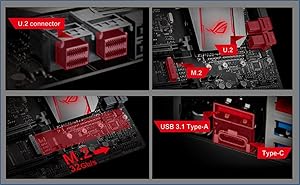
While I've only started building the system (and I'm yet to turn it on), this product oozes quality, and thoughtful design.From a system builder perspective, it has an M.2 slot for SSDs, U2 slots, on-board wifi with an included antenna/amplifier and other goodies, but more than that, it has a CPU insertion tool (a plastic frame to help you place the CPU without touching anything or damaging any parts). The board is thick, and quality printed, with great connectors and shields, and fits as well as any ATX board into an ATX case. The I/O plate at the back is padded to prevent any gaps forming between the plate and motherboard, and includes an "easy adapter" for your case pins (a small grouping connector to gather your reset/power/etc cables and connect them to the board in one move).The software features are amazing, from full UEFI control through to tweaking software, heavy optimisation (filling all memory slots increases maximum speed), LED control (set your own case colours if you build a lighting system), and best of all (to me) - the RAM drive - the ability to forsake a little RAM to almost instantly load apps or even cache parts of frequently used files (game data?) from RAM.I'm already amazed and I'm looking forward to using it fully with an i7 6700K and corsair DDR4 3000MHZ RAM (the board takes up to 32GB).
User
Outstanding Motherboard!
Absolutely perfect! The Maximus has many debugging features which makes it perfect for new builds and upgrades. Performance is outstanding and it looks amazing. Couldn't be happier with this one.NOTE: For i5/i7 6600K or above, you'll have to update the BIOS first, but you can do that easily just powering the motherboard on. No CPU/Ram required, just download the update from ASUS.
User
Amazing motherboard
Bought this motherboard as I upgraded to an i7-6700k. The first one was faulty as it wouldn't read more than one stick of RAM (I did some troubleshooting and it was definitely the board). Buying it through Amazon meat I could get a replacement quickly and it's amazing. Sometimes hardware is faulty so I'm not marking it down for that. The motherboard itself if completely fit for purpose, and mostly easy to set up (though a few of the screws and cables are a bit fiddly at the top). It comes with sata cables, and it exactly as it looks in the picture. Now I have a motherboard that works, it's brilliant and I can't recommend it enough.
User
Republic of Gamers? Republic of Garbage!
No end of issues with this mobo. Not enough USB 2 headers (2), so if you want an AIO CPU watercooler and something else internally USB powered (in my case the X61 Kreaken and the HUE+), say goodbye to your front USB ports.And if you read somewhere that this would support NZXT's 4 pin LED strips, it doesn't, it destroys them (I read that somewhere and it destroyed mine today).But most of all, the CONSTANT SPEAKER BUZZ. I have to shout because it's a bit annoying and it can still be heard when gaming at low volumes. I've been using the same Harman Kardon Soundsticks III for the last year with my 'old' Z97 mobo with no buzz at all, now it sounds as though there is a monotone bee and his pitch perfect bee friend sitting either side of my monitor.Want to run an X61 Kraken CPU water cooler off of this mobo? No chance. If you plug it into the CPU FAN header you'll get a CPU fan speed warning at start-up (must enter set-up). If you set it to ignore fan speed monitoring in bios, you wont get the fan speed on CAM software. If you try to use the fan xpert control on anything other than 'Hurricane' it will drop your pump speed until it sounds like something trying to produce a fur-ball. Same goes for if you plug it in to Water_Pump header.This being my 7th build I can get around most of the above, but that BUZZ! That annoying speaker buzz is not possible to game, live or sleep with (until the speakers auto sleep) and will therefore I will be RETURNING THIS MOBO.Republic of Gamers? Republic of Garbage!
User
great product just not been reliable for me
ASUS Hero Alpha Z170its a great product but sadly does not seem to be very reliable, I am currently expecting my 2nd replacement but will be returning for a refund if problems persist
User
Fast, stable and packed with goodies.
Great looking board packed with features that I use - very little flab in the feature set means you get what you pay for and only pay for what you want / need (unlike higher end models in ROG series). Quality control issues as first board needed RMA when wireless module died within a week. Supply issues can make replacements a bit slow (mine took a month)! Great community support on ROG Forums but Asus support is lacking with default responses and RMA pretty well their only course of action.Mine clocks a 6600k with 32Gb DDR4 RAM at 4.4Ghz nice and stable with a decently low core voltage. Asus's own 5 way optimisation kind of works but manual instructions (again in ROG Forum) provide far better results IMO.
User
Hero Aplpha TLDR: Well laid out, looks and sounds great
Asus Maximus VIII Hero/Alpha Intel Z170 DDR4 S-ATA 600 ATX Motherboard This board looks great in my new build. The only niggle I have with the aesthetic is that the PCH LED shines behind my M.2 drive so most of the effect is lost. The heat sinks look great and the overall colour scheme of the board are spot on in my opinion. I haven't bought any LED strips yet so I can't comment on the aura system for syncing lighting colours at the moment.I didn't have any trouble installing the board or anything to the board. The three fan headers on the top edge by the CPU socket are very well positioned if like me you are using an all in one, closed loop CPU cooler. I have my rear exhaust fan plugged into the fan header along the front edge (opposite end to the rear IO) by the SATA ports so the cable runs behind the motherboard and is out of the way. I also like the RAM slots with the lock/release lever on one side only. I would have preferred the graphics card release lever to slide like the ones on Asrock boards as the clips can be hard to reach once a large graphics card is installed, but this is a very minor issue.I have briefly played with the bundled software but nowhere near enough to make an informed judgement on it. I will say that the five way optimisation software overclocked my CPU to 4.8ghz which impressed me, but the temps where quite high so I dialled that back a little.The sound is very good in my opinion and I really like having separate volume controls for my speakers and headphones as I use both often with the headphones plugged into the front panel connector on my case. The audio sounds better than that on my old X79 board, both through the speakers and the headphones. I played briefly with the equaliser, bass boost and other sound enhancing software but quickly decided that for my ear, the sound was better with those switched off. Not to say the sound quality was worse, just not for me. If you like your booming bass in games for example, you might get more miles out of the extras than I do.The included instruction book is well laid out and covers a lot. There is a link to a website should you need more information. The black SATA cables included are nice to have as are the cable labels so you can label which cable goes to which hard drive. The rear IO shield is padded which is a nice touch. There are other bits and pieces in the box like a ROG guitar pick and a door hanger if you like that sort of thing.
User
Boot-up problems
Unfortunately I have to give this motherboard 2 stars. I've owned two of these now (Hero and Hero Alpha) and both have encountered the exact same issue: They fail to boot. Sometimes they boot every other time, and other times they won't boot at all. This seems to be related to their bios boot-up protocol; something about my setup just does not agree with it. ASUS support were moderately helpful but their final resolve was to label the motherboard as defective and replace it, which I am almost certain will do nothing to help me. This is obviously very frustrating given the time and energy to install a new motherboard. At this time, I'm uncertain as to whether I will try to replace the board, or just return it and go with another option (if they'll let me!).On the plus side, when the motherboard does boot up, it functions as expected. Seems great at overclocking. The AI Suite 3 is excellent, although it does seem to wrestle with the Windows power management and occasionally causes some issues. For some reason this motherboard doesn't come with the fast USB charge that the Hero has. This mobo also comes with inbuilt wifi, which the Hero does not.As a final critique, I would say that 4 USB ports on the back I/O panel is definitely not enough. For a gaming motherboard, I would imagine most users will need more than 4 USB ports!
User
Scheda Madre Maxi!
Scheda madre dotata di innumerevoli funzionalitá, sia direttamente su essa (con i vari pulsanti dedicati) che nel bios o nel software installabile su windows.Il manuale in dotazione é scritto molto bene con tutti i dettagli che possono servire (in inglese).Attenzione quando infilate la scheda madre nel case, il pannello con i connettori sul retro del PC ha una linguetta che tende a infilarsi in una delle prese USB, con un cacciavite fate si che questa si sposti mentre mettete in posizione la scheda.Al primo avvio il QCode interno alla scheda madre ha dato dei codici di errore, seguito le istruzioni sul sito web Asus per aggiornare il bios all'ultima versione, contattata anche la Asus in chat mi ha supportato e sono stati risolti i problemi.www asusqcodes comL'aggiornamento Bios si puo' fare con una chiavetta in cui caricate il file di aggiornamento nella root, con un nome ben definito (scritto nel manuale), poi collegate la chiavetta ad una particolare presa USB sul retro e premete il tasto apposito di aggiornamento del bios.In generale ottima fattura! Non ho usato la scheda video integrata perché ne avevo presa una a parte.Una persona l'ha trovato utile
User
Parfait
Parfait, CM performante.
User
A nice performer with features to match
Everything about the Hero and Hero Alpha screams "quality". Attention had been paid to ever square cm of the board to make sure it looks good and performs perfectly. The alpha version features wireless connectivity, Bluetooth and supports DDR4 at speeds from 2133 - 3800mhz (as I have tested, I don't have any 4000). The BIOS also allows extended overclocking functionality beyond that of the Hero. Concentrating mainly on the RAM voltages and timings. The clear CMOS button has also been moved to the rear IO, so you don't need to keep opening your case to clear the CMOS on a bad overclock. The board features 4 buttons, 1 for "RAM OK" and the other three are power, restart and safe boot. Power and restart are fairly common but the safe reboot button allows you to keep your OC settings, rather than clearing the whole CMOS, and get into the BIOS to adjust the setting you think is causing the problem. Very handy when you're going for the tightest possible timings on your RAM or trying to find the absolute minimum voltage needed to post at your chosen frequency.I really am trying to think of something negative about the board but I honestly can't think of anything. If you're an overclocker and don't want to spend money on the socket 2011 CPUs then the VIII Hero Alpha is perfect for you. Depending on your chip, 4.9ghz or maybe even 5ghz is easily possible on a 6700k with this board and the right cooling.
User
Five Stars
Very good
User
Besser wie erwartet !!!!
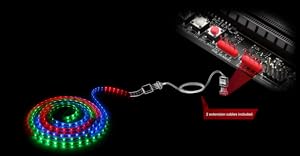
Nach langer Zeit habe ich mich für ein neues System entschieden und nun nach "langen 2 Wochen warten auf die Komponenten" ist er fertig gestellt. Ziel war es, ein leistungsstarkes, leises und ansehnliches System zu bauen.Endstanden ist folgendes System:- Core i7 - 6700K Skylake, 4 (8 Threads) x 4,00 GHz Standart- 16 GB G.Skill, DDR4, 3200 MHz- Asus Maximus VIII Hero Alpha, Sockel 1151,ROG- Asus ROG STRIX-GTX1070-8G-GAMING- Corsair Hydro H80iV2, AIO Wasserkühlung- Samsung 950 Pro Series M.2 2280 SSD, 256 GB, Systemplatte- Samsung 840 Pro Series SSD-Festplatte, 512GB, Spieleplatte- Seagate Desktop HDD 3TB, SATA 6Gb/s (Datengrab)- Samsung EcoGreen F4 2TB, SATA 3Gb/s (Sicherung), extern- Corsair CC-9011081-WW Carbide, Series 400C, Seitenfenster- Corsair RMi Series RM650i, 650W, ATX 2.4, voll modular- 2 x Thermaltake Riing 12 LED, RGB, 3er Set Gehäuselüfter- 1 x Thermaltake Riing 12 LED Gehäuselüfter schwarz/rot- Sleeved Kabel, BitFenix 24-Pin 30cm rot / schwarz ATX- Sleeved Kabel, BitFenix Alchemy PCI-E, 8-polig, rot / schwarz- Sleeved Kabel, Phanteks, 8-Pin EPS12V, rot / schwarz- Sleeved Kabel, Nanoxia Frontpanel, 30cm, roter EinzelsleeveDieses o.a. System hat meinen alten i7-4790K mit 4,4 GHz abgelöst und hat meine doch anfangs sehr skeptischen Erwarten in Bezug auf Leistung und Geschwindigkeit ohne Einschränkungen übertroffen.Nach ersten Tests mit den werksseitigen OC Tools des o.a. Mainboards lief die CPU stabil (Test: 2 Stunden Prime95) auf 4,7 GHz.Dabei wurde eine "Last" Temperatur von 68 Grad erreicht. Unter normaler "Last" (nicht Prime) wird die CPU nicht wärmer wie 56 Grad. Im Idle gerade mal 29 Grad.Über die Anschlussmöglichkeiten des Mainboards muss ich nicht näher eingehen außer den Unterschied zu dem "normalen" Maximus VIII Hero:- 2 x RGB Anschüsse für LED Stripes, einstellbare RGB Hintergrundbeleuchtung des ROG LogosIch würde mich wieder für dieses Mainboard entscheiden, auch wenn es ein wenig teurer ist.
Trustpilot
1 month ago
1 week ago