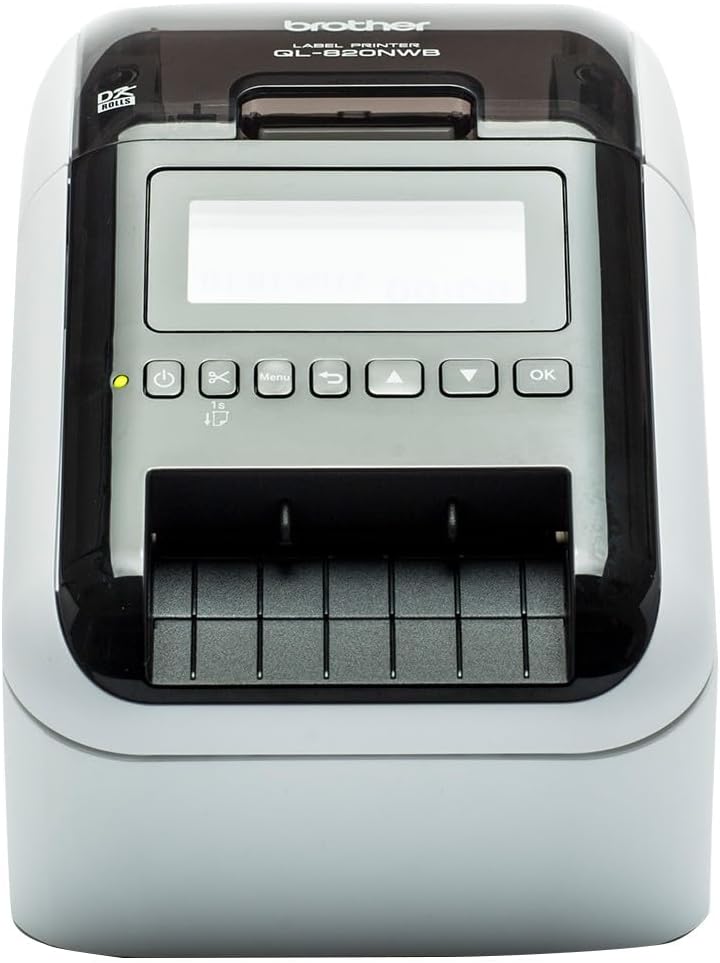
🚀 Print Bold, Print Smart — Labels That Lead the Pack
The Brother QL820NWBc is a high-speed, compact desktop label printer designed for professional environments. It offers versatile connectivity options including wireless, Ethernet, USB 2.0, and Bluetooth, enabling seamless printing from multiple devices. With a sharp 300dpi resolution, it prints wide-format labels up to 62mm and supports continuous rolls for custom lengths up to 1 meter. Unique dual-color printing in black and red requires no ink or toner, delivering vibrant, durable labels ideal for office, retail, warehousing, and food prep applications.


| ASIN | B0BTHSHG4Y |
| Additional Printer Functions | Print Only |
| B&W Pages per Minute | 30 |
| Best Sellers Rank | 5,716 in Stationery & Office Supplies ( See Top 100 in Stationery & Office Supplies ) 26 in Label Makers 39 in Labels & Labelling Equipment |
| Box Contents | Paper |
| Brand | Brother |
| Brand Name | Brother |
| Color Depth | 1 bpp |
| Color Pages per Minute | 30 |
| Colour | white |
| Compatible Devices | PC |
| Connectivity technology | Bluetooth |
| Control Method | App |
| Country of Origin | Japan |
| Customer Reviews | 4.4 out of 5 stars 2,339 Reviews |
| Dual-sided printing | No |
| Duplex | Simplex |
| Hardware Interface | Ethernet, USB, USB 2.0 |
| Ink Colour | black, red |
| Item Dimensions D x W x H | 12.5D x 14.5W x 23.4H centimetres |
| Item Type Name | Laser Printer |
| Item Weight | 2.68 Kilograms |
| Item height | 23.4 centimetres |
| Manufacturer | Brother |
| Maximum Copy Resolution Black and White | 300 dpi or higher |
| Maximum Copy Resolution Color | 300 dpi |
| Maximum Print Resolution Black and White | 300 dpi |
| Maximum Sheet Capacity | 100 |
| Maximum print Resolution Color | 300 dpi |
| Media Size Maximum | 3 x 5 inch |
| Model Name | QL-820NWBc |
| Model Number | QL-820NWBc |
| Model Series | QL |
| Model name | QL-820NWBc |
| Network Connectivity Technology | Bluetooth |
| Other Special Features of the Product | Wireless, high quality |
| Output sheet capacity | 100 |
| Paper Size | 62mm |
| Print media | Labels |
| Printer Output Type | Monochrome |
| Printer Resolution Horizontal in Black and White | 762 Centimeters |
| Printer Type | Thermal |
| Printing technology | Thermal |
| Product Warranty | 1 year manufacuter |
| Resolution | 300 x 300 |
| Special feature | Wireless, high quality |
| Specific Uses For Product | office labeling, product identification in retail and warehousing, food preparation and safety, address labeling |
| Total USB Ports | 1 |
| Unit Count | 1.00 Count |
| Warranty Type | limited warranty |
P**L
Brilliant machine and really good software - works well with MacOs
I was a little concerned about buying this due to talk of compatibility issues and poor software. But the QL-700 - USB only - connects fine to my MacBook Pro M4. Software downloaded from Apple app store and is very stable and user friendly. Quality of print is very high resolution and sticks well to most surfaces. More than met my expectations.
H**Y
Brother QL-800 Label Printer - Precision Labeling with a Splash of Color
The Brother QL-800 Label Printer has become an indispensable tool in my home office, offering unparalleled convenience and versatility in label printing. Its PC connectivity, desktop design, and the unique red & black printing capability make it a standout choice for anyone in need of efficient and eye-catching labeling solutions. Here's why I wholeheartedly give it a perfect 5/5 rating: Effortless PC Connectivity: ⭐⭐⭐⭐⭐ The QL-800's seamless PC connectivity has revolutionized my labeling experience. Connecting it directly to my computer allows for quick and efficient label creation, streamlining the entire process. The user-friendly software enhances customization and ease of use. Desktop Design for Convenience: ⭐⭐⭐⭐⭐ The desktop design of the QL-800 is both space-efficient and practical. It fits neatly into my workspace, and its compact size doesn't compromise on its robust capabilities. Having a dedicated label printer on my desktop has significantly improved my workflow. Red & Black Printing Innovation: ⭐⭐⭐⭐⭐ The standout feature of the QL-800 is its ability to print in red and black. This dual-color printing capability adds a level of sophistication and visual impact to my labels. It's a game-changer for creating attention-grabbing labels that stand out in a professional and creative manner. Fast and High-Quality Printing: ⭐⭐⭐⭐⭐ The QL-800 lives up to Brother's reputation for delivering high-quality prints at an impressive speed. Whether I'm printing address labels, file labels, or product labels, the sharp and clear results are consistent, saving me time without compromising quality. Versatile Labeling Options: ⭐⭐⭐⭐⭐ The QL-800 offers a wide range of labeling options, accommodating various label sizes and types. From small address labels to larger shipping labels, the printer handles diverse labeling needs effortlessly, making it a versatile solution for any situation. User-Friendly Interface: ⭐⭐⭐⭐⭐ The user-friendly design of the QL-800 makes it accessible to users of all levels of expertise. Loading labels is a straightforward process, and the control panel is intuitive, ensuring a hassle-free and efficient printing experience. Overall Satisfaction: ⭐⭐⭐⭐⭐ In conclusion, the Brother QL-800 Label Printer has exceeded my expectations in every aspect. Its seamless PC connectivity, desktop convenience, red & black printing innovation, fast printing speed, versatile labeling options, and user-friendly interface make it a top-tier choice for label printing. The QL-800 is a perfect blend of efficiency and creativity, earning it a resounding 5/5 rating. Highly recommended for anyone seeking a reliable and feature-rich label printer for both professional and personal use.
S**E
Love it!
Excellent label printer. You need to download software and a driver for your PC - somewhat quirky to install but works fine. The P-Touch program you use to layout and print labels looks dated but is functional. I use the printer much more than I thought I would. If I was buying it again, I would probably get the WiFi version.
D**O
Over Fifty Thousand labels printed and still going strong - Top Quality bit of kit!
I first purchased this printer 2 years ago to print self adhesive address labels. As some other reviews have indicated, the set up can be tricky as I found initially. A quick internet search soon pointed me to a video clip on youtube which showed me how to update the firmware on the supplied printer to enable it to communicate with my Windows 10 LapTop. From then on the printer worked with zero issues, being incredibly easy to use and reliable 100%. I use it in the simple mode, utilising its excellent built in "PtLite10.exe" program, so as not to need any software on the lap top to operate it. Since then, two years ago, this little printer has printed out over 50,000 self adhesive address labels, and it amazes me how its self cutter blades have still not yet gone blunt! Because I can not believe that this little printer can go on much longer, I just took delivery of a second one as a spare. It too required a firmware update to work with Windows 10, as previously. It will now be kept as a spare should the first one decide that it needs to retire! Just on running costs for information: Labels and consumables: With this being a thermal printer, it saves a fortune not needing any ink, so ignoring its tiny power consumption, the only running costs are the labels that are used. I have only every used the "compatible type" labels for my needs, and they have proved superb and at a fraction of the cost you might pay for original Brother ones. Final important consideration on choice of address labels: If you aim to put this printer through its paces printing lots of labels, it is tempting to use the "continuous" labels (one continuous length of label cut off as required) , as the cutter chops off the label at the end of the longest line of text (seemingly more economical as less paper used), unlike using fixed length individual labels which are always cut at the end of (in between) each label. I moved over to fixed length individual labels for this key reason: The cutter blade on fixed length labels only has to go through the thin backing sheet. On continuous length labels, when the text ends, the cutter has to chop through all of the backing paper, a film of adhesive, and the label paper itself. That combination with the continuous labels would I expect, soon cause the cutting blades of this printer to get clogged up or blades made dull if using in volume. In Conclusion, aside from the Firmware updates I needed with both purchases, this printer gets maximum points from me for pure durability and ease of operation.
C**R
A great label machine!
If you're wondering whether to buy a thermal printer or not, then I can highly recommend one of these for your label needs. They are fantastic and I've been really pleased with my Brother purchases. Drop in a roll of labels (various sizes available) and it prints quickly and, most importantly, without any ink/toner needed. That's the thermal magic. All you need to do is buy replacement rolls when one runs out and you can get compatible versions that are a fraction of the cost of the Brother originals if you'd prefer them. I do also have a laser printer, but the speed and ease of use is no match for a thermal printer. I first had a QL500 and was amazed at what these little machines could do. I create labels as part of my small business use and this is what I started with. When the blade snapped on my first machine (that was me, pulling at what I shouldn't have), I knew I wanted a replacement as thermal printing had been amazing! My QL500 still prints fine and I was all set to just replace the blade, but I found this new QL800 available as a warehouse deal and decided to go for the upgrade. It's essentially very similar and does the same job, but I love that it cuts the labels automatically when a print run finishes as I print quite a lot of labels and was having to do this manually with the earlier version. There is a QL700 that came in between the two which also does the same, but the QL800 also offers black and red printing, which I thought would be something that would come in useful for my designs. It would be 5 stars from me, but for two things. Firstly, this option now has 'standard' and 'high resolution' printing, whereas my original machine just printed as is on one setting. I like the idea of this, but on standard mode, it's like draft quality on a regular printer or maybe not even that. You wouldn't use it for much so I'm not sure really sure why its needed. However, in making this great high resolution option print clearly, it slows the print speed down enormously and makes it slower than my first simple machine. It's a little frustrating to have been printing clearly previously on a basic version of this machine, at a much faster rate, and now to be printing more slowly after upgrading. Secondly, having been tempted by the black and red label possibilities, I was disappointed to find that Brother currently only offers one label roll that will do this and its expensive! More than I'd pay for a single roll when a laser printer could use a whole range of colours for a fraction of the price. I should have looked this up more carefully I suppose before purchasing as it's not what I expected. I'm counting on future proofing by having this one though and expect that more black and red label styles will follow ... hopefully with the compatible labels on offer also ... fingers crossed! They are minor gripes but perhaps something Brother should look at with the next version to try to iron out the small issues. I'm still tremendously happy with the machine as a whole and would recommend them to anyone needing labels printing!
G**N
does what it says on the tin
the build quality is solid very easy to set up and print labels print quality is excellent for home use speed is excellent and cuts individual labels for you. ive had a few different well known brand label printers and id say brother comes out on top for build quality , ease of use , print quality , and compatible replacement labels are relatively cheap.So if you want to print labels /addresses you cant go far wrong with this printer.
S**Z
Great quality machine
This is a really great little machine that’s easy to set up and where you can be printing within minutes…. If I was being picky it would benefit from a simple printed sheet detailing how to create a simple address label just to speed up the learning. It’s compatible with Windows 11 which is what I needed and using the Brother labels the print quality is first class. I’ve got some much cheaper labels which clearly aren’t as good quality as the Brother originals but the print quality is still perfectly good enough for my address labels. I am delighted with it and can wholeheartedly recommend….
P**.
Piece of expensive junk
Really disappointed in this bought it as i thought it would be excellent to print labels signs, but mainly print labels to go to clients, from the ptouch address book, i send laptops etc out so i could also have a battery postage warning on the same label But NO. the black red rolls allow me to print both colours, but the p-touch address book will not support any red, only black. So not only can i not print out the red warnings on the same label.. the address book wont work at all as it detects the black red roll and just throws errors and wont even print an address label .... I apparently now have to order black rolls, then keep swapping them in and out if i want an address label or a sign in red.. Not sure how this is worth the money really
Trustpilot
3 weeks ago
2 weeks ago