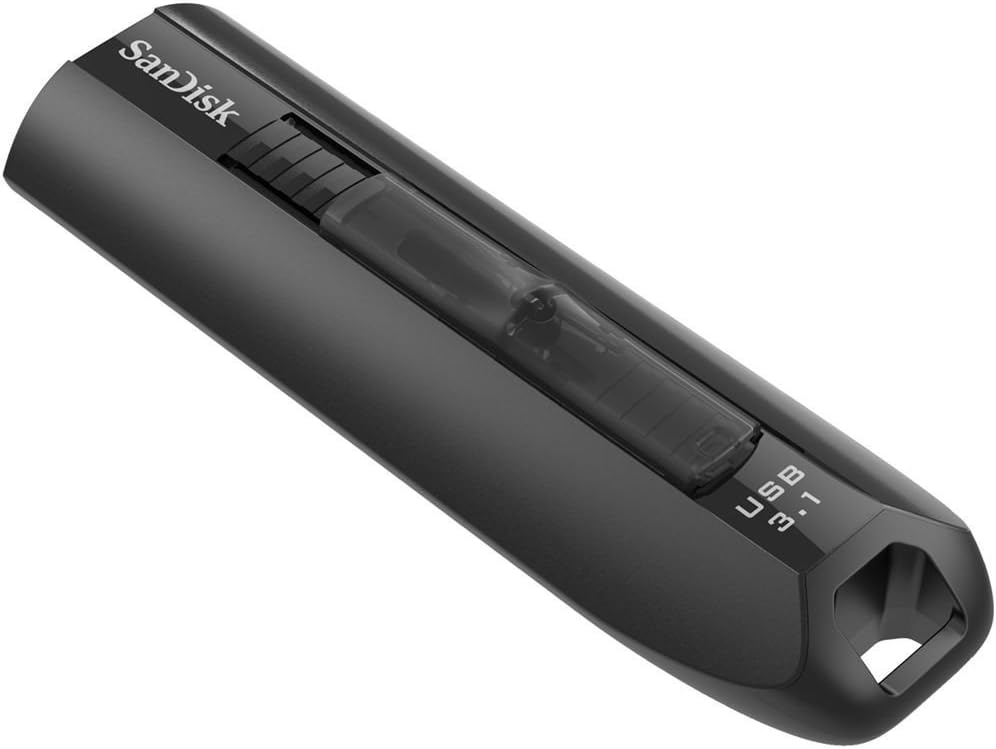
SanDisk Extreme Go USB 3.1 128 GB
Product ID: 51833392
Details
- BrandSanDisk
- Hardware interfaceUSB 3.0
- Memory storage capacity128 GB
- Special featureMaximum 0 - 35
- Write speed150
⚡200MB/s read speed
🕒4K movie transfer <40s
🚀150MB/s write speed
Buy anything from 5,000+ international stores. One checkout price. No surprise fees. Join 2M+ shoppers on Desertcart.
Desertcart purchases this item on your behalf and handles shipping, customs, and support to Japan.
⚡ Speed Meets Style: Transfer Like a Pro, Wherever You Go!
The SanDisk Extreme Go USB 3.1 128GB flash drive delivers ultra-fast read speeds up to 200MB/s and write speeds up to 150MB/s, enabling lightning-quick transfers of large files like 4K movies in under 40 seconds. Featuring USB 3.1 Gen 1 compatibility with backward support for USB 2.0, a sleek black design with a subtle blue LED indicator, and a durable retractable plug, it’s engineered for professionals who need reliable, high-performance storage on the move. Operating within 0-35°C and backed by a 5-year warranty, this drive is a powerhouse for data-intensive tasks and everyday use.


| ASIN | B01N0YZVQE |
| Box Contents | 1 |
| Brand Name | SanDisk |
| Colour | black |
| Compatible Devices | Any device with a USB port |
| Customer Reviews | 4.4 4.4 out of 5 stars (5,955) |
| Flash Memory Type | CompactFlash |
| Global Trade Identification Number | 00619659152178 |
| Hardware Interface | USB 3.0 |
| Item Type Name | Extreme Go USB 3.1 128 GB Flash Drive |
| Item Weight | 18 g |
| Manufacturer | SanDisk |
| Memory Storage Capacity | 128 GB |
| Model Name | SanDisk Extreme Go USB 3.1 Flash Drive |
| Model Number | SDCZ800-128G-G46 |
| Network Connectivity Technology | USB |
| Product Features | Maximum temperature: 0 - 35 °C |
| Product Warranty | 5 years |
| Read Speed | 200 Megabytes Per Second |
| UPC | 619659152178 |
| Unit Count | 1.0 count |
| Write Speed | 150 |
J**K
Impressive flash drive as fast as some of the PC SSD drives
Sandisk, You did it again. Your fastest flash drives may not me physically small, but they always deliver in terms of performance. Design is exactly like on the promo shots: full-black with shiny strip and blue LED hidden underneath it. When the drive is connected, it glows in "breathe" mode and when you copy/read data, it turns into pulsing mode. The diode is strong enough to be easily seen, yet not too much which would annoy/distract the user. Simple, informative, nice looking. As for the case, aluminium would be more in place just for the sake of looks (temperatures aren't an issue here, at all), yet Sandisk keeps sticking with plastic. Plug's ejecting and hiding mechanism feels solid enough for many years of use and helps reducing already significant length of the drive. Speeds are exactly like promised: 150 MB/s write is in range synthetically or on many small files, while on larger files You achieve stable 100 MB/s. Overall: great pick for power users, operating on large amount of data and expecting highest speeds possible. While the looks can seem cheap (big size & plastic case), it's the components that count. And that's where the Sandisk smashes the competitors.
D**M
As fast as described drive with reasonable build quality and good seek times
Device tests to read / write at the stated speeds on some PCs. The initial ex-fat partition had to be re-formatted to ext4fs or f2fs to get the performance on linux, and write speed was quite a bit slower on a raspberry Pi 4b vs write on a Solidrun ARM PC / conventional skylake PC (read speed was just below 200Mb/s on all devices). Currently in use as the root drive for the Pi I've got running my DHCP server, syslog and SNMP server. Like night and day for system responsiveness even compared to a top speed SD card. Well worth it as avoided the need to buy another mini PC.
A**R
Durable, Fast,
Have had this product for 18 months and it never fails to impress. I use this every day for transferring files between laptops, PCs and colleagues. It has never let me down and has never slowed down. Its average transfer speeds are around 120MB/s higher if transferring single large files, slower if transferring lots of small files but rarely does the average drop below 100MB/s. For those people who score it badly on transfer speed I would suggest checking ports and/or drivers. Depending on OS USB3.0/3.1 is not supported even on a USB3 port unless you have the correct drivers. Generally in these cases you will see speeds more akin to USB2 or even slower. Yes there are faster sticks around now but bang for buck you can't really go wrong with this.
R**S
Good capacity, but definitely not the fastest chip
The Sandisk Extreme Go SDCZ800-128G-G46 USB3.1 sticks are nominal 128GB good speed devices with a fast interface. They are ideal for sending big chunks of data through snailmail in a jiffybag, and also where there is not a local high speed interconnect between machines. There was some clutter on the sticks taking up some valuable space when first examined, but I always reformat new media to remove any possible Trojans etc and NTFS is a more robust file system than exFAT. I also always test them to check for speed and capacity. At first sight the retractable plug is handy, but the contacts are still just as exposed to dust dirt and static. So in reality this feature is simply a gimmick and a waste of space, and these sticks end up being about 2cms longer than normal sticks which makes them more vulnerable to accidental knocks while plugged into, say, a laptop. H2TestW gave me an average write speed of 35.2MBytes/s and 57:12 minutes to write the whole chip, double the speed of the 128GB Sandisk Ultra chips, and steady between 35.5 and 35.0 all the way through. However, I have seen this test write between 95 and 105Mbytes/s on the older 32GB Sandisk Extreme USB3 devices on this machine, almost three times faster, so it is definitely the chip that is slowing it down. Read speed is much better, at 135Mbytes/s and 14:52 minutes to verify the whole chip, but still does not fully exercise the USB3 interface, and still slower than the 32GB which were about 168Mbytes/s. Storage is shown as 117GB available on the PC, actually 126,533,763,072 bytes, when formatted as exFAT with default sector sizes. NTFS has a slightly bigger overhead so slightly less available storage at 126,452,592,640. There were no bad locations on either of my two samples. The chip runs at about 15°C above ambient, nowhere near as hot as some I've tested, but then it is not working as hard. This is actually a good thing, because running cooler should maximise lifespan and reliability. I have specifically ignored the Sandisk encryption system because I don’t know anything about its provenance and also because it is an all eggs in one basket system. If it is unavoidably necessary to encrypt any files I’ll do them individually with software I know and trust, and give each a unique pass key.
D**N
A good, big and quick USB stick
I use this stick to backup my working data from my PC daily, and it is really good. The 128GB capacity is plenty for the data I create, and the extreme range of sticks have really good transfer speeds when used with a USB 3 or 3.1 port. The fast transfer speeds mean that I backup more often, and anything that makes backing up data less hassle is only going to be a good thing.
C**R
Fab
Fab
M**O
Really fast usb drive
This usb drive is really fast - copying large files to the pen drive is done at close to advertised speed (141MBs) on my laptop. Reading is even faster - 172MBs on my machine, which is from 2012. It does have SSDs though, not the HDDs. The most important thing to me is that these speeds are sustained, they don't shoot up and down like with some cheap usb drives. The blue activity light is useful too. I had 3 older Sandisk Extreme drives and they were all perfect. The only thing to mention is I broke some old ones myself. They are quite large and I would pick the laptop in a hurry and bent them. They worked fine at first, but after a few months would fail. Not the issue with the drive, but my own clumsiness. Just something to keep in mind that they are a bit longer than most pen drivers, but then again they are faster than most. I would recommend these.
A**É
Als ich den Sandisk 64 GB Stick entschieden habe zu kaufen, war mir ein bisschen unsicher, da die Top-Rezensionen nicht so gut sind, aber glaub mir, der Stick ist völlig in Ordnung. Die Schreibgeschwindigkeit entspricht wie angeboten (im extrem Fall natürlich). Allerdings konnte ich die Lesegeschwindigkeit sogar in extrem Fall nicht die 260MB/s erreichen, nur bis 200MB/s. Dennoch ist insgesamt ein sehr guter Stick, es kommt auch mit dem SanDisk SecureAccess, obowhl ich noch nicht benutzt habe, denke ich für den Alltag sensible Daten zu verschlüsseln, ist völlig in Ordnung. Es hat auch einen RescuePRO Key(1-Jahr-gültig), mit dem man Daten retten kann, habe aber bis jetzt nicht benutzt. Es könnte auch ein bisschen billiger sein, denn für den Preis würde ich schon mehr Leistung erwarten. Ich habe auch Bilder hinzugefügt, mit verschiedenen Tests und verschiedene Version von Programmen wie ATTO und Crystal Disk Mark und Windows Selbst. Nur als Info, mein PC ist relativ gut, mit Core i9 und nur SSDs, also die fehlende 60MB/s von Lesegeschwindigkeit ist nicht wegen des Performances meines PCs.
J**N
Creo que es de lo mejor en relación calidad/precio si quieres algo con buenas velocidades sin dejarte mucho dinero. Si quieres algo ultrarrápido tendrás que gastarte más. Una vez sacado el puerto USB del pendrive, se fija bien y no se mete solo al introducirlo en el puerto USB del ordenador. Edito: varios meses después de la compra la velocidad de escritura empezó a bajar muchísimo haciendo dientes de sierra, como a otras personas les pasó por lo que pude leer. Si te pasa esto, prueba a hacer un FORMATEO DE BAJO NIVEL con "HDD Low Level Format Tool". ¡¡¡A mi me el formateo de bajo nivel me ha resucitado este pendrive de 64 GB!!! ¡Parece mentira pero ha funcionado! Adjunto imágenes de escritura de 1 archivo de 47 GB tras hacer formateo de bajo nivel.
L**3
I'll start out by saying I purchased three flash drives at the same time and can provide some comparison between them all. Overall I think the Sandisk Extreme Go series is probably the overall best value for the money. Pros: Speed- This drive, while not the fastest at reads, offers a great combo of quick read and write speeds. I was easily achieving over 150mbps read and up to 180mbps at times, while also having write speeds around 140mbps. Form- A little big, but it was light and feels solid enough Formatting- Came ready to go with NTFS, Cons: Price- Not super expensive, but costs more than some other brands. Casing- Some may think the light plastic casing will be too weak. Compared to a Samsung FIT flash drive and an Arcanite drive I can confidently say that this is the best value. Arcanite had read speeds approaching 300mbps, but writes would quickly slow to 50-70mbps. That means this Sandisk drive would finish a write almost three time faster. The smaller samsung drive also had fast reads, but only 35mbps on the writes. For a final note I would say to buy larger than you think you need. Files are so much bigger now I wouldn't purchase anything below 128GB unless you know that its only for a subset of smaller files.
D**O
Excelente memoria, es muy rápida y funciona muy bien para lo que la quiero, que es pasar peliculas en 4k para poderlas ver en la TV, sin embargo hay que tener en cuenta que algunas TV's no reconocen memorias de alta capacidad en formato exFAT, por lo que tuve que formatearla en NTFS (que no es el ideal para memorias USB debido al sobredesgaste) para que mi TV pudiera reconocerla. Lo que no me gustó fué que la descripción del producto dice que incluye lector OTG (para usar la memoria como almacenamiento para un celular o tablet), lo cual no es verdad, pero igual es un problema de la publicación, no del porducto en si. Otra cosa que no me gustó es el software de encriptación que incluye, ya que al momento de quererlo instalar te pide que lo actualices, y al querer actualizar se crashea. No le doy mala calificación por eso ya que no es algo que valla a utilizar, si quieres una memoria con encriptación hay muchas mejores en ese rubro, incluso con encriptación por hardware, ademas que no fue el motivo por el que compré esta memoria, que fue para pasar archivos a muy alta velocidad.
R**Z
Merhabalar, Öncelikle dağıtıcı girma olan "Kolay Gelsin" kargo ekibine verdiği kaliteli ve güzel dağıtım hizmeti için teşekkür ediyorum. Umarım "Kolay Gelsin" ekibi hizmetinin kalitesini koruyarak gelişir ve ülkemizin her tarafında kaliteli hizmet veren bir bir dağıtım firması olur. Ürüne gelince ürün beklediğim hızı sağladı. 128GB lik usb belleğe saniyede 130MB veriyi sorunsu bir sekilde yazıyor. [root@d7567 sdc1]# dd if=/dev/zero of=testf bs=1M count=512 oflag=direct status=progress 520093696 bytes (520 MB, 496 MiB) copied, 4 s, 130 MB/s 512+0 records in 512+0 records out 536870912 bytes (537 MB, 512 MiB) copied, 4.15278 s, 129 MB/s [root@d7567 sdc1]# Hızlı usb belleğe ihtiyacı olanlara tavsiye edilir. Umarım yakın zamanda aynı ürünün uygun fiyata 256GB ve 512GB modelleride sunulur. Teşekkürler.
Trustpilot
2 weeks ago
2 weeks ago