📚 Elevate your reading game—because your stories deserve the best view.
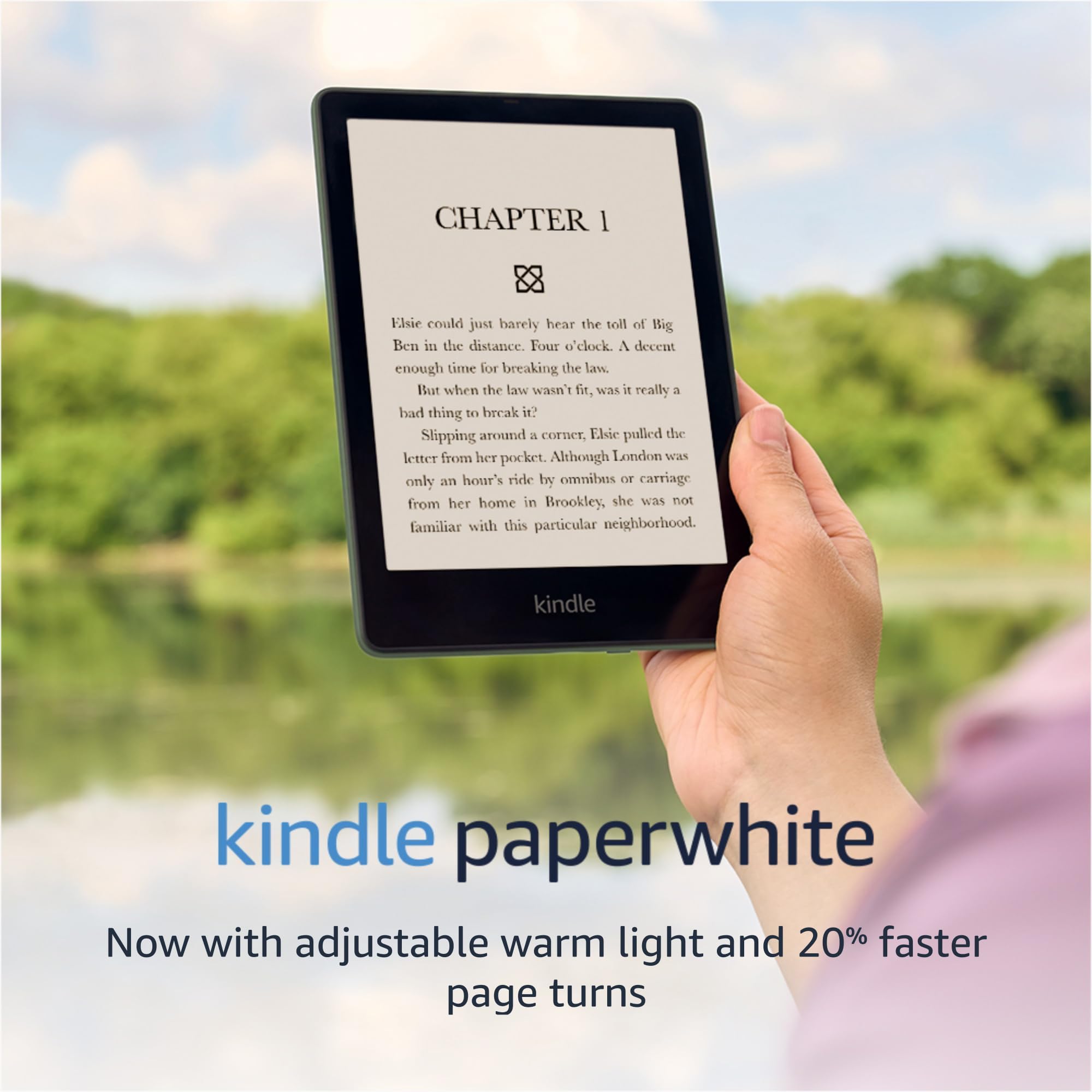
The Amazon Kindle Paperwhite (16GB) features a larger 6.8-inch glare-free display with 300 ppi for crisp text, adjustable warm light for eye comfort, and a waterproof IPX8 design. It offers up to 10 weeks of battery life, faster page turns, and ample storage for thousands of books. With Bluetooth support for Audible and no lockscreen ads, it’s the ultimate all-in-one reading device for professionals who demand convenience and style.
| Display | Amazon's 6.8” Paperwhite display technology with built-in light, 300 ppi, optimized font technology, 16-level gray scale. |
| Size | 6.9” x 4.9” x .32” (174.2 x 124.6 x 8.1 mm). |
| Weight | 7.23 oz (205 g). Actual size and weight may vary by configuration and manufacturing process. |
| System Requirements | None; fully wireless and doesn't require a computer to download content. |
| On-Device Storage | 8 GB or 16 GB; holds thousands of books. |
| Cloud Storage | Free cloud storage for all Amazon content. |
| Battery Life | A single charge lasts up to ten (10) weeks, based on a half hour of reading per day with wireless off and the light setting at 13. Battery life may vary depending on use. Audible audiobook streaming over Bluetooth will reduce battery life. |
| Charge Time | Fully charges in approximately 5 hours from a computer via USB cable; Fully charges in less than 2.5 hours with a 9W USB power adapter. |
| Wi-Fi Connectivity | Supports 2.4 GHz and 5.0 GHz networks with support for WEP, WPA and WPA2 security using password authentication or Wi-Fi Protected Setup (WPS). Does not support connecting to ad-hoc (or peer-to-peer) Wi-Fi networks. |
| Accessibility Features | VoiceView screen reader, available over Bluetooth audio, provides spoken feedback allowing you to navigate your device and read books with text-to-speech (available in English only). Kindle Paperwhite also includes the ability to invert Black and White, adjust font size, font face, line spacing and margins. Learn more about Accessibility for Kindle. |
| Content Formats Supported | Kindle Format 8 (AZW3), Kindle (AZW), TXT, PDF, unprotected MOBI, PRC natively; HTML DOC, DOCX, JPEG, GIF, PNG, PMP through conversion; Audible audio format (AAX). |
| Documentation | Learn more about Kindle devices with our Quick Start Guide and Kindle User Guide. |
| Warranty and Service | 1-year limited warranty and service included. Optional 1-year, 2-year or 3-year Extended Warranty available for U.S customers sold separately. Use of Kindle is subject to the terms found here. |
| Included in the Box | Kindle Paperwhite, USB-C charging cable and Quick Start Guide. |
| Waterproofing | Waterproof (IPX8), tested to withstand immersion in 2 meters of fresh water for 60 minutes. Learn more about the waterproof Kindle Paperwhite. |
| Available Colors | Black |
| Generation | Kindle Paperwhite (11th Generation) - 2021 release. |
| Software Security Updates | Learn more about these software security updates. If you already own a Kindle, visit Manage Your Content and Devices for information specific to your device. |
C**S
Perfect for travel...and the rest of your days
So I came into possession of this little guy due to a late night Amazon impulse buy a few days before leaving for vacation. I was going on a weeklong trip with my family and didn't want to have to bring my ipad (what I usually use to read) or any actual books with me on the plane. Let me preface this by saying I am an avid reader, spending the majority of my free time reading...and have been for most of my life. My siblings lament to anyone listening about the horror of summer road trips, riding in the back of our family sedan, fighting for leg room because I always had at least 5-6 books at my feet to read during our travels. You should hear the way my sister grumbles at even the mere mention of a car ride with me (She horribly dramatic) but I digress. I also used to have a nook e-reader, an original model Kindle from way back in the day that no longer works, and have the kindle app on my ipad which I use to read most days. So I am familiar with e-reading. This kindle is quite possibly the best purchase I've ever made. It's basically pocket sized so it was extremely portable. I brought it with me everywhere; On the plane, in the car, in my bag to restaurants...I even managed to fit it in a particularly spacious pocket of an oversized jean jacket I wore on cooler nights. It's amazing. It was comfortable enough to hold in one hand, or two, depending on what I preferred at the time. The various light options on the kindle, including the warm light feature makes it easy to read regardless of where I was and what kind of lighting is available, without eye strain. I shared a room with family for a couple of nights and the dark mode feature barely emits light past my immediate person, so I was able to read into the wee hours of the morning if I wanted to without disturbing my family sleeping in the same room, or sacrificing my precious reading time. ( I get particularly sassy if I'm interrupted in the middle of a discovering a plot twist in a juicy novel, i'm just saying). You are able to customize lots of the settings, such as the fonts, size, spacing and layout, so that the books look however you want them to while reading. (I definitely used that feature to make the font smaller and more compact while I read an embarrassingly cringleworthy, but suprisingly emotional and fantastic, harlequin romance novel while on the plane. It's nobody's business why I was practically sobbing into my complimentary pretzels after the protagonists romantic interest declared his love to her for the first time, thank you very much) I also may, or may not have had a TINY accident in which I spilled my entire 32oz water bottle full of water all over my pants and my kindle. After squealing in alarm at how cold the water was, I was able to get my bearings, wiped the water off the kindle, changed my pants and continued reading. I have noted no damage whatsoever to my kindle and that was at the beginning of my trip well over a week ago now. After reading every day for at least 4-6 hours per day/night for 7 days straight I had 57% battery left over. I think the battery is supposed to last for 2 weeks maybe? IDK. Basically it lasted a long time, long enough for me to be impressed. Also, I downloaded at least 15 new books on there, not to mention the impressive collection of books I already owned and was able to sync to the device, and I still have over 4GB of space available to use. I have since named the kindle Kurt, as I feel emotionally connected to the device after our adventures together these past weeks. If you are a super bookworm like me, or are just trying to finish a whole book for the first time, I highly recommend this device for purchase. I think it was worth the money a thousand times over. And if after reading this you do decide to purchase it, I hope you love it just as much as I do.
J**E
Reading Is Fun Again
The first thing I thought of when I saw an e-reader was AWESOME! But that was before they introduced the paperwhite models. In essence, they were amazon branded android tablets. They were slow and clunky and incredibly cheap. I'm further embarrassed to admit my first e-reader was actually a Barnes & Noble Nook. Which - if anything - was worse than the original Kindle's. I also discovered that I just plain missed holding a book. I couldn't explain it but I know a lot of people understand what I'm talking about. There is just something about being able to physically hold that book in my hands that just felt "right" and the e-readers just did not provide that. Finally amazon introduced the paperwhite and that was an absolute game changer. The ability to read a Kindle in direct sunlight was just unheard of. The older color versions were essentially useless in direct sun, or even marginally cloudy days as well. I still preferred holding a book in my hands though. But that all changed one night when I couldn't sleep and I tried to read at 1am and couldn't get ANY light to work well enough while also trying to hold my hard back book and not wake up my wife. It became a challenge of monumental proportions (at least for me it was). Slowly, over the course of the next 6 months, I began to warm up to the idea of giving the Kindle another try. This is where I made a big mistake however. Instead of buying it new, I went with a reputable company that sold reconditioned electronics for a deep discount. My reasoning seemed solid (at the time), if I ended up not truly enjoying my Kindle, at least I hadn't wasted too much $$ on buying a new one. Unfortunately, the model I received was tied to the account of the former owner, and I wasn't able to correct that with a simple master reset. It took several days to work thru that problem, but once I did, I was off and running. I got a slightly smaller model (6" screen) and while it functioned, it stuttered so often I forgot just how smooth it really should've been. But still, even with the issues, the hiccups and stuttering, I grew to really enjoy using it and more importantly, I loved the battery life it offered. I decided it was time for an upgrade, and this time I was going all-in. I got the 6.8" screen, which isn't that much bigger, but it DOES make a difference. Since I ordered directly from amazon this time, imagine my absolute surprise when I turned it on I was worried that it was going to take forever to link up to my WiFi and have to add my amazon account information...but that did not happen. Not sure if amazon pre-programmed it, but as soon as I turned it on it said, "Welcome Jeff" and I was stunned. How did it know??? Well, no matter, the set-up was a friggin' breeze and I was thrilled how seamless it was. Operation was so much easier and while it still offers a little stuttering (which in all honesty is simply due to the black & white screen and how it operates) but it was decidedly better than the older model. Battery life is stellar, though not as good as amazon claims. I think what they say is almost absurdly optimistic. But, the truth is, a paperwhite will give you pretty great life on a full charge. It operates well, and I love how I can invert the screen so more of it is black. Not sure if that uses less battery like it does on an amoled phone screen, but I'm going to see and test it just in case. My old Kindle did not have this option. All in all, reading is fun again for me and I love how I don't need a special light to read in the middle of the night like I did with a hard back. Kudos to amazon, I love my Kindle.
A**W
you need a kindle
I am absolutely obsessed with my Kindle Paperwhite! I love being able to carry hundreds of books with me wherever I go, and the larger display makes reading so comfortable. The adjustable warm light is one of my favorite features because it's easy on my eyes, especially when I'm reading before bed. The battery life is incredible; I can go weeks without needing to charge it, even with regular use. It's lightweight, easy to hold for long reading sessions, and the glare-free screen feels so much like reading an actual book. If you're someone who loves to read, this is one of the best purchases you can make. It's perfect for traveling, relaxing by the pool, or curling up on the couch with a good book. I find myself reading so much more now that I have it!
E**R
Practically Perfect
As you probably know, the kindle paperwhite is black and white and is used as a dedicated e-reader for books and other reading material. This device acts like printed media rather than a tablet -- once your book is open there are no ads and no distractions, simply fast reading on a comfortable device. I've upgraded to several generations of kindle paperwhites over ten years. This review is for the 11th generation that came out in 2021. The idea of within a minute retrieving any book in my library or getting a brand new book is simply irresistible. The kindle paperwhite is a great e-reader. Note that it frequently goes on sale so try to time your purchase so you can save $$. These are the things I like about it: * PORTABLE The kindle paperwhite is small and light and fits easily into my purse, even with a cover. By the way if you get a kindle definitely get a cover as well to protect it. As an added bonus, the cover makes the kindle feel like a slim book while you're reading. There are many attractive covers in addition to the official amazon ones. * WATERPROOF The kindle paperwhite is waterproof. Indispensable for the pool or bathtub. * EASY ON THE EYES The screen lighting of the kindle paperwhite is adjustable and reading is pleasant. I prefer to read with black background and white letters. (Settings > Accessibility > Invert Black and White). You can change the brightness by swiping down from the top and finding the "Brightness" setting. And don't forget you can change font and text size as well. When your book is open simply touch the top of the screen, select Aa > Font then adjust as you want. Print on the screen is quite clear both in bright sunlight and in a dark room. You can even make the lighting warmer (more yellow) for nighttime reading by swiping down from the top and finding the "Warmth" setting. * READ TO YOU EVEN IF YOU DON'T USE AUDIBLE The text to speech (TTS) feature is my very favorite :-) I love having my kindle read to me so I can do other things like needlework or driving at the same time. TTS works even if you don't have audible books, alexa, or a phone app. Simply connect your bluetooth device to the kindle (Settings > Wi-Fi & Bluetooth > enable Bluetooth > select your device) then turn it on (Settings > Accessibility > VoiceView Screen Reader). You can adjust the volume and speech rate to your liking. * LONG BATTERY LIFE Yes, the battery really lasts for days or weeks. Things like bright screen level, wifi on, and TTS may drain the battery at a faster rate. The kindle uses a C adapter. * PLENTY OF SPACE FOR ALL YOUR BOOKS The standard kindle paperwhite has 8 GB storage which can store at least 2000 or 3000 ebooks or roughly 35 audible books. You can also get a kindle paperwhite with 16 GB or for even more space for audible books you can get a Signature paperwhite with 32 GB. ______ As I've gone through several generations of the kindle paperwhite I've noticed that while the physical device continues to get better, I don't like the software as much as previously. Here are three things in particular: * NO GAMES I really really miss the games. These were so fun to play for me and to entertain young ones. Please can we bring supportive software for games back? * KINDLE DEVICE HOME AND LIBRARY SCREENS I hate the Home screen because most of the screen is taken with book recommendations rather than your own library. The top ribbon shows the book covers in order of last opened. You can only see three and a half books so you'll be doing a lot of scrolling if you're looking for a book you read a while ago. The Library screen is a bit better because you can list your books by title or author (three lines at top right screen give you "Sort by" screen), but the listings still include book cover thumbnails that take up room. I admit I'm fussy but I like to have a compact list that I can scan quickly rather than needing to scroll through page after page and/or removing books from my device. (The books are still accessible in the cloud but will need to be reloaded if I want to read them again). * COLLECTIONS IN AMAZON CLOUD Since the beginning until now, Amazon cloud storage uses only one layer of folders. If you have, say, science fiction books and mysteries, you either jumble them together in "Fiction" or else you have to make two separate folders that don't link. Please, Amazon, fix this. _____ Overall while the kindle paperwhite isn't *perfect* it's pretty darn close and lovely to read for books with plain text and images/photographs. PDFs and more complex images like maps are difficult to see on the small screen and may do better with the Kindle Scribe which is larger. If you want a reader with color and web browser capabilities you may want to consider getting a kindle Fire rather than paperwhite. The kindle paperwhite is a great device for what it is meant to do -- read books -- and for that I will give five stars, although I am keeping my fingers crossed for software updates to make the experience even better.
C**S
A Book Believer Converted
I am someone who believes that there is something profound and special about a physical book. My favorite part about a book is its smell. It's not wrong to describe the smell of walking into a Barnes & Noble as pure euphoria. New books smell like potential, beginnings, and the possibility of something grand. Old books smell like legends, ancient wisdom, or forgotten secrets. Books have a weight to them as well. It's reassuring to know that this book you're holding is real — it takes up physical space in the world and this makes it undeniable. It's as if the power of the stories and ideas within are so strong that they have materialized into matter out of the aether. It's hard for me to hold, say, a Bible without a sense of reverence and awe. Even today when I walk into a large library I can't help but feel like I have walked into a holy place — a place of worship. Being surrounded by books has the same effect on me that a Xanex has on others. Books have an impact on me. I love them. This is why, when I started reading on a Kindle over a year ago, it felt like I was committing adultery. This nasty little plastic screen inspired none of the feelings that books gave me. It took the magic of books and sacrificed it on the altar of consumer electronics. Despite these feelings, I continued to use it. Now I have read a little over fifty books using my Kindle. I still believe that the Kindle kills the magic that physical books have, and it does. But for the first time in a year, I decided to pick up a book in paperback and read it. This experience of going back to real books has made me realize a few things about the Kindle and myself. First off, I realized with horror that I am addicted to my Kindle and its features. The people who designed the Kindle did so with intent. The Kindle's sole purpose is to read books — there are no other apps on it, there are no intrusive ads, and there is nothing to distract you from reading. Honestly, the device is relatively primitive compared to other consumer electronics, but that is a design choice and not a flaw. I would argue it is even easier to get lost in a book using the Kindle than it is with a physical book. And then there are the features — the glorious features. My favorite feature by far is the built-in dictionary. When reading a physical book and coming across a word I didn't know the meaning of, assuming I couldn't intuit the meaning from context, I would have to mark my place in the book, put it to the side, pull out my phone, and Google the word. This is tedious. It also breaks my train of thought and forces me to use my dreadful phone with all of its notifications and apps and stuff that sends me into a panic and introduces into my reading time the potential to sidetrack myself. I hate that. With my Kindle, all I have to do is touch the word and a popup with the definition appears and is dismissed just as easily, and then I'm off reading again — an interruption that is barely even noticed and my attention remains intact. Even better is the fact that my Kindle keeps a list of all these words that I've looked up over time, and I can review them anytime. I look at it occasionally and quiz myself — this is my idea of 'fun'. Now I'm a big fan of writing in my books — I underline, highlight, and write in the margins constantly. If I ever need inspiration or if I'm trying to remember something I've read, I will thumb through the book I found it in until I eventually find it. Sometimes when I get bored I will sit in front of my bookshelf and go through the books I've read looking at all the passages I highlighted to refresh my memory on all those inspiring things that I read in years past. It's a little tedious but not too bad. This habit of highlighting is not lost to me while reading on my Kindle. You simply press and drag your finger across the passage which will highlight it. But that's not the best part: Kindle will keep up with everything I have highlighted and organize it all for me by the book it was found in. So at any given time, I can see all of my highlights in any of the books I have read, and I can even share them to my Goodreads profile! This gets me visibly excited. The last feature I want to talk about is the backlit screen. If you do any of your reading in bed then you probably have a bedside lamp or a flashlight or some other novel light source designed for books. Maybe it's just me but I find it difficult to get comfortable in bed and read a paperback at the same time. Either my spouse is annoyed by the light while she is trying to sleep or I can't find the perfect position that makes it both comfortable and easy to read. The Kindle has a backlit screen with adjustable lighting and a "warm" light setting. This means all other light sources in the room can be extinguished and I can still get my reading done. No book-light required. The Kindle is so lightweight that I can lay or recline in any position comfortably. No more fighting with those books whose binding is stiff and unyielding. So now we come to the point of this post. A confession. It's a confession to myself and the world. As much as this pains me to say: The Kindle offers a far superior reading experience over books. I said it. I don't like it any more than you do, but it is simply true. The onboard dictionary, the highlights, the backlit screen, the insane battery life (I charge this thing once a month), all of it together creates the most consuming and productive reading experience available. I still feel subtle pangs of guilt when I look at my bookshelf. I don't think that will ever go away for anyone who truly loves books. But now my bookshelf has become a kind of "greatest hits" display. I still buy all the best books I read, and I now consider my bookshelf as a place of honor for all the greatest books. But I think of my Kindle as another appendage on my body — I never go anywhere without it. I love books. I love my Kindle. To my fellow book lovers out there who are still opposed to the idea of a Kindle, I say that you can love both. It will be okay. The Kindle isn't evil after all.
A**R
great for travel
I used to be a snob about paper being better than digital. But, my husband has a kindle that he loves and uses all the time. I started to want my own for travel and camping trips. It is really handy to be able to bring a LOT of books with you for a long plane ride or something. I also like that it's water resistant. I brought it to the beach a few times and didn't have to worry about splashes getting on it. I have had books get a little damaged on camping trips (cover bent or torn, pages wrinkled from high humidity) but didn't have to worry about that happening to the kindle. It's very lightweight and comfortable to hold with one hand. It's also a great option if you have a small house with limited storage for hoarding a lot of books. I like the way you can adjust the display as necessary: font size, brightness, white/amber spectrum for reading at night, etc. The screen doesn't have glare when reading outdoors and refreshes quickly when tapped to turn the page. So far the battery life has been amazing! I have had this device since May 2022 and I haven't needed to charge it yet. I keep the Bluetooth and wifi off unless I need to use those functions. That seems to conserve a lot of battery juice. When I first got it, I brought it on a trip, reading for several straight hours on airplanes and then about an hour or two per day for a week long trip, then lots of time reading on planes while traveling back home. Since I have gotten back home, I read for a few hours per week. At the time of writing this review, it is July 7, 2022 and I have now had the device for nearly 2 months. The battery hasn't gotten lower than 70% yet! Your mileage may vary, but I have been very impressed. My only real issue with this device is that is was a bit hard to figure out the navigation at first. There's no instructions in the box, and no tutorial when the setup has been completed. A lot of the navigation functions are hidden unless you tap on a specific area of the screen. As a millennial who is not as tech savvy as some other people my age, I had a bit of a panic when I couldn't figure out how to use it. I had to watch a YouTube video tutorial to learn where to tap to see the different menus! I can imagine someone like my mom or grandma really struggling to figure it out on their own because they are even less tech savvy than me! But once I knew where to tap, getting around the settings and navigating back to my library is not a problem anymore. I haven't tried using Kindle Unlimited or ebooks from my local library yet. But, I do check the "kindle daily deals" and sites like BookBub for discounts on ebooks. Generally ebooks are cheaper than paperbacks. So unless you are someone really thrifty who only buys used books, you are probably going SAVE money on books, instead of spending more. And, I just realized if you set up Amazon household so your account is linked with your spouse or parent who lives at the same address, you can then share ebooks between your accounts. After you purchase an ebook, from your Amazon account you can "add to household library" and then you can both access the same ebook. Which is great if your spouse or parent is also a book lover!
S**C
Good Buy for my Very First Kindle buy
I'm an avid reader & always wanted a reader for all my books - just my books. Bought this for my introduction into Kindles as I never had one before and I decided why not try it out. Can't say it was a bad one - actually it was a very good one. Took the Paperwhite Kindle 6.8" locked ad 16gb for my first and I appreciate it. Got me the Kindle + Kindle unlimited subscribtion. What I like about the Kindle: This reader is wonderful and saves my eyes from the glare of the phone or tablet I once used. Apart from the glare free screen, I like that I can be on a bus reading, with the sunlight pouring through, or sitting outside in the bight environment of day light and I have no problems reading the screen. At night, I can set the screen and read comfortable as well. Yes, its easy on the eyes. The ads run when the screen is closed and isn't a bother while on & reading. The kindle goes on for days without having to charge. YES! I had to test out that particular line "up to 10 weeks of battery life". 10 weeks is a stretch if you're a reader reading daily - If you're a reader who reads off and on or every two days or so, it could probably last up to 10 weeks. But as long as you're a frequent user reading - it can last up to about 10 days (almost or 2 weeks). The battery life is great! I also decided to try the waterproof theory but not too much (lol) I was reading one day while at a funeral, and rain decided to pour down a bit. I stood there under the light drizzle but not the pouring rain - so, i'll say the screen is waterproof, not sure about the emersion theory. Definitely good on storing books. Before I received my kindle, as an author new to the Bookstagram community, I found some good deals such as "Stuff Your Kindle Day" or other free books download and began downloading to my account. When received my E-reader, and got it set up, had about almost 3000 books. So, the storage is pretty okay. I don't have Audible nor a subscription for audio books - so, I can't exactly say that the audio hands free is a go. I have to give this a try as I have a audio book trial to listen to and will give an update on this later. Perspective: The device is great, easy to use, great for traveling with. It's thin, lightweight and battery life last long (not the whole 10 weeks) like I explained above (rolls eyes). Definitely can use at the beach, river, waterfalls, springs (bodies of water) as long as you're careful not to lose it (lol). Shades of pages can be changed, or you can schedule the light changes, Can adjust the size of the font you wish to use to read. The screen is black and white - as in the colored cover of books won't be seen. But I'm good with that. This is only for Amazon Kindle reader - No other books apps can be used on the kindle. You can read, pdf files (don't really like how some of these pdfs read on it & I more prefer the epubs), epubs. Haven't bothered to try other files...I do know that on my app on my phone, png, jpeg would be seen. I think it's good for the price I got it for. Recommend or Not? Why not? If you're new to the books e-readers like me, I see nothing wrong in giving it a chance to see if you're into having just a kindle or if you'd prefer a tablet e-reader where you can have the Kindle app and other ebook apps as well for your reading. (If you looking for a reader to host kobo, bookfunnel library, booksprout app, etc then buy a tablet this won't do). If you have no problem with having a read that shows your book covers black & white, sure get it. There are other kindle that cost more with the colored cover display. Other than that, Yes I recommend it.
S**Y
Still works!! Dropped in pool 3 times!
God, I love this thing. Frankly, one of the best purchases I’ve ever made. Now, don’t get me wrong— I, too, have a love affair with holding a good paperback book and feeling the thickness of the pages slowly switch hands as I read, and the smell of old paper and the comfort of simply holding a book that sparks curious conversation with strangers. But hear me out… I’m a flight attendant and read books too fast to carry all that extra weight and bulk with me to make sure I never run out. This thing holds thousands of books, the battery lasts about a week with high use (a month if less), and when I finish a book, I can immediately start the next! If a book isn’t holding my interest, quick swap! It fits perfectly in my uniform pocket and slips weightlessly into your bag. I bring it with me to the pool every summer and have accidentally dropped it in the pool 3 times and it still works good as new! I’m highly impressed, and I don’t think I could live without it. Now the very few downsides… I live in Phoenix, so on really hot days (105-120F) the kindle can overheat and stop working, even if in the shade. So that kinda sucks because floating in the pool is one of my favorite places to read. The power button is obnoxiously on the bottom (I feel it should be on the top or upper side) so if you prop it up on a hard surface, or place it in the seatback device holder of an airplane, it can press the power button, thus, turning it off. I absolutely hate it and hope they change the design in the future. I do recommend getting a screen protector to prevent scratches, and stick a device holder ring on the back for comfort while holding. Other than that, this thing is an absolute gem worth every single penny, and Kindle Unlimited provides a plethora of good books to choose from!!
Trustpilot
1 week ago
1 month ago