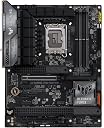
Desertcart purchases this item on your behalf and handles shipping, customs, and support to Japan.
🎮 Power, speed, and durability — the ultimate foundation for your next-gen gaming rig!
The ASUS TUF Gaming Z790-Plus WiFi motherboard is engineered for Intel 12th to 14th Gen processors, featuring robust 16+1 DrMOS power delivery, PCIe 5.0, DDR5 memory support, and four M.2 NVMe slots. It offers ultra-fast networking with WiFi 6 and 2.5Gb LAN, plus cutting-edge connectivity including Thunderbolt 4 and USB 3.2 Gen 2 Type-C. Built with military-grade components and advanced cooling solutions, it delivers stable, high-performance gaming and multitasking for professional and enthusiast builds.


| ASIN | B0BQD58D96 |
| Best Sellers Rank | #27 in Computer Motherboards |
| Brand | ASUS |
| CPU Model | Core i9 |
| CPU Socket | LGA 1700 |
| Chipset Family | Intel Z |
| Chipset Type | Intel Z790 |
| Compatible Devices | Personal Computer |
| Compatible Processors | 14th, 13th, 12th Gen |
| Customer Reviews | 4.6 out of 5 stars 1,390 Reviews |
| Graphics Card Interface | PCI Express |
| Item Dimensions L x W x H | 10.7"L x 2.75"W x 14"H |
| Item Type Name | Computer motherboard |
| Item Weight | 1320 g |
| Main Power Connector Type | ATX |
| Manufacturer | ASUS |
| Memory Clock Speed | 7200 MHz |
| Memory Slots Available | 4 |
| Memory Storage Capacity | 192 GB |
| Mfr Part Number | TUF GAMING Z790-PLUS WIFI |
| Model Name | TUF GAMING Z790-PLUS WIFI |
| Model Number | TUF GAMING Z790-PLUS WIFI |
| Number of Ethernet Ports | 12 |
| Number of Items | 1 |
| Number of Ports | 13 |
| Platform | Windows |
| Processor Socket | LGA 1700 |
| RAM Memory Technology | DDR5 |
| Ram Memory Maximum Size | 256 GB |
| S/PDIF Connector Type | Optical |
| System Bus Standard Supported | SATA 3 |
| Total Number of HDMI Ports | 1 |
| Total PCIe Ports | 5 |
| Total SATA Ports | 4 |
| Total Usb Ports | 12 |
| UPC | 197105014503 |
| USB 2.0 | 11 |
| Unit Count | 1 Count |
| Warranty Description | 3 Years |
V**Y
Absolutely Amazing!! HUGE deal when Buying Used
Cut the cost in half buying through Amazon's Used option. Inside a generic brown box, it was carefully and safely packaged for shipping. It arrived in two days! The board works flawless with all of the features that I was looking for and expected at half of the price if buying it new. There are a lot of people that ship items back without ever even using them, and I highly recommend this option and this motherboard. If someone were to choose to buy this at it's current new price, this model is still a great choice. I'm just not sure for the full price that I personally would have went this route, because other models with the same options are available. It is a fantastic board, looks great with it's sleek all black military tough vibes going on. It has a very subtle RGB lighting effect on the top right corner. The setup is very simple and easy, but I've been putting computer builds together for over 25 years. Also my Lian Li Dynamic XL RGB case I've installed this board into is quite massive and would make almost any build super easy to assemble. So the ease of assembly really depends on not just skill but the case it is being installed in as well. This is a full sized board, and not a small mATX. My experience with the bios of this board and all of the features are as expected. I've definitely favored Asus for years now. This board has had no issues with my 13600k processor, or my two sticks of DDR5 6000 memory. I've easily enabled the xmp memory profile, and overclocking features to test and they all work as they should with my 13600k P-Cores hit an astonishing 5.7Ghz. After the test I've set the board back to it's default settings. Then adjusted the thermal limit and CPU voltage, setting limits, as well as making other various adjustments to ensure a very long lifespan. It is not required, but my preference. I very highly recommend this board, and am really glad that I chose to buy it used in good condition through Amazon. While I can definitely understand that this decision on such an important component for a computer seems like a very high risk, for me it was definitely worth it, costing me only half when comparing the price of new. Overall I'm left with no regrets and big savings on a high quality, top shelf, stellar product.
T**Y
Best value Z790 board for Intel 12th-14th Gen — highly recommend
Built a new Z790 system around this board with an i9-14900K, 64GB DDR5-6000, and an RTX 5070, and it has been rock solid for several months now. A few things worth knowing for anyone considering this board: The 16+1 DrMOS power delivery handles the 14900K without any thermal throttling even under extended Cinebench loads, which is not a given at this price point. All four M.2 slots are usable simultaneously without disabling any SATA ports, which matters if you're running multiple NVMe drives. WiFi 6 and the 2.5Gb LAN both work out of the box in Windows without hunting down drivers. The Thunderbolt 4 / USB4 header on the front panel is a genuine differentiator — most boards in this price range skip it. BIOS is clean and intuitive; AI Overclocking got my DDR5 kit to its rated XMP profile on the first boot. Minor caveats worth mentioning: the M.2 covers use a screwless retention system that takes a little getting used to the first time — but honestly once you figure it out it takes about 10 seconds and you'll never think about it again. The SATA ports are angled, which can be a slight cable management challenge in mid towers, though it's really not a big deal and a short right-angle SATA cable sorts it out immediately. Overall this is one of the best value Z790 ATX boards available. Solid VRM, full-featured connectivity, and ASUS's well-regarded BIOS. Highly recommend for Intel 12th-14th Gen builds.
J**S
So far so good!
When Microsoft announced that Windows 10 was no longer going to be supported, I knew I was going to have to update to a new PC. I was running on an old 3rd gen Intel processor which couldn't support Windows 11 and some games required new processes that my CPU couldn't do. So, I decided it was time to build my second PC. The building process was fine and it was a decent size for the chassis I bought. It looks pretty cool too. The only real issue I had was that there were no drivers installed, so I had no networking. This meant I had to bypass a step in the Windows installation process to get to the desktop. Then, using an external hard drive and a laptop, I got all the drivers and everything was fine. I have heard stories of people needing a Bios update to use a 14th gen processor, but the one I got apparently already had the update, because it booted with CPU just fine. As I said, the only issue was with the lack of drivers, but that wasn't a particularly difficult problem once I realized that was an issue (though it would be for someone who doesn't have a spare laptop or something). Overall, this new build has been night and day compared to my old PC. It does boot very quickly, especially with a good M.2 SSD. Runs every game I've played very well. It sells for $250 on the Asus website, but I got it off Amazon for $200, and it was certainly good for the price. 9/10, IGN, would play again.
A**I
Always been a fan of ASUS and this MOBO is another reason why
Always been a fan of ASUS products, even before they had their own line of PCs. Ever since I could remember, if something had ASUS parts in it, (specifically motherboards) I knew it would be a good purchase. That still stands true today. I have a 15 year old laptop by ASUS that is definitely outdated and has probably received a virus or 2,000 and still works great. Other great features: -Extremely fast boot speeds, I literally have to spam del to open BIOS on startup because it boots so fast. -The auto OC seems to be working quite well so far. I have noticed some slight lag issues with games or processes that require a lot of computing power but it could be something else causing it. -I love the subtle lighting that stays on when the PC is off, it’s also a nice feature while it’s on but it gives it a nice touch when it’s off. -I also think the cooling efficiency design is also helping with CPU temps staying cooler as well.
F**N
First-class products
I bought this second-hand, and it worked perfectly on the first try—I’m really happy. It feels no different from a brand-new one, and I’m very satisfied. As for how it holds up in the long run, I’ll let time tell.
T**T
Good board, description may not be accurate
Listing states that is is 14th, 13th, and 12th gen compatible, if buying used, it may be, it may not be. It will be 12th and 13th Gen compatible, but not guaranteed 14th gen compatible due to bios updates. Mine was in excellent condition and all components work flawlessly. Seller needs to add that "may be compatible" note to be 100% accurate with the product. That is the only thing stopping a 5 star review.
R**E
Very high performance at a relatively low price.
I re-used the CPU chip from a fairly entry level Best Buy computer. With the same chip and the same RAM, this mother board gave a much, MUCH faster computer. Even the boot time was cut in half. I had not realized how much of a bottle neck a MB could be until now. For the price, this is a no-brainer.
N**D
The Brains Behind My Battle Station
This board right here? It’s the backbone of my whole build. I dropped in the i5-14600KF and my RTX 3080 FTW3, and this Z790-Plus didn’t even flinch—it was like it was born to run with beasts. Setup was smooth, BIOS was clean, and ASUS didn’t skimp on the layout. Everything’s spaced out right—no finger acrobatics needed to plug stuff in. Power delivery is clean with that 16+1 DrMOS setup, so when I pushed the CPU clocks a little, it held strong with zero drama. The DDR5 support? That’s where things really pop. I’m running some 6000MHz sticks and this board took it without a hiccup. Booted straight up, no weird voltage tweaks needed. If you’re about that snappy load time life or running heavy apps back-to-back, DDR5 on this board absolutely rips. And those 4x M.2 slots? Come on. I tossed in two drives already and still got space to expand. Fast storage everywhere, no bottlenecks in sight. Connectivity is stacked. You get WiFi 6E built in—connection is crisp, even through walls. That 2.5Gb LAN port? Super clutch when I wanna plug in and stream heavy with zero lag. Front USB-C, tons of rear I/O, Thunderbolt 4… they really thought of everything here. I’m running a dual-monitor setup with external drives and a capture card, and there’s still ports left untouched. The Aura RGB syncs up with the rest of my case lights and looks clean—not overdone, just the right glow. I’ve built on a few motherboards before, but this one feels like it was made for folks who actually use their rigs hard. It doesn’t just look tough—it is tough. Temps stay in check, airflow’s smooth, and the VRMs don’t heat up even when the CPU’s at full send. My system’s been stable, fast, and locked in ever since. Everything just plays nice together, like this board is the glue that holds the chaos together.
F**H
Ddr5
اشتريت مذربورد من ASUS من هذا المتجر وكانت تجربة ممتازة جداً. التغليف كان ممتاز ومحمي بشكل احترافي، والمنتج وصل بحالة جديدة ومختوم. الشحن كان سريع والتواصل رائع. المذربورد تعمل بكفاءة عالية بدون أي مشاكل، والمتجر كان صادق في الوصف والمواصفات. أنصح بالتعامل معهم وبكل تأكيد سأشتري منهم مرة أخرى.
A**R
Great motherboard
Great board, but for now, with doubt circulating in the media about the reliability of higher-end Raptor Lake CPUs and above, I have only used these motherboards for systems using up to 14600K.
F**O
Entrega rapida
Entrega rápida e placa muito boa
P**4
OK, ale...
MOBO działa bezbłędnie, jednak: 1) pierwsze uruchomienie działało tylko na jednej kości DIMM, w tej konfiguracji aktualizacja BIOS i dopiero wtedy jest możliwe dołożenie drugiej kości. W innym przypadku płyta po prostu nie startowała. 2) BIOS jest... nieprzewidywalny. Przykładowo dopiero włączenie CSM pozwoliło mi na uruchomienie karty RAID, rzecz w tym, że ta karta jest w 100% zgodna z uEFI (i w tym trybie działała na poprzedniej płycie bezbłędnie). MOBO jest dobre, działa bezbłędnie z Windows 10 i systemami Linuxa ale powyższe błędy nie powinny mieć miejsca przy produkcie z półki średnia-wyższa. Na marginesie: czytając negatywne recenzje tej płyty, po raz kolejny utwierdzam się w poglądzie, że osoby bez wiedzy komputerowej nie powinny samodzielnie budować komputera.
E**E
Solid Product
I installed this about 3 weeks ago and it was pretty smooth sailing. There are lots of plastic film covers on various parts to keep it from scratching during install/shipping. Remember to peel them off as you are installing. It has some LED lights that can be turned on or off in the BIOS. Speaking of BIOS, Asus motherboards always have nice, clear and easy to use BIOS software. This one is no different. One feature that I likes (but also hated) was that the screws in the M.2 SSD heatsinks were attached to the heatsink. It makes it easier for those with bigger hands to get the screw in place. In the other hand, it also made it difficult to line the screw up with the hole. I feel like there could be a happy medium there. Finding the Windows drivers was pretty simple, but on first boot, you are prompted to install the Asus Armoury Crate software. It let's you control/view the fan speeds, LED lights, see the temperatures, install latest drivers and more. It's actually a really slick idea, but the software itself is awful. It takes up a lot of memory and it crashes all the time. I suggest installing it to get the fastest drivers, then uninstall it right away. NOTE: You will need to use Asus' Armoury Crate Uninstaller tool available on their website to completely rid yourself of it. So far, I haven't had any issues with the motherboard itself. Hopefully it stays that way for a long time.
Trustpilot
2 months ago
2 weeks ago