


๐ Elevate your security game with 4K AI-powered night vision brilliance!
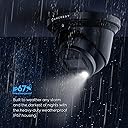
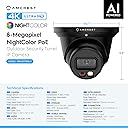
The Amcrest 4K Night Color AI Turret IP PoE Camera delivers professional-grade outdoor security with ultra-high-definition 8MP video at 15fps, enhanced by AI human and vehicle detection. Its dual illumination system offers vivid full-color night vision up to 49 feet, housed in a durable IP67-rated metal turret. Featuring a wide 129ยฐ field of view, built-in microphone, and seamless Power over Ethernet connectivity, it integrates effortlessly with Amcrest Cloud and major NVR/NAS platforms for secure, flexible video storage. Designed for easy setup and reliable 24/7 monitoring, this camera is a top-tier choice for millennial professionals seeking smart, stylish, and foolproof home or office security.





| Alert Type | Motion Only |
| Antenna Location | Outdoor Security |
| Asin | B0BMWB4474 |
| Best Sellers Rank | #799 in Dome Surveillance Cameras |
| Brand | Amcrest |
| Built In Media | Quick Start Guide |
| Color | Black |
| Compatible Devices | Smartphone |
| Connectivity Protocol | Power Over Ethernet |
| Connectivity Technology | Wireless |
| Control Method | App |
| Controller Type | Amazon Alexa |
| Customer Reviews | 4.2 4.2 out of 5 stars (545) 4.2 out of 5 stars |
| Effective Still Resolution | 8 mp |
| Enclosure Material | Metal |
| Form Factor | Turret |
| Frame Rate | 15 fps |
| Indoor Outdoor Usage | Outdoor |
| Item Dimensions | 6.1 x 6.1 x 5.3 inches |
| Item Weight | 1.6 pounds |
| Light Source | LED |
| Manufacturer | Amcrest |
| Memory Storage Capacity | 256 GB |
| Mount Type | Wall Mount |
| Night Vision | Night Color |
| Night Vision Range | 49 feet |
| Number Of Channels | 1 |
| Number Of Items | 1 |
| Other Special Features Of The Product | Image Sensor, Motion Sensor, Night Vision, Portable |
| Photo Sensor Technology | CMOS |
| Power Source | Ethernet Cable / POE |
| Room Type | Classroom, Kitchen, Living Room, Office |
| Specific Uses For Product | Inside, Outside |
| Unit Count | 1 Count |
| Upc | 850024042964 |
| Video Capture Format | H.265/H.264 |
| Video Capture Resolution | 4k |
| Viewing Angle | 129 degrees |
| Waterproof Rating | IP67 |
| Wattage | 7.5 watts |
| Wireless Technology | Power Over Ethernet |
User
Great camera with easy setup
I purchased two of these cameras so far, and have been extremely happy with the quality of the product as well as the video and images that they produce. The initial setup was fairly easy, with the most difficult part being to install the SD card into the camera. You have to physically disassemble the camera to install the SD card. It wasn't a difficult process for me; but for some, I could see that being a challenge. That being said, I feel this is a much better system for SD cards than other cameras that I looked at prior to buying these. All the other cameras made the SD card easy to get to and install; however, the downside of that is that it also would be easy for someone else will ill intentions to get access to and remove it as well.Once the SD card is installed, the remainder of the setup process goes very quickly. I recommend doing a "test setup" prior to actually mounting the cameras in their desired locations. I ran a short network cable from my switch to the camera, and it immediately booted up with no problems. The next step was to setup up the app, and associate your camera(s) with your account in the app. This is the only hiccup I had in the setup process.. You actually use the camera on your phone to scan a QR code on the camera to perform this process.. My confusion was that after reading the instructions, I thought the bar code on the exterior of the box is what needed to be scanned. There is actually a QR code on the cable attached to the camera that needs to be scanned in order to add the camera to the app.. After a few minutes to figure this out, the remainder was very easy to complete. The app asks a few other basic setup questions(name of camera, etc) and then you are fairly quickly viewing live video from the camera. While the app is rich in features and adjustments that can be made to the camera setting to finetune the image, I ultimately decided to go with the setup as it was out of the box. Somewhat because I was a little afraid that I would make it worse if I started messing with the settings, but, mainly because the picture and video quality are awesome as they were. In addition to the app, the cameras can also be viewed and adjusted on the computer. This process was also painless and straight forward.Installation in their final position was pretty simple. You just need to find a way to get an ethernet cable from the camera to your NVR and or POE network switch. It's really just that simple. I had a professional install mine just because I wanted the backyard camera mounted on my back fence, and I didn't want to dig the trench to bury the cable to that camera. After they were both installed and re-connected, I just fine-tuned the direction that the camera was pointed, and they were ready for use.One more thing to think about prior to purchasing this camera. Where will you store your video / pictures. I personally, for now, am using the SD card in the camera. I installed a 128gb(the biggest they say the camera will support), and have it recording 24/7 and it holds about 2.5 days worth of video. Eventually, I will probably go to only recording motion events, but want to keep an eye on it for the first 30 days and just make sure it's capturing all events prior to switching. I will say, so far, it has performed above expectations in that area as well. But, if you didn't want to use the on board SD card, you can also use a FTP service, a NAS, or any number of cloud based services to store your video. Amcrest also offers a cloud option, which I believe you get a free trial of. However, I knew that long term I did not want to pay for a service so I opted not to even take advantage of the free trial, so I can't speak to the functionality of that.Overall, I would highly recommend the product. It's simple to setup and use.
User
Great drop in replacement!
1. Setup - I already have an NVR setup and I have 2 2k POE cameras and one doorbell camera. I swapped the 2k (also amcrest) in the front of the house with the 4k. Switching it out was super simple. The way these mount is the same so it was straightforward and I didnโt have to use the installation drill guide or anything. The NVR recognized it right away and I was able to set it up without any issues. It was a frictionless swap between the two cameras.2. Quality - The build quality is pretty much the same as the 2k cameras I have which is not a bad thing and I expect it to withstand the weather without any issues. The image quality is notably sharper. We have a streetlight in front of our house so the camera doesnโt switch to night mode most of the time which is fine. The light isnโt much use to me because of the mounting location. I have it mounted near the top of the A pillar in front of the house so itโs pretty high up and can see the entire cul de sac. Having it so far away meant that details were lost with the previous camera. Zooming in the image, the quality improvement is most noticeable and welcome.3. Functionality - I have my cameras running 24/7 and recording all movement. I didnโt really test the AI motion capture features because I donโt really feel the need for them currently. Itโs not very often that I actually look at the recorded footage and have to look for something, but when I do, the motion capture and person capture flags that I already have setup were enough. I keep the same settings as before.ConclusionAfter using it for a couple weeks, I didnโt have any connection issues come up. It integrated with my existing system perfectly and without issues. As someone with a NVM system already installed, I think this product is perfect for me as a drop-in replacement to upgrade image quality. The light is a nice feature but not something I use. The improved night vision is welcome but not super important for where I have it installed. Overall I feel good that the footage captured is of much higher quality so that in the event that I do need to scrub back and look for something, I know Iโll have superior details.
User
Overall a great camera
The good:- wide angle with a sharp picture. Nightvision is color and provides a very crisp image with minimal blur.- construction feels very sturdy and I like it's waterproof design. I used this camera to replace my 4MP amcrest turret camera (which that had the same design and it's been outside non-stop in use for the last 5 years.)- AI features are really nice and work surprisingly well, which reduces false alarms.- My NVR (PC running Blueiris) detected it immediately and connected.- Amcrest Surveillance Pro Desktop App works great (windows 10/11 app)- Happy that Amcrest is a well known brand and stand behind their products. I've had a few other cameras in the past by random chinese brands and they had all sorts of issues. I have had 0 issues with amcrest productsthe bad:- doesn't come with a starbit, I have to dig one out of my tool chest (not a big deal)- I've noticed that the android app won't continuously show the feed, after about 1 minute the transfer rate drops to 0 KB/S. I'm not sure if that's a limitation of my phone or what. I have a samsung galaxy s21.Overall I am really happy with this purchase, especially considering the cost vs 4k quality. The nightvision is very crisp on this camera. My wife says that she feels so much more comfortable being able to check on things outside when she hears a bump in the night. Recommend!!
User
Very clear picture, easy to install, software is a bit of a challenge.
The 8-Megapixel Smart PoE is a great camera for your home security system. I have it paired with the Amcrest 4K 8CH POE NVR and a iCreatin 48V35W PoE Injector for power. Make sure you have the proper accessories for this camera, or you may have delays getting it set up, it's not a simple, "buy this product and you'll be able to start using it" situation.I have this device mounted in the ceiling of my workshop with 24-hour recording on my NVR for security, and to recall anything in the shop that may be moved or be points of interest. I have remote control set up on the Amcrest View Pro app on my Samsung Galaxy S22 Ultra and it works fairly well. As seen in the photos, the screen looks squished and a bit pixelated when the phone is in portrait mode, but does clear up when in landscape mode or when viewing the recorded video. I also have a TV hooked up to the NVR so that I can view this camera and my other Amcrest cameras located around the outside of the building, with is very convenient. Getting the camera to connect to the NVR was very easy, but I still have trouble navigating a fairly clunky app/NVR desktop. Setting up names for cameras and various channels of each camera is quite difficult, and I have yet to figure it out completely, but the cameras do load and are able to be viewed. I suspect this is a Amcrest Pro View issue or even how it interacts with the NVR, not the hardware of this product, but it's still confusing.Low-light mode works well, as seen in the photo, while not pitch black in the room, it is quite dark and it still shows all needed details in the room. Motion trigger areas are easy to set up with a grid system with varying sensitivities.Overall, I'm happy with the product and the entire line of Amcrest products. They do all tie together, and while I have tried a lot of security camera lines (Nest, Blink, Arlo) I do choose to keep using Amcrest as my security system. I'm very happy that I don't have to pay monthly for 24-hour recording, but I do realize that came with buying an NVR as the back-end to this Turret Camera.
User
Good camera, nice 4K image.
The camera was installed using a high quality cable and a new poe injector. Camera fired up and image quality was pretty good, a little better than my Amcrest doorbell camera. Went thru a cold Buffalo winter with no problem. Now that spring is here, the camera only has a good image during the day but the night image is very dark and distorted.UPDATE 3/30/26 pressed the reset button and the night image is back to normal.
User
Crisp picture. A first step in AI for Amcrest. No intruder protection, so mount it high.
Instructions: The bulk of the instructions were discussing how to set up the camera. The process is very similar to other Amcrest PoE cameras, with either IP or P2P options. There was one page at the back discussing how to set up the AI features. It seems almost like an afterthought. If Amcrest is targeting a higher usage rate for the AI features, I would recommend including a dedicated section within the user manual specifically explaining how to use the IVS and other AI features, complete with step-by-step instructions on how to set up a "smart plan" with photos. The instructions should also mention that the AI features are experimental and are not 100% accurate all the time.Functionality: The 8MP 4K camera is generally the very best resolution in home security. I was very happy with it compared to the 5MP camera that I previously had. The "night color" feature is a little misleading: yes, there is a white LED on the front of the camera that can light up, and the camera will be able to see colors due to the light, but any camera can see color during the day or in a well-lit area. If it is truly nighttime and there is no light, or very little light, this camera must rely on IR and the image shows up as black and white, again which is standard. This camera, same as any other camera, cannot see color in "total darkness" as advertised.Although I did not test the audio, I would like to see Amcrest be able to integrate the audio with other more popular camera providers like the Ring doorbell. It would increase adoption and help consumers potentially unify a disparate suite of cameras from several different manufacturers on a single property. Also to note: this camera does not have enhanced protection against physical threats, like some of the other Amcrest cameras. This camera should ideally be mounted high up on a solid wall where it cannot easily be reached by intruders.Of course customers should be aware of the usual with PoE cameras: there is no automatic pan/zoom/tilt despite the circular shape and the camera must be hardwired into an Ethernet cable in order to provide power and data. For outdoor mounting this may require weatherproofing (a weatherproofing sleeve is included) to accommodate cable drops.Overall experience: The AI features were a novelty but not significant. In my testing, the AI face detection offered limited choices ("confused", "happy") and was wrong just as often as it was right. Nevertheless I think Amcrest is moving in the right direction by establishing the IVS platform and starting to incorporate AI into its products. This is extremely important for the future. The white LED feature with motion detection serves as a deterrent, which is wonderful, but standard on outdoor cameras. Overall this is a very good 4K outdoor camera with excellent resolution and many of the standard features including IR, motion detection, and lighting, including some novel exploratory "AI" features. I would like to see this camera have true, useful AI that can detect threats highly accurately. I would also like to see this camera have enhanced protection against physical threats.
User
Great Camera, great interface
The Amcrest UltraHD 4K (8MP) IP PoE AI Camera, 49ft Nightcolor, Security Outdoor Turret Camera, Built-in Microphone, Human Detection, Active Deterrent, 129ยฐ FOV, 4K@15fps IP8M-2779EW-AI (White) is exactly what you think when you read the name of it.It is another product brought to you by Amcrest. A company who makes affordable home security that is pretty much as simple as it comes to use and hook up. This camera worked from the minute I plugged it in to the POE DVR, and automatically added itself to the Amcrest App on my phone through the DVR.This camera by far has one of the clearest picture of the Amcrest products I have. The night vision and daytime pictures are both very clear and easy to pick out anything on the camera.I mounted this on a detached garage, so the hardest part was running the CAT 6 cable between the house and the garage. Plugging the cable in and mounting the camera was very simple.Overall here are my pros and cons.Pros:Great camera for the priceSimple Plug-and-play operationGreat camera qualityGreat Daytime PictureGreat Nighttime PictureCons:I don't have a big enough DVR to add a ton more of theseRunning CAT 6 Cable between the house and detached garageFinal Thoughts:Amcrest put out another great looking, easy to use camera. Buy this if you are looking to add to your home security system.
User
Extremely Happy With the Camera!
Review for: Amcrest 4K Night Color AI Turret IP PoE Camera 49ft Full Color Nightvision, Security IP Camera, Built-in Microphone, Human Detection, Perimeter Protection, 129ยฐ FOV, 4K@15fps IP8M-2779EB-AI (Black)This is another amazing product from Amcrest. I already own have the 5MP Turret( IP5M-T1277EW) and this 4K version is an excellent upgrade. The cameras practically have the same features, but the IP8M-2779EB has 4K video resolution. The box says the it uses H.265 HEVC compression but you can change that to H.264 (which might be necessary to use the footage in other third party applications [Like APPLE HOMEKIT via Scrypted]). This change and lots of other settings can be done in the camera's web interface (just type the camera's IP address into the browser). I've found that the web interface is all that I really need to configure that camera settings. I have the AmcrestViewPro app on my iPhone, but it's isn't very user friendly. I typically use the app to scan the camera's QR code and (after at least one app crash) set up my login info for the web interface.Pros:- Easy to set up and use- Very solid build quality- Great picture, even at night- Very useful web interface- PERFECT for adding to APPLE HOMEKIT via Scrypted because a) the price, b) the H.264 video codec, c) You can have the main full quality video stream and set up two other sub-streams that are lower resolution.Cons:- I wish that the frame rate FPS was a bit high. It's 15 FPS, which is pretty typical for this type of 4K camera. My other Amcerst Turret ( IP5M-T1277EW) actually goes up to 20, but it isn't 4K.- I wish that the app experience was better, but the web interface is great, and there are lots of other third party software that will work with this camera.- The camera seemed to get a bit warm while I was testing it in the house. That's probably fine, since it has a metal body.- My camera came with what appears to be a small crack or a piece of debris inside of the lenses housing (see photo). It doesn't seem to impact the camera footage in any way, but this is why I deducted a star.I'm very happy with this camera and will likely get a few more and an NVR to finish out my security system.
Trustpilot
3 weeks ago
1 week ago