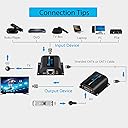
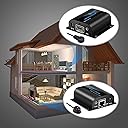
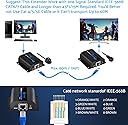
🚀 Elevate your AV game—extend, control, and conquer every room with ease!
The eSynic Professional HDMI Extender POC is a high-performance solution that extends HDMI signals up to 200 feet over a single Cat6/7 Ethernet cable, supporting full 1080p resolution at 60Hz. Featuring built-in IR remote control capabilities and a plug-and-play design, it’s ideal for gaming consoles, digital signage, and multi-room AV setups. For optimal performance, shielded Cat6 or higher cables are recommended.


| ASIN | B00YC3BWL2 |
| Brand | eSynic |
| Cable Type | HDMI |
| Cable type | HDMI |
| Colour | black |
| Compatible Devices | Personal Computer |
| Compatible Phone Models | PS3, PS4 |
| Compatible devices | Personal Computer |
| Compatible phone models | PS3, PS4 |
| Connectivity Technology | HDMI |
| Connector Gender | Female-to-Female |
| Connector Type | HDMI |
| Connector type | HDMI |
| Customer Package Type | Standard Packaging |
| Customer Reviews | 4.2 out of 5 stars 557 Reviews |
| Ethernet Cable Category | Cat 6 |
| Global Trade Identification Number | 00711583416224 |
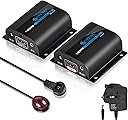
| Included Components | HDMI transmitter x 1 PCS, HDMI receiver X 1 PCS, Power adapter |
| Indoor Outdoor Usage | Indoor |
| Item Shape | Round |
| Item Type Name | HDMI Extender ESYNIC 60m 1080P HDMI Repeater With IR Function Up to 200 Feet Over Single Cat 6 Cat 7 Ethernet Cables for PC DVD Sky HD Box PS3 PS4 Satellite Box and More Devices |
| Manufacturer | eSynic |
| Manufacturer Part Number | zHE006 |
| Maximum Current | 2 Amps |
| Model Name | zHE006 |
| Model Number | zHE006 |
| Number of Items | 1 |
| Number of Pins | 19 |
| Other Special Features of the Product | Built-In IR Extender Support, Signals up to 200 Feet, Support Up to 1080p Resolution |
| Recommended Uses For Product | Computer, Home |
| Special feature | Built-In IR Extender Support, Signals up to 200 Feet, Support Up to 1080p Resolution |
| UPC | 711583416224 |
| Unit Count | 1.0 count |
D**F
A brilliant piece of equipment.
This is a great piece of kit! I purchased this to replace a Sky "Magic Eye" which takes a feed from the box in the living room to our upstairs bedroom. The magic eye worked ok to begin with - the picture quality wasn't great and there were some glitches with the sound, but it was reasonable and cheap. Unfortunately, the device became temperamental and I found myself having to unplug and reconnect it every day. I had already cabled my house with Cat5E and thought that I would try an HDMI over network box. Some of these devices require two cables and when I read reviews it appeared that the cable runs had to be the same length. I couldn’t guarantee this so opted for a single cable device. I saw this one and thought the price was good, particularly as it sends the IR signal to the Sky box. My concern was that in the description, they specifically recommend Cat6 cabling. I can confirm that the device works perfectly on my Cat5E network. I estimate that there is about 15m of cable from the “input” device to the patch panel, a short lead to connect between the living room and the bedroom port, and around 10m to the bedroom itself. Add in the connections from the wall to the devices themselves and I think there is a total run of roughly 30m, all Cat5E. The picture quality is excellent to my eyes, much better than the “Magic Eye” and the sound is fine too. It should be noted that I’ve not been using Dolby surround or anything, just the TV speakers. There is no interference and the remote signal is perfect. In fact, the new remote sensor appears to be more sensitive andthe remote doesn't need the careful aim it did before. So having now tested the device, I’m going to order an HDMI splitter to complete the installation. This does have the unfortunate requirement for two more electrical sockets at the source (for the splitter and transmitter) and one at the receiving end. Only time will tell how reliable the power supplies are. I’d suggest that anyone doing a similar installation should still try it on their own cables before investing in a splitter and additional remote, but can heartily recommend it from my own experience. I wish I had bought this first! As a side note, the device was also delivered quickly (2 days ahead of the earliest estimate – excellent service!)
M**E
Great for PC gaming.
Okay, so here was my situation. I had my PC in my living room which I had connected to my TV for gaming. I wanted to move my PC upstairs to my bedroom but still have my PC connected to my TV. Obviously, it would have been too far for an HDMI cable so I came across these HDMI extenders that use Ethernet in the middle. So I bought a 25m Cat6 cable as well as this extender. I was a little sceptical that it would work well for gaming but the least I could do was try. It does indeed work and there is no drop in graphics quality or input lag (I’m using a wireless X360 control pad). It’s full 1080p 60fps gaming with no issues whatsoever. Now, beware, the Ethernet plays an important part in this. I bought an identical Cat6 cable for connecting the PC to the router which was also downstairs. I tested the new cat6 cable in the hdmi extender and to my surprise, there were all sorts of problems with picture dropouts and graphical artefacts. Switched back to the other one, and it worked fine. Not sure if the second cat6 cable was faulty or what but I’m using it as my internet cable with no issues. The point is, if you do get any issues with the extender, try another Ethernet cable first. The only slight downside of the extender is the LEDs on the boxes constantly flash when it's not active. I’ll have to cover them up with something. And remember this is only 1080p which is fine for me as I think we’re many years away from true 4K gaming.
J**V
Great Item, Used for cctv on Cat5e 20+ metre run
Review for: Esynic HDMI Extender 1080p 60m Having used a couple of these units for cctv, superb picture without any noticeable loss, sending from Hikvision NVR, using existing good quality cat5e cable. NOTE: if you are using or installing cheap cat 5e cable, it is false economy. Cheap cables are often thinner in diameter and may not be 100% copper, that's how they make them cheaper. I was lucky enough to have installed good quality cable from electrical suppliers many years ago, so I don't really get any problems. Whether I'm using for internet or for cctv. These units are working fine on a length of 25-30 metres of cat5e and the cable has a joint using a rj45 coupler. I did experience distortion at the top end of the output at 1080p, but my Hikvision allows me to select a lower output but with still an outstanding cctv image. However I added a 1 in 2 out, powered HDMI splitter to add a second tv and that cured the 1080p issue and I can now get full 1080p on both cables without any problems, a super clear image. I have read reviews of people having problems using these units, particularly on cat5e, There are a number of causes for this; some of which I shall list. Another important thing to remember; if you are DIYing it, with little to no experience of such installations, you may struggle to do the job correctly, as experience helps a lot, so do, good tools, good cables, connectors etc & testing equipment. However if you are up to the challenge, here's what you have to look out for: 1. Firstly all connectors, cables, and tools have to be good quality 2. Use a good quality cable, if it is a new install, go for the cat6, if its an existing cat5e cable ensure that it is a good quality cable, take a snippet of your cable and go to an electrical wholesaler and compare it to theirs. 3. Use a good quality crimp to make your rj45 connections, bad connectors or connections will result in a poor image. A cheap crimp will not do a good job, but you can buy a good quality crimp, from around £15-£20, check Amazon reviews by professional installers. There is a crimp that looks like a knipex brand, which may be the same tool. 4. Check your connections and cables with a cheapish tester, they cost a few pounds on Ebay and Amazon, that is the least you can do to make sure that your cable is correctly wired with good connections from end to end. 5. Use a splitter if necessary, this amplifies the signal a little, so if after doing everything correctly, you still have any small image issues, this might correct it. Hope this helps.
C**Y
Great for extending sky to another digital HD tv
Wanted to extend Sky HD to another TV. Easy to set up used a CAT6a cable between the extenders and used the IR blaster and receiver to be able to use the sky remote. The extenders worked perfectly and now have full HD on the other TV. The IR receiver did not work at first until I read the instructions again. You need to make sure the blaster is attached to the front of the sky box you are linking from whilst the receiver can be attached to the second TV. Once I did this all were working perfectly. Can now throw out the sky eye as that does not work on digital TV. Great bit of kit and highly recommended.
E**N
Good when it worked
Good when it worked but after about a year the recieved failed and no longer showed any power was being recieved.
F**R
Wave your magic wand. It might work. Might not.
This was good. Excellent actually but it suddenly stopped working after a day. I spent the best part of 2 days trying to get It working again. Tried everything. If you get it working, leave it alone and don’t touch it. I set it all up and it was working great. I went to tidy the cables etc and it stopped working. Nothing doing despite trying everything. There are too many variables with this set up. There are too many things to check that may or may not cause trouble with it. The units come in anti static bags. This was a surprise for a consumer product. It’s not a motherboard or a video card, it’s a product intended to be used by an end user. Why would it need an anti static bag? I should have returned it at this point. If it is that delicate, it’s bound to have issues. You do just one thing wrong in desperation and it’s fried. Not for me I’m afraid. I wasted over £60.00 here with the costs of the cable and the units etc. I wouldn’t choose this product unless you are an electrical engineer.
M**S
TV multi room virgin/sky
Well I’ve been looking to get my virgin tv box into other rooms I wasn’t prepared to pay virgin £60 for another box and then £5-£6 extra a month. So I brought this extender along with a hdmi splitter, Cat7 flat cable 30m and 3 Amazon HDMI leads. Total cost around £75 although it’s not cheap to start after a few months it will pay for it self. To start with once it was all set up The screens did flicker on and off. ((Signal issue maybe)) So I just unplugged everything got the main tv working first through the spilter then it stopped flickering then I connect the bed room tv to the extender and plugged the cat7 cable and the picture come up straight away no issues! Once all this was set up I just moved the IR sender and receiver so I was able to change the channels from the other room. All works execellent, picture is at 1080p didn’t have to adjust picture quality. No lag changing channels.
A**R
Being able to control everything from a different room.
Awesome product. Works almost perfectly. Some of the normal channels are not crystal clear, slight distortion but the HD channels are crystal clear. Had a cat 6 cable installed from under the stairs where my set top box and console is located and connected it to the TV in the living room, the other side of the house when I was getting my house refurbished, so all wires are hidden in the walls and ceiling. Set up was very easy, took me like 30 seconds. Definitely would recommend.
S**.
Prodotto non nuovo.
Prodotto visibilmente usato. Lo tengo lo stesso perchè funzionante ma se sapevo che non era nuovo non l'avrei acquistato. Aggiornamento una settimana dopo l'acquisto: assistenza cliente perfetta !!! E, di questi tempi, non è cosa scontata. Complimenti !
Trustpilot
1 week ago
1 day ago