

Desert Online General Trading LLC
Warehouse # 7, 4th Street, Umm Ramool, Dubai, 30183, Dubai
Desert Online General Trading LLC
Warehouse # 7, 4th Street, Umm Ramool, Dubai, 30183, Dubai


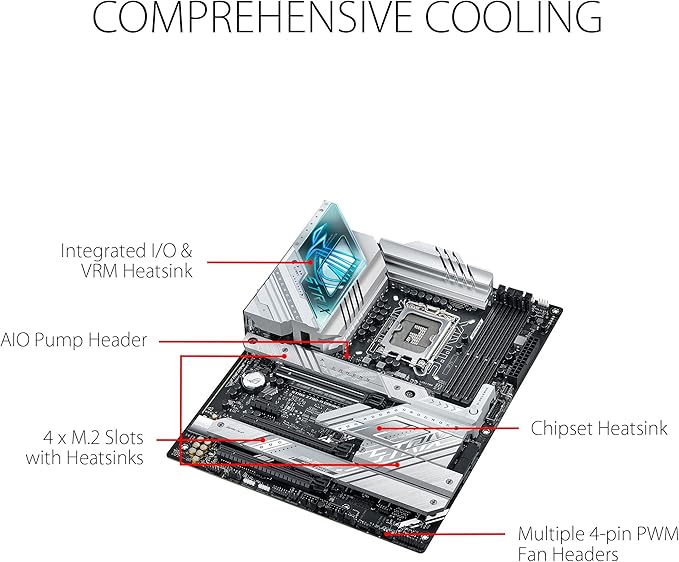

🔥 Dominate your build with ASUS ROG Strix Z790-A – where power meets precision!
The ASUS ROG Strix Z790-A Gaming WiFi D4 motherboard is a high-performance ATX board designed for Intel LGA 1700 socket CPUs, supporting 12th and 13th Gen Intel Core processors. It features a robust 16+1 power stage design rated at 70A per phase, advanced thermal solutions, quad PCIe 4.0 M.2 slots with heatsinks, and cutting-edge connectivity including Wi-Fi 6E, Bluetooth 5.3, 2.5Gb Ethernet, USB 3.2 Gen 2x2 Type-C, HDMI 2.1, and DisplayPort 1.4. Perfect for gamers and professionals seeking future-proof, reliable, and fast computing.


| Brand | ASUS |
| Product Dimensions | 30.5 x 24.4 x 7.7 cm; 1.5 kg |
| Item model number | 90MB1CN0-M0EAY0 |
| Manufacturer | Asus |
| Series | ROG Strix Z790-A Gaming WIFI D4 |
| Color | Black |
| Form Factor | ATX |
| Processor Type | Core i7 |
| Processor Socket | LGA 1700 |
| Memory Technology | DDR4 |
| Computer Memory Type | DIMM |
| Maximum Memory Supported | 6 GB |
| Memory Clock Speed | 2133 MHz |
| Graphics Card Interface | PCI Express |
| Connectivity Type | Wi-Fi |
| Wireless Type | 802.11ax |
| Number of USB 2.0 Ports | 1 |
| Number of HDMI Ports | 1 |
| Number of Ethernet Ports | 1 |
| Are Batteries Included | No |
| Item Weight | 1.5 Kilograms |
B**D
Love the sliver white theme
As described . Delivered quick Recommend for those who still want to build DDR4 builds .
R**F
Amazing
Not damaged and in the best condition
K**L
Amazing features, but unstable, freezing, GPU not detected after reboot, ethernet stops working.
This motherboard has lot of amazing features for overclocking and fan control. I was always using ASUS motherboards and this is my first and biggest disappointment since 20 years. I'm not really sure whether I was unlucky with this specific unit, but when searching multiple forums it appears that I'm not the only person with these problems and z690 series ASUS motherboards. My current setup is ASUS z690 i-gaming + i9-12900K + DDR5 G.Skill Trident 5600 32 GB + EVGA 3090 Ti. Unfortunately even at stock speeds and everything set to factory defaults - the system is freezing frequently and randomly, sometimes without any load. There are no errors in the event logs. After reboot the VGA is not detected. Unplugging power and plugging again makes VGA detectable. This was happening since I have assembled this system in January 2022 and across all BIOS versions so far (currently at version 1403). Tested with 3 different graphic cards (PNY 3090 / ASUS 3090 ROG STRIX OC / EVGA 3090 Ti) and no PCie raiser on the way. Disabling PCIe native power management (NPM / ASPM) makes issue less frequent but doesn't fix the problem, it actually introduces new problem - ethernet card stops working after 10 minutes. Enabling PCIE NPM/ASPM resolves ethernet card issue but makes system again freezing randomly. This is the most unstable ASUS motherboard system I have owned so far. Tried reinstalling OS on different drive, but unfortunately I got the same results. Apart from that the placement of NVME Heatsink makes it incompatible with lot of heatsinks and AiOs, not mention that SSD tends to overheat, since it will be sitting almost directly above GPU core. The solution for front panel SATA card is also questionable, makes it very difficult to fit into many popular itx cases. I understand its challenging to put so many features in such tiny board, but other manufacturers apparently managed to do it better. I contacted ASUS support, but since I'm really tired with troubleshooting this motherboard, as soon as I will get different LGA 1700 motherboard - I will start RMA process with this one.
ن**ي
منتج جيد
منتج جيد
M**E
Open packaging
I had missing items screws out of packaging everything was tampered with was like getting a 2nd hand product very bad dont buy from these people
P**.
Habe das Board gestern bekommen, und mich direkt an die Montage gemacht. Ich habe das Corsair Carbide 540 Gehäuse, es passt wunderbar, und alle Schraub-Gewinde sitzen bereits an der richtigen Stelle. Die Kühl-Platte für die M2-SSDs (Achtung, nur einer der beiden Slots ist gekühlt), sieht etwas wackelig aus, hält aber gut. Am Anfang konnte ich einfach kein Bild bekommen, obwohl ich es ohne Grafikkarte direkt mit dem Onboard-Display-Port versucht habe. Die LEDs auf dem Board blieben immer mit leuchtenden VGA und Boot stehen. Ich habe dann meine Nvidia 1080 eingebaut, und auch hier das gleiche Spiel. VGA und Boot leuchten, nichts passiert. Ich habe dann einen Win10 Boot-Stick eingesteckt, und auf Reset gedrückt... schon läuft alles. Danach kurzes Bios-Update über die UEFI-Funktion, dabei wird das System noch einmal komplett zurück gesetzt und wieder bleibt er bei VGA und Boot stehen. Nach Reset geht er wieder :-) Ich habe keine Ahnung warum das so ist, aber es scheint immer nur nach einem UEFI-Reset aufzutreten. Abgesehen von dieser kleinen Schikane ist das Board großartig, und alle eingesetzten Komponenten (Samsung 970 Evo Plus, Palit Gamerock 1080, Corsair 32GB Vengeance Speicher und Intel Core i9-9900k) erbringen gemäß Benchmarks die erwarteten Leistungswerte. Die Software ist großartig, die Treiber für Windows 10 werden nach Installation direkt vom Board installiert. Meldung von Windows 10 nach der Installation, dass automatisch der Netzwerk-Treiber installiert wird. Sobald das läuft (30 Sekunden), wird eine Software "Armoury Crate" installiert, mit der man alle benötigten Treiber installieren kann. Noch die Nvidia-Treiber von der Homepage nachgezogen, und alles läuft stabil und schnell. Ich habe selten einen PC innerhalb von 10 Minuten nach dem Einschalten komplett installiert und eingerichtet gehabt. Mit der Asus AI-Suite 3 lässt sich das Board komplett nach den eigenen Wünschen konfigurieren. Die Software ist zu Anfang etwas gewöhnungsbedürftig, da sehr umfassend und aus meiner Sicht schon etwas überladen. Tuner werden die ganzen Funktionen natürlich lieben, vor allem die automatischen Overclocking-Einstellungen sowie die automatische Lüfter-Justierung. Ich kann das Board also insgesamt nur empfehlen. Es ist für Einsteiger absolut geeignet, und bietet für den Profi trotzdem alle Möglichkeiten zum Fein-Tuning. Zur Qualität kann ich jetzt nach ca. 10 Stunden Betrieb noch nichts sagen, aber bisher kam es zu keinerlei Abstürzen, und die Platine wird selten über 35 Grad warm. Für etwas über 200 Euro erhält man hier also eine perfekte Basis für einen PC, die hoffentlich sehr lange ihren Dienst verrichten wird. Sollte sich daran etwas ändern werde ich berichten.
B**O
Gerçekten çok güzel bir anakart yazılımları olsun wifi olsun 9. nesil cpu desteği olsun ancak gel görki realtek ses sürücüleri sağ olsun seslerde sorunlar var. - Cızırtı patlamaları - Seslerde dinamik farkedilebilir gecikme. Usb kulaklığımın ses sürücüsünü kullanarak bu sorunu çözsemde forumlarda insanlar toplanıp Asus'a nefret kusmaya devam ediyor. Bir daha olsa almam.
J**R
Perfect
F**C
Well-built mITX ASUS board with thunderbolt and bios flashback. Perfect for my Fractal Terra build. Only downside was height of VRM heatshield which restricted CPU-fan to NH-L9x65. Perhaps for the best as I hear turbulence can cause noice if too close to case.
G**N
Motherboard is good. + built in I/O shield + enough ports for USB 2.0, 3.0,3.1, hdmi2.0 and dp + rgb lighting however cross control of rgb components for corsair, asus, logitech is a turn off. + heatsink fan blower for vram around processor + 2 nvme m.2 ports on the board + 2 rgb and 1 argb header - Only one 3.0 port on the board. Which means if you have four 3.0 gen 1 ports in front of your case( like coolermaster h500m)only 2of them will work - No inbuilt wifi and bluetooth
Trustpilot
3 weeks ago
1 week ago