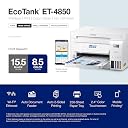
๐จ๏ธ Print smarter, save bigger, and stay effortlessly connected.
The Epson EcoTank ET-4850 is a wireless all-in-one cartridge-free printer designed for high-volume office use. It features high-capacity refillable ink tanks that deliver up to 7,500 black and 6,000 color pages per refill, dramatically cutting ink costs by up to 90%. With a 250-sheet tray, auto duplex printing, Ethernet and wireless connectivity, plus voice-activated printing, it combines productivity with convenience. Its PrecisionCore technology ensures sharp text and vibrant colors, while eco-conscious design reduces cartridge waste. Ideal for professionals seeking reliable, cost-effective, and sustainable printing solutions.


| ASIN | B09YLN1YM9 |
| Additional Printer Functions | All In One |
| B&W Pages per Minute | 15.5 ppm |
| Best Sellers Rank | #152,650 in Computers ( See Top 100 in Computers ) |
| Brand | Epson |
| Built-In Media | EcoTank ET-4850 all-in-one, manual, power cord, 1 bottle of 502 Black (127 mL) and 1 bottle each of 502 Cyan, Magenta, Yellow (70 mL) |
| Color | White |
| Color Depth | 24 bpp |
| Color Pages per Minute | 8.5 ppm |
| Colour | White |
| Compatible Devices | Laptops |
| Connectivity technology | Ethernet, USB, Wi-Fi |
| Control Method | Voice |
| Controller Type | Android |
| Customer Reviews | 4.2 out of 5 stars 1,936 Reviews |
| Display Type | LCD |
| Dual-sided printing | Yes |
| Duplex | Automatic |
| Hardware Interface | Ethernet, USB |
| Ink Color | Black, Cyan, Magenta, Yellow |
| Item Dimensions D x W x H | 50.3D x 41.7W x 25.4H centimeters |
| Item Type Name | Inkjet Printer |
| Item Weight | 6.71 kg |
| Manufacturer | Epson |
| Maximum Copy Resolution Black and White | 4800 x 1200 dots_per_inch |
| Maximum Copy Resolution Color | 4800 x 1200 dots_per_inch |
| Maximum Copy Speed Black and White | 15 ppm |
| Maximum Media Size | A4 |
| Maximum Print Resolution Black and White | 4800 x 1200 Dots Per Inch |
| Maximum Sheet Capacity | 250 |
| Maximum print Resolution Color | 4800 x 1200 Dots Per Inch |
| Model Name | ET-4850 White |
| Model Number | C11CJ60202-N |
| Model Series | EcoTank ET |
| Model name | ET-4850 White |
| Number of Trays | 1 |
| Other Special Features of the Product | Wireless |
| Output sheet capacity | 250 |
| Paper Size | 8.5 inches |
| Power Consumption | 12 Watts |
| Print media | Paper (plain) |
| Printer Connectivity Type | Ethernet, USB, Wi-Fi |
| Printer Output Type | Color |
| Printer Type | Inkjet |
| Printing technology | Inkjet |
| Processor Count | 1 |
| Resolution | 4800 x 1200 |
| Scanner Type | Flat Bed, Sheet Feeder |
| Special features | Wireless |
| Specific Uses For Product | Office |
| Total USB 2.0 Ports | 1 |
| Total Usb Ports | 1 |
| UPC | 010343967595 |
| Wattage | 12 watts |
J**M
Perfect so far
I waited for over 6 months to write a review. So far this printer is excellent. No connection problems, fast and crisp printing, and very economical. I'm only printing out content a few times a week but the fact that my cartridges still show about 80% full is a huge improvement from my last printer of a different brand. The document feeder and scanner (which I also use every month) also works perfectly. I've never had a printer that worked so effectively. I could not ask for more.
A**S
10 Million Stars - Buy this one NOT HP for Macbooks
This is my first Epson. And I want to share the full story of how we semi-accidentally ended up with this awesome brand of printer. It's pricey but so worth it. I waited about a month to write this review. Backstory: Originally, we had an HP 2540 inkjet printer that was supposed to be compatible with airplay but was plagued with connection issues for most of its usable life. It was probably about 10 years old by the time we replaced it, but the issues began about a year or two after owning it. And the issues got worse when 5g was rolled out. It seemed like it was only compatible with 2g. Why HP Sucks: I work from home and normally directly connect to ethernet to ensure that my speeds are as high as possible. However, to use the old HP Inkjet, I had to turn on wifi from my Macbook (on top of ethernet) and use stupid HP apps as a go-between to bridge the connection. I'm no computer scientist, but even I can recognize poor design and a technological bandaid when I see it. And don't even get me started on how fast it blew through expensive ink cartridges. $50-60 for black $50-60 for tri-color. You print 20 pages of normal printing and it starts saying you are low on ink. That's way too much, mkay? Eventually, it got to the point where I had to do factory resets nearly every time I wanted to use it. Also, the paper feed tray hinge hooks had broken, and the tray was literally being held together with duct tape. It was stored in one place, rarely moved, and when it was moved, it was done so gently. I think the hinge broke because the plastic just got old, cracked, and dried out. Why Bought another HP and Then Returned it, Before Buying this Epson: I am a longtime Apple person. Tend to default to buying items that are vetted/sold by Apple when they are connecting to other Apple products. And, unfortunately, the Apple store recommended the HP Envy. Literally the day I unboxed the HP Envy, it was giving me the same connection issues as the old HP inkjet. That's when I realized it wasn't the wifi compatibility. Nope. HP is just poorly-designed, ink-guzzling garbage. Research Methods // Pros and Cons: I discovered it with internet research (ranking criteria: NOT HP, compatible with PC and Mac, customer ratings, and price per print). It came down to a few different Epsons and a Cannon, but the reason this Epson won was that it has affordable ink and the ink lasts a long time. Why this Printer Rocks: 1) Ink is relatively cheap by competitor comparison 2) Ink lasts a really long time 3) it automatically prints double-sided. This blew my mind, because I didn't need or pay attention to this feature, but now I can't imagine not having it. It's saving so much paper!!! 4) Print quality is effective for basic print needs. Prints text without white lines. 5) Installation was easy and it worked as expected from day one. 6) It receives print jobs without me needing wifi on my macbook 7) it prints easily from my iphone 8) Print speeds are much faster than Inkjet 2540 9) Paper tray location is under the printer, which means you are not leaning a paper tray against a wall. And it probably won't crack apart like the plastic hinges did on my old printer. 10) Replacement Ink is easy to install in the reservoirs. Because you get a reservoir for each tri-color, your color printing will implicitly last longer. And there are aftermarket options for ink. 11) You will save so much paper. Good for the environment and your budget. Possible Negatives: 1) The initial setup was long (plan on at least 30 minutes to install firmware and test print quality). You are warned not interrupt the setup process, because it could mess things up. Follow directions and you will be fine. 2) The print quality test print will test your patience, especially if you have a hard time seeing. This is because it will generate a list of shapes and ask you which ones printed correctly. You then punch in the number on the printer to confirm alignment. The messed up shapes are only messed up by a millimeter of difference. So it can be hard to see the differences. 3) Photo-quality printing does not appear to be its strong suit. However, printing at pharmacies or online is so cheap. Just do it there. 3) It's a little bulky height-wise, but fits on top of a standard bookshelf. 4) Price is high/prohibitive. But you get what you pay for. I truly believe this is a quality product and you will save money over time because of the efficiency of ink use, low cost of replacement ink and efficient use of paper through automatic duplex printing.
J**F
Love it
I love my new printer. I waited till it came on sale after Christmas and I got an awesome deal on it. I love that there are no cartridges and when filling the ink tanks it stops all by its self when the ink is full. I like the fact it holds 250 sheets of paper. It prints way better than any other printer Iโve ever bought before.
J**M
Excellent printer and pricing!
I Recieved my "Refurbished Epson 4850" in exceptional condition as the listing specified. It looked and functioned as new and was very easy to set up and pair with three home computers that would be utilizing it. Print quality is superior and fast! The unit is compact and very well engineered. I am incredibly satisfied with this purchase!
M**J
Highly recommend this effective but pricey printer
Pricey but effective, this Epson printer gets the job done without having to resort to expensive ink cartridges. My previous printer was an HP and the ink was close to $200 CDN (for both colour and black and white). Of course this is outrageous, and despite my efforts to use cheaper ink, the HP printer rejected those cartridges and I was no longer willing to pay the piper. The Epson is a bit slower to print, and is much smaller than I expected but it is certainly bigger than a bread box. Colours are a bit lighter than another HP printer in the house (not the same one i mentioned earlier here), but the photo quality with good paper is excellent as far as I'm concerned. I print on a regular basis so have not noticed the ink clogging issue others have noted in their comments. If it happens I will update this review. Highly recommend this product for domestic purposes.
Trustpilot
3 days ago
2 weeks ago