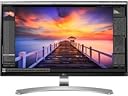
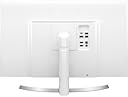
đ Elevate your workspace with 4K brilliance and effortless USB-C power!
The LG 27UD88-W is a 27-inch 4K UHD IPS LED monitor featuring a 3840 x 2160 resolution, USB-C connectivity with power delivery, and multiple USB and HDMI ports. Designed for professionals, it offers crisp visuals, versatile device compatibility, and a sleek ergonomic stand, making it an ideal upgrade for MacBook users and multitasking managers seeking premium display performance.


| ASIN | B01CDYB0QS |
| Adaptive Sync | FreeSync |
| Aspect Ratio | 16:9 - 1.78:1 |
| Aspect ratio | 16:9 - 1.78:1 |
| Box Contents | Monitor |
| Brand | LG |
| Brand Name | LG |
| Colour | black |
| Contrast Ratio | [High Contrast Ratio] |
| Customer Reviews | 4.4 out of 5 stars 572 Reviews |
| Display Technology | LCD |
| Display Type | Ips,Led |
| Global Trade Identification Number | 08806087593259, 08806087918540 |
| Hardware Connectivity | USB Type C |
| Has Color Screen | Yes |
| Image Brightness | 1 |
| Image contrast ratio | [High Contrast Ratio] |
| Item Type Name | PC Monitor |
| Item Weight | 13.3 Pounds |
| Manufacturer | LG |
| Maximum Display Resolution | 3840 x 2160 |
| Model Name | 27UD88-W |
| Model Number | 27UD88-W |
| Mounting Type | Wall Mount |
| Native Resolution | 1920x1080 |
| Network Connectivity Technology | DisplayPort, HDMI, USB |
| Picture Quality Enhancement Technology | True Color Pro, H/W Calibration |
| Pixel Pitch | 0.56 |
| Power Consumption Size | 6.96 Watts |
| Processor Count | 1 |
| Product Features | Adaptive Sync |
| Product Warranty | 1 year |
| Refresh Rate | 60 Hz |
| Resolution | 4K UHD 2160p |
| Response Time | 5 Milliseconds |
| Screen Finish Type | Glossy |
| Screen Size | 27 Inches |
| Screen size | 27 Inches |
| Screen surface description | Glossy |
| Shape | rectangular prism |
| Specific Uses For Product | Business, Education, Gaming, Photo Editing, Programming, Video Editing |
| Total HDMI Port | 2 |
| Total USB 3.0 Ports | 1 |
| Total USB Ports | 3 |
| Total Video Out Ports | 2 |
| UPC | 719192199750 |
| Viewing Angle | 178 Degrees |
| Voltage | 240 Volts |
| Warranty Type | limited warranty |
K**H
Great monitor for anyone with a Mac with USBc port
Great monitor to go with a USBc MacBook. With one cable I plug my laptop in and it will charge as well as carry 4k visuals to screen. Also great that is has USB ports as I can use my extend keyboard and leave that plugged into the monitor. Display also looks crisp 1080p when I am using it with an older MacPro via the display port. Great monitor for anyone with a Mac with USBc ports could not recommend more.
C**.
A Class Act
A class act, OSC software works well, picture is excellent, and the stand is stylish and functional, have used with the USB 3/ Thunderbolt interaface and the HMI interface, Picture is Outstanding in all areas, I think USB - C wins
D**W
Supplied with mismatched power cable
Item was shipped from a European seller with euro two prong plug. Second package included a separate UK 3-pin cable but the other end didn't fit the power supply of the monitor. Ended up using the European two prong plug with my travel plug. Monitor itself is excellent - plugged into new MacBook Air (Nov2018) via USB-C and video feed perfect. Charges laptop to, all through the single USB-C cable that came with the monitor.
M**X
Highly Recommend! 4k..
Beautiful aesthically and technically. 5/5 - 4k incredible. One slight issue - only came with a EU plug not UK..
G**H
Didnât come with a UK plug
Screen is great but did not come with a UK style plug. Fortunately already had one.
M**H
Ensure your computer has a suitable graphics card to run this screen.
This is a super screen. Very clear and easy to set up. Bought for photo editing on Photoshop and Lightroom. You must ensure that your computer has a graphics card capable of running 4K. Mine was not and had to install a suitable graphics card.
P**T
No one mentions it doesnât have speakers!!!
Great looking monitor and picture quality, but I feel I am missing the point maybe here, but there is only headphone output for sound. For this reason I wouldnât buy this again. Donât know what to do with this now, for a ÂŁ500+ screen I expect some kind of sound
B**Y
Fit for purpose and works well with an iMac
The standby swith keeps coming on and off as a reminder that it is asleep. Would be nice if it was completely off when sleeping
D**S
Exactly what I was trying to find.
The monitor is good, with a lot of custom controls and settings it makes an excellent screen. It is working with Macbook pro '17 via usbc and I can say the whole setup is amazing. One wire for video signal and power to laptop and the screen itself is very eye appealing. I like the picture and it is excellent for me, a lot of real estate. One suggestion to the manufacture is to redesign the power supply as this one looks like a white brick and does not look good on the desk. Otherwise love the product.
J**N
Ecran et vendeur au top !!
Achat effectuĂ© avec un vendeur autre que Amazon, TopBiz, d'habitude je ne laisse pas de commentaire mais la je suis obligĂ©, commande passĂ© le 7 nov au soir avec une livraison prĂ©vu entre le 14 et le 17 nov et reçu le 9 nov !!!! Sois prĂšs d'une semaine avant, alors rien que pour ça bravo au vendeur. Concernant l'Ă©cran, tout simplement incroyable, livrĂ© avec une multitude de cable, usb c vers usb c, un hdmi, un display port et un usb c vers 3.0, besoin de rien en plus. TrĂšs belle finition, parfait pour un macbook en usb c, tous mes pĂ©riphĂ©riques sont branchĂ© derriĂšre. Le meilleur de tout ce que j'ai pu voir, le prix est justifiĂ© et je ne peux que le conseillĂ©. Seul bĂ©mol a ma connaissance, le rĂ©glage du volume et de la luminositĂ© de l'Ă©cran avec les touches clavier du mac ne fonctionne pas, mais j'avais le mĂȘme soucis avec mon dell ... Si quelqu'un a une solution je suis preneur :) Encore merci a TopBiz, cordialement
G**R
Beautiful Image Quality
Beautiful Image Quality. Great Specs I have had the LG 27UD88-W monitor for about two weeks now, using it in Gaming, Web browsing, everything else I normally do. In a wordâŠWOW! No complaints so far. (the seller Video & Audio Ctr did a great job shipping & answering questions.. see below). Now for some background. I did an exhaustive 3 month search online for the ideal monitor for my needs. 2K, 4K, G-Sync, non G-Sync, curved, half a dozen or so manufacturers. Upgrading from a Samsung Syncmaster TN 1080p panel that was about six years old and still going strong, this upgrade is just jaw dropping beautiful! I am an avid gamer and also do a lot of surfing & reading and writing online. I stare at my screen 3 to 12 hours a day. My greatest concern moving up to 4K was not the image quality. I knew that was going to be great. It was the text size and other elements of the GUI being drastically smaller than 1080 or even 1440p. I have no problems with small text size although I prefer to either zoom text larger or just use Win10 scaling. Less eye strain (I wear glasses). However my wife has visual challenges that would have totally prevented her from using 4K quality with only a 27â panel size (at default, 100% normal scaling, everything readable is incredibly SMALL). So I gambled with this monitor knowing I would be very happy with the quality, backlight, pixels, panel design⊠but the text??? The scaling BETTER be good! So once it was set up, the first thing I did was play around with scaling, just in Windows10. At 200% scaling, everything looks much more readable, about the same as it was for my wife on the 1080p Samsung monitor. So the gamble paid off. I post this info for anyone who, like me, didnât want to pay the premium and move up to 30â or higher that 4K would scale better without tweaking windows. I have read and agree that at 4K resolution, 30 to 32â is really a âsweet spotâ which just makes reading better. But both windows and LG did a great job with scaling. So LG's web site has a bunch of software/driver downloads and I got the latest Windows driver, also tried the TrueColorPro 3.5.8 which I liked the idea being able to calibrate the color. I just could NOT get this software to work. I could tweak a couple things (Gamma, brightness) but the software wonât even recognize this device. Also this software requires the monitor be plugged via USB port to the PC. Did that. Then the software gave an error on every boot up, and takes too much memory to run in the back ground. Uninstalled it. Fortunately LG factor calibration really is just great. I donât really see the need to tweak for my needs. As for the other necessary piece of software.. OnScreenControl; LG did a nice job but donât expect EVERY menu setting that is available to the joystick OSD menu to be in this menu that you access via your mouse. Disappointing that. But LG does make additional UI scaling options ABOVE what Win10 gives. So for those of you wanting to go crazy and scale up above 200% you can. It goes as high as 300% (windows caps out at 200%). In this stratosphere expect some tweaking to get things to behave and fit. Takes a bit of patience if you got it. A side note â my wife and I share 1 PC and each have our own user account. She has a higher windows scaling set and mineâs lower. Windows will save/remember/allow this environment no issues. But, change the desktop resolution? It will be global and change both user accounts at the same time. So no custom resolution folks. As a nod to LG I think they just kept the On Screen Control simple and yielded most used settings quickly accessible via a right click on the task tray icon. As for the infamous backlight bleed notorious with IPS tech, this monitor has very very minor bleed on the lower corner(s) and even less at the top. Honestly if I didnât know what it was and didnât look for it, I would not even notice. Also there is NO application that I have used so far which even shows it. Just when the monitor is not plugged into a source but is on. Dead Pixels? None (yay!). I am also pleased with all the design elements of this monitor, from the height adjustment which is a breeze to raise & lower, to the rotation (I will never use that), to the USB ports in the back, to the fact that this monitor does NOT have built-in speakers. It is very hard to find a quality & high end monitor that puts all of itâs design, build and money into what I WANT (image) and not into something I will never use (crappy speakers). So that was a plus. There is NO Pivot option, which I actually need, so my fix? Place hand towel below each leg, a towel that has one side some nylon stitching embedded face down. This thing pivots like itâs factory made to do that. Just donât turn it unless you grab the stand, not the panel. Coming from an older TN panel I had just gotten used to the lame color reproduction and crappy viewing angles and especially the off whites and brightness. Imagine TN tech yields very bright panels but the whites look light beige or washed out dull. LG did a fantastic job here. I mean whites are like bleached and bright, and the colors just POP! Watching 4K videos are really great, I even took a magnifier and looked up close at the screen⊠NO visible pixels. To anyone not sure what that is about, it means no matter how close you sit or how awesome your vision, this monitor is going to look clear, bright, colorful and great. EXCEPT â if the image source is less than optimal. Donât expect a great experience if you are watching a 720p video or lower on youtube. So in essence this monitor is going to reproduce an experience for you that I can best describe as âwhat you see (stream) is what you getâ. If you have a great video, photo or game that is hi-rez you will love it. Which nowadays is not an issue as almost all newer game titles and all the web sites are using modern software and embedded elements that just look fantastic. My graphics card is a bit dated at GeForce GTX 750Ti so I ran Warframe at 3840 x 2160 and it played good, looked great but I had to dial it back a bit to keep it running smooth. At 4K resolution it was between 10 and 30Hz. I keep this game at 1440p until I get a better graphics card. Planetside2 and DCUniverse also look great. Even though my experience is not fully realized at the higher rez, everything else is a HUGE bump for me. I just never get tired of looking at this monitor. Sleek thin bezel design, stable not to wobbly stand, comfortable joystick navigation for On Screen Display (menu). After several months comparing just about every high end monitor (over 20 models) it came down to about six and I had to pull the trigger on something. This model had way too many great features and so many positive reviews so I was confident and have no regrets. While I would have loved G-Sync (yes, I should get AMD card but am Nvidia loyalist) and wish it were a larger screen, turns out you canât have G-Sync and 4K over 28â size. And that 1 choice yields a TN panel. Why bother. So at 27â to have Gsync you get a couple other choices, one from ASUS and another ACER, both of which are sweet but close to $900. Wasnât worth it for me at this time. In a couple years I give this monitor to my wife and pull the trigger on a larger 4K or 1440p Gsync gaming monitor. I have to compliment this retailer Video & Audio Center. I never heard of them, but have 4,778 reviews as of this writing, with 100% positive reviews. I figured this is a good bet. The item shipped within 24 hours which was great, and I didnât get a usable tracking number right away (for some reason UPS didnât have it in their system) so I contacted the seller by phone to ask why. They answered right away and the rep was very nice, informative, English, and helpful. They sent an email response as well. The item was trackable the next day, and was delivered within 5 days of order. It arrived packaged very well (original box inside another cushioned box) no damage to product.
R**M
Ăberzeugender 4K Monitor
Um nicht mit mehren Monitoren auf dem Arbeitsplatz hantieren zu mĂŒssen, sollte ein 4k (3840 x 2160 Pixel) Monitor her. Mittlerweile sind einige Monitore mit einer solchen Auflösung auf dem Markt und es wird auch wirklich Zeit dafĂŒr. Nach einigen Recherchen fiel die Entscheidung zugunsten diese LG 27UD88 aus. Wie sich herausstellte war dies eine sehr gute und ĂŒberzeugende Wahl. Leider stellt sich - wie bei Festplatten - heraus: Genug Platz gibt es irgendwie nie... Persönlicher Einsatzzweck ist Audio-, Video- und Bildbearbeitung, Office,Internet, Programmieren. KEINE Spiele, KEINE Filme schauen, keine hobbyistische Suche nach "backlight bleeding" oder Fehler in der Ausleuchtung. Eine AufzĂ€hlung der AnschlĂŒsse und technischen Daten erspare ich mir, da es die notwendigen Informationen auf der Herstellerwebsite und auf den einschlĂ€gigen Testseiten in HĂŒlle und FĂŒlle gibt. ErwĂ€hnenswert ist in jedem Falle der Lieferumfang, dieser umfasst nĂ€mlich DisplayPort-, HDMI-, USB-C- und USB-C-zu-USB-3.0-Kabel sowie ein externes Netzteil (natĂŒrlich, sonst geht ja nix!). Somit lĂ€sst sich gleich starten (sofern nicht nur VGA oder DVI(-D) als Quelle bereitsteht), was ja nicht bei allen Herstellern selbstverstĂ€ndlich ist. Die KabelqualitĂ€t scheint ausreichend gut, durch bereits vorhandene Kabel kam die mitgelieferte Kabelage jedoch nicht zum Einsatz. Design ist ja immer Geschmacksache. So auch hier: Mir gefĂ€llt das GerĂ€t ausgesprochen gut und macht auf dem Schreibtisch ordentlich was her. Generell wĂ€re mir zwar ein internes Netzteil lieber gewesen, dies ist jedoch dem Design, dem schmalen Rahmen und der flachen Bauweise geschuldet. Nun ja, irgendetwas ist ja immer... Ein weiteres Manko, welches den gleichen Hintergrund im Design findet, sind die AnschlĂŒsse, welche die Kabel und USB-Sticks hinten "abstehen" lassen, das war bei meinem vorhergehenden DELL 24" Monitor deutlich besser gelöst und auch sind zwei USB 3.0 AnschlĂŒsse nur begrenzt als "Hub" zu werten. Zudem ist diese Lösung nicht so angenehm zu erreichen wie seitlich, wenn man mal "kurz" einen USB-GerĂ€t anschlieĂen möchte. An ergonomischen Funktionen bietet der LG 27UD88 eine Höheneinstellung (zwischen ca. 8 und 18 cm), Neige- und Pivot-Funktion. Das Display lĂ€sst sich von 7,5 bis 18,5 Zentimeter in der Höhe stufenlos anpassen. Der Kabelhalter am MonitorfuĂ erscheint ob des nicht gerade kleinen Investments etwas "billig", versieht jedoch klaglos den Dienst - auch mit mehreren Kabeln. Im Betrieb waren weder vom Netzteil noch vom Bildschirm irgendwelche StörgerĂ€usche vernehmbar, was ja auch nicht immer selbstverstĂ€ndlich zu sein scheint. Die Bedienung erfolgt mittels eines "Sticks" welcher sich mittig unter der Front befindet und lĂ€sst sich zuverlĂ€ssig bedienen. 4 Achsen und ein Druckpunkt lassen sich schnell lernen und das MenĂŒ des Monitors bietet vielfĂ€ltige Einstellmöglichkeiten. Das verbaute 27 Zoll groĂe AH-IPS-Panel mit einer Auflösung von 3840 x 2160 Pixeln (Pixeldichte von 163,2 ppi, FullHD erreicht bei bei gleicher Diagonale nur 81,6 ppi), was 4K entspricht, bietet ein hervorragendes Bild, kontrastreich, gut ausgeleuchtet, gute BlickwinkelstabilitĂ€t und macht wirklich einen heiden SpaĂ. Selbstredend fĂ€llt die Schrift schon arg klein aus (aber absolut gestochen scharf!) und winzige Programmsymbole bieten die Möglichkeit richtig viel Programme und Dateien auf dem Desktop abzuspeichern, weil jetzt mal richtig viel Platz dafĂŒr ist. Fehlerpixel sind nicht auszumachen, lebendige Farben, vernĂŒnftige Kalibrierung ist vorhanden. Da ich nichts mit Druckvorstufen zu schaffen habe, reicht mir die (anhand entsprechenden Bildmaterials) geprĂŒfte Kalibrierung aus. Ein externes KalibriergerĂ€t fand keine Anwendung. FĂŒr jemanden mit Adleraugen sicherlich kein Problem, alle anderen mĂŒssen die Skalierungsfunktionen des Betriebssystems verwenden. Ăber die QualitĂ€t der Skalierungen der Betriebssystem möchte ich hier keine Zeile verschwenden, da dieses Thema eher nicht der Hardware anzulasten ist. Mit Windows 10 jedoch kein Thema, Windows 7 stellt sich da etwas unscharf dar. Insgesamt ein ĂŒberaus guter Monitor, der einfach SpaĂ macht, chic aussieht und mit der Auflösung einen weiteren Monitor (fast) ĂŒberflĂŒssig macht...
M**.
LG 27UD88 - Ottima proposta con USB di tipo C
All'interno della confezione troviamo monitor, piedistallo, cavetteria e manuali (assieme ad un CD per l'installazione di eventuali driver). L'assemblaggio Ăš veramente facile, il piedistallo si incastra nell'alloggiamento dello schermo, volessimo separarli basterĂ premere un tasto sul retro per liberare il meccanismo, mentre la parte inferiore viene avvitata con delle viti predisposte appositamente. Il prodotto Ăš quasi interamente in plastiche, molto solide, il piedistallo in finto metallo satinato ed il retro in plastica bianca lucida. Nella parte inferiore dello schermo Ăš presente un piccolo joystick per regolare le impostazioni che funge anche da pulsante di accensione e led di notifica (Ăš comunque possibile modificare quasi tutte le impostazioni tramite il software OnScreen Control disponibile per Windows e MacOS). Sul retro troviamo 2 porte hdmi, 1 ingresso Display Port, un ingresso audio classico, due porte USB 3.0 e la star di questo prodotto, ovvero una porta USB di tipo C. Proprio quest'ultima mi ha spinto all'acquisto di questo specifico modello, per poterlo usare comodamente con il mio MacBook Pro 2016 da 13 pollici. Con un solo cavo (attenzione ad usare quello fornito da LG e non quello che usate per ricaricare il vostro portatile, che molto probabilmente non supporterĂ il trasferimento dati) possiamo trasferire dati, audio e video, oltre che ha ricaricare il dispositivo. La ricarica che permette questo prodotto arriva fino a 60W, funzionerĂ quindi in maniera ottimale con Macbook e Macbook Pro da 13 pollici, mentre sarĂ un po' lenta per il modello da 15 pollici, che avrebbe bisogno di una potenza maggiore (85W), la ricarica avverrĂ comunque a velocitĂ piĂč o meno ridotta a seconda dell'utilizzo attuale del computer. La risoluzione di questo schermo Ăš la classica dei monitor 4k attuali: 3840x2160, non Ăš quindi ottimizzata per i MacBook come la linea Ultrafine sempre di LG, la frequenza di aggiornamento Ăš di 60 Hz sui dispositivi piĂč recenti, mentre sui primi MacBook sarĂ limitata a 30 Hz (Ăš comunque possibile trovare in rete guide per forzarla a 60 Hz). Sempre connettendo il computer tramite USB C Ăš possibile utilizzare le due porte USB 3.0 come un piccolo hub, potrete quindi attaccarci hub piĂč completi (magari con piĂč porte e lettori di memory card) oppure unitĂ di memoria esterne, ed accedervi automaticamente ogni volta viene connesso il portatile. Per quanto riguarda la trasmissione audio, il modello da 27 pollici non presenta speaker integrati (a differenza del nuovo modello da 32 che ne Ăš provvisto), Ăš comunque possibile collegare casse esterne tramite il solito jack da 3.5. In conclusione questo monitor Ăš un'ottimo prodotto per un utilizzo all round, le immagini sono eccezionali ed i colori piĂč che buoni. L'inclusione di una porta USB di tipo C ne giustifica il prezzo maggiore rispetto ad altri prodotti simili, specialmente se possedete giĂ un portatile compatibile. Se intendete utilizzarlo principalmente per gaming potreste voler valutare schermi con frequenze di aggiornamento maggiori, nonostante l'inclusione della tecnologia FreeSync lo renda un'opzione interessante se avete schede grafiche AMD.
Trustpilot
1 month ago
2 months ago