Desertcart purchases this item on your behalf and handles shipping, customs, and support to Japan.
🚀 Stay connected anywhere, anytime — ditch downtime for good!
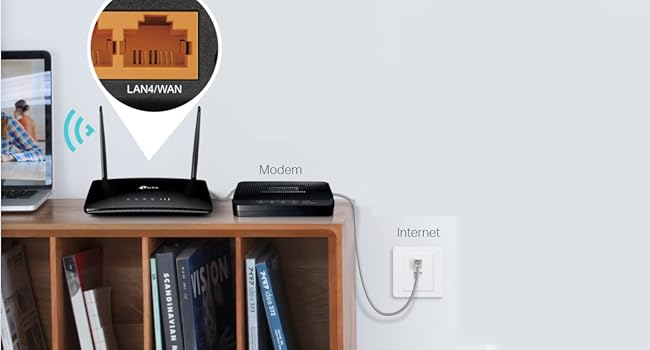
The TP-Link Archer MR200 is a cutting-edge 4G LTE router featuring a built-in SIM slot for instant mobile broadband sharing. With dual-band AC750 Wi-Fi delivering up to 733 Mbps combined speed, detachable antennas for enhanced coverage, and a versatile WAN/LAN port, it offers seamless connectivity for multiple devices. Easy setup via the Tether app and compatibility with major operating systems make it a perfect solution for professionals seeking reliable, high-speed internet on the go or as a backup to traditional broadband.


| ASIN | B0161ACBE0 |
| Antenna Location | Home |
| Antenna Type | Fixed |
| Best Sellers Rank | 1,230 in Computers & Accessories ( See Top 100 in Computers & Accessories ) 28 in Whole Home & Mesh Wi-Fi Systems |
| Box Contents | AC750 Wireless Dual Band 4G LTE Router Archer MR200|RJ45 Ethernet Cable|Power Adapter|Quick Installation Guide |
| Brand | TP-Link |
| Brand Name | TP-Link |
| Colour | Black |
| Compatible Devices | Laptop, Personal Computer, Smart Television, Smartphone, Tablet |
| Compatible devices | Laptop, Personal Computer, Smart Television, Smartphone, Tablet |
| Connectivity Protocol | Wi-Fi, Ethernet |
| Connectivity Technology | Ethernet |
| Control Method | App |
| Country of Origin | China |
| Coverage | Typical for router size and type |
| Customer Reviews | 4.4 out of 5 stars 17,479 Reviews |
| Data Transfer Rate | 150 Megabits Per Second |
| Frequency | 5 GHz |
| Frequency Band Class | Dual-Band |
| Frequency band class | Dual-Band |
| Has Internet Connectivity | Yes |
| Is Modem Compatible | Yes |
| Item Dimensions L x W x H | 30.5L x 22.5W x 7H centimetres |
| Item Weight | 9.52 Ounces |
| LAN Port Bandwidth | 733 Mbps |
| Manufacturer | TP-Link |
| Manufacturer Part Number | Archer MR200 |
| Maximum Upstream Data Transfer Rate | 50 Megabits Per Second |
| Model Name | TP-link AC750 |
| Model Number | Archer MR200 |
| Model name | TP-link AC750 |
| Number of Ports | 2 |
| Operating System | Linux, Mac OS, Windows Vista |
| Other Special Features of the Product | Easy Setup, 4G SIM Support, WAN/LAN Port, Removable Antennas, Wide 4G Network Compatibility |
| Product Warranty | 3 year manufacturer |
| Router Network Type | wireless |
| Security Protocol | WPS |
| Special feature | Easy Setup, 4G SIM Support, WAN/LAN Port, Removable Antennas, Wide 4G Network Compatibility |
| Unit Count | 1.0 count |
| Wi-Fi Generation | Wi-Fi 5 |
| Wireless Compability | 802.11b, 802.11g, 802.11n |
| Wireless communication standard | 802.11b, 802.11g, 802.11n |
P**E
Superb alternative to landline. Some tips and observations...
Purchased as an emergency router to cover for loss of home broadband (TalkTalk, again, and there's a 3 week wait for an engineer). Some tips and observations: The house in question (my other half's) is also in a mobile not-spot, so you might be wondering if this was a good idea. Well despite no reception at all (not even 2g, for texts or calls) downstairs, we found one corner of one room that had 4G. Fancy that! Turns out it's more or less in line of sight with the distant cellphone tower some miles away. Also 4G in one corner of the loft. We quickly tired of taking turns to stand in the corner on our phones, so I looked into mobile 4G options. Initially looking at small Mifi units which work the same and are portable, but actually, what we wanted was wifi around the house and the same features as our landline router. Some reviews of the small Mifi units say they have limited wifi range - great for in a car, caravan or around a table - but not for a whole house. And they don't have ethernet out connectors (critical if you want to extend wifi with powerline adapters for example, or connect a wired network item like a printer or camera). So that led me to purchase this unit, as for all intents and purposes, it's just like your normal landline router, but takes a sim card. I decided to stick with the network that works up to 4G on my phone which in this case is GiffGaff. Some reviews and some Q&A state this takes a smaller SIM card, it does not, it takes a FULL sized SIM card. But don't worry because assuming you're ordering a SIM card for this from your preferred network, most are full sized with easy snap outs for the smaller sizes, so all eventualities are covered. Now one tip... I suggest you set this up somewhere where reception is guaranteed, I did mine at home in the city where 4G is full power and full speed. It just makes it easier to get started, then install where it's needed and if it doesn't work well you know it's the reception. Installation was easy. Quick start guide included. Note that for GiffGaff it didn't automatically work, you need to connect to the router (in my case I just did it via wireless and typed in the router URL as shown in the quickstart guide) to go through the wizard, GiffGaff was selectable from the drop down menu. Once selected it then magically connected. Once done, just power off then power back up where you want it - no more setting up needed, it just connects by itself, like your phone would. Second tip.. ignore the coverage maps. The place this is installed is not in a 4G area according to the GiffGaff/O2 maps but works in one corner of one room. Initially 2 bars of 4G then 3 bars when I rotated it 90 degrees!! You can either order free SIMs from the various networks and try them or see where your phone gets coverage and stick with the same provider. The speed... wow... I mean you don't expect 4G internet in a rural "not spot" to be faster than the landline and yes we are lucky to get it from one location upstairs, but 13Mb to 14Mb download and 1.5Mb upload and 35ms ping... TalkTalk landline is 12Mb tops. That's measured, by the way, over wireless on an old 2010 Macbook downstairs in the kitchen so I am sure the actual speed is higher (I will speedtest on ethernet at some point to check). The range of the Wifi is really good. Fast connection downstairs under the router, and fast one room either side downstairs. Patchy in the lounge which is downstairs and two rooms across on the 2010 Macbook, but fine on my Moto phone there and the iPad (assume they have newer and better wifi chips built in). Fast enough to handle two people surfing. Little in the way of drop outs etc but that would be quite network dependent anyway. But data usage... OMG. My final tip. If you have been offline for a while and are using a limited data package (say up to 2Gb a month), PLEASE disable auto updates on your devices and PC and iPads etc. Because when they finally connect they will slurp updates and that can be 1Gb gone. One phone alone used 200mb updating. You will need to educate the household about NOT playing video. Or explore a 20-30GB plan so you don't need to worry. One downside of this sort of internet connection... you WILL get irritated when surfing because every freaking advert and auto play video will cost you money. An adblocker is a must with a 4G router. I never thought I'd say it, but this is a viable alternative to landline mobile in terms of speed and uptime, on all aspects apart from ongoing cost of the data. And it's a pretty useful backup to have if internet is critical to you and your landline provider is flakey.
J**E
Forget everything else!
Seriously...orget about the others under £100. I have an off-grid camper and in the 10 mile radius of my home, the signal is dire. I normally can't get any signal AT ALL in my home or the car park. I wanted to spend about £50 on one of the sim hubs for when im away fishing or hiking, but after reading A LOT of reviews, I opted for this Tp Archer for a bit more money because it has the 4G+ feature. I'm very pleased I did. This thing will give me 30Mb+ consistently in the car park (unheard of!) and 60mb+ regularly. There is no set up, and I mean NONE! Put the sim card in, switch on, connect device using the simple password on the router. That's it! Total plug n play. Never having issues. Never buffering. Never needed an additional antenna. Great bit of kit at a most reasonable price for the stress free connection you get. This is the one you were looking for. Trust me 👍🏻
O**T
Good value and reliable but not without it's quirks
Overall this is pretty good. I use it with a Talkmobile SIM and consistently get in excess of 130Mbps but normally closer to 140/150Mbps. It's not the 300Mbps the router is capable of but I suspect that is down to how I'm set up and possibly signal strength. I came from ADSL and 35Mbps so having quadrupled my speed I've not put too much effort into investigating. I have set up the carrier bands manually as I found the band aggregation was being lost if I left it to auto so that may have some impact on speed. I suspect an O2 based SIM might also improve speeds too but I'm not willing to pay the extra. I've been running this for over a year now and the money this has saved me on landline internet means it's paid for itself, I mostly work from home and reliability has been excellent with my works VPN being handled perfectly. I've only had to reboot the router a handful of times over the last 12 months, some of which may have been unnecessary as it was issues with work servers. The router is fed to a mesh network and connection speeds are maintained through the nodes. My whole house, including multiple smart devices are all handled well. The split 2.4 and 5ghz bands coming in handy for that. Setup can be as simple or complex as you like with a basic or advanced menu both available. I've had no issues with compatibility and for me has been great value for money.
K**T
Buy it, you won't regret it
I bought this router to be free of long broadband contracts, constant issues with router and bandwidth and because I want flexibility. Having absolutely no tech knowledge, even less practical ability and no child/teenager to sort it I was very concerned at how the project might end. Against the odds and within 20 mins I had set it up - this in the middle of a heatwave and having broken my glasses when I sat down to open the box. I am so delighted by the ease of connectivity, the quality of the unit, the hugely improved coverage range and finally, finally an end to the circle of doom. Having the sim slot allows me to use a provider with the best coverage for my house at a significantly reduced price which can be cancelled within 30 days. The router is portable and ideal for caravans, boats, rentals etc. Excellent value for money and with a 3 year warranty. What's not to love.
G**Y
Excellent - so much better than BT!
This Archer MR600 V2 4G+ router has proved to be a real game changer for us and our internet access. We live in a rather underprivileged area as regards broadband. Despite being in London, we cannot yet get fibre broadband and BT "copper" broadband is limited to about 5mbps - and it's so unreliable, we are unable to reliably watch streaming films or sport. So, I decided to try mobile broadband with this router. While we are surrounded by masts, only one is in direct line of sight but is fairly distant. So, after some experiments, I opted for a Poynting external 'directional' antenna. Having further experimented with a few provider SIMs, surprisingly, I found O2 to give by far the best service (I had assumed it would EE). Then, some fine tuning of the antenna was necessary to get the best signal and speeds. I opted for a Tesco "SIM Only" unlimited data plan - being the most cost effective contract without hidden data limits (and it uses the O2 network). This router itself is easy to setup and provides fast and consistent service. We consistently get 4G+ downloads of 70+ mbps. Indeed, in the evenings we get over 100mbps. Signal quality is 75%. That is excellent - 4G+ really works for us! Another reason for getting this particular router is the capability of setting LTE bands manually. Given the number of masts in our area, there are unusual problems with reflected signals and, at certain times of the day, the router would automatically switch to another band. This not only slowed down downloads, it also interupted streaming viewing - particularly annoying during a football match..... By manually setting the LTE bands (we use 40, 40), this problem was eliminated and we are rather chuffed. With the 4x gigabit LAN ports, integration into our home network was easy. This allows access to our printers, home NAS, Blu-ray player, TVs and Humax YouView box. Connection to a DECO Mesh setup extends the router's fast 5GHz WiFi to everywhere in the house - including the all-important but distant kitchen! As such, this particular router is ideal for our requirements and we are very pleased. It did take some time and thought to get the home environment set up correctly but, it was well worth it. Goodbye BT, your high prices and poor service! NOTE. If you require a 4G+ router that allows manual LTE band selection for aggregation, there aren't many available choices. This, IMHO, is the best at a reasonable price. However, beware, the V1 version of this router does NOT feature this functionality unless you get a special Beta version of the firmware from TP-Link support. So, opt for the V2 device - which is also a few pounds cheaper. The V2 device also has the useful option for scheduled reboots. I set ours to reboot at 4am every other night. That can help in keeping things running smoothly. UPDATE November 2023 I have now purchased the newer MR500 V1 version of this router for my daughter's house - again coupled with a Poynting external antenna. This router has now run 3 months without any issues or need of a reset. We are both chuffed!
C**S
Excellent 4G Router with Great Coverage and specialy made for playing games on a pc
I bought the TP-Link Archer MR600 AC1200 4G+ Cat6 router and have been very impressed with its performance. Compared to the Vodafone 5G Cube router I was using before, this router gives me much more control over my connection. After updating the firmware, it's very easy to lock specific LTE bands or even lock onto a particular cell tower, which is a huge advantage for anyone looking to optimise mobile broadband performance. I'm using a Vodafone 4G SIM card in the router, and the connection has been extremely stable. I regularly play online games such as Ark: Survival Ascended, Battlefield™ 6, SCUM, Rust, Once Human, and Dune: Awakening. Since switching to the Archer MR600, I have not experienced any latency issues, unexpected disconnects, or connection drops while gaming. With the Vodafone 5G Cube, I often had problems where the router would switch to a different cell tower in the middle of a match, causing either a complete loss of internet connection or very high ping. The Archer MR600 solved this problem because it allows band and cell locking after a firmware update, giving me a much more stable connection. The 2.4GHz Wi-Fi coverage is excellent. I use only the 2.4GHz band throughout my 50 m² house, and all my devices receive a strong, stable signal with no coverage issues. Another thing I like is the user interface. It offers a simple Basic Mode for users who just want to get connected quickly, but it also includes a powerful Advanced Mode with plenty of settings for those who enjoy tweaking and optimising their network. Overall, this is a reliable, feature-rich router with great wireless coverage, excellent network management options, and stable gaming performance. If you're using mobile broadband and want more control over your connection, especially for online gaming, I highly recommend it.
P**F
Goodbye BT Broadband. 4G wireless broadband a must for rural living.
Update Jan '24 ---------------- Well, this TP router worked well for three years....until recently. My mums 4g router went on the blink, it would drop out every half an hour or so and became more and more frequent. No use when you're trying to get tasks done online. I troubleshooted all the usual things; reboot, reset, firmware updates, tweaking settings, others experiences online....nothing worked, whatever I tried. Strangely, I have the exact same make and model of router but 'with less miles on the clock'. I swapped the routers over at my mums, yet the problem still exists, it kept dropping out. Maybe it was the SIM? Nope, it worked fine in my phone. Ultimately I never got to the bottom of the problem. Other users echoed similar problems but with different models of the 4g routers....I got frustrated and fed up, bought a Huawei 4g router and haven't looked back. Such a shame. TP Link I thought had high standards, but this device fell low of my expectation. 3 years and it goes wonky. Not good enough. Update 3 Jan 2021 ----------------- -Only one minor problem that my mum has reported with the router; it does slow down after a few weeks and therefore a reboot of the router is required. After a reboot, everything is back up to speed. Otherwise, no problems. Original Review - Oct 2020 ----------------- I recently purchased this for my aging parents who live rurally. As most people know, landline broadband out in the sticks is as much use as a chocolate teapot. Before purchasing this 4g router, my parents were subscribed to BT for their broadband, and it was expensive, slow, unreliable, kept dropping out, and there was a 'fault' somewhere along the lines that - with countless engineers visits - failed to resolve their internet issues. I had enough of it and purchased them this 4G router. All I can say that this 4G router is BRILLIANT! A complete 180 from before! It has totally changed my parents experience of accessing the internet now. They can now watch HD films and YT videos without constant loading and buffering, and pages load super quick now. It's incredible! They can fill in forms and do their shopping online more reliably now than ever, and video call family which is essential for these Covid restricted times we live in. I bought them a GiffGaff SIM to pop in, let them choose what they want from it and they were good to go. 4G worked flawlessly from the get-go! __________ A few pointers to be mindful of though: Even though the product description says 'just plug in and play', I don't find that *entirely* true. There is an element of some quick setting up to be done before you can surf. - Stating the obvious, you have to buy a SIM card. And depending on who you decide to go with, you may well have to activate the SIM before you can use it. I bought a GiffGaff SIM from a supermarket, activated it online and then popped it into the router when it arrived. It worked perfectly. - When you set up your router for the first time, you have to go to the routers settings 192.168.1.1 and do some quick set up stuff before you get going. It only takes 5 minutes if that, then you're online - but if you're a total geek, you can rummage through all the other advance settings and set up the router to your liking. ___________ In short, this router is A MUST for those of us who live out in the countryside and have lousy landline internet. Also, in the long run, I very much suspect that this will save my parents £££ from going into BT's coffers, which was very costly and wholly unreliable service. This 4G router has blown them right out of the water. Touchwood, so far so good. I hope to update my review in the coming months and see what my parents think of it too. So far 10/10. Happy bunny indeed.
M**.
Great router, wrong plug type for UK.
Great router but comes with a 2-pin plug, luckily we had a shaver adapter we could use but still inconvenient. Why no UK plug! Contacted TP-Link support and they advised that I return it to Amazon.
D**R
Internet rápida en zonas rurales
Este router destaca por su sencillez y estabilidad de conexión. Leer más para ver si te va a servir.... Nuestra Casa Rural: Estamos en una casa que no ofrecen fibra ni ADSL. Tiene buena cobertura 4g y con un iPhone XR (cat 12 para los que entienden) puedo alcanzar bajada de entre 0.2Mbps (nefasto) y 50Mbps (serve para todo, streaming, Netflix, ps4 etc). Pero es muy cambiante e inestable, y estoy hablando de puntos de fuera de la casa. Dentro con paredes de piedra olvídalo. Soluciones por empresas grandes de tlf (Movistar, Orange, Vodafone): Si no hay cobertura fibra ni ADSL ofrecen Internet por 'radio'. Es el mismo que captamos con el móvil 2g,3g,4g etc. emitida por los antenas. Pero nos ofrecen un router especial que admite una tarjeta SIM. Este SIM tiene datos ilimitados y con el router se puede conectar las dispositivos en casa mediante WiFi y/o cable. Movistar me dijó el máximo posible era 20Mbps. Tiene coste de unos €40 mensuales. Decidí investigar alternativas. La solución! Router TP-link y targeta SIM: Al investigar vi que se puede hacer todo por libre. Es decir, compras un buen router 4g como este de TP-link. Tambien contratas una targeta SIM con Gb ilimitadas (entre 30€ y 40€ mensuales). Pones este targeta en el router y desfruta de Internet como si fuera fibra. Por el momento la conexión es estable y rapido con una media de 50gb. Este router (cat 6) se alcanza velocidades mucho mejor con mi iPhone XR. Eso sí, hay que buscar la posición del router donde mejor alcanza la torre 3g/4g. Que SIM elegir? He probado con una tarjeta SIM de O2 (de mi hijo) y muy bien. Estoy esperando una nueva de Yoigo con Gb ilimitadas de 33€ mensuales (tienen cobertura tri banda de Movistar, Orange y el suyo propio). Conociendo las grandes empresas (Movistar, Orange) puede que ellos capan la velocidad (movistar me dijó 20Mbps max) y como intento evitarlas pues he eligido yoigo. Editaré esta sección en cuanto pruebo con Yoigo. En fin. Muy buen router, instalado en segundos y según tu situación una solución muy buena. Puedes viajar con el y si hay cobertura de 3g/4g siempre tendrás Internet!
C**R
Niet product uit de afbeelding
Op de afbeelding wordt de v3-revisie afgebeeld (zie de nano-SIM). Ik heb de V2 ontvangen. Deze zal dus helaas teruggestuurd worden en dan maar elders bestellen tot ik ergens een V3 geleverd krijg. Volgens de TP-Link fora, zou de V3 intussen al wel in omloop zijn in de Amazon-magazijnen.
D**I
Meilleur achat de ma vie d'internaute !
Ayant une connexion ADSL relativement faible 5/6 méga le vent dans le dos, et étant plusieurs personnes sur la connexion, il était devenu un calvaire de surfer sur le web dès qu'une personne utilisant le réseau regardais une simple vidéo ou n'importe quel contenu en streaming. L'antenne 4G+/5G étant disponible avec free à coté de chez moi (3kms quand même) depuis peu, je me suis dit pourquoi ne pas essayer un routeur 4g avec un forfait sans engagement, et la... le miracle! - 168 méga en Down - 8 méga en Up - Ping 28 ms Le tout fait sur speedtest avec une tempête dehors ! Fini le calvaire en attendant la fibre ! A moi les jeux en ligne, vidéos et autres sans compromis ! Je passe d'ailleurs de Orange vers la Freebox pop pour avoir le forfait ilimité 4g+/5G qui me servira uniquement pour le routeur et pour un prix au total moins élevé que ce que je paie actuellement. Le routeur en lui même est excellent, la portée de la Wifi est beaucoup plus efficace que la livebox, 2.4/5ghz. Le signal 4G+ est détecté chez moi à 75% alors que je me situe à 3 km de l'antenne la plus proche, sur ce point ne comparez pas avec votre téléphone, le routeur capte beaucoup mieux la 4G+ que mon iphone 12 par exemple. L'interface sur navigateur est claire, simple et efficace, il suffit de rentrer le code pin de la carte sim, et roulez jeunesse. (pour l'acces à l'interface dans votre navigateur taper http://192.168.1.1/ dans la barre de recherche) Possibilité de parametrer la bande passante par appareil connecté, VPN, contrôle parental etc..., c'est top. Son seul défaut à mes yeux réside dans le fait qu'il ne soit pas 5G.
D**D
Funciona pero no para Internet en Casa de Telcel
Excelente modem fácil de iniciar. Lo adquirí para México pensando que había compatibilidad con el sistema de internet en casa Telcel pero no funciona porque el proveedor del servicio bloquea el dispositivo para navegación en línea. Me decepcionó mucho el servicio del proveedor de internet pero este dispositivo es una maravilla para otros países y posiblemente para otras compañías telefónicas.
A**H
LTE Advanced router
It worked really well for a few months and then stopped reading my sim card. Sim card worked fine on a different device.
Trustpilot
2 weeks ago
1 week ago