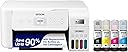
Desertcart purchases this item on your behalf and handles shipping, customs, and support to Japan.
๐จ๏ธ Print smarter, save bigger, and stay effortlessly connected.
The Epson EcoTank ET-2803 is a wireless all-in-one inkjet printer featuring ultra-high 5760x1440 dpi resolution, cartridge-free EcoTank refillable ink bottles that last up to 2 years, and modern connectivity including voice-activated printing. Designed for home and office use, it combines cost-saving ink efficiency with sharp print quality, a built-in scanner/copier, and eco-conscious design to deliver hassle-free, professional results.


| ASIN | B0BHXNP6B1 |
| Additional Printer Functions | Copy, Scan |
| B&W Pages per Minute | 10 pages_per_minute |
| Best Sellers Rank | #1,721 in Office Products ( See Top 100 in Office Products ) #7 in Ink Tank Printers |
| Brand | Epson |
| Built-In Media | EcoTank ET-2803 all-in-one, manual, CD-ROM for product setup, power cord, 1x bottle 522 Black (65 mL) and 1x bottle each 522 Cyan, Magenta, Yellow (65 mL) |
| Color | White |
| Color Depth | 24 bits_per_pixel |
| Color Pages per Minute | 5 pages_per_minute |
| Compatible Cartridge | T522 |
| Compatible Devices | Laptops |
| Connectivity Technology | USB, Wi-Fi |
| Control Method | App |
| Controller Type | Android |
| Customer Reviews | 4.2 out of 5 stars 3,880 Reviews |
| Duplex | Simplex |
| Hardware Interface | USB |
| Initial Page Print Time | 10 seconds |
| Ink Color | Black, Cyan, Magenta, Yellow |
| Item Dimensions D x W x H | 22.8"D x 14.8"W x 10"H |
| Item Type Name | Inkjet Printer |
| Item Weight | 8.8 pounds |
| Manufacturer | Epson |
| Maximum Copy Resolution Black and White | 600 dpi |
| Maximum Copy Resolution Color | 600 x 1200 dpi |
| Maximum Copy Speed Black and White | 10 pages_per_minute |
| Maximum Media Size | 8.5 x 14 inch |
| Maximum Print Resolution Black and White | 5760 x 1440 dots_per_inch |
| Maximum Sheet Capacity | 100 |
| Maximum print Resolution Color | 5760 x 1440 dots_per_inch |
| Model Name | ET(EcoTank) ET-2803 |
| Model Number | C11CJ66203 |
| Model Series | ET |
| Number of Ethernet Ports | 1 |
| Number of Trays | 1 |
| Other Special Features of the Product | Refillable Ink Tank, Scanning |
| Output sheet capacity | 100 |
| Paper Size | 4" x 6", 5" x 7", A6, Half Letter, Letter, A4, Executive, Legal, User definable (from 2.2" x 3.4" to 8.5" x 47.2") inches |
| Power Consumption | 12 watts |
| Print media | Paper (plain) |
| Printer Connectivity Type | USB, Wi-Fi |
| Printer Output Type | Color |
| Printer Type | Inkjet |
| Printing Technology | Inkjet |
| Processor Count | 1 |
| Resolution | 5760 x 1440 dots_per_inch |
| Scanner Type | Flatbed |
| Special Feature | Refillable Ink Tank, Scanning |
| Specific Uses For Product | Home, School, Office |
| Total Usb Ports | 1 |
| UPC | 010343957909 |
| Warranty Description | 1-year limited warranty |
| Warranty Type | Limited |
| Wattage | 12 watts |
M**R
Preliminary review: Outstanding!
I bought this mainly to print text documents, to make copies, and scan to a thumb drive, a document or an occasional photo, without having to run downstairs to use my wifeโs quite old Epson printer/scanner/copier. So far Iโm very impressed with this printer! I set it up to work via WiFi with my iMac (running Mac Sonoma), following the quite clear and briefinstructions on the small folded sheet that came with the printer. Setup was remarkably quick and easy (and Iโm an old guy!) after downloading the necessary (and easy to find) files on Epsonโs web site and installing them on my computer, and everything worked fine. I did not download the iPhone/iPad app for printer setup and use, but with my setup I can still print from my phone and iPad using WiFi even when Iโm nowhere near my computer. Even in draft mode on plain paper (which I normally use and is OK for most of my purposes) text came out clear and crisp, with no unwanted marks or other problems on the printed pages. Printing text on regular paper was pleasantly fast. I did not turn on โquiet modeโ nor try to print text in higher quality. As far as color printing goes, nearly all my photos are taken with a digital SLR or a mirrorless camera, and the rest on an iPhone. And just about every photo gets edited in Adobe Lightroom, then Photoshop, and those few that get printed are done on a higher end (8-colors of expensive ink cartridges) Canon printer. However, just for the heck of it I used the Epson to print a test photo that has various tones of colors and pure black to pure white โstep gradientsโ and skin tones. I printed one letting Photoshop manage the colors, which is what I always do for best results, and one letting the printer manage the colors. I was blown away with the results. While the quality was not as good as I get with my fine art printer, whether I let Photoshop do the color management or let the printer do it, it was โdarned closeโ to the Canon printerโs outputs. Although I still plan on using the Canon for all my color printing, Iโll venture a guess that for the most people who want to make color prints of their photos theyโll be quite pleased with the job the Epson does. And since the Epson has those high-capacity ink tanks, three colors plus black, rather than individual ink cartridges, even making lots of prints wonโt be very expensive. Although I canโt assess how the Epson will hold up over the long run, my initial review can be summed up in three words: a real winner!
K**N
$ saver
I've had this printer for a few months now & it seems to be a good printer. I do miss being able to have it print on both sides as my previous printer would do - it's a bit of a nusiance having to go in & turn the paper over. But, it definitely appears to be a $ saver when it comes to the ink! (The setup was a bit of a challenge for me - but that may just be me - I'm not the highest level of techie.)
H**9
First time printer owner, i think i made the right call
I have nothing to complain about with this. I bought it for the purpose of printing out a large pattern at home. It requires 110 pages for the instructions alone, and 150 pages for the pattern pieces. I bought the pattern for 1.75. I thought it would be a cheap add on for a large poster printing place to stave off extra fees for only printing one pattern. To print out the pattern as is would have been 50 and another 30 for the instructions with whole punching. And none of that counts the shipping for both. So i decided to buy a printer to stop this from happening in the future. So far its done a phenomonal job. Im still working things out. This is the first printer ive owned on my own. I did alot of research because i didnt want subscriptions for paper, ink, or page limits any of that so i looked for a refillable printer that could be used when i need it and i could refill on my time with minimal waste. Refills are cheap enough that i could stock up if the need arises. Paper is cheap to buy for the plain stuff. It may not seem like ive saved any money, but i have other patterns i need and want to buy that are already 10s of dollars that would become triple digits with printing costs and shipping. Fedex doccument printing isnt BAD but not feasible when the pattern has three separate instruction booklets and are 40 pages each. So far its printed out 300 pages and didnt break a sweat, I dont know what im doing trying to get the phone app and the printer to work together? But i will say that ive had no problems connecting the computer to the printer, MOSTLY because i wanted a printer cable since wifi is spotty in my house. Usb cable port works like a dream, i would say its strong and durable but i dont really have a comparison that isnt university's printers. I like the size. Cant really say anything on alignment. I say get it. Its a worthwhile investment.
A**R
Wish I would have done my research!
Prior to this, I had a Canon printer that always frustrated me because of how quickly it ran out of ink and how much replacement ink cost. I heard great things about EcoTank printers and I was looking forward to getting one. People were praising these left and right and the premise is solid. Tanks of separate ink that you fill with less expensive refill ink. I ordered the 2802 version at a good price that I was happy about. The printer is light and made of flimsy plastic, but I didn't really care because I wanted something that was economical, so this is what you get for your money. The setup was easy and the ink loading process was fun. Yaaay! So there it sat until I needed to print something. Cut to a month later when I needed to actually print something, and things went downhill quickly. This was the first time using it for actual printing. When setting it up, I had a test sheet print out with no problem. Now when I went to print, the sheet, while feeding in, would start canting to the side and get jammed. Three separate attempts, all just jamming while getting half way through the printing process. I went online to some forums and wow, I wasn't the only one with this problem. Postings everywhere of the same exact issue. The "fix" for this was to clean the rollers. So I took apart everything and used alcohol, rubbing, not the kind that I was wanting more and more to drink because of this damned printer, to clean the rubber parts on the rollers. Zero change. Every sheet would crinkle up and jam. When I was in the forums, almost all the other victims had the same results. Unfortunately all the other people in the same predicament had reached out to Epson and were told to reach out to where they bought it from, which is Amazon of course. Having been past the return point, they did not have many options. For a reminder, this was a brand new printer. It had sat for approx 30 days and would not work. Now granted, I didn't bother contacting Epson for a fix and maybe they would have treated me better than all the others, but I didn't care. I was done with this. I was disgusted with the printer at this point and Ron Swanson'd it into my trash bin. I have ordered a Brother laser printer. Hopefully this works better.
L**S
Lovely B/W and colored wifi printer. Get it!
Printer works well. Easy to set up, though it does take 20ish minutes. So give yourself time. Ink is nice you can just fill it up as needed and see how much you have rather than an opaque cartridge. It doesnโt print two sided but it was easy to do manually. WiFi connection is nice because I can print from anywhere in the house. If you prefer wire connection, it doesnโt come with the wires to connect to your device. Overall I like it! Itโs nice to have the ability to to do color printing and the colors come out nicely.
A**N
Satisfied
I purchased this printer due to being sick and tired of paying $50 every other week for printer cartridges. Works as it should and no difficulty with Wi-Fi connection printing from my phone or my laptop. I did however, have to buy a USB cord (did not come with the printer) to scan over 30 pages of documents. I'm not sure if the problem was with my Wi-Fi or the printer, but it would not stay connected to Wi-Fi long enough to scan all the pages needed. The cord was about $8 and had no issues while scanning with the cord.
D**R
Minimum deliverable build quality, but works for sublimation. Conditionally Recommended
I've had a number of Epson printers over the years, starting with a 9-pin FX dot-matrix, and ending with a Stylus Photo R3000. While I never expected to get back into low-end inkjet printers again, my wife's foray into sublimation printing brought me to the Epson EcoTank ET-2803. At first glance, you realize that the ET-2803 is an exercise in cost cutting taken to the extreme. For about $250 you get a paper handling mechanism, a print head, a flatbed scanner, an ink delivery system, wireless connectivity, a screen, and actual interface buttons. Oh, and it's all jammed in a cheap plastic box. Despite that, and the fact that the screen is the size of a postage stamp, the entire package works. It's hard to know longevity on something like this, but I'd imagine that it will survive long enough to go through a few maintenance tanks. What's a maintenance tank, you ask? More on that later... As far as the setup of the ET-2803 goes, there's very little to it. Unfurl the printer, load the ink, and let it go through the process of drawing the ink down the tubes - you're in business in less than 10 minutes. Things were a little different for me because I didn't load the OEM ink, and instead opted to put in Hippoo sublimation ink. I have seen the ET-2083's OEM ink performance on plain and glossy paper. It's fine, but not great. Printing is fast, but does not yield sharp text OR photo-realistic prints. This makes sense, as the ET-2803 has a cheap printhead, and the printer is only working with 3 colors (plus black). The driver is pretty barebones, not really allowing for much in terms of settings adjustment. While this may be good for the plug-and-play crowd, it really doesn't do you any favors when trying to dial in the quality of your printed output. I definitely have had some clogging issues with my printer, but acknowledge that is probably due to the 3rd-party ink that I've put in my printer, and not an inherent problem with the Epson. I mention it, though, because I have run through the various cleaning procedures on the printer's maintenance menu. The design of the printer incorporates a "last-resort" cleaning method, beyond normal head cleaning, that flushes all of the ink in the tubes into the maintenance box. That's a LOT of ink. I don't imagine most users will run a power clean, but it may be necessary if your printer sits unused for long periods. If you do run the power clean, plan to go through ink more quickly than expected, and expect to replace your maintenance tank within your printer's lifespan (fortunately, it's not difficult or expensive). My issues with the ET-2803 are likely self-inflicted through the use of sublimation ink. The ET-2803 is an OK sublimation printer, and is one of the least expensive ways to enter the hobby. As far as a general-use printer goes, the ET-2803 is a mixed bag. Consumables are much less expensive than cartridge-based inkjet printers, which is great. Print quality is usable, but not great. The main thing is that this printer makes sense in some use cases, but not in others. For example, if you print semi-regularly, occasionally scan, and sometimes need color printing, this is a good choice. If you want to dabble with sublimation printing, this is a entry-level choice. However, if you rarely print, you're probably better off with a b/w laser printer. Conditionally Recommended
J**T
I love my printer!
If your looking for an excellent value and good on ink that does the job right without any problems! Look no further this is the one to buy! I got it hooked up through the Internet the first try and still printing on from ink I purchased it with!
M**.
Trรจs bonne imprimante
Je suis vraiment satisfait de cette imprimante. Elle est facile ร installer et ร utiliser, et la qualitรฉ dโimpression est trรจs bonne. Jusquโร maintenant, elle fonctionne super bien. Trรจs bon achat!
J**E
The best photo printing printer ever
I run a business which sells photographs. This has been my printer for 20 years. I will never use another printer. Feel absolutely confident buying this printer.
L**U
best household printer
likes it a lot, best price quality ratio ever.
E**H
Solid printer with a few quirks
The Epson EcoTank is a decent printer lacking amenities. I bought the Epson printer for my home office purposes of a few black and white and colour pages. It was relatively easy to set-up but required installation of an app on my phone and a program downloaded from their official site (which was annoying). They provide sufficient amount of black and color ink cartridges which have a little extra ink leftover to fill your tank when your run out unexpectedly. It's missing a connecting wire to a desktop manager and relies on WiFi networking to connect. It does NOT have multi file scanning your typical heavy duty office printer has and you need to individually scan each page. Printing double sided requires you to flip the page manually. Lastly, I wish loading paper on the back of the printer was a bit less finicky. It does NOT have a solid end feel and the pages seem precariously placed to possibly jam. Otherwise, it's a printer and it does its job. Would I buy it again? Probably if it was on sale.
A**R
Great printer!
I have only had this printer for a few weeks but it has been great thus far! I made posters with it on photo paper that turned out beautifully. I am really impressed.
Trustpilot
2 weeks ago
1 month ago