Desertcart purchases this item on your behalf and handles shipping, customs, and support to Japan.
⌨️ Build your vibe, command your space — the LK67 is the keyboard upgrade you didn’t know you needed.
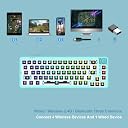
The GK GAMAKAY LK67 is a 65% compact mechanical keyboard kit featuring 67 hot-swappable keys compatible with 3pin and 5pin MX-style switches. It supports triple connectivity modes—Bluetooth 5.0, 2.4GHz wireless, and USB-C wired—ensuring seamless multi-device use. Fully programmable with advanced RGB lighting including a unique bottom mesh and side glow, it offers a customizable, space-saving design ideal for professionals and gamers seeking a personalized typing experience.
| ASIN | B09PRP5M7F |
| Antenna Location | Gaming |
| Best Sellers Rank | 55,774 in PC & Video Games ( See Top 100 in PC & Video Games ) 1,971 in PC Gaming Keyboards |
| Box Contents | USB Cable |
| Brand | GK GAMAKAY |
| Brand Name | GK GAMAKAY |
| Button Quantity | 67 |
| Colour | Clear Blue |
| Compatible Devices | PC |
| Compatible devices | PC |
| Connectivity Technology | USB |
| Connectivity technology | USB |
| Customer Reviews | 4.3 out of 5 stars 610 Reviews |
| Hand Orientation | Ambidextrous |
| Keyboard Backlighting Color Support | RGB |
| Keyboard Description | Gaming |
| Keyboard Layout | QWERTY |
| Keyboard description | Gaming |
| Manufacturer | GK GAMAKAY |
| Model Number | LK67 |
| Number of Batteries | 1 |
| Number of Items | 1 |
| Number of Keys | 67 |
| Number of Sections | 1 |
| Power Source | Corded Electric |
| Product Features | Customizable Display Keys |
| Product Warranty | 1 |
| Recommended uses for product | Gaming |
| Special feature | Customizable Display Keys |
| Style Name | Contemporary |
| Switch Type | Mechanical |
| Theme | Gaming |
S**D
Amazing value
Once I got the keyboard, I started modding it, I put a thin layer of foam in the case, tape modded the pcb, lubed all of the stabs and lubed the switches, the wire balance is amazing and it’s poppy, the parts for this is the Akko cs crystal switches, milk Japanese keycaps
G**Y
great but got a defective one
this is a great little board. was a pleasure to bulid in, the software could be better and unfortunately mine did have a defect, but for 65 pounds its a great beginner board
M**H
This board is an INSANE value for the money
Now I just want to say that this is my first custom built mechanical keyboard and this review may be long because I don't want to stop typing lol. My current setup: Personally Lubed Glorious Panda Switches Green matcha keycaps with hiragana from Amazon 4 layer tape mod on the PCB Microfoam surgical Foam tape on the bottom plastic Glorious coiled nebula cable Building the board: Taking the board apart for modding was actually a fairly straight forward experience. The top case comes off by snapping it out of place and lifting it off of the bottom case. Then you unscrew a few screws to take off the plate and PCB from the bottom case. This is the part that usually trips people up though. While taking off the plate and PCB (which are attached by screws on the underside of the PCB), you have to be EXTREMELY careful so as not to destroy the mode selector switch on the back of the case. This part took the longest for me to do because I really wasn't trying to have to buy another board. Be cautious and take your time with this part if you are planning on modding your board. After taking the PCB out and not breaking the switch, I was able to start modding. I lubed my stabilizers and got them feeling perfect. Then I proceeded to tape mod the PCB by using 4 layers of masking tape. I know people generally use 3 layers but I was going for and extremely deep thocky sound. After tape modding the PCB I then applied hospital like foam tape to the bottom case to help dampen the sound even further. Used about 4 to 5 layers on this part. After applying my mods, I had to create holes in the tape on my PCB to allow me to be able to screw it back in. I was careful putting the mode selector switch back in place and all was well. Features: The board comes with MANY RGB features. I'm not a super fan of RGB in general but the mode I use kind of serves as a decent backlight at night. The three modes it comes with are nice to have. You can essentially connect up to 5 devices for this keyboard. 3 bluetooth devices, 1 2.4 GHz device and a wired connection. Layout: The keyboard layout is your standard ANSI layout so not much to say there. Functionality: I checked all the connections on the keyboard with a pair of tweezers before setting the board up just to make sure all the keys worked. They did. The rotary knob also works flawlessly and is really convenient when trying to change the volume of media. Even works on Mac. Connectivity: Connectivity is great on this keyboard. I have no issues whatsoever using the 2.4GHz connection on my MacBook Pro M1, BT on my iPad Pro and wired for my custom gaming PC. No dropouts or anything like that. Sound: Overall I did not try this keyboard stock because based on the reviews I watched it would have sounded akin to my corsair K65 lux that I finally retired after 5 years of use. I wanted nothing to do with the hollow sounds of a keyboard. I wanted something way more substantial and deep. My cost breakdown: This keyboard - $70 Personally Lubed Glorious Panda Switches - $50 for 2 packs Green matcha keycaps with hiragana from Amazon - $35 4 layer tape mod on the PCB - $4 Microfoam surgical Foam tape on the bottom plastic - $7-8 Glorious coiled nebula cable - $50 Krytox 205g0 - $13 Switch lubing supplies - $10 Glorious Switch opener (I would not recommend this one) - $10 TOTAL: $250 oof... Final thoughts: For $70, this keyboard is a phenomenal value. It is of decent quality and you can really make it sound like an expensive board. Now as you saw above this board cost me $250+ dollars to build and about 6 hours of build time. You're probably wondering why I turned a $70 board into one thats $250... Well that is because I had to buy all the supplies for it. I didn't have switch lube, I didn't have brushes, a switch opener, masking tape, keycaps, switches, etc. I was literally starting from 0. I also wanted a really nice coiled cable to go with the board instead of the one that was included. I didn't have to do any of this. A simple setup without lubing and starting from 0 can literally cost you around $130 with just the board, Akko switches, and $30 keycaps and possibly no mods if you don't have masking tape lying around. Even at $130 this board is still a very great value. I would HIGHLY recommend to anyone thinking of buying this to use for a build. Thank you for coming to my TED Talk lol. P.S. I ended up using Microsoft Power Toys to change the keybindings, because I didn't really trust the software that was recommended to use for the board.
N**H
GK gamakay lk67
the lk67 is an amazing pcb, this was my first custom keyboard build using novelkey x cream switches and it was super easy to put together the stabilisers are perfect and it looks incredible, it is on the expensive side but well worth it!
T**N
Es grandiosos este teclado, sin embargo...
Es magnífico si vienes de un teclado ya armado, es decir, el típico teclado barato que ni si quiera se puede considerar ga de entrada. Ahora bien, viene la explicación del porqué de las 4 estrellas, y la razón es que el plástico se deforma cuando lo abres, puede que yo no sepa manejar correctamente el plástico, pero en mi caso, el plástico se deformó. Por lo que les recomiendo no abrirlo, utilizen mods que se puedan implementar sin abrir el teclado, como el PE Foam qje es como una pegatina y ya sería todo lo recomendable que le podrían hacer y la ultima modificación que le podrían hacer son los estabilizadores. Si gustan arriesgarse adelante, pero no lo estén abriendo constantemente solo abranlo 1 vez, pero en esa vez hagan las modificaciones correctas y traten de no equivocarse en ellas, para así evitar abrirlo, es mas si pudieran cómprense 2,uno que sea su conejillo de experimentación y el otro que sea el bueno. Muchas gracias por leer. Edicion: Si lo llegan a modificar no corten todos los postes, simplemente corten los postes de en medio, los que están en el del backspace, el de multimedia, el de las flechas, el del shift izquierdo, el de espacio y el del tabulador son los que no deben de cortar porque ayudan a que el Top Housing cierre correctamente, no cometan el error mio de cortar el del espacio. Y si quieren realizar el Tape mod solo pongan una capa para que así la entrada USB-C no esté descentrada del agujero. El PE Foam si es muy recomendable mejorará mucho más el sonido que ya tiene de stock. Y ya son todas las recomendaciones que tengo para que no cometan los mismos errores que desgraciadamente yo cometí. Segunda edicion: Después de un par de modificaciones para lograr la mejor experiencia sonora, el teclado obtuvo una cierta curvatura que hace que baile sin la presencia de un mouse Pad, por lo que recomiendo que si vas a modificar el teclado, pienses muy bien en lo que le vas a realizar para evitar el Case se deforme.
J**.
Great Board, Mod Friendly, Great Customer Support
Writing this review after fully completing my keyboard build. Firstly, props to the vendor for providing such an excellent board with great value, AND for providing great customer support. Although being constructed of mostly plastic, this board feels great and weighty for its price point. Second, modding with this board is fairly simple, yet a little complex. For this board, I have used a mix of lubed Gateron Clears and Browns. For some misc. mods, I have used electrical tape and packing foam to get a "thocky" sound profile and the typing experience has never been smoother. The stabilizers are alright as well, although I do not really like the spacebar stab out of the lot. There were a few issues that I did not like. The selection switch for the 3 connection modes, feels really frail and does not slide in a way that indicates that the mode has changed. To remedy this, I placed thin pieces of electrical tape around the hole cutout so that the switch is a bit sturdier. Another issue I ran into was with the hot swap sockets, upon first impressions, these sockets are a bit hard to press switches into but get easier the more you swap switches. I noticed that after inserting the switches the first time, it took quite a bit of force and it put unnecessary pressure on my fingers. Over time as I modded and tested out the board over two weeks, the sockets became much more loose and easier to insert switches into. Overall, I am glad to say that for my first build, I am glad to have chosen the LK 67. This is one of the cheaper beginner boards and it was fairly simple to mod and get amazing results. As a plus, the customer support is top notch as they follow up quickly with any reviews and questions that anyone might have. I will definitely keep Gamakay in mind for my next keyboard build!
J**R
Great kit just make sure you have the right keycaps
Great kit but make sure you have a 1.75u shift key that will fit. My ducky SA profile caps didn't work even though the shift was 1.75 there was slight interference with the case and I had to use akko ASA keycaps instead. Besides that it's awesome, the software could use better instructions (make sure you are in wired mode when you are trying to use the software or it won't recognize the keyboard) but once you figure it out it's fine and pretty versatile giving you some extra lighting options and allows you to set up macros and switch around what keys do what and choose what the knob controls. Also when looking for knobs most guitar knobs will work fine and you can also search for tm680 knobs on amazon and find a few. The green looks pretty good as well. Here is a picture after it's been all set up with akko lavender switches akko periwinkle keycaps and a knob sourced on amazon with the lighting set up to match the caps. One complaint about this though, there isn't a way to change the lighting on the sides of the board, not really a deal breaker but does kind of kill the look if you are trying to make everything match when looking at it from the side. Also the lighting around the knob is also unable to be changed, again not a deal breaker and it does serve a purpose (showing which mode the keyboard is in and also a low battery indicator) but still an annoyance when trying to match up everything. All in all a great budget kit in my opinion. Pros: Great price, media controls with the knob, tons of different color options, software allows for macros and custom layouts as well as custom lighting options, not the heaviest board by any stretch but does have a nicer weight to it than I was expecting Cons: Certain lights cannot be changed, the plastic does feel kinda cheap, if you plan on modding you can easily break the mode switch when disassembling if you aren't careful, The right shift is 1.75u which isn't normally THAT big of a deal however the thickness of the case plastic next to it is slightly to thick making it unable to use certain keycap profiles such as SA thus limiting the options even further than normal. All in all I think it's a great value and the pros along with the price outweigh the cons of this kit, making it a great place to start of you are wanting to dip your toes into the hobby.
Trustpilot
1 month ago
3 weeks ago