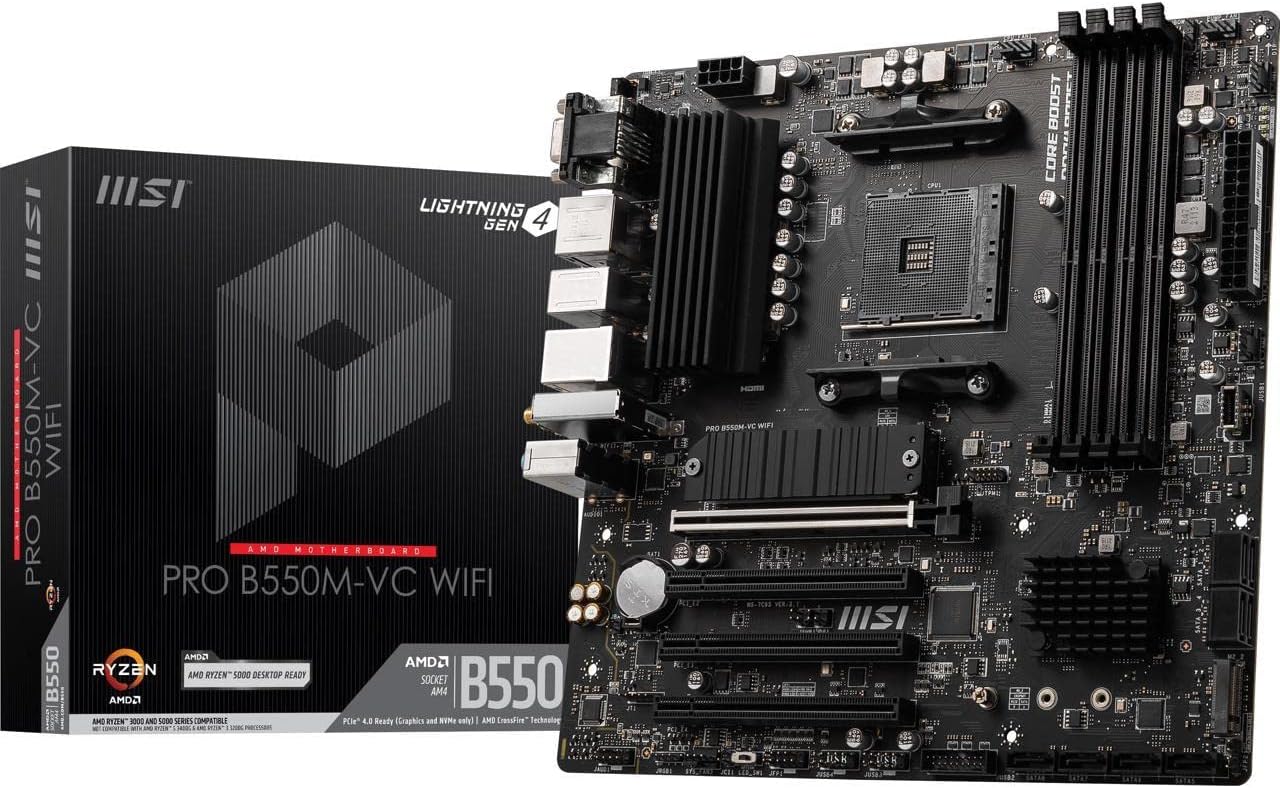
🚀 Power your professional edge with MSI PRO B550M-VC — where speed meets stability!
The MSI PRO B550M-VC WiFi ProSeries motherboard is a compact yet powerful mATX board designed for AMD Ryzen 5000 and 3000 series processors. It features PCIe 4.0 support, ultra-fast DDR4 memory up to 4400 MHz (OC), and advanced thermal solutions including M.2 Shield Frozr. Integrated Wi-Fi 6E and Bluetooth 5.2 provide next-level wireless connectivity, while a user-friendly BIOS and durable design ensure reliable performance for professional workflows and gaming alike.

| ASIN | B0BDCZRBD6 |
| Best Sellers Rank | #10 in Computer Motherboards |
| Brand | msi |
| Color | Information Not Available |
| Customer Reviews | 4.5 4.5 out of 5 stars (1,208) |
| Date First Available | September 6, 2022 |
| Item Dimensions LxWxH | 9.6 x 9.6 x 2.5 inches |
| Item Weight | 2.4 pounds |
| Item model number | 9B13-144-548 |
| Manufacturer | MSI |
| Memory Speed | 4400 MHz |
| Number of USB 2.0 Ports | 6 |
| Processor | amd_ryzen_7 |
| Product Dimensions | 9.6 x 9.6 x 2.5 inches |
| RAM | DDR4 |
| Series | PRO |
| Wireless Type | Bluetooth |
K**A
Excellent Value and Performance, easy to use.
I have been using this for quite a while now and I have to say, I am not disappointed in my choice. This has been one of my greatest purchases so far, and I am glad I put my trust in MSI rather than ASUS. The quality is amazing, the BIOS is easy to navigate even as a beginner, and it has all the connections I need. It was also really affordable and provided so many benefits that other motherboards for the same price could not provide.
J**G
Great Budget-Friendly Motherboard – Runs Games Flawlessly!
The MSI PRO B550M-VC WiFi ProSeries Motherboard has been an excellent choice for my mid-range gaming PC build. I paired it with a Ryzen 5 processor and an AMD Radeon Sapphire graphics card, and it handles everything smoothly. While I could have gone with newer hardware, this board made it possible to build a reliable system on a budget without sacrificing performance. For the money, it’s fantastic—supporting WiFi, solid RAM compatibility, and plenty of connectivity for everyday use and gaming. I play Valorant and Halo Infinite regularly, and both run flawlessly on this setup. The board feels well-built, stable, and efficient. Overall, if you’re looking for a motherboard that offers great value and dependable performance for gaming and general use, this one is hard to beat.
H**S
Works well.
Great product. I wish it came with paper instructions, but it can be pulled up online.... after you get the PC assembled or with your phone. Good product. It has 2. NVMe M.2 slots with alot of fan and argb headers.
E**S
Great motherboard
Had 0 issues installing this motherboard. It is my first board with built in bluetooth and wifi which are really convenient. Don't forget to screw in the antennas as they support both wifi and bluetooth. If you forget (like I did at first) your signal will be trash. After the antennas were screwed in I got good signal.
L**N
It's a Mobo
Working very well for my son and his 5600x and 5070.
J**E
Great matx am4 board
Installed 64gb 3200 cl16 ram, 5700x3d, 7900xtx. Runs perfectly, bios is easy to navigate and price to performance is fantastic.
S**D
Support 3 monitors with APU. 8 SATA for HDD/SSD. Avoid using drivers on MSI Centre.
Great value for $110-ish! It supports 3 onboard connections to 3 monitors (HDMI, DisplayPort, and VGA), with an APU such as Ryzen 7 5700G. HDMI is 2.1, but DisplayPort is only 1.2, so check on your monitor's resolution. The motherboard comes with BIOS version 7C95vH8, so the BIOS does not need to be updated to support Ryzen 7 5700G. Version 7C95vH0 and above supports this CPU/APU. It supports up to 8 SATA storage devices, so it's great for future expansion on HDD or SSD. It works perfectly with a case like Phanteks Eclipse G500A (This case also provides front panel type-C USB connector to this board). Note that the M.2_1 slot support Gen3 PCIe SSD, unless your CPU/APU supports Gen4. Practically there is not much difference between Gen3 and Gen4 PCIe SSD anyways for either gaming or daily use. The compatibility list on the MSI website was last updated on FEB 2023, and the tech support is not very helpful on finding anything other than that list. The newer versions of DRAM should mostly be compatible, and you just have to plug them in and see if they pass the onboard EZ LED light debug checking sequence at booting. If so, then your DRAM is good to go. Caution: Do NOT install the B550 chipset drivers through the MSI Centre prompt! If you do it, it will mess up your system and make it not bootable. Then you'd have to restore the system to the last recovery point. Just go with the drivers on the MSI website (and the AMD website for your CPU/APU), and you are good to go.
J**S
Solid and Flexible Motherboard for a Home Server Build
I used the MSI PRO B550M-VC WiFi ProSeries motherboard in my most recent home server build, and it has turned out to be a great fit for what I needed. As a dad running a small home lab out of the corner of my office (with four kids and a dog occasionally bumping into my gear), I needed a motherboard that could balance reliability, expandability, and a small footprint, and this one delivered. One of the biggest selling points for me was the multiple PCIe x16 slots. I’m using one for a GPU (for some light Plex transcoding and occasional AI tinkering) and another for an HBA card to expand my drive capacity. That kind of flexibility is rare in mATX boards, and it really made this one stand out. Another huge win: the SATA ports. I’ve currently got six drives hooked up, four for bulk media storage, one for VMs, and one for parity, and the board handled it all without any splitter drama. There’s room to grow, which is a relief because these kids keep filling the Plex server with every animated series ever created. The onboard WiFi was a nice bonus. I’m wired in most of the time, but having WiFi as a fallback during router reboots or for quick setup made things easier. Build quality feels solid, and the BIOS was straightforward to navigate. I had zero issues getting my Ryzen 7 5700G up and running, and I haven’t had to touch the setup since, just how I like it for a home server I want to forget is running in the background. If you’re looking for a dependable, feature-packed micro-ATX board for a home server or general-purpose system with multiple PCIe devices and lots of storage, this is a fantastic option. It’s done everything I’ve asked of it, and more, without fuss.
P**Y
Cheap AM4 motherboard for a cheap mid-range build with 5800XT. Easy to install and good performance. Can't complain.
S**O
I have a love/hate relationship with this mobo. Once it’s set up, it works like a dream! It comes with a very basic BIOS which doesn’t allow it to operate much at all. To get it up and running, you need to install the latest version of BIOS from a flash-drive. That means that you have to have access to a working computer that you can use to download the latest BIOS onto a flash-drive before you can upload it onto the mobo. It was a complicated process for this novice, but now that I’ve done it, not so very difficult after all! The next problem was that the mobo won’t access my old HDD’s because it operates UEFI protocol. According to the manual, which I had to download onto my phone (!), the protocol can be switched to accept other versions, but my initial attempts have been unsuccessful. I therefore had to download Windows onto a flash-drive, via another computer, and upload it onto the mobo. Because the mobo is cutting-edge, it has 2 iSSD ports. I had bought a 1TB iSSD as part of the build and the installation was fairly straightforward, but fiddley. And now the ‘love’ bit!!! The build powers up in 15 seconds and powers down in 5 seconds. The in-built WiFi works well, even though one of the antennae is loose - I’d have to take the mobo out of the case to tighten the nut! Although I’ve not given it a stern test, it performs all the ordinary tasks effortlessly and shows every sign that it could allow my R5 CPU to fly!!! One last thing; the BIOS for this board isn’t on the MSI UK list - you have to get it from the MSI US list!!! As I said at the start - a love/hate relationship!!!
P**N
I love my new MSI motherboard. It’s super fast and has the best & easiest Bios interface I’ve seen. It includes (2) NVMe slots, Bios update button and mATX size is perfect for smaller cases. I also like the MSI driver installation utility which popped up automatically right after boot. This board looks unassuming and avoids unnecessary bright paint or component covers.
J**M
The board came new (anti-static bag was taped) and no noticable defects, first boot-up was pretty slow. The led indicator lights flickered a little when booting, something not noticed before on other MSI boards. Initial boot using CSM (instead of default UEFI setting) into sata SSD (for testing) took some time as well, subsequent boot-up into windows were fast after the board cycled through it's boot cycle. Yet to try M.2 and WiFi. 4600G and direct HDMI to MOBO were used for testing. Everything else worked well, wireless kb and wired mouse worked normally out of the box. Overall board was new and worked as it should out of the box. All items in the box were unopened and accounted for. Remember to switch to CSM instead of UEFI in Bios to boot up legacy drives.
J**N
Build was fine and the board was decently size and decently featured, however i had issues building only on wifi as the wifi driver given by MSI was the wrong driver and could not get the wifi/bt to work. get the wifi/bt drivers from AMD/MEDIATEK instead of MSI, for the AMD RZ608 wifi. Other than the wifi issues, board was easy to work with, M2 NVME worked fine and wifi speed was fast
Trustpilot
1 month ago
2 weeks ago