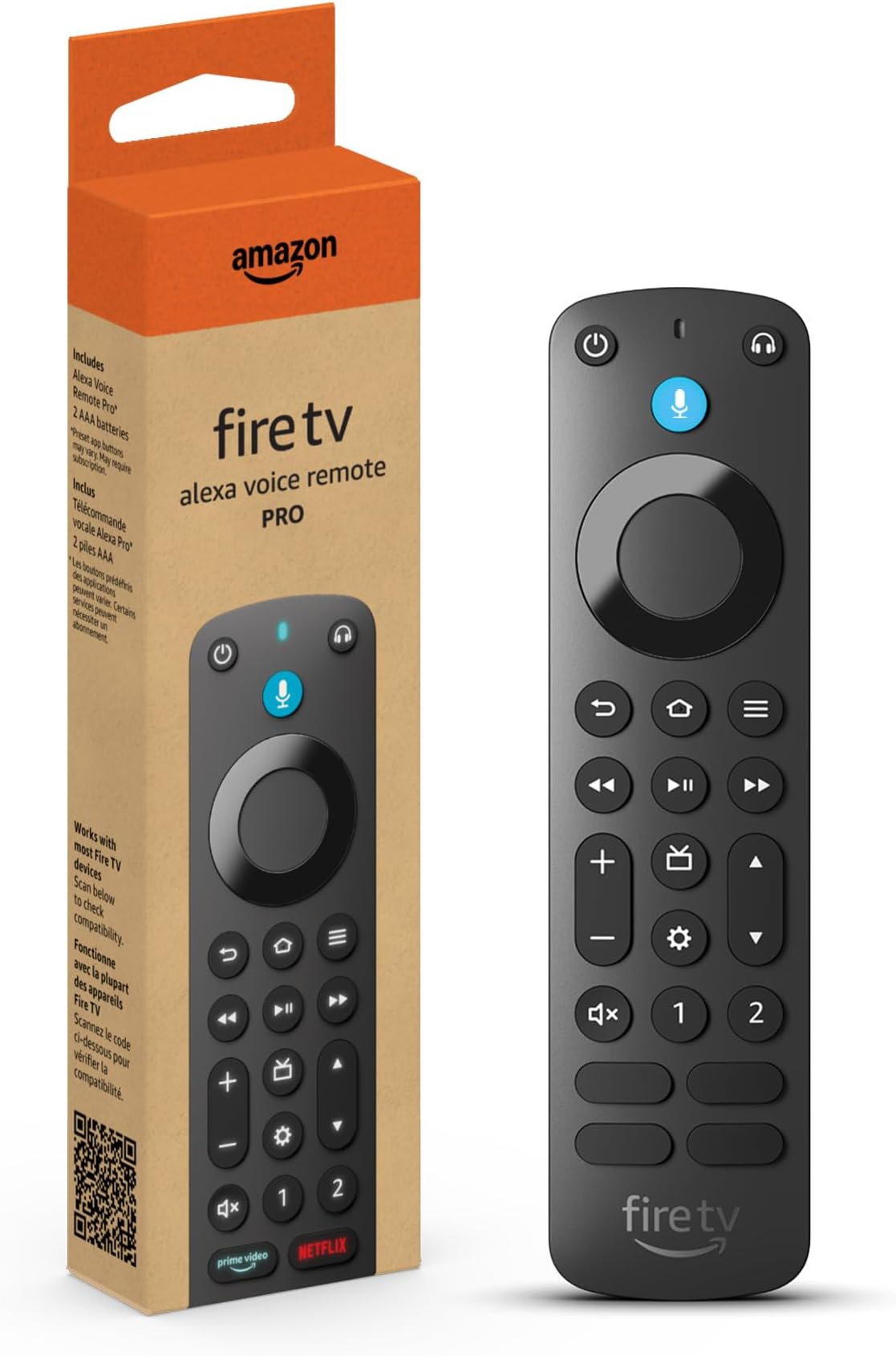
Amazon Fire TV Alexa Voice Remote Pro (newest model) with remote finder, TV controls, and backlit buttons
Product ID: 473860611
📡Bluetooth + IR dual tech
📱Customizable Alexa shortcuts
🔦Motion-activated backlit buttons
Desertcart purchases this item on your behalf and handles shipping, customs, and support to Japan.
🎬 Command your entertainment like a pro—never miss a moment!
The Fire TV Alexa Voice Remote Pro combines Bluetooth and IR technology with motion-activated backlit buttons and customizable Alexa shortcuts. Featuring a remote finder, dedicated headphone pairing, and integrated TV controls, it’s designed for seamless, hands-free entertainment management on compatible Fire TV devices.
| Size | 38 x 148 x 18 mm |
| Weight | 54 g (without batteries) |
| Batteries | 2 AAA (included) |
| Technology | Bluetooth, IR |
| Compatibility | Compatible with most Fire TV streaming media players, Amazon Fire TV smart TVs, and smart TVs with Fire TV built-in. Check compatibility with Fire TV devices. |
| Warranty and service | 90-Day Limited Warranty and service included. Use of Fire TV is subject to the terms found here. |
| Included in the box | Alexa Voice Remote Pro, 2 AAA batteries, Quick Start Guide (PDF / Accessible HTML) |
R**S
Rough start, but now it's great.
Update #2: I received the replacement remote today. After installing the batteries and pressing the home button, I navigated to the menu on the Fire Stick to add a remote. It immediately found the remote and paired. Total setup time was under 15 seconds. When I ask Alexa where my remote is, the remote starts beeping as intended. The tone isn't super loud, but it should help locate the remote as intended unless it's under a cushion. The tone almost sounds like the Universal Studios intro. The custom buttons are also super easy to setup. My overall impression of the remote itself after finally receiving it... Is 5 out of 5. It works exactly as intended, and was super easy to setup (once I received a working unit). I only wish the replacement process has been smoother, but it worked out in the end. While I would take off a star because of the initial experience, the product is what I'm rating. And yes, I would certainly recommend this product to others. Update #1: After writing my initial review, Amazon customer service contacted me in hopes of reaching a resolution. They apologized for the confusion with the experts, and were very friendly and understanding. While they were not able to "send a replacement" directly, they agreed to issue the refund immediately, and told me to keep, donate, or dispose of the current remote. I opted to have the refund credited as a gift card, so I could immediately place a new order and apply the gift card, which I did. The new remote should arrive by Saturday. I will provide additional updates on the product one I receive it and finally get to test its features. Initial Review: I ordered this remote to replace a lost remote. By the time it arrived, the original FireTV Stick 4K was bricked, and they could not fix it. I ordered a NEW FireTV Stick 4K during Black Friday, and got it set up tonight without a hitch. Once it was setup, I attempted to pair this Remote Pro with my new FireTV Stick 4K (3rd Gen). Despite repeated attempted holding the Home button down, it would never connect. Long story short, I've now spent 1 hour and 40 minutes on two phone calls, being transferred to 6 different representatives. I've factory reset my remote pro 4 times, changed batteries, unplugged the FireTV Stick, and done everything but dance.... Everything the customer service "experts" advised. The first FireTV "expert" told me there wasn't even an option to add another remote in the settings (?!? Settings.... Controllers and Bluetooth Devices). Then I spoke to another "expert" who told me the Remote Pro wasn't compatible with Fire TV Stick, despite its compatibility page listing 5 types of Fire TV Sticks it's compatible with. After finally having tech support agree it was likely an RMA.... they refused to send a replacement, as it was not in Amazon's policy to do so. The only option would be to send it back, wait days for it to be received, so they can process the refund, wait for it to show a credit, and then I get to spend the money on the remote again and hope for the best. I've been an Amazon Prime customer for years, and I've had great experiences 95% of the time.... But this is by far the worst experience I've ever had with them. I think the product page sounds great for this product, and I understand RMAs happen... That's all fine. I get it. But to go through nearly three total hours just trying to get a remote paired or replaced has me questioning if it's worth it in the first place. Perhaps if I ever get a working Remote Pro, I'll be glad to update my rating.
E**E
Great remote!! Replacement 4 me !
Lost my remote , this one is great . Easy to pair or connect w finder feature and back lighted up buttons and 2 extra programmable buttons for favorite channels! Love it thank you for a great remote, well worth the money !!!
R**P
Controls BOTH TV AND RECEIVER for power and volume!
This remote is even better than I expected! Even though I already have perfectly fine Fire Stick remotes as soon as it popped up on my TV screen I immediately ordered one (not something I usually do!) for the backlit feature alone. While waiting for delivery I started reading more about it and got more and more excited because of other features, a couple of which I already had on my previous remote but still worth mentioning. Can turn on TV AND/OR receiver when you press power! This is easily set up during the simple remote setup process. You just have to select the brand of each; you do not even have to fool with model number or other info. Keep in mind that when using these buttons you need to have the remote pointed toward the system because these controls us IR like a regular remote, while most controls between the Fire Stick and remote are WIFI so not directional. There is a caveat about this feature if you have a little more involved "theater" system and also use a multifunction remote like a Logitech Harmony that automatically changes source and input ports depending on what you are doing. For example, if you press "Watch a Movie" on the Logitech to watch a blu-ray disc the Logitech changes the HDMI ports as necessary. The next time you press the power button on the Fire Stick remote the system input and source will still be set for watching a DVD. The Fire Stick remote will turn on the TV and receiver, but the TV will say not connected because ports are wrong. You have to then use the Logitech remote to turn the system All Off then press Watch TV to get the ports set properly. This is a minor nuisance. A more common issue is that sometimes when you turn the system off with the Fire Stick remote and maybe do not have the remote pointed correctly the receiver may not turn off, which you may not realize if the receiver is behind a fabric door like mine. The next time you try to power on the system you actually toggle the receiver off so you will again get a not connected message. Again you have to grab the Logitech to All Off then Watch TV to get everything in sync. There may be a fix for some of this. I recently realized that in Settings for either the Fire Stick or the remote there are a number of settings you can change to modify how the devices interact such as the length of the signal the remote sends, the kind of thing more advanced users might want to explore. TV channel and volume controls are now located and look more like most remotes which, to me, also makes them more convenient to use. Two programmable streaming service buttons are great and pretty simple to set up. We watch a lot of stuff on Paramount+ so it is nice to just be able to jump to that service after watching a different one. I wish more of them were programmable. The backlighting is great! When you pick up the remote the backlight automatically comes on. So I am super happy with this new remote!
T**S
Nice remote, battery drainer
Batteries die fast, but it’s a good remote, the find my remote feature is great, especially since my kids always misplace it and it makes it easy to find. The remote lights up when moved and I think it’s because of this the batteries die quickly. So far, I haven’t found a way to turn the light off. Overall, a good product.
T**E
Best Fire TV Remote to Date...
Great remote upgrade. 1. Less than a minute to add, including going through settings menu for addition., 2. Ease of programming the 2 programmable button which you can use on smart things.. Heck it offered to program my last smart Alexa request... Yes, literally my last verbal Alexa request not TV or home theatre device related. You can add apps, functions, etc. 3. The quick buttons are 4 of 5 tops apps I use to which I programmed the 5th (my #1 Live TV app) to the 1 button. 4. It automatically connected to my previous remote settings controlling my home theatre system volume controls... 5. The backlight is also a well needed addition for an actual OEM unit.... Sweet... Best Fire TV Remote to date... I guess that's why it's the Pro... This is coming from using the latest remote (2026). It's my backup now... I actually bought this remote as a secondary/backup... Go figure.. LOL It's Nice... Real Nice...
B**.
Worth the upgrade from the standard remote
I’m really glad I upgraded my Fire TV remote to this one. It was very easy to pair with my Fire TV, and it worked smoothly right away. Compared to my old remote, this one feels like a much better and more convenient upgrade. The remote has a comfortable design, and I love the backlit buttons. They make it so much easier to use in a dark room, which is something I really missed with my old remote. The remote finder is also a huge time saver, especially when the remote gets misplaced. Overall, this is a great upgrade from the standard Fire TV remote. The added features make it much more convenient, easier to use, and worth the purchase.
S**N
You cannot beat the features these remotes offer!
We love these remotes! This came with our one Amazon TV and my dog chewed it, so we had to buy another to replace it because the features it offers are AMAZING! For starters, we lose our remotes ALL the time! One of those times, I jokingly said "Alexa, where is the remote" and to my wife's and my surprise, it started beeping!!!! We did not know it had this feature, so we burst out laughing. But that right there made this a must have replacement after our dog chewed ours. On top of that feature previously mentioned, the light up buttons are awesome! We use this remote in the bedroom at night, so with poor to no lighting, its nice to know what button we need to press without guessing or trying to angle the remote to the TV for that little bit of light. This remote is a must have and we will eventually replace all of the remotes for our compatible devices with this one.
T**I
Works great!
I was a little hesitate to get this pricey fire TV remote because I’m not overly technical. But I really wanted the audio button to be able to use my earbuds. The backlight and the system buttons were merely extra perks for me. The “find my remote” wasn’t that important to me because I’ve never lost it. It has a “spot” like Sheldon Cooper. We always know where it will be. lol The setup was surprisingly simple! I was pleasantly amazed. I wanted the audio remotes for our living area so when I’m in the kitchen I don’t have to turn up the TV to deafening volumes. I can leave it where it is and use my earbuds while I’m cooking or doing dishes. Or cleaning around the house for that matter! I also wanted it in our bedroom for use with my sleep earbuds. That way I can still hear it comfortably while my husband sleeps next to me before I go to sleep. Both setups were super simple! Then I was even able to use one of my older remotes that was actually new from the bedroom with volume controls and replace it with a remote without volume controls with the fire TV I was using in my work room. All of them synced without fail. Also, I realized that you can still use earbuds or headphones with all your fire TVs even without the audio button. You just have to go through the settings. But the button makes it more convenient because you can use it while it’s on a show without interruption. There is a slide bar that comes on the right hand side with the controls. Pretty handy! The remotes are pricey. I paid $35 for each one. But as long as they last a long time as my others have it should be worth it. Now the cons. I actually don’t know anyone who has Direct TV and Amazon Fire TV. We used to have it but we cut the cord and got Fire TV. That’s was the whole point for us. So that button is a waste and will never be used. We also don’t have Peacock. Are these companies getting a kickback? They are not the most popular with Fire TV customers as per my research. What about Max, Hulu, Disney+, etc? Any of those would be a better choice in my opinion. And my guess about the Prime Video button…switching from Direct TV to Prime. Because YOU ALREADY HAVE PRIME! Waste of a button, again. So three of the bottom buttons are a ridiculous waste. If only they would give you stickers to program the ones you actually have and use. That would be worth the whole $35 price tag. And the last thing is the channel bar. Again, that would be a Direct TV thing in my opinion. I didn’t realize Amazon worked with Direct TV. Hmmm… All that said, this remote is super fast. I like everything else about it aside from my rant above. The two programmable buttons will be handy when I decide what to program. Can you program Max or Hulu or Angel Studios? I have no idea. But the remotes work great. If you get them on sale it would be a great deal for you. I hope Amazon reads these reviews and takes note of the waste. I notice a lot of reviewers are ranting about the same things. But I’m still happy that I purchased these remotes.
Trustpilot
2 weeks ago
2 weeks ago