


🎬 Elevate your entertainment game—3 inputs, 1 switch, endless possibilities!
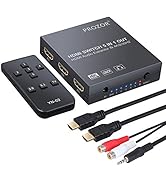
The Proster 3x1 HDMI Switch with Audio Extractor is a compact, high-performance device that allows users to connect three HDMI sources to a single 4K display, supporting up to 4K@30Hz and 3D video. It features advanced audio extraction capabilities, delivering both stereo and 5.1 channel surround sound via Toslink and 3.5mm outputs. Equipped with an IR remote and premium gold-plated connectors, it ensures seamless switching and superior signal quality, compatible with a wide range of devices including streaming sticks, gaming consoles, and Blu-ray players.




| ASIN | B073TTS9QG |
| Audio Output Mode | Stereo, Surround Sound |
| Best Sellers Rank | #779 in Audio & Video Selector Boxes |
| Brand | Proster |
| Built-In Media | 3.5mm to 2 RCA Cable, HDMI Audio Extractor, HDMI Cable, IR Remote Contraller |
| Cable Type | HDMI, USB |
| Color | 3x1 Hdmi Switch With Audio Extractor |
| Compatible Devices | Blu-Ray Player, Camera, DVD Player, DVR, Gaming Console, Personal Computer, Television |
| Connector Type | 3.5mm Jack, DVI, HDMI, RCA |
| Connector Type Used on Cable | 3.5mm Jack, DVI, HDMI, RCA |
| Customer Reviews | 4.2 out of 5 stars 2,560 Reviews |
| Item Dimensions D x W x H | 3.26"D x 2.91"W x 0.74"H |
| Manufacturer | Proster Trading Limited |
| Mfr Part Number | 4330353443 |
| Model Number | 4330353443 |
| Number of Ports | 3 |
| Power Source | AC adapter |
| UPC | 711583415739 |
| Unit Count | 1.0 Count |
| Warranty Description | One year |
D**9
**UPDATE** - It works now.
I had a lot of trouble getting this switch to work. To Proster's credit, they sent me a replacement, and then when I couldn't get that one to work, they sent me a standalone audio extractor. I got the audio extractor earlier and got it to work fine, with the exception that the PS3 input seemed to cut out. I decided on a hunch to try it straight through the extractor instead, and no problems. I guess at this point I worried the problem I had getting the Proster switches to work was caused by the cords. I knew I had just replaced the PS3's HDMI and hadn't tried since then, so I got out the switch after independently testing all the cords, and voila, it functions perfectly. My best hypothesis is that this was caused by the HDMI cable Proster sent with their switch, which didn't work to convey the signal properly from the switch to my TV. Gotta say, egg all over my face now. Anyway, here's a review of the actual features of this switch: Pros: - Very reasonably priced for the features. - Switches audio when you switch inputs. - Comes with a remote for switching input. - Supposedly supports 4K (I haven't upgraded to a 4K TV yet, so I can't confirm). - Outputs 1080p. I only mention this because I could not find it written about this device anywhere, but it's important to know before buying if you're like me and don't have a 4K TV yet. - My experience with ProsterUS was very positive, they were very interested in fixing my problem, even before I posted a negative review. Sure, there's a bit of a language barrier that made me wonder Cons: - Might come with cheap (free) cables. For best results, you may want to provide your own connections. - Uses a USB cord as a power source. USB chargers come in a variety of different outputs, and the manual doesn't specify what is required to power the HDMI switch. A regular purpose-built power supply would take out the guesswork, though obviously then they'd have to ship with region specific plugs. Anyway, I'm willing to admit when I'm wrong, and I'm pleased to be wrong this time, since getting the switch working fulfills my current needs and also means I'll have an easy time when I do eventually upgrade to 4K. So to any of you with this switch and problems; check your connectors, maybe it's not a dud after all.
W**.
Works as intended.
I bought this converter about a month ago to use for our back yard outdoor movie theater because the Epson 1060 HD movie projector we have does not have an audio out option for surround sound (which is crazy because it costs about $600 so it should give you some decent sound options; however, the picture quality is amazing). Even though it's awesome watching movies and streaming live tv on a 10 ft x 16 ft screen in our own back yard, it just wasn't as great as it should have been because of the lack of sound. I am not good with technology at all, so I googled to find out how I could get surround sound hooked up to the projector, and I ran across a Youtube video of someone using this audio extractor. I found it on Amazon for like $25 with a protection plan and figured even if it didn't work I could send it back or else just be out a small amount of money. It arrived like 2 days later and was very simple to figure out how to get it all hooked up and test it out. It even comes with an HDMI cord, and has 3 input options, so we can plug in our Fire Stick and PS4 at the same time, and we just use an aux cord to run from the converter to our sound system and extract the audio to surround sound. We've been able to enjoy basically a movie theater experience every weekend in our own back yard on a 220" screen watching Netflix, live TV and football games (Go Buckeyes!!! Even though they cant even beat Purdue...) But we now have awesome surround sound thanks to this nifty little converter switch.
C**O
For the money it's a good audio extractor/switcher but not perfect
I was looking for an HDMI audio extractor to use my Roku stick with an older AV receiver and projector. I used to plug it into the Xbox One, but Microsoft has made it so hard to use the input on the Xbox, I gave up and looked for another solution. This unit extracts audio to go via an optical cable into my receiver but it also has three inputs which makes it very versatile. So, what is the bad? There is a minor audio delay through the unit and into the receiver. If you have the output going to a TV and your AV system and use both the TV audio and the AV sound you will hear an echo as the audio out the TV arrives faster than the audio being processed (extracted) by this unit. It's minor and you just need to turn the TV audio down or off but it is there. I also noticed that the audio through the device dropped out for a second or so a few times over the course of weeks worth of testing it. You also need it powered to work and/or to pass video through it. Overall, for under $25 it solved a major issue I had. It's not perfect but works well enough.
T**D
Hub works as expected.
I'm very impressed with this hub. My use case is a little different from normal HDMI switching. I helped a friend consolidate and simplify their cabin's audio and video hookup. There is no centralized amplifier with HDMI inputs and we didn't want to spend that much on the installation. So, I needed a way to switch between video sources and split the sound from the HDMI to send to a DVD player/sound combo system. This hub did the trick! (see photo for full wire diagram). The Hub is built well and it performs beautifully. It easily switches the video and sound of 3 very different HDMI sources, 2 of which are 6+ years old. Two of the sources: an Amazon Fire Stick and DVD Player both have their HDMI output connected to the Hub inputs. The third is a Cable box that did not have an HDMI output. So, I use a separate convertor to convert RCA (Y/R/W) to HDMI which is connected to third input of the Hub. The Hub HDMI output is goes through an extender that powers and splits the signal to a TV and Projector. Both monitors are a couple of years old and neither are 4K so I can't speak to resolution capability but picture is clear with no blinking or lines. I split the sound from the hub using optical to 5-speaker surround sound system and 1/8" stereo jack to an all-in-one center speaker. There is a slight echo if both speakers systems are on. Most likely because optical transmits faster than stereo jack. However, in my application only one sound output will be used at a time so that was no big deal. The remote control is super simple but it does the job. The Hub uses USB power cable so DON'T FORGET TO GET A USB POWER BRICK if you have teenagers and you don't have an extra one lying around your house.
T**P
So far, so good!
My TV does not have audio outputs, so when I hooked up my Firestick, I quickly realized I could not get sound from my sound bar or other speakers. After a day or so of trying to get used to the limited sound quality from my TV, I decided that I either needed to upgrade my TV, or get an HDMI splitter. So far, it works wonderfully. I plugged the Firestick into the splitter, ran an HDMI cable from the splitter to one of the HDMI ports on the TV, then was able to run an optical cable from the splitter to the sound bar, and used the additional analog port to run audio cables to the other speakers that I have (actually I ran them to another splitter first, so I could control sound for multiple components). Overall the sound quality and picture quality using this device is excellent! Depending on your set-up, this is a good workaround if your TV does not have audio out ports. If you are splitting the speaker power between multiple sets of speakers as well as a sound bar, you will need additional cables and Y-splitters, etc. that do not come with this device. You also will need some patience, and basic understanding of how to hook up audio, and what the settings need to be at, across each component (TV, Firestick, Splitter(s), DVD/Blu-Ray, Tuner, VHS, etc.). If you don’t have the settings set correctly, you won’t get the sound! You also need to understand a bit about current, and how the sound gets to the speakers, and be able to work through problems such as echos, and diminished sound quality, each time you split the signal, especially if not using quality cables and adapters. I’ve been doing this for a long time, so it was fairly easy for me, and I have many components hooked into my sound system. It would not have been so easy, if I was just starting out, however (at least with the amount of wires, cables, components, etc. that I had to deal with). If you are just dealing with a TV and a sound bar, it should be pretty straightforward.
R**E
Doesn't work as advertised
The description says this has automatic switching. I previously had an automatic HDMI switch without the audio extractor, and I could connect my cable box and PS4 to it. Whenever the PS4 would turn on, it would switch to it, and when the PS4 would shut off it would switch back to the cable box. This one does not do that. The only time I got it to automatically switch was when I physically unplugged and plugged back in the cable. Well, I could just do that to the actual devices if that's how it's supposed to work. Plus, the remote has VERY short range. We're talking maybe 2 to 3 feet. Which means I have to get up and walk across the room to switch it, at which point I might as well just press the button on the front of the box. As others have mentioned, the PIP is extremely tiny (takes up about 2% of my screen) making it pretty much useless, and it can't be moved if it's blocking anything important. Everything about the way this device is supposed to work, beyond pressing the button on the front to cycle through inputs, simply does not work. I would ask for my money back, but then I would have to go back to physically switching the cables themselves, which is exactly what I was trying to avoid.
A**R
Holding up after 6 months
I've been using it for half a year now to great effect, does exactly what it needs to do and holds up well. I rarely use the remote because the auto device detection works pretty dang well, turning on a device will generally make the switch change inputs automatically. Tos-Link audio works great with my receiver and 5.1 audio pass through works as intended. 1080p looks sharp and detailed.
N**I
Perfect for a PC/PS5/Switch setup
BIG TLDR: I would only recommend this if you have the very basic need of 1080p 30fps. This gets sus beyond that resolution, but anything that and below it will work great with. This switch is the example of perfecting last generations technology so much that you can offer it at bare bones prices. EDIT - Months later, I decided I wanted to try gaming on my HDR monitor instead of my standard TV. After a lot of troubleshooting, I found out this switch does not support HDR. I find that strange, considering this is supposedly a 4k switch and these things usually come together. I would almost think you'd have to go out of your way to not include HDR with 4k. But whatever, I initially bought this for a 1080p TV so I can't complain about it not working for what I originally bought it for, and I can still use it with that TV. I still have to take at least one star off for cheaping out on the tech this much though. I'd been having apparent sound issues with my PS5 made known by the rhythm game I was playing. I thought I was fine previously with a converter, but the songs played though it and the optical cable sounded like they were coming from an old radio and not my bookshelf speakers. I decided to try this plus an aux cable to try to get my PS5's audio to run though my PC (line-in audio) instead of just the speakers and it worked! The audio is fully controllable though my PC and sounds the same as if I were playing music in a web browser. And as a bonus - this device doubles as an HDMI-switch so I was able to extend good sound to my Nintendo Switch also. The only downside I've seen is that the automatic-input switching is worse than non-existent. It seems to be able to do it, but in a bad way. Whenever I pressed the home button on a console's controller, it switched back to my PC. And if you have the wrong input selected on the HDMI-switch, pressing home on another controller will somehow activate whatever input's console you are on. Like, somehow it allowed my Switch controller to turn on my PS5. Regardless, I'm fine manually switching everything with my remotes so after disabling those features in the console menus it all works as intended. I can now use my PC as I was able to before, but now whenever I'm playing a console I get the same great audio from my PC and I'm able to adjust it from there too. So all in all a wonderful fix for anyone with a full gaming setup like mine -- if you're fine with manual input switching. All you need is this, an aux cable, and an HDMI cable for every console. And this even comes with an HDMI!
K**0
Works Great
I recently purchased a new TV which didn't have the older connectors to the back that my older NAD receiver required. This unit allowed me to plug my TV box and gaming systems into it and then into the TV and receiver so once again I can have stereo sound. The remote works well, but I have to be fairly close to it to make it work. Most of the time it auto-selects so the remote isn't required. To explain, if I'm watching TV and then want to use the PS4, just by turning the PS4 on, the audio and video automatically switch to the input for the PS4. When I turn the PS4 off, it goes back to the TV box which is usually the only input still turned on. The only drawback is the way that it's set up with the inputs and outputs. Because they're all on the sides, I can't keep the device up front where the remote will reach it more easily, it has to be tucked away in the back. I'm sure someone could find a work-around for that if they needed to, but I'm quite content with everything the way that it is. This thing was a great little problem solver, especially for the price!
V**A
Me ha funcionado excelente
Compre este producto para poder conectar varias fuentes a un proyectos de cine en casa y a mi equipo de sonido, ha funcionado muy bien, tengo conectados una PC, un chromcast y un blu-ray, la separación de audio funciona de maravilla, el audio tiene muy buena calidad (tengo un equipo high end y se escucha muy bien). El único defecto es que en ocasiones se tiene que desconectar y volver a conectar alguna fuente para que las reconozca nuevamente, pero es algo muy sencillo.
O**N
Easy to use
I’d plugged in and worked without issue. Very easy to use.
X**N
Best product for console gaming on monitor and speakers
This product is exactly what I was looking for and it delivers. With this product, I have my Xbox One, Nintendo Switch, and laptop all connected to the same monitor and external speakers. My monitor doesn't have an audio out port so the built-in DAC comes in handy. Build quality is great and the package includes three cables. This is a lifesaving product for me and I highly recommend it to anyone connecting consoles and monitors.
G**E
Excellent product, easy to set up and is exactly what I was looking for
I am extremely happy with this product. I purchased it for my computer station so that I could switch between my PC, switch, and PS4 using a single monitor. This product works exactly as advertised, and gives me the audio out that I was looking for. This helped me to route the sound into my computer so that the switch and PS4 could come out of my computer speakers. My favorite thing about this is the automatic switching the product does the minute I turn on my PS4 or switch. That is super convenient and was an unexpected feature that ended up working very well for me. The remote is okay, and does it's job. It doesn't look very good, and the button layout is pretty weird. It also has issues controlling the unit if it's not in the line of sight, which is fairly normal for IR remotes. I am very happy with this product.
Trustpilot
2 months ago
1 month ago