Desertcart purchases this item on your behalf and handles shipping, customs, and support to Japan.
🎧 Elevate your game and stream with sound that commands attention!
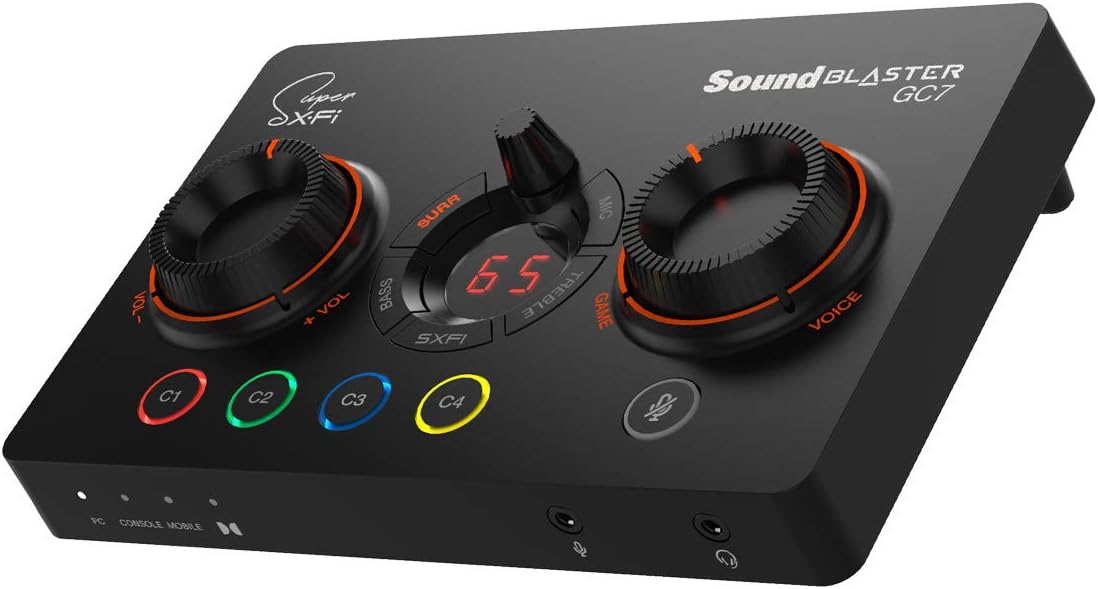
The Creative Sound Blaster GC7 is a high-performance USB DAC and amplifier designed for gamers and streamers. Featuring a 24-bit/192kHz audiophile-grade DAC, 7.1 virtual surround sound, and dual DSP with Super X-Fi and Sound Blaster technologies, it delivers immersive, precise audio. Its ergonomic design includes 4 fully programmable buttons and a GameVoice Mix knob for seamless control of game and chat audio, making it an essential tool for competitive gaming and professional streaming setups.


| ASIN | B08ZD59L8H |
| Audio Output Mode | Surround |
| Best Sellers Rank | #5,971 in Video Games ( See Top 100 in Video Games ) #595 in PlayStation 4 Games, Consoles & Accessories |
| Brand | Creative |
| Compatible Devices | Personal Computer |
| Customer Reviews | 4.2 out of 5 stars 809 Reviews |
| Hardware Connectivity | USB |
| Hardware Interface | USB |
| Hardware Platform | PC, Nintendo Switch, PS5, PS4 |
| Item Dimensions L x W x H | 6.81"L x 4.49"W x 1.85"H |
| Item Weight | 281 g |
| Manufacturer | CREATIVE |
| Maximum Sample Rate | 192 KHz |
| Mfr Part Number | 70SB185000000 |
| Model Name | gc7 |
| Model Number | SB1850 |
| Number of Items | 1 |
| Platform | PlayStation 4 |
| Signal-to-Noise Ratio | 120 db |
| Surround Sound Channel Configuration | 7.1 |
| UPC | 054651194458 |
J**G
Great hardware Mediocre software
The pros and cons of this device really depend on your use case. For me i just didnt want to buy a soundcard for my pc seeing ats this made much more sense for me. PROS:Sound quality is fantastic for gaming! A wide sound stage with great separation allows you to locate enemies in fps quicker and gets you a more immersive experience. It can drive the higher impedence headphones like the hd6xx with ease.A ton of settings like scout mode and sxfi sound pretty good but i just setup a couple sound profiles for rpg's and fps and that's enough for me. The mixamp dial is reaaaally convenient when you cant hear your squad mates or the game is too loud, 2 seconds and its perfect. I really love the way this thing works. 4 Programable macro buttons which can do anything from a certain command macro to opening up a program. Also has rgb on said macro buttons. The mic amp sounds fantastic and has a bunch of modes to improve the performance of most mics. Also has a voice changer if your into that. The software has a ton of customization options where you can literally spend hours fine tuning your setup and it works somewhat smoothly once you get it up and running. it also has bluetooth which i havent used but really should mess around with. Cons: Build quality is somewhat on the light side but the touchpoints like the dials and buttons feel solid enough where i wont have to worry about them falling apart. Software: the setup like you've probably seen in the other reviews of this item leaves a lot to be desired. You have to download 3 apps one on your phone and 2 on your pc while making 2 different accounts. Plus its somewhat buggy but i like the product and performance enough where ill only knock off half a star for this and nothing more. 4.5/5 Tldr: if you've been looking for an amp for gaming this one will do the trick and wont break the bank. Sure you can spend $1000's more but if we're being honest you probably wont notice the difference ingame.
S**E
Way better than expected. And it's actually reliable.
I have used a lot of Creative products over the years including the original sound blaster Audigy from way back when. Their hardware is top-notch and you can get some great sound out of their products. But in most recent years the software side of their products has struggle hard. And that combination of great hardware and poor software is no good. This was my experience with the G8 external soundcard. Great sound and a plethora of options to customize your experience but the drivers and software were terrible resulting in intermittent disconnects from my PC. After some back and forth with attempted fixes and varying results I finally gave up and returned the device. As a replacement to the G8 I purchased the GC7 and I have to say this is what the Creative experience is suppose to be! There is still the great sound quality and a plethora of options to tune the experience to your liking AND it's software stable. No disconnects, it starts every time, and it sounds great! Furthermore, there is a dedicated power button on the back of the device, which the G8 didn't have. It's power via a USB-C to USB A cable and it has optical in/out which is my I/O of choice. Most laptops don't have optical anything and sound is most often limited to 3.5mm Jack's coming off an onboard sound chip with limited settings to tune your experience. This device fixes that.
J**A
Could have been perfect but it's not.
This review is for the Creative Sound Blaster GC7 . TL;DR │ Great hardware. Get it for the custom buttons and hard dials. Good software, for the most part⁽ⁿ¹⁾⁽ⁿ²⁾. I think the price is justifiable. Still no ambient background noise removal like RTX voice. SXFI is amazing but you have to have your headphones supported. CONTENTS: Intro │ What I Like │ What I Don't Like │ Outro │ Notes │ Package │ Verdict - - - My background: I've used a lot of Creative's DACs and AMPs. I've tried the Recon3D , E1 , E5 , X7 , G1 , even the X-Fi Go . I've also dealt with their speakers and headphones, with and without built-in DACs. Needless to say, I was a big Creative fan. Then, I stopped buying from them because of principle (I got a warranty issue with them). But, I figured I'd give them another try. Creative still knows how to take crappy sound and turn it into something great. Not only do they do it better than most, but they do it efficiently, without costing an arm and a leg. More about the sound quality in my closing statements below. This is a long review if you read the accompanying notes. WHAT I LIKE │ + │ + SXFI is unbelievable.⁽ⁿ⁰⁾ + Looks great in person. Doesn't look cheap. + Four customizable buttons with RGB. + Dedicated mic mute button. + NO capacitive buttons, all tactile. + Kickstand feet (fixed though). + USB-C. + HeadSET jack (TRRS). + Two useful giant dials. + Multipurpose middle dial. + Software speaker/headset switch button. + The switch is remappable to the 4 buttons. + The new CREATIVE Windows app.⁽ⁿ¹⁾ + App support for Dark Mode.⁽ⁿ¹⁾ WHAT I DON'T LIKE │ × │ × The garbage SXFI Apps (plural).⁽ⁿ²⁾ × Incomplete SXFI support for the main APP.⁽ⁿ²⁾ × SXFI headphone profile support.⁽ⁿ²⁾ × Middle dial functions are not ideal.⁽ⁿ³⁾ × Very tacky. RED in 2021.⁽ⁿ⁴⁾ × Not a fan of the Game/Voice label.⁽ⁿ⁴⁾ × No ambient background noise removal.⁽ⁿ⁵⁾ × The line in does not work properly for microphone.⁽ⁿ⁶⁾ × Front I/O ports create messy cabling.⁽ⁿ⁶⁾ × No sound volume mute button.⁽ⁿ⁷⁾ × No mute option for the customizable button.⁽ⁿ⁷⁾ × The keystroke function is sometimes buggy.⁽ⁿ⁷⁾ NITPICKS × I wish the buttons could handle macros natively. × Only up to 300 Ohm headphone support.⁽ⁿ⁸⁾ × The dials have hard min/max stops.⁽ⁿ⁹⁾ × Pull tab outer box (instructions inside).⁽ⁿ¹⁰⁾ × Not wireless headphone-friendly (no BT transmitter). × Mode selector is too close to the power button. At the end of the day, I'm gonna give Creative a pass here. As mentioned, the only concern I have about sound is the lack of ambient noise cancellation. For other things, Creative for me has been consistent in making great sound processing. This is their bread and butter, and they do it better than most multi-peripheral manufacturers. However, I reckon that the best upgrade you can make will still be your equipment, like a better microphone, and a set of speakers and/or headphones. Sound processing can only take you so far. I would avoid headsets because their microphones are usually an afterthought. "Gaming" headsets are notorious for having a crappy microphone. But, if you are one of those people who still prefer headsets, then this product is for you as this will certainly do your sound justice. That is of course provided, you have a wired headset as this does not have any wireless capability (the Bluetooth is only for set up). Really, any other Creative DACs will be amazing. As I mentioned, you'd get this for the hardware interface (and maybe SXFI if you're into that thing). Regarding SXFI, well...⁽ⁿ⁰⁾ - - - NOTES ⁽ⁿ⁰⁾This is unbelievable. Let me describe my experience... Me, wearing open-back headphones: "Let me turn on SXFI. Ooops, the audio output switched to my massive speakers. (removes my headphones)... HOLY SH... That was all in the headphones? What sorcery is this?!" ⁽ⁿ¹⁾Every single Creative device I've ever had have their own sandboxed app. I hated it. Right now, I have at least two apps from Creative on any given machine. The new app seems to be a direction towards a universal app for future products. It is clean. It supports dark mode. It's just called the "Creative App", and no more product-specific software. It's easy to use and intuitive. ⁽ⁿ²⁾But...for some asinine reason, I have to download their garbage SXFI Windows 10 app for SXFI (literally a 1.5-star app in the Windows store). On top of that, I ALSO have to download the mobile SXFI app to set up profiles. My setup was filled with frustration as the SXFI app cannot detect my device, WHILE the Creative app sees it just fine (Fix: I had to reboot). Also, SXFI headphone profile support is still lacking. No support for Sony's flagship XM series. Also does not support any Bowers and Wilkins headphones. ⁽ⁿ³⁾The creative apps almost always universally allow you to adjust 1. Surround, 2. Crystallizer, and 3. Bass (Boost). In the app, they call these settings "Acoustic Engine (AC)". The multipurpose button controls ONLY the surround for AC. The Bass in the dial does not control the Bass (Boost) in the AC, but rather, the bass on the "Equalizer" (same with the treble). I wish Creative just dedicated the buttons to their Acoustic Engine functions instead, as this set of controls (AC) are UNIQUE to Creative, and also for consistency. ⁽ⁿ⁴⁾It is 2021. Why are they still using red aesthetics to mark anything that has gaming in it? Either put in a muted color or just RGB it. This color theme is so 2010. This is why I didn't take a second look at the G5 and the G6. To be fair, it is not real RED, but more like a very fiery orange. Also, the labels for "Game" / "Voice" adds to tackiness. I wish they just labeled it more aptly like "Media"/"Chat" or "Speakers/Headset" or anything more generic. ⁽ⁿ⁵⁾For a company that specializes in audio hardware to still not have any sort of real ambient background noise removal is a real shame. In the age of remote work, this feature is seriously missing. ⁽ⁿ⁶⁾I was supposed to use the rear line-in connection for mic, because crowding the front I/O is very untidy. I find it weird that the only jack for a dedicated microphone is the one in front. My E5 was working just fine with the Line In/Mic combo. ⁽ⁿ⁷⁾Trying to set up a button as the mute button was almost impossible. The "Media Control" options only have "Play", "Next", and "Previous". I tried setting up a trigger with AutoHotKey, but did not work (e.g. ctr+alt+m). I assigned the same keystroke to my programmable mouse, the mouse works fine. I used the MOUSE button to assign it to the Creative app, and guess what? It worked, but the "KeyStroke" displays "Alt+ VolumeMute". If you look at your keyboard, there is no "VolumeMute" key. The software itself is buggy. Sometimes, the buttons just don't work until I open the app, and open the customize button window. ⁽ⁿ⁸⁾Their previous DACs support up to 600 Ohms. (E5, G5 , G6 , X3 ) ⁽ⁿ⁹⁾Not a fan of hard stops on min and max volume, because it quickly becomes out of sync when you change the volume via software, or via other hardware. Free turning dials (like the E5/G5/G6) would have been ideal. ⁽ⁿ¹⁰⁾This might be subjective, but a pull tab on a $170 piece of electronic is something I do not find appealing. I'd like to preserve the original box and not destroy it, for any reason. - - - PACKAGE │ ✓ ✗ │ ✓ Outer box wrap with instructions. ✓ Inner box. ✓ GC7 DAC. ✓ 1.5m/4.9ft Male to Male TRRS AUX cable. ✓ 1.8m/5.9ft USB-C to USB-A cable. ✓ 1.5m/4.9ft Optical Audio cable. ✓ Printed materials. ✗ NO garbage. - - - VERDICT: I recommend this product, but barely. ★★★★☆ | 4 stars out of 5. It is okay. I had more frustrations on the setup than I thought I would, but it is still a solid device once it is set up. NOTE: If the video is too small for you, it's because of Amazon restrictions. I posted the same video on YouTube. watch?v=FFfILmck12o This review is for the Creative Sound Blaster GC7 .
J**H
Great multi channel Audio interface.
i have the gc7 connected to my pc via usb. Then have optical output connected to A/V reciever, as well as optical input from wireless BT transmitter. This allows me to stream audio simultaneously from 2 pc's as well as wired headphones and, mobile Bt. Microphone input works great on front. I use a button style 3.5mm mic. Audio quality is great with alot of tweaks in the creative app, inc up to 192khz bitrate audio. surround, clarity, and just about every audio modification you can think of. I do wish it had a usb interface for audio inputs like usb headphones or wireless audio dongles. other then that this is a great product for controlling all of the sound. I do recommend!
K**E
Great Audio - But Why a Mobile App?!
Pros: The sound is amazing. I upgraded from a SteelSeries GameDAC. When I first used the GamerDAC I was blown away by DTS. Now upgrading to GC7 I am blown away AGAIN. I use the Steel Series Arctis 5's, the power provided by the GC7 is unmatched compared to the GameDAC. I can control base, mids, and treble as needed. My Arctis 5s sound amazing now, more so than when combined with its own product the GameDAC. I have a unique setup as I used to be a YouTuber. On my main PC I game and talk on discord. So having the volume mixer between game and chat was a must for me. I can balance how loud a game is or how loud I want discord. I have a second PC I use to watch YT, netflix, etc.. while gaming. I route this audio via 3.5mm to the main PC. I am also able to control the audio using the Game/Chat mixer nob. This was another must for me. I can make my game louder or my entertainment louder, etc... Gaming wise the sounds are amazing, I can hear the fine nuances in ambient environments, NPC chat is clear, bass is strong and crisp. Discord audio is clearer than ever. I couldn't be happier. Cons I understand the innovation from Creative trying to use a picture of your face, and mapping of ears. But with all of the extreme data privacy and leaks I was super uncomfortable taking my picture to 'map' my features. I was a bit frustrated when I found that Steel Series are not even supported for this feature. Maybe I could have looked it up but its not a big issue. Just something I did not like. The initial setup is confusing because it asks you to download a mobile product for the desktop. I ended up uninstalling the mobile app, did a google search and found the mobile product to control the GC7. So unfortunately I cannot comment on the true value of sxfi. I have setup a lot of complex audio routing so setup was not an issue. It was more so the instructions coming out of the box. I don't want to use a mobile device to control or update a desktop app. It doesn't make sense to me. I have experience setting up multiple audio interfaces and routing audio to different sources.
F**O
EQ bands only cut or boost 9dB and bass and treble controls don't work right
The EQ only cuts and boosts up to 9dB! That's terrible! The old EQ had a 48dB range, cutting/boosting up to 24dB per band! I used to praise Creative for having a 31Hz band in their EQ and allowing it to be boosted up to 24dB. I love boosting the low bass for certain types of music. I got interested in this GC7 because of the C1-C4 preset buttons because I wanted to quickly recall custom EQ settings for different genres of music. Because of the narrow range of adjustment, it's totally useless. Creative, please add back your plus, minus 24dB range of adjustment, and while you're at it, add in a 16Hz band to the EQ and/or add a few parametric bands as well (adjustable center frequency and bandwidth Q with at least a cut and boost range of plus, minus 24dB per control) with a lower limit going down to 10Hz. Also, there also seems to be a bug in the bass and treble controls. For example, if I turn up the bass and then turn it back down to zero, the 31Hz band remains around -1dB. If I turn it all the way down and then turn it back to the center, the 31Hz band is boosted 1dB. It should be at 0dB if I center the control. The same thing happens with the treble control but to the 16kHz band. The other thing with the bass and treble controls is that it affects several bands in the EQ (with bass affecting up to 1kHz!), and if I make any individual adjustments to certain bands, they're lost if I set the bass or treble to the highest or lowest settings. For example, if I set the 31Hz band at +3dB and I turn the bass all the way down, if I recenter the bass control, the 31Hz band is no longer at +3dB. Ideally, the bass and treble controls would be their own controls, not affecting the EQ settings. In fact, the best thing would be to give them an adjustable shelf frequency because not everyone likes the midbass boosted when they want the bass boosted. Right now I'm using a Sound Blaster X-Fi SB1095, and I just love that the EQ gives me a plus/minus 24dB range of adjustment, so again Creative, please bring this back to your EQs for all your sound cards. I will keep buying your sound cards if you do this!
J**R
Good DAC, bad Linux support
This is a nice little DAC and I appreciate having a desktop device to control audio settings. The setup is simple and the result is great. That said, I dual boot WIndows and Linux but spend the VAST majority of my time in Linux. In Windows, you can download an app that allows you to save presets and use sound modes. The SXFI functionality works perfectly well. When in Linux, I can still use the EQ and volume controls and Linux (Nobara) recognizes the device properly and allows me to use surround/spatial audio output without SXFI. That said, a lot of the features like being able to set presets and use sound modes is done through the app and there is no app for Linux. I expect this to be the case most of the time, but Creative used to be a company that had a bit better Linux support than this. That said, if you are buying this for use on a Linux device, you can still find value in it but your feature set will be somewhat limited and you might look for something with better support or that is cheaper so you're not paying for features you can't use.
A**D
overall does its job very well . sound quality is good and features are good connectivy is great
use it with gaming pc and work laptop via a basic usb docking device. overall its great sound effects for games, for music i put it on flat and it sound good . equlizer on board is very convenient. Main purpose was to avoid having to physically change the connection between the gaming pc and the work laptop, now all i ahve to do is plug in the dock to the laptop and everything works, it is connected to the usb dock and sometimes this causes the gc7 to turn off , that appears to be the dock fault but anyhow its easy to resolve by disconnecting dock from lapotp. Ovearll for the price i think this device is unbeatable .
A**D
Really an amazing piece of technology.
The audio sets a whole different mood and makes all the difference in the world.
J**S
Great product
Use it every day, very helpful
F**Z
Calidad de Audio y Producto
Producto muy recomendable, la verdad superó mis expectativas, producto totalmente recomendable
B**I
TOP soundcard
Creative Sound Blaster GC7 Review: A Streamer’s Dream with Audiophile Punch The Sound Blaster GC7 isn’t just a USB soundcard—it’s a full-fledged audio interface designed for gamers, streamers, and creators who want hands-on control and immersive sound. With Super X-Fi tech, a powerful headphone amp, and console compatibility, it’s one of the most versatile audio tools on the market. 🎛️ Tactile Control at Your Fingertips Unlike most USB DACs, the GC7 features physical dials for master volume and GameVoice Mix, plus four programmable buttons and an EFX control panel. This layout gives streamers and gamers instant access to audio tweaks without diving into software menus. 🎧 Super X-Fi & Battle Mode: Immersive Soundscapes Creative’s Super X-Fi technology simulates a multi-speaker setup through headphones, delivering spatial audio that feels cinematic. The Battle Mode enhances positional cues, giving competitive gamers an edge in locating enemies. 🔌 Multi-Platform Connectivity The GC7 supports PC, Mac, PS4, PS5, Nintendo Switch, and Android devices. With USB-C, optical, line-in, and mic-in ports, it’s ready for any setup. Bluetooth control via mobile app adds another layer of flexibility. 🔊 High-Fidelity Audio Performance With a 125dB signal-to-noise ratio and support for 24-bit/192kHz playback, the GC7 delivers clean, detailed sound. The built-in Maxim MAX97220A amp drives headphones from 32 to 300 ohms, making it suitable for both gaming headsets and studio-grade cans. 🖤 Sleek Design and Solid Build The matte black chassis is compact yet premium. Knobs rotate smoothly, buttons have satisfying tactile feedback, and the LED display is bright and informative. It’s a device that feels as good as it sounds. Whether you're streaming, gaming, or just want better control over your audio environment, the Creative Sound Blaster GC7 is a powerhouse. It’s not just a soundcard—it’s your command center for immersive, customizable sound.
N**Y
Toujours sur mon bureau après plus d’un an d’utilisation, un vrai plus pour le gaming immersif
📦 Qualité et installation J’ai acheté le Sound Blaster GC7 en juin 2023 et je l’utilise depuis quotidiennement sur PC, principalement pour jouer et créer du contenu. La qualité de fabrication est excellente, le boîtier est solide, les boutons sont précis et rien n’a bougé avec le temps. L’installation est simple et il est reconnu immédiatement. 🎮 Performances en jeu : la vraie différence Je joue beaucoup à des jeux immersifs comme Escape from Tarkov ou Star Citizen, où le son est extrêmement important. La différence avec une carte son classique est immédiatement perceptible. Après plus d’un an, je remarque toujours : ✔ meilleure spatialisation ✔ localisation des sons beaucoup plus précise ✔ son plus clair et plus détaillé ✔ immersion nettement renforcée Le mode Scout, une fois configuré correctement, apporte un vrai plus. 🎛️ Utilisation au quotidien Les boutons physiques sont un énorme avantage. Pouvoir ajuster le volume ou l’équilibre jeu/chat directement sur le GC7 est très confortable. Après plus d’un an d’utilisation, tout fonctionne toujours parfaitement. ⚠️ Points négatifs Pour être honnête : ✖ le logiciel demande un peu de temps pour être bien configuré ✖ beaucoup d’options, ce qui peut être déroutant au début ✖ la finition noire mate prend assez facilement la poussière, ce qui oblige à le nettoyer régulièrement pour qu’il reste propre sur le bureau Mais ensuite on n’y touche plus. 🧠 Conclusion après plus d’un an Avis honnête après plus d’un an d’utilisation quotidienne : Le Sound Blaster GC7 est devenu un élément indispensable de mon setup. Je ne pourrais plus revenir en arrière aujourd’hui. Particulièrement recommandé pour les joueurs PC qui recherchent une meilleure immersion.
Trustpilot
2 weeks ago
1 month ago