Desertcart purchases this item on your behalf and handles shipping, customs, and support to Japan.
⌨️ Speak Fluent Keyboard: Upgrade Your Workspace, Upgrade Your Game!
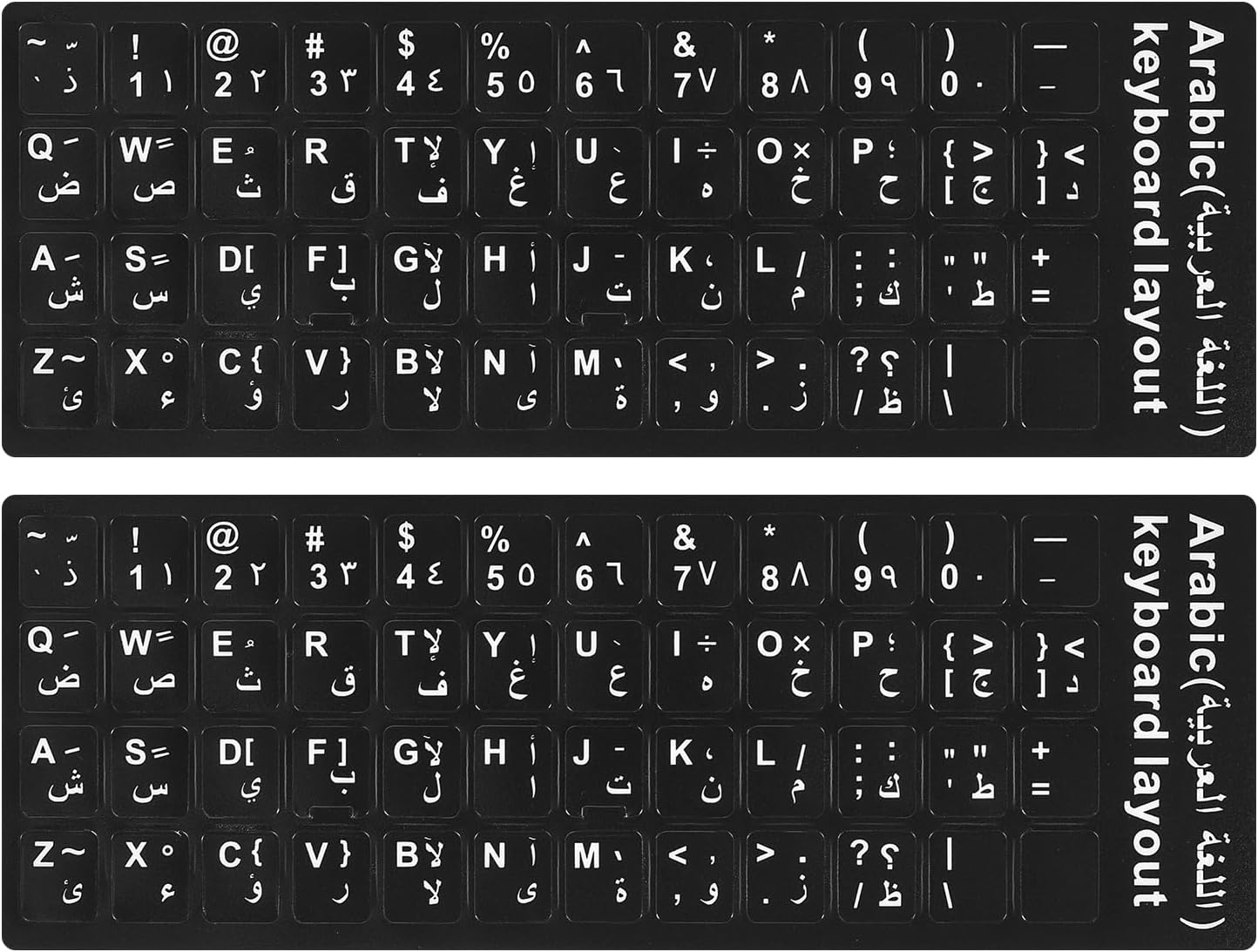
These 2PCS Arabic-English keyboard stickers by CaseBuy offer a premium matte vinyl finish with precise cutouts for easy application and removal. Designed for desktops, laptops, and notebooks, they provide a durable, scratch-resistant, bilingual typing experience that refreshes worn-out keys without replacing your keyboard. Backed by a 5-year fade resistance and a risk-free warranty, they’re the smart, stylish upgrade for professionals embracing multilingual productivity.


| ASIN | B07287S8D6 |
| Additional Features | Bilingual Keyboards, Easy to Apply, High Adhesive, Scratch Resistant |
| Best Sellers Rank | #3 in Computer Keyboard Skins |
| Brand | CaseBuy |
| Color | Arabic |
| Compatible Devices | computer |
| Customer Reviews | 4.4 out of 5 stars 9,742 Reviews |
| Enclosure Material | Vinyl |
| Finish | Matte |
| Item Dimensions L x W | 7.09"L x 2.56"W |
| Manufacturer | CaseBuy |
| Material | Vinyl |
| Mfr Part Number | KB-STICKER-ARABIC |
| Model Number | KB-STICKER-ARABIC |
| Number of Items | 2 |
| Number of Packs | 2 |
| Pattern | Letter |
| Shape | Rectangular |
| Size | 0.43 x 0.51 inches |
| Special Feature | Bilingual Keyboards, Easy to Apply, High Adhesive, Scratch Resistant |
| Theme | Alphabets |
| UPC | 602191620229 |
| Unit Count | 2 Count |
K**Y
perfect
With the precise cuts, these stickers were a perfect fit for my OEM keycaps while maintaining aesthetics and were extremely easy to apply. The K sticker tore while peeling the outer film off but I was able to easily line it up again. However, it's a given that stickers this small would be fragile. The adhesive is quite strong and the letters don't stand out harshly against the rgb on my transparent keycaps while still allowing me to see what key I am pressing.
M**.
Get the stick on peel off option, they're perfect!
I was recently looking at my tired and worn out keyboard... I really like, it so I looked for a replacement and of course it has been discontinued. I then took a better look at it and realized, if I could only find letter stickers, I could have the missing letters... so the hunt began. I found these stickers! Initially I was ok with a sticker over the key, then this same vendor had stickers that you stick on and lift off, which leaves only the letter and no sticker, they cost a couple dollars more but you get the same look with no stickers. This is perfect! I really didn't want to feel the stickers on a few keys during use. It took me all of 3 minutes to stick them on and peel off them off leaving new letters! It's even better than I had hoped. It looks like it did when new! Application was easy, the letters look small but they are the right size for great readability and key alignment. I was so happy with these that I had to immediately do this review. These are fantastic! Installation tip: Use the included tweezers to get them off the card
G**D
Great letters, but hard to peel the backing off
I like these English keyboard stickers — they look close to the original keys, feel good under the fingers, and stick very well once applied. The sheet includes the entire keyboard, which is convenient and makes it easy to replace multiple letters if needed. The only issue is the peeling process. The directions say to “peel off the letter,” but the stickers are placed on a sheet with scored edges, so the whole square tends to pop out with the adhesive backing still attached. You have to be very careful to lift only the letter itself, not the whole scored piece. Once you get the hang of it, it’s manageable, but it definitely requires patience. Overall, the stickers are functional, look good, and do exactly what I needed — just be prepared for a slightly delicate peeling process.
F**D
A Cheap Fix That Actually Works
So that we’re all on the same page here, I’m reviewing the English Transfer Letter–white stickers — the kind where you place the transparent sheet on the key, press it down, and peel away the film so only the letter stays behind. Or, as the listing so eloquently puts it, “Only Letter Leave on…” What more can I add to wisdom like that? And the surprising part is: it works great. My keyboard is far more readable than it was before and it actually looks pretty decent. You get two sheets of stickers (no F‑keys or number pad), an oversized pair of tweezers, and a little polishing cloth for cleaning the keys. I’m a bit of a keyboard junkie and picky about how a keyboard feels. I recently got one with a near‑perfect feel, but the lettering was so faint I had to squint at it like I was deciphering ancient runes. I haven’t been a touch typist since high school — back when my buddy convinced me to take a typing class so we could meet girls. He met his future wife; I ended up with typing skills that have been slowly fading for forty‑plus years. These stickers turned out to be a pretty good fix. The lettering is clear and crisp for the most part. The only weak spot is the special character keys (the ones with two symbols). The designs sit a little too close together, and because there are so many tiny dots and lines, peeling the film off can get tricky. The only regular key that gave me trouble was the “E.” I peeled from the wrong side and almost lifted part of the letter with the film. That one was on me. In fact, after installing everything, I almost wished I’d just centered the stickers and left the clear covering on — it actually looks fine that way, just a bit shinier because the plastic reflects light. Since the lettering on my original keys was slightly larger than the stickers, I do get a faint “ghost image” effect on a few keys, but it’s still miles better than what I started with. A couple of tips: – Use the tweezers. They make alignment easier and keep fingerprints off the plastic if you decide to leave it on. – If you’re removing the clear film, peel slowly. Smooth it down a few times over several minutes then lift the film S‑L‑O‑W‑L‑Y. If a letter starts to come up press the film back down and peel from the other side. For letters like E, K, and F, peel from the straight‑edge side. – Be extra careful with special character keys. They’re more delicate and more likely to lift. Take your time and they look great — with or without the plastic removed. For the price, less than ten bucks at the time of this review, I consider them a very good value. Recommended.
J**S
Easy fix for worn keys
These worked great for refreshing my keyboard. The stickers are easy to apply, line up well, and the letters are clear and easy to read. They stick securely and instantly make old or faded keys look new again. Great value, especially with the extra set included.
T**S
i can see the keyboard letters again
Wow , i can't believe i can see the keyboard letters again . nice bright letters , i cleaned all the keys with alcohol wipes and they seem to be sticking well .
R**N
Stickers
Very difficult to get off the sheet the letters are attached to. I finally gave up after putting 10 or so of the letters on my keyboard. I like the letters though. In installing them, i discovered that I have a lighted keyboard that I didnt know my computer had. Double blessing.
K**K
Super easy to install, does not have Backspace sticker
Update #2 Not too long after my last update, a few of the letters used the most started sliding off my HP keyboard, so I pulled them off super glued them on. I will just do that to them as needed. Seems to work fine now Update: A year and a half later and after daily use there is zero wear on them on my PC keyboard. I still had the second set so asked my wife if she wanted them on her laptop. Those letters/number were tiny and very had to see in daylight. Now it looks like a new keyboard and she is happy as can be. Really like the ease of install with these on my HP keyboard. Just used an exacto knife to lift it off the backing, lined it up and stuck it on. I made the mistake of putting one in the wrong spot, but it lifted off and went where it belonged with no issue. The fonts are larger than the originals which is nice for these old eyes. My only issue was it does not come with a sticker for the long Backspace sticker for the upper right side. You can see in the picture the original writing is all but gone as were most of on the letter buttons which are now covered by the stickers. I did put the Shift sticker on the lower right where the fonts were which was also a long button. All in all very happy with them and I can actually see the letters again!
J**.
Works good + Useful
Product quality is very good and seems durable for long time. But Biggest minus point is, F1,F2.... and Shift, Tab, Alt, Ctrl, Caps Lock, Enter, Esc, Delt, Windows keys are missing. Unnecessarily overpriced
G**3
Funzionale ed economico
Funzionale ed economico, in foto shift, A, S sostituiti
D**E
Pas complet
Dans la généralité ils sont très bien pour les lettres et les chiffres par contre il manque toute la toutes les virgules les points, les caractères spéciaux exetera j'ai commandé deux plaques pour en avoir et je n'ai pas eu tout ce que je voulais c'est bien dommage
A**N
Renueva tu teclado
Heredé una computadora portátil vieja. Muchas llaves habían perdido las letras. Este artículo le dio una nueva vida al teclado de mi computadora portátil. Muy complacido
T**M
Good product
The sticker is good, and it sticking well to my keyboard keys. Since most of the stickers are smaller than the actual keys, I would recommend placing a keyboard cover on top of the keyboard so you don't feel the stickers differences when typing. It would also help with the nails sticking and accidentally peeling off the stickers.
Trustpilot
2 months ago
1 day ago