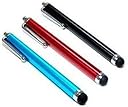
I constantly lose pens so I didn't want to spend a lot for a stylus knowing it would probably go missing soon after purchase. Three styluses for under 5 dollars seemed like a good way to try the concept out since I never used one before.First of all these are shorter than I realized, they are approximately 4.5 inches long from tip to tip. That is long enough to fit comfortably in most adult hands, but certainly not the length of a standard pen. The back end has a small hole that you can run a string through if you wanted to attach the stylus to something. The writing tip is a soft rubber with a smooth finish. The pocket clip is not metal even though it looks like it in the picture. It is actually just plastic with a metallic paint.As for function, they started out gliding across the screen very well. All three worked on my Toshiba Thrive. However, after allowing my 5 year old to use one in the hopes of keeping his grubby fingers off my screen, I noticed one of the pens starting to skip across the display a bit. The end felt a bit sticky, so assuming he got a little jelly or something on it I decided to carefully wash it in warm water and a mild hand soap. That was a big mistake. It wasn't that he had gotten something on the tip, it was the fact that the smooth finish on the rubber was starting to wear off and I was feeling the natural rubber. Once I washed it, I was left with a rubber tip that dragged rather than glided across the screen. It was still fine for tapping and typing, but was now useless for most games and drawing apps.Since the one stylus was ruined for my needs, I decided to dissect it. I carefully pulled on the rubber tip to see how much force it would take for the tip to come off. It actually held up pretty well, and although it wasn't especially hard to pull it off, I don't think it would pop off during normal use. The metal ring that held the tip in place can also be removed, and since the rubber tip is just held on by the squeezing of the metal ring, you can actually replace the tip if it were to come off by accident. However, you have to actually be able to find the rubber tip something I couldn't do when stylus #2 died at the hand of my youngest. I was not able to remove the back end with just my hands, but the pocket clip snapped off easily. In other words, the styluses were about what I expected for the price.Now I'm down to just one. I'm sure it is somewhere in the house and I'm bound to locate it sooner or later. It does the job it is supposed to do when I can actually find it. It certainly comes in handy if you are wearing gloves and don't want to remove them to use your touch screen. It is also a bit easier to tap the correct location on the screen with the stylus rather than with a fat little finger, but with it's rounded tip it is still not a precision instrument for drawing. The screen does stay a bit cleaner than using your fingers, but I still noticed stylus smudges on the screen so it is not a perfect fix. Parents take note that I noticed my kids tapping a bit too hard with the pens and sometimes hitting the screen with the metal side if they had the pen tilted too much. I didn't notice any damage to the screen, but it made me wince every time I heard the clink.For the price I think these are worth it. I don't expect them to hold up for a long time even if you don't have a 5 year old terror on the loose, but I'd still rather have 3 cheap ones than 1 expensive one. For now I'm back to using my fingers until stylus #3 pops its head out again, or until I spring for the Bundle of 14 Colorful Stylus Universal Touch Screen Pens so that I can have one on every surface of my house.