

Desertcart purchases this item on your behalf and handles shipping, customs, and support to Japan.
⌨️ Compact power meets pro-grade precision — own your desk, own the game!
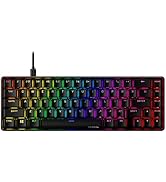
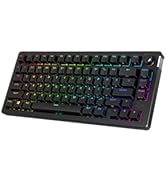
The HyperX Alloy Origins 60 is a premium mechanical gaming keyboard featuring a space-saving 60% form factor, durable aircraft-grade aluminum construction, and tactile HyperX Aqua switches. It boasts vibrant RGB LED backlighting with exposed LEDs and advanced customization options via HyperX NGENUITY software. Designed for gamers and professionals seeking speed, accuracy, and style in a compact package.







| ASIN | B09QP8XH7L |
| Additional Features | Backlit |
| Antenna Location | Gaming |
| Best Sellers Rank | #1,594 in Video Games ( See Top 100 in Video Games ) #164 in PC Gaming Keyboards |
| Brand | HyperX |
| Built-In Media | Alternative Esc and Spacebar keycaps, Keycap Puller, USB Cable |
| Button Quantity | 61 |
| Color | Black |
| Compatible Devices | Gaming Console |
| Compatible Operating System Family | Windows |
| Connectivity Technology | USB-C |
| Customer Reviews | 4.7 out of 5 stars 3,666 Reviews |
| Enclosure Material | Aluminum, Polybutylene Terephthalate |
| External Testing Certification | Não aplicável |
| Global Trade Identification Number | 00196337181311 |
| Hand Orientation | Ambidextrous |
| Item Dimensions L x W x H | 11.7"L x 4.2"W x 1.5"H |
| Item Weight | 0.78 kg |
| Keyboard Backlighting Color Support | RGB |
| Keyboard Description | Gaming |
| Keyboard Layout | QWERTY |
| Keyboard Plate Material | Aluminum |
| Language | English |
| Manufacturer | HP Inc. |
| Mfr Part Number | 56R61AA#ABA |
| Model Name | Alloy Origins 60 |
| Model Number | 56R61AA#ABA |
| Number of Items | 1 |
| Number of Keys | 61 |
| Number of Sections | 1 |
| Recommended Uses For Product | Gaming |
| Series Number | 5661 |
| Special Feature | Backlit |
| Style Name | HyperX Aqua |
| Switch Type | Tactile |
| Theme | Rainbow |
| UPC | 196337181311 |
| Unit Count | 1 Count |
| Warranty Description | 2 Year |
| Water Resistance Level | Not Water Resistant |
A**A
Honesty is the best policy
I got this for my husband for Christmas. He absolutely loves it for his set up. The keys are great, the lights are nice in it. If you like the clicky clack this is perfect for you. Definitely a nice cheaper option for PC set ups
A**E
it's very Consistent, Smooth, and Responsive and very beautiful as well :)
i heard about HyperX before but i never knew how good there keyboards actually were until i got one the HyperX Alloy Origins 60% prolly one the most consistent, responsive, and smoothest keyboard i have ever felt ( also it's actually pretty damn heavy and durable for the size but that's because it's Alloy/Metal ) and actually im using right now for this review and im so satisfied and it's so smooth as well also noise level isn't loud but you could definitely here i beautiful clicky sound as well that's not annoying and the 60% prolly the best size pure MNK gaming as well since you get a BIG amount of more mouse room for consistent tracking and bigger and cooler flicks ( Also it was my Birthday gift too )
E**.
One year review
after using this keyboard for about a year i can comfortably say its been a good purchase, it still works perfectly after a year, no dead or sticky switches and is super easy to clean, it sounds and feels great to type on and use for gaming, the software for the lighting could be better, but its not terrible, overall there are not many complaints i have about this keyboard, and i am actually really pleased about purchasing it, so much so that ive decided to review a product for the first time, definitely a good keyboard to buy if youre looking for a 60%.
E**E
10/10 good for gamers.
Got for my boyfriend for his birthday and he loves it! Exactly what he wanted and he uses it daily. He's a huge gamer, and fits all his gamer needs!
J**H
Good keyboard but something is off
Overall it's a good keyboard, the I wish it had F keys though as it is very annoying to use without it especially when playing Minecraft, but obviously that's the design of this keyboard. Some situations using a vehicle in Battlefield I was unable to press W and A or D at the same time, so I couldn't turn while accelerating, however I'm not sure if it's a bug with the game or the keyboard but I have never had that issue before this keyboard so I will assume it's a keyboard issue. I also had issues with the windows key not working but I found a way to fix it however it was not intentionally disabled, it was a bug also affecting it. Still a solid keyboard though.
B**T
Great little keyboard. Well made with great feel.
Love this keyboard. I really like the clicky feel of the red keys. I type a lot and like a good mechanical keyboard. I have a small writing station and went with the 60 as it fits well in the space. I’m not actually using this for gaming. The ability to change the backlighting is great. Changing keycaps is easy. If you’re used to a full size keyboard, it takes a little time to get used to the 60% and it may affect your typing speed until you adjust. But overall, this keyboard leaves me wanting nothing. Build quality is great! It’s actually quite a heavy keyboard for its size. Feels very substantial. It’s satisfying all around. In fact, I just bought a second one to use with another machine in the other room.
J**M
Enjoying the 60%
I actually felt bad because I sent back numerous 60% keyboards to Amazon after trying them and being unhappy... until I got this one. I love this keyboard! I purchased the Aqua switches and are like very quite browns but smoother IMHO. I share my desk with all my work laptops so desk space, especially during the day and thus why I wanted a 60%. At the same time I wanted something I could travel with rather than typing on a laptop keyboard. This one checks all the boxes for me as it easily connects to my laptops or my gaming desktop, types wonderfully, isn't too loud and most importantly... has easily usable arrow keys!!! That may sound stupid but for not having easily usable arrow keys drives me nuts and is one reason I sent the others back. The FN key is on the far right so it's easy to hold and use them... in fact after a little use you will almost forget you even have to hold the other key down. Build quality is excellent and the keycaps should last an not wear off. At the current price vs some customer keyboards, unless you WANT to replace the switches, this is a steal IMHO. Yea it's a few years old but definitely worth the current price. Last thing to note is height. While definitely not a low profile keyboard it's very easy to use without a wrist rest. While I have a 60% rest it's almost easier to use without it making traveling or gaming even easier. Very happy and glad I finally found one I like... I'm sure Amazon is as well :)
C**S
Perfect
Brought it for my son and he loves it. Well made and feels good when typing. Nice soft flow with the perfect click clack sounds.
H**0
安価ながらも上質なキータッチと作り
ゲームをしないシステムエンジニアの目線でのレビューです。 アクア軸?青じゃなくて?と思いましたが、青軸のようにカチカチいわないスイッチです。 カチ、の代わりに コクっ という感触が指に優しく伝わり、青軸よりも好みです。茶軸です。 作りもよく、光り方も上品です。 キータッチに加え、コンパクトさも魅力です。 カーソルキーなどはFnキーとのコンビネーションですが、すぐに慣れます。
A**M
كيبورد ممتاز جداً
الي يبغى كيبورد يتوكل على الله وياخذ ذا مرا ممتاز
E**.
Aqua Switch Kullanımı Keyifli
Efsane ötesi
7**7
60%レイアウトのレビューです。
購入して2か月ほど経ったのでレビューします。メリット3つとデメリット2つを書きたいと思います。軸に関しては触れません。 一部のキーの同時押し(セキュリティオプションや変換等を除く)が標準ではできませんので、その部分は追記を見てください。 まずメリットの1つは、60%レイアウトなのでとても小型な事です。FPSを狭い机でプレイしている方は、わざわざキーボードを逆ハの字に置く必要がなくなります。机が広い方も、このキーボードは簡単にどかす事ができるので、いつもキーボードを置いているエリアを別のことに使いたい(ゲーム用パソコンと事務用、大学などの課題用のパソコンを分けていて、そこにノートパソコンを置いて何か別の作業をするなど)ということが結構な頻度で起きる方におすすめです。2つ目は、windowsキーの無効化ができることで、間違えてwindowsキーを押してゲーム画面からデスクトップに戻ってしまうということがなくなります。alt+tabなども無効化できるようですが、間違えて押すことはまずないと思うので必要ないでしょう。半角全角に関してはUSキーボードなのでありません。日本語入力に関してはデメリットのほうで後述しています。3つ目は個人的なものですが、私が以前使っていたキーボードにはメディアコントロールがなかったため、メディアコントロールがキーボードでできるというのはなかなか便利だと感じました。 ここからはデメリットについて書きます。1個目に、小型化の代償として、F1-F12やDeleteなどが独立したキーとして存在しません。例えば、普通のレイアウトのキーボードではctrl+alt+deleteで、あるメニューが開きますがこの60キーボードではctrl+alt+fn+backspaceという風に押す必要があります。頻繁に使う人は面倒でしょうし、慣れるまではやりにくいでしょう。2つ目として、やはりUS配列というのは日本で売るには人を選ぶかなと思います。半角全角キーがalt+`(このキーボードだとalt+fn+esc)になり、日本語と英語を切り替えるのにも2個(3個)キーを押さないといけないので、US配列は嫌だという人は買うべきではないでしょう。 ここからはキーボードの話ではなく、windowsの設定の話ですが、usキーボードをwindowsで使う場合は、キーボードレイアウトの設定を日本語から英語にしっかり変更しましょう。私は1か月ほどそれを忘れていたので、キーボードの表記と実際に入力される文字が違うという縛りプレイもどきをしていました。 文章を書くことに慣れていないので、拙い文になってしまいましたが参考になれば幸いです。 2022/06/05追記 一ついくつかのゲームで起こりそうな問題点を見つけたので追記します。 60スタイルのキーボード限定だと思いますが、ファンクションを押しながら押す必要があるキーと、押す必要がないキーの同時押しができません。例外的に変換やセキュリティオプション(ctrl+alt+del)等はできますが、例えばMinecraft のアイテムIDを出すときに使うF3+Hなら、F3はファンクションを押しながらキーボードの3を押す必要がありますが、Hはファンクションを押す必要がない(そもそもデフォルトではファンクションレイヤーにキーボードの明るさの変更が割り当ててある)のでアイテムIDは出せませんでした。もしこれにどうしても対処するのなら、ファンクションのレイヤーにも同じキーを割り当てる(例えばキーボードのAであれば、ファンクションのレイヤーにもAを割り当てることでFNを押しながらAを押してもAを入力できる) か、もしくは先にどこかしらのキーのファンクションレイヤーにコマンドを割り当てておくことが必要です。(キーボードのSのファンクションレイヤーにF3+H等) しかし、前者の方法には問題があり、すべてのファンクションレイヤーに同じキーを当ててしまうと、音量操作やキーボードのプロファイル切り替えなどがキーボードのみでできなくなります。そのため、F1-F12+Aなどの入力が必要なゲームであれば、先にどこかしらのキーのファンクションレイヤーにそのショートカットを割り当てておく必要があります。(私はシフトのファンクションレイヤーにF3+Hを入れて解決しました)これは普通のキーボードでは起こりえない問題なので、書いておきました。やはりよくも悪くもピーキーなキーボードなので、あまりパソコンに詳しくない人や、どうしても60を使ってみたいという人以外は使わないほうが良いです。 ちなみにですが、F3+Hはそもそもこの60キーボードでは同時押しが不可能ですので、一時的にどこかのキーのファンクションレイヤーにHを入れないと、ショートカットの登録すらできません。
S**T
Teen gamer loves it
My teen loves this keyboard as it is apparently great for gaming. It's compact size means there's more desk space for using the mouse when playing the games. They like the lights, the ways you can modify the keyboard and the tool that comes with it to help keep it clean underneath the keys.
Trustpilot
3 days ago
2 weeks ago