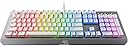
🌈 Elevate your game with clicky precision and dazzling RGB — don’t just play, dominate in style!
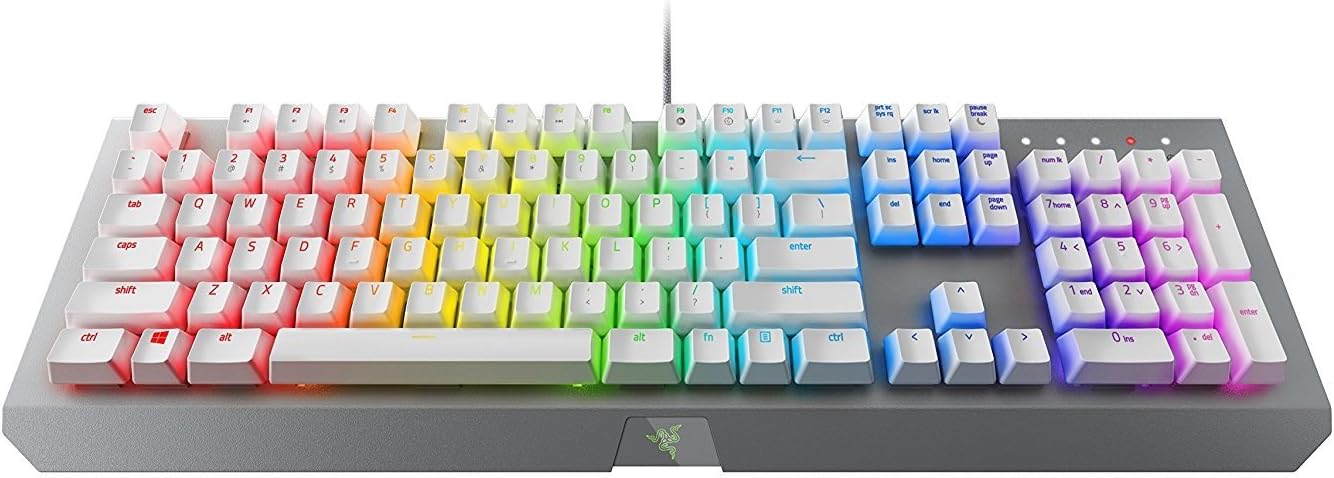
The Razer BlackWidow X Chroma Mechanical Gaming Keyboard features tactile and clicky Razer Green switches rated for 80 million keystrokes, customizable Chroma RGB lighting with 16.8 million colors, and a military-grade metal construction for durability. Designed for gamers and professionals seeking precision, responsiveness, and a visually immersive experience, it offers full key remapping via Razer Hypershift and a sleek mercury white finish that fits any modern setup.
| ASIN | B072JWR7Y5 |
| Best Sellers Rank | #89,178 in Video Games ( See Top 100 in Video Games ) #3,842 in PC Gaming Keyboards |
| Brand | Razer |
| Color | RGB Mercury |
| Customer Reviews | 4.5 4.5 out of 5 stars (1,021) |
| Date First Available | August 8, 2017 |
| Hardware Platform | Laptop, PC |
| Is Discontinued By Manufacturer | No |
| Item Dimensions LxWxH | 7.17 x 18.08 x 1.58 inches |
| Item Weight | 3.11 pounds |
| Item model number | RZ03-01762000-R3M1 |
| Manufacturer | Razer Inc. |
| Number of USB 2.0 Ports | 1 |
| Operating System | Linux |
| Power Source | Corded Electric |
| Product Dimensions | 7.17 x 18.08 x 1.58 inches |
| Series | BlackWidow X Chroma |
M**.
Razer's new Green Swtiches are incredible! Clicky Click liker cherry blue's with awesome LEDs
Razer BlackWidow X Chroma. I have to say, this is possibly the best keyboard I have ever used. I love the RBG lighting effect, the clicky sound of the newly revamped Razer green switches is something I definitely cannot live without; they sound almost identical to MX cherry blues. Once you go blue, you can never type on a non clicky keyboard again. Razer recently changed their switch supplier and has made incredible strides in terms of quality and performance. I actually returned my Corsair K70 RGB keyboard because I couldn't stand how terrible the clicks were. I actually made a mistake when I was at the store buying it; I confused the key-switch 'click' with the actual key bottoming out. Corsair used a grey style switch which gave a 'tactile' response; tactile means mushy to me. I prefer a clean 'snap' of the switches. As far as this keyboard goes, here is what I love about it: - Awesome clicky keys - Heavy, strong built metal frame - Incredible RGB's (better than my Corsair K70 lights ever were) - Smoothly, light, and crisp keystrokes - Cable management trenches in the back of the keyboard Here is what I didn't particularly like: - No wrist pad; I have seen some Razer products with magnetic wrist pads and that would've been awesome - Super small font on some keys, making the RGBs more difficult to see (the 'alt' button has very minimal light that passes through, but I would still consider the RGB effect to be much better than competition) The price for this is also very fair. For about $100 dollars, you get the best RGB's in the market with switches that go head-to-head with the legendary cherry mx blues; how can you beat that? Other manufacturers will typically be much higher, and I don't think there is any price that can compare to this quality. But really, this is by far my most fun keyboard to use, code, type, and game with. In fact, I'm writing this review with it right now, this has been my longest review of a product I have ever written.. coincidence? I think not! :) I have a Das Pro also, but I use that one for work. I would have to rank them nearly the same in terms of typing performance. They Das pro is a little bit better in terms of keystroke performance, but not by much. BUT, the Das pro doesn't have LEDs. Which is why I use the Das Pro at work while keeping the Razer BlackWidow X Chroma at home. I really enjoy this keyboard, I made the switch to mechanical boards about a year ago and to be honest, it changes my perspective. I love this keyboard, and I'm sure you will too!!!! If anything quality related happens, I will be sure to update this post as to what happened. (Note: for the picture, I did purchase some PBT white plastic keycaps which really seem to help the RGB's shine through even more!!!!)
U**R
Great Keyboard, feel nice once you get used to mechanical, no real complaints
Cant' think of any complaints for this thing. It feels pretty comfortable. It did take about 2 weeks to get used to a mechanical keyboard considering I've used a standard keyboard for almost 20 years, but now that I'm using this, it feels just fine. Admittedly I rarely actually use the special color coded features of the keyboard (for example, in Overwatch, your keys light up if your ults or special attacks are available [or unavailable, too, I supposed]) since realistically, if you are looking at the keys while playing, you're playing wrong. It's more of an eye candy thing for when friends are watching you play, I suppose. Like... I've set my keyboard right now to show "rainbow colors", but I only realize I've got that feature on like once every 10 minutes or so when I actually take a peek at my hands. I used to have it to where clicking on a key would shoot out pretty ripples of colors, but it did admittedly get annoying, so now it's just statically colored like a rainbow with no interaction (except for the custom games that do stuff - it's not noticeable though when you're actually 'in the heat of battle'). Still, though, it's nice having the customizability, so it's not a con in the least. I suppose my only two mini gripes about this product are a distinct lack of USB ports on the side. My much cheaper steel series keyboard that I had before this (I think it was the Z-Steel?) had two USB ports on the side that I could use to attach a mouse receiver or whatever (I know the obvious answer is to use the back of the computer for my receiver, but I'd prefer to have the receiver within 3 feet of me instead of like 7 so that I get better signal). This freed up USB slots on my computer's front panel that could be used for other stuff like my USB headset that I switch between my laptop and desktop, and my tartarus chroma gamepad, and various other stuff like my phone or USB drives. Not a huge issue though; most keyboards don't have USB hubs built in, so I shouldn't be complaining; just pointing out a nice feature to include. The other mini-gripe is that the FN key is by the right hand side, between alt and the menu key. Most keyboards put their FN by the left hand size between the ALT and windows key or CTRL and Windows key (google 'fn key' and look under images if this doesn't make sense), so this takes some getting used to if you're trying to turn down the volume while in a full screen game or something of the sort. However, those are just gripes for the sake of griping; it's otherwise an AMAZING keyboard that is super customizeable. I haven't tried the "Pro's standard" keyboard, the Corsair K70 RGB, but looking at it visually online, it looks almost exactly the same (even down to the color effects) minus the wrist pad. So I think this keyboard is just fine. One thing a friend of mine pointed out, though, that might bother some people is that it doesn't have any macro keys, both on the left hand side, nor by the spacebar. This doesn't bother me since I don't ever use custom keys (and do have a Chroma Tartarus from Razer anyway), but it may affect some people that are used to using them. Regardless, though, I feel like this is an almost perfect keyboard for me that I see no reason for upgrading from, for at least another five years or so, unless something really huge happens by then.
R**K
My new favorite keyboard for both work & games.
I bought handful of Razer products for my most recent PC build and I am extremely pleased with the quality and functionality of all the products I've used thus far, particularly this keyboard. The BlackWidow X is the first mechanical keyboard I've owned, and I can say with confidence I won't be going back to a membrane keyboard anytime soon. Although this is a gaming keyboard, I do a lot of work on my gaming PC, so my keyboard needs to be typist-friendly as well as gamer-friendly. The BlackWidow servers both purposes flawlessly. The simplistic design, heavy metal frame, Chroma lighting, mechanical keys, & the Synapse software used to configure the keyboard all work together to make this the perfect keyboard for gaming. I particularly like how the keys map to certain games and light up accordingly based on what's going on in the game (Overwatch being my favorite example). In addition, I almost feel as though I type faster on this board. Maybe it's just the clicking of the keys giving me that impression, but for whatever reason, the spacing of the keys and their sensitivity are perfect for my typing style. The metal metal not only gives the impression that the board is very high quality, but the weight of it prevents the board from shifting around the desk accidentally. I really don't have enough good things to say about this keyboard. If I had any complaint, it would be that the white keys (I bought the Mercury Edition) obviously show any dirt that builds up more more quickly than standard black keys. However, I don't even mind that so much as it let's me know it's time for a cleaning.
J**S
I love this keyboard, I was weary to drop more than 100 on any keyboard but considering I use my computer for majority of my free time, I didn't mind spending a premium on a this keyboard. The brush metal and popped up keys is awesome, the keyboard has a nice clicky sound (which is quite loud and some people might dislike it) that is satisfying to hear. It has a much slimmer profile, which I welcome. I have limited desk space and I don't use any macros so it doesn't concern me. There are plenty of other keyboards with macros and wrists rests by Logitech, Razer or Corsair if you need it. I honestly dont notice any difference to my wrists, it's slim profile already keeps the keyboard low so long hours of gaming or typing doesn't hurt your wrists. The RGB lighting is what makes the keyboard shine beautifully. The supported software by Razer is pretty cool. For some supported games like Overwatch or LoL, certain keys light up, for instance when your ult is ready. Another example is when you're low on HP, the keyboard would flash red creating this next level immersion. 5/5 would recommend
J**R
Tolle Tastatur, jedoch Amerikanisches Layout, was ich der Beschreibung nicht entnommen habe, sonst top.
J**U
キー入力が毎回違う場所で反応しなくなる。USB接続だが無反応になる事がある。大丈夫な時とダメな時があり使えない。
A**M
Should have done my research before purchasing this but shortcuts does not work on iMac. Also, when I try to register this product, it says product not found.
S**R
Yo compre este teclado porque quería un teclado mecánico de gaming a pesar de que no soy gamer. Quería el teclado por la iluminación rgb y por su durabilidad, lo uso tanto para programación como para tareas de trabajo comunes en la computador. Este es un teclado MECANICO para gaming por lo cual es bastante ruidoso, lo cual a mi en lo particular no me molesta en lo absoluto, al contrario, me encanta escuchar el sonido de las teclas, sin embargo esto no es para todos. Si estas buscando un teclado RGB hay otras opciones mas silenciosas. Si, de lo contrario quieres escuchar cada teclazo, sin importar la hora del día o de la noche, adelante, tiene un sonido muy agradable y fuerte. Adicionalmente hay que decir que este es un teclado MUY pesado, obvio esta pensado para los gamers, para que el teclado no se mueva de lugar cuando están jugando. Nuevamente esta es una característica que a mi en lo particular me gusta. En cuestión de las opciones RGB y programabilidad del teclado, es excelente, solo que depende del software Synapse de Razer así que hay que tener en consideración que hay que instalar ese software para poder programar las teclas para acciones especificas o para configurar perfiles de colores. Puedes bajar muchos perfiles de colores de internet. Si tienes Mac, el teclado funciona sin ningún problema, la versión Synapse 2 funciona en Mac. La versión Synapse 3 por el momento solo funciona en PC/Windows. Espero que esta reseña le sirva a otras personas...
Trustpilot
1 month ago
3 weeks ago