Desertcart purchases this item on your behalf and handles shipping, customs, and support to Japan.
📻 Own the airwaves with AnyTone’s powerhouse dual-band rig!
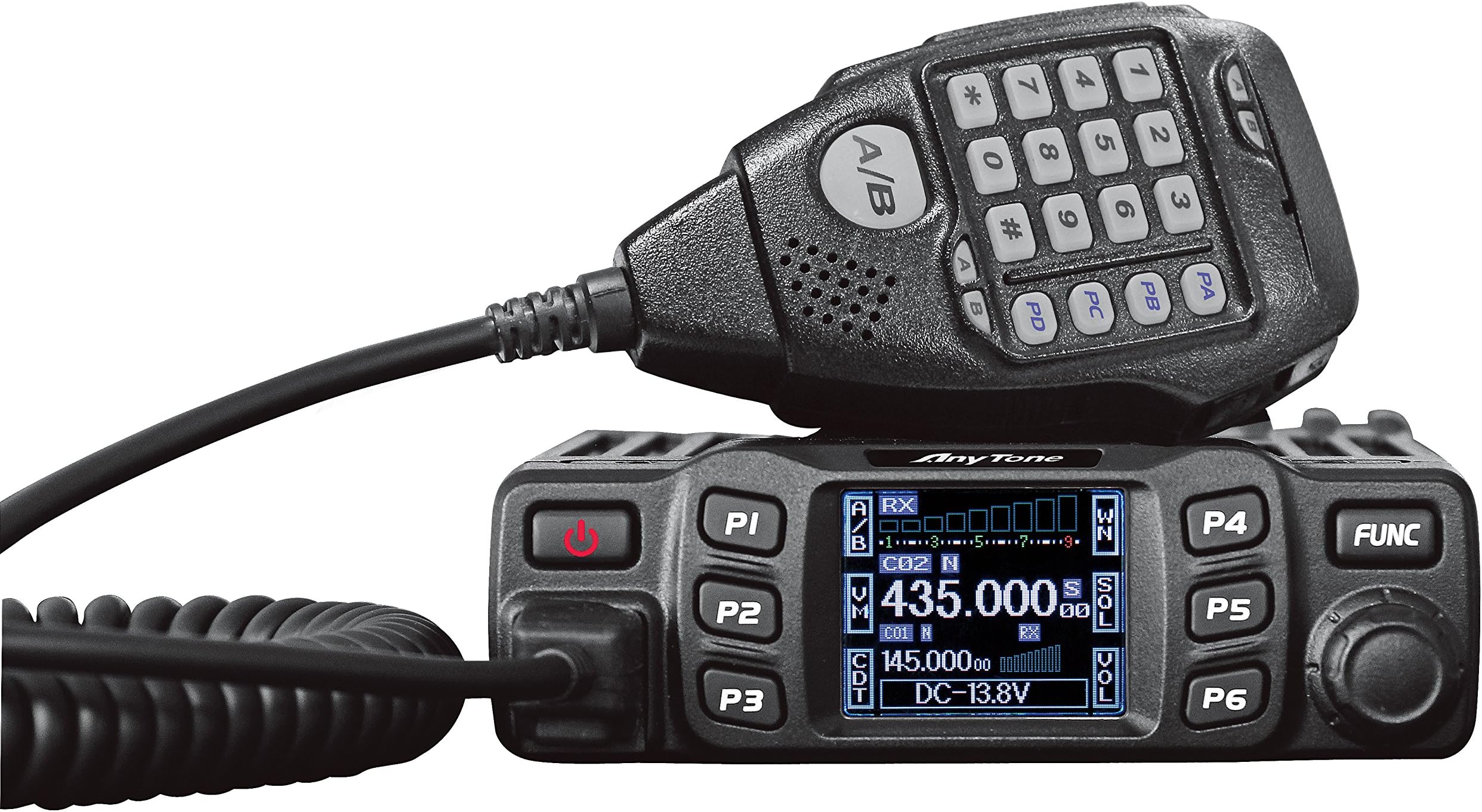
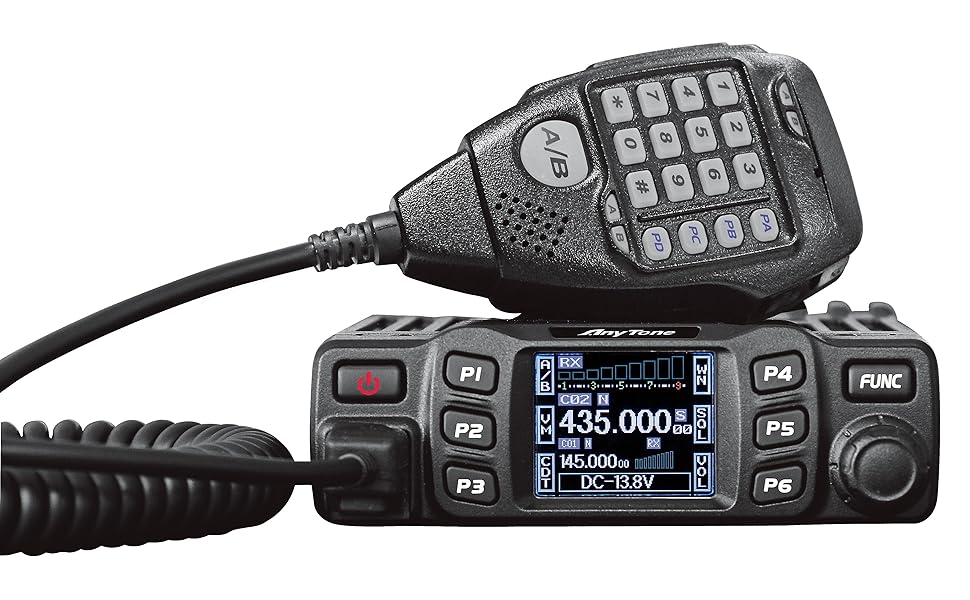
The AnyTone AT-778UV is a professional-grade dual band VHF/UHF mobile transceiver featuring a vivid 180° rotatable TFT color display, powerful 25W adjustable output, and advanced call functions including emergency alerts. Built with a rugged alloy body and cooling fan, it ensures stable, long-range communication up to 5 km. FCC compliant and easy to program, it’s the ultimate tool for serious ham radio enthusiasts and professionals seeking reliable, crystal-clear connectivity.

| ASIN | B071DQPNCW |
| Additional Features | Long Range |
| Best Sellers Rank | #357 in Portable FRS Two-Way Radios |
| Brand | AnyTone |
| Built-In Media | 1 piece radio |
| Color | Black |
| Compatible Devices | Other AnyTone radios, compatible accessories |
| Connectivity Protocol | CTCSS, DCS |
| Customer Reviews | 4.4 out of 5 stars 694 Reviews |
| Frequency Range | 144-148/420-450MHZ |
| Global Trade Identification Number | 00799577000918 |
| Item Dimensions D x W x H | 4.7"D x 5.8"W x 1.5"H |
| Manufacturer | QIXIANG |
| Mfr Part Number | AT-778UV |
| Model Number | AT-778UV |
| Number of Batteries | Unknown batteries required. |
| Number of Channels | 200 |
| Number of Packs | 1 |
| Special Feature | Long Range |
| Talking Range Maximum | 5 kilometer |
| Tuner Type | UHF, VHF |
| UPC | 799577000918 |
| Unit Count | 1 Count |
| Voltage | 13.8 volts_of_direct_current |
| Warranty Description | 6 months from purchase date |
| Water Resistance Level | Not Water Resistant |
E**Y
REAL rig for $120! Color screen is gorgeous. Rig works FANTASTIC. 5-15-25 watts!
Love this radio but it's keypad locked up recently. Mic keys (except ptt) work but nothing on the unit works. Does anyone know of a place I can send this for repair? I tried to factory reset via the software etc. But no luck. This is my main home desk 2m/440 radio used on 5 watts 90% of the time with a mag mount dual band antenna on my metal frame large box fan. SWR adjusted down to 1:1. KF6YKM since late 90's. Any info appreciated. Ham since 99 - Advanced Class License - This is a REAL dual band radio in the same ballpark as the big boys. The COLOR screen is phenomenal: Full of info and very colorful which really makes it a pleasure to operate. Operation and programming is easy and simple. I ordered the cable but not felt the need for it. Others have complained about the DTMF functions. It has them but since I don't use them it doesn't affect me. It offers dual watch altho I don't really use that either. Power is nice. 5-15-25 watts. And changeable on the fly. I am repeater guy so 5 watts on a indoor j-pole is fine. I also tested it on a 1/4 wave dual band mag mount on my older fan with a metal case and works nicely as well. For $120 this little rig can't be beat. I did not read the manual at all. (it is a bit rough.) Went on youtube, watched a fellow show how to program / use it and voila! Easy. Has a logical menu system layout and intuitive interface. It feels like a rugged rig. I have had two other "mobile" style Chinese rigs. The first was was okay for $60 but hard to program manually. The second I ordered recently ($80) and returned. No transmit audio. Three bands - 2m, 220 and 440. I could key the repeaters up but no audio came thru. I tested locally with my HT's and true. No output audio. Returned it here to Amazon. It was tough to program manually as well altho CHIRP supports it and made it much easier. Often I like to program on the fly and this AnyTone rig is easy for that. BTW, CHIRP so far does not support this little rig BUT it has it own downloadable software. Not tried it but looked at it. Looks capable enough. Okay, bottom line - how does it sound: Speaker audio out is nice and clear and loud. Some have complained it takes two keys to adjust volume and squelch and that is true. I don't find it a big deal as the keys are next to the multi function rotary dial. Thumb press and turn. Voila. Had a buddy of mine check the audio on a repeater and reported it sounded good, loud and crisp. Can't ask for anything better. I had a feeling it would sound fine as I used it simplex here with the granddaughters helping and it worked and sounded fine. This rig is semi wide banded so working on MURS and GMRS is possible. Of course stay within legal guidelines and make sure your antenna is tuned for those bands. GMRS 10 year licenses are $80 last I checked and MURS is free but keep the power low. Same with FRS. So from a non technical ham that just wants to use a good rig and hear and be heard without too much hassle to work and program, I give this rig two thumbs up.
A**R
Best Kept Secret In Ham Radio
I’ve been running this radio as a base station for about 3 years. And it’s a great little radio. Excellent performance every time I fire it up. It sounds decent on receive and I get good audio reports on transmission. Easily programmed with CHIRP and the programming cable (which was an extra purchase). Considering the performance and the price, this is the best-kept secret in ham radio. Couple it with a decent antenna and you’ll be impressed with what it can do. It takes some time to become accustomed to the controls, but you’ll come to appreciate the versatility of the menu system. If you’re on a budget and hunting for a basic VHF/UHF FM radio, this is the one.
D**D
How to Program
My unit came with a flash drive containing the software. Here is a summary of how to program the radio. 1. Install the software as you would with any software. 2. Click on the newly installed icon and you will see an option to install "USBToComPort_Win8." You must install this driver. 3. Open the software and turn on the radio. 4. In the software, click on "SET," and then, "Set Com." The Com port window will open. Click on the pull down for the available Com ports and leave it open. Plug the programming cable into the radio. Now plug the other end of the cable into a USB port on your computer and watch for a new Com port to pop up in the pull down menu. Select that Com port. 5. Click on "Program," and then click on "Read from Radio." You have to do this step first to save an image (configuration) of your radio. Once this is done, you now have a usable file in which you can begin entering your frequencies. Click on "File" and "Save As" and give your new file a filename. 6. Enter your frequencies, CTCSS etc. and any configuration settings you want, like AOP (automatic power on), DTMF, scan type, default volume, etc (see screenshots below). 7. Click the file save icon. 8. Click "Program," and then click "Write to Radio." 9. Done. I really like this little radio. It's built solid, and the greater portion of the case is aluminum heatsink. The receive sound quality is very good, and reports on the transmit sound quality are also very good. And I found it quite easy to learn and use. I am using an old ATX computer power supply, so my input voltage is only 12.4V, but I get full quieting on every repeater within about 25 miles. I don't have a reliable power meter to measure the actual output. This little radio does everything I need, and it does it well. If I buy a radio for the car, I'll buy another one of these. At this price point, it's a no-brainer.
R**Y
The "Almost There" Radio...
Update: 7/22 Now that I have used the radio for a few weeks I have to say this is great little radio. At this size, power, and price, It would be hard to find anything comparable. The UI issues are easy to work around, and just like any other radio, once you know how to work it properly it is not a big deal. But the UI could use some tweaking in a future release. That said, the no DTMF thing still bothers, which keeps this radio out of 5 star territory. Update: 7/5 I have had more time to go through the radio. I will retract the "sorry it had to be this one" comment. But I will leave it the rating at 3 stars. The primary reason for this is no DTMF capability. For amateur radio this is a real deal breaker. Other issues like the A/B selection were resolved once I received the programming cable and software. The company does not have the software somewhere you can actually get to it. You have to ask them for a link to download it. This seems fairly bizarre in this day and age as there seems no relevant reason why software that is specific to this radio would need to hidden from users in this way. Other things I was able to address in the software: ..You can make the knob default to volume control instead of channel select. You can then just use the buttons on the mic to scroll channels. Or you can press the P6 (CH) button which will make the knob function to change channels again momentarily. .. Once there were several memories in place, the A/B and VFO issue seems to have gone away. I believe this is related to the Mem and VFO settings in the software. Once these are written to the radio the first time, it seems to behave properly. Out of the box the radio seems to behave like A is always a channel or memory, and B is always a VFO. In software you change both A and B to be memory based and the problems go away. .. I still really like the display. I will say that the company has answered every question I have asked, and in a timely manner, even if it did take 3 days to figure out how to send me the programming software. The important thing was they followed up to make sure I had it, and that they addressed it right away when I didn't. So they get kudos for good customer service. The AT-778UV is a cool, mini, dual watch, mobile radio, with some minor quirks, and the one major quirk of no DTMF. And for that it earns 4 stars. **** Original Post **** Nice to see a new radio from Anytone. Sorry it had to be this one. Sooo close! First let's start with aesthetics. It is a nice looking little radio. It would be a "micro" or "mini" class. As you can see, the radio is not much larger than the microphone. There are +'s and -'s of course. The screen is clear and bright, but it is small. I do like the menu system with the contextual P buttons. As you press the FUNC key, the P buttons change. You then press the appropriate P button for the function you need. There are additional menu options than can be accessed with a long press of the FUNC button. The menus can be adjusted to your liking from the larger main menu but I find the defaults are pretty good. There are also 4 programmable (PA-D) buttons on the microphone that can also be customized. The microphone is the Anytone type that has the A/B selection in the mic. There are 2 A/B indicators. The one near the A/B button tells you which VFO you are on. And the A/B at the top of the microphone indicates which VFO your receiving a signal on which is handy. Audio is loud and transmission is clear. The Microphone audio is bright and easily readable. Reports from a few QSO's are very good. The menu system is actually not to bad. To program a channel, go to VFO mode (more on this in a second) enter the frequency. Press FUNC and the P buttons will now change to show CDT, SFT, BND, and POW for CTCSS, Shift, Band (wide, narrow) and power. Change the parameters as needed and when adjusted accordingly, press FUNC to go back to the V/M key and hold it for a second. It will then bring up memory locations. Turn the knob to an available channel number and press V/M again. Back to that V/M thing. I can't get it to work. There are 2 modes for the radio - amateur, or professional. In the main menu (Long press of the FUNC button, FUNC MENU, press the knob to select.) under DSP you can change to CH, NM, or FRQ. (press the knob, turn to select, and press the knob again.) You are supposed to be able to press P2 (V/M) and go from memory to VFO mode. I cannot get it to consistently work. The radio appears to be stuck between amateur and pro modes. If you program a memory, put it in channel 1, then you should be able to press V/M to toggle from memories to VFO. This does not work. If I can work with the seller to resolve this problem, and if you don't need DTMF capabilities (which honestly I rarely use) then this is a pretty cool little radio. It certainly appears much less "toy" like than some of the other micro offerings. The audio is great, unlike the Baofengs which always seem to sound like you are talking in a cast iron bath tub. More to come...
L**M
Excellent budget mobile ham radio
This radio is excellent. I’ve received perfect signal reports (or as close as you can get to one) and I now have one in my car and one as my “base station” in my townhome. It pulls constant 13.7 volts, runs off of my external batteries perfectly, and is super easy to program with chirp. My car radio is connected to a magnetic mount antenna and my base station radio is connected to a j pole. The settings could be a little more descriptive and the manual could do a much better job at stating what all the settings are, especially for the shortcuts. For example, it states what the dual watch setup is but never states that it will show up as “RDW”. You have to go to the specific function number it mentions to figure that out. There are lists that people have put together for this - but that shouldn’t have been needed. This is a relatively small issue compared to the great price, ease of installation, great microphone, and overall value. The manual shortcomings isn’t enough of an issue for me to take off a whole star for it.
S**.
It's not bad
I've finally got to play with this for a few months and really tried it out. It works well and for me I was able to talk about 40 miles with a comet antenna. I could probably get further with repeater use. It is easy to program with a cable on chirp but you won't have power to the radio to do the programming if you don't have an inverter of some kind. I had to remove the battery from my vehicle, used a cable to connect to the battery and it worked long enough to program. But now to change frequencies I'd have to remove the battery again, bring it inside the home and connect to the computer to program. It might work well if you had Chirp on a laptop that you could take to the vehicle but I don't have one. I would recommend the radio. It's small and lightweight.
T**A
Best bang for the buck
My first Ham radio. Completely satisfies me. Pros: Solid Radio Body and Mic. Easy to use, Easy to program. For a 25watt radio, it is powerful. Used it this weekend to communicate with my buddies. I was able to reach out to them 40 miles apart from mountain to mountain. It felt like a blow Torch and able to send signals to my buddies from valleys to mountain tops and tops to wooded Valleys during my hunting trip. Cons: no software came with it. You'll have to download software from their website. No com cable came with the unit, so you'll need to buy the cable for it. I got locked out once because my mic stopped working and I couldn't input my password to unlock. Luckily, my computer was able to unlock it. Another con is that the hand book is written by a person who doesn't speak English well. The written direction sucks. Anytone needs to straighten out their writings and directions in the owner's handbook. Conclusion: Best Bang for your buck!!!
P**L
Unhappy Camper
While the radio was working, I was very pleased. Unfortunately, that lasted only two months beyond the warranty. Although disappointing, this is not unusual for electronics. Two months after the warranty expired, the screen prompted for a password. I have NOT knowingly set up a password. The only thing operating on the radio was the number keys on the microphone. I could NOT even shut it off without unplugging it. I tried entering every combination of numbers I would have used if I had intended to set up a password. Nothing worked. What is disappointing is the response, or should I say lack of response, from Anytone to my many help inquiries. There has been no response to numerous emails. The help request that I submitted on their website generated no response. I did not receive a response (pick up) via their website chat after several attempts. Currently, it is A door stop to my office door.
Trustpilot
2 months ago
1 month ago