Buy anything from 5,000+ international stores. One checkout price. No surprise fees. Join 2M+ shoppers on Desertcart.
Desertcart purchases this item on your behalf and handles shipping, customs, and support to Japan.
๐ก Illuminate Your Projects with Style!
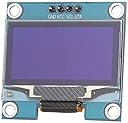
The HiLetgo 1.3" IIC I2C Serial OLED LCD Display Module features a high-resolution 128x64 display powered by the SSH1106 driver IC. Designed for seamless integration with various control chips, including Arduino and STM32, this module boasts ultra-low power consumption of just 0.08w when fully lit, making it an ideal choice for energy-efficient projects. With easy installation and customizable IIC addressing, it's perfect for tech enthusiasts looking to elevate their creations.
| ASIN | B01MRR4LVE |
| Additional Features | Low light |
| Aspect Ratio | 2:1 |
| Best Sellers Rank | #722 in Single Board Computers (Computers & Accessories) |
| Brand | HiLetgo |
| Built-In Media | Display |
| CPU Model Number | SSH1106 |
| Compatible Devices | Single-board computers (Arduino, msp430 series, stm32, 2 CSR IC) |
| Connectivity Technology | I2c |
| Cooling Method | Passive |
| Customer Reviews | 4.3 out of 5 stars 234 Reviews |
| Display Resolution Maximum | 128x64 |
| Display Type | OLED |
| Graphics Card Description | Dedicated |
| Graphics Description | Dedicated |
| Graphics Ram Type | Unknown |
| Human-Interface Input | Buttons |
| Manufacturer | HiLetgoยฎ |
| Memory Slots Available | 1 |
| Model Name | SSH1106 |
| Model Number | 3-01-1261 |
| Native Resolution | 128x64 |
| Operating System | Linux |
| Personal Computer Design Type | Barebone |
| Personal computer design type | Barebone |
| Power Consumption | 0.08 Watts |
| Processor Brand | Intel or AMD |
| Processor Count | 1 |
| RAM Type | DDR DRAM |
| Resolution | 128*64 |
| Screen Size | 1.3 Inches |
| Specific Uses For Product | Education, Programming |
| Style Name | Minimalist |
| Video Output | I2C |
| Video Output Interface | I2C |
D**.
Little big screen is sharp
Little bigger OLED and it really has a bright screen with clear letters. Wired right up and came to life quickly. A nice little screen for out new Model train base unit.
D**G
Works OK on Pi Pico with CircuitPython, with caveats
I bought it for Raspberry Pi Pico, and it takes a little effort to make it work for that platform. I'm using CircuitPython. Some notes: - It's monochrome. - I2C address is 0x3c - Use the adafruit_displayio_sh1106 library. - The sh1106 driver has a 132x64 buffer, but the LCD is 128x64. If the WIDTH is set to 128, you will have artifacts on sides of the screen. BUT if you set it to 132, the screen will be cropped slightly at the sides. - So libraries like terminalio work, but will crop a couple pixels off the left side. - Due to that fact, it's best to explicitly set graphic object location (like- text_obj.x = 30). - The display.brighness can be set to two levels (bright and less bright). The dim setting can be set with something like: display.brightness = 0.01 - Other Adafruit libraries like adafruit_display_shapes also work. Here's a very simple code snippet that works on the Pico. The pin defs are in the comments. Put the libraries in the /lib folder on CIRCUITPY. Demo uses these two libraries: - adafruit_display_text - adafruit_displayio_sh1106 ############ Code begins ############## # sh1106 demo for CircuitPython & the Raspberry Pi Pico # for the HiLetgo 1.3" I2C Serial 128x64 SSH1106 OLED LCD import board import busio import displayio import terminalio # the libraries below can be found in the adafruit-circuitpython-bundle, # and should be in the /lib dir from adafruit_display_text import label import adafruit_displayio_sh1106 displayio.release_displays() # the I2C pins: # SCL = GP5 # SDA = GP4 # Other: # GND = GND # VCC = 3.3V i2c = busio.I2C(board.GP5, board.GP4) display_bus = displayio.I2CDisplay(i2c, device_address=0x3c) WIDTH = 132 HEIGHT = 64 display = adafruit_displayio_sh1106.SH1106(display_bus, width=WIDTH, height=HEIGHT) # Make the display context main_group = displayio.Group() display.root_group = main_group text_area = label.Label(terminalio.FONT, text="Hello world!") text_area.x = 30 text_area.y = 30 main_group.append(text_area) while True: pass
D**.
Very nice I2C OLED display
Crisp characters that can use the u8x8 library with 1x1, 2x1 and 2x2 size characters using an Arduino or ESP-12 board (I haven't used the graphics capability as yet). These displays are robust as I found out when I accidentally swapped the Vcc and Gnd connections on my breadboard with no harm. The only reason for not giving it a 5 start rating is that it is difficult to mount with the connection pins extending above the circuit board. You'll also have to design and 3D print a bezel as I only found one design and it didn't fit my needs. All-in-all a good display at an inexpensive price.
R**M
Nice display, not Drop-in compatible with other 128x64 displays
These displays are white OLEDS. I didnโt notice it was an SSH1106 device and needs a different driver than the 0.96โ and 2.42โ SSD1306 displays I had been using. The 8x8 ASCII set of drivers from U8g2 worked but it only supports fonts that fit in 8 pixel cells (as far as I can tell) The 5x7 Adafruit fonts I was using allowed for about 20 characters on a line, the 8x8 drivers only allow for 15. The code with the SSD1306 driver still works but it leaves 2 columns of random pixels on the right side.
C**R
Like this compared to 0.96" displays
I like the display size compared to 0.96 SSD1306, I'm the author of Java UIO on GitHub if you want to use U8g2 in Java. I also made the U8g2 arm-linux port thread safe and super fast to drive multiple displays. I2C bus at 400 KHz can drive this display at 30 FPS without breaking a sweat on the CPU. As others have pointed out you have to use SH1106_I2C_128X64_NONAME for U8g2, but it works in hardware or software mode for me.
D**D
No Mechanical Drawings
Used for an Arduino project, thought I could use the mechanical drawing from any old 1.3" I2C OLED out there, they must be a dime a dozen. Nope, HiLetGo doesn't have one on their website or anywhere readily available. Cost me a ton of time, money, and materials getting housings that these don't fit into. Emailed them asking for a mechanical drawing, they sent me a package, but the only drawing was that of the OLED itself, and not the carrier board.
A**R
Cheap, bright, quick to get and works.
Its a inexpensive nice looking little OLED display. Yes, it's a SSH1106, so for Arduino you need to use a library like U8g2, but all you need to do to run the examples is hook up +5V (or 3.3V) power and ground, SDA, SCL to the hardware I2C uart on your device, select SSH1106 HW I2C in the commented out device list, delete any pin outputs for the u8g2 developer's boards... And change the u8g2.begin() (in setup) to: u8g2.setI2Caddress(0x078); u8g2.begin(); u8g2.setPowerSave(0); And the demos will work. If you are using the text only library then substitute u8x8 for the u8g2 above. If you are trying to use it on an Uno or Nano you probably will want to use the text version as there isn't much RAM left for anything useful with the graphics version on these devices. I have used SSI1306s on Raspberry Pis before and I think most of the libraries also support this chip on that platform so the downsides are minimal to non-existant. You will likely get the SSH1106 version just be prepared for that. It's a nice display, reasonably priced and quick to get from Amazon. I t is still small but noticeably larger than your typical 0.96" display with a SSI1306.
W**N
Nice little display
Easy to use, clear display! Using Arduino ide for ESP32 Install library "U8g2 by Oliver Kraus" #include <Wire.h> #include <U8g2lib.h> U8G2_SH1106_128X64_NONAME_F_HW_I2C display(U8G2_R0, /* reset=*/ U8X8_PIN_NONE); void setup() { Serial.begin(115200); Serial.println("Starting OLED Test..."); display.begin(); display.clearBuffer(); display.setFont(u8g2_font_ncenB14_tr); display.drawStr(10, 30, "Hello, World!"); display.sendBuffer(); } void loop() { // Nothing needed for static text }
Trustpilot
3 days ago
4 days ago