Desertcart purchases this item on your behalf and handles shipping, customs, and support to Japan.
⚡ Power your workspace with speed and style — the MikroTik hEX PoE means business.
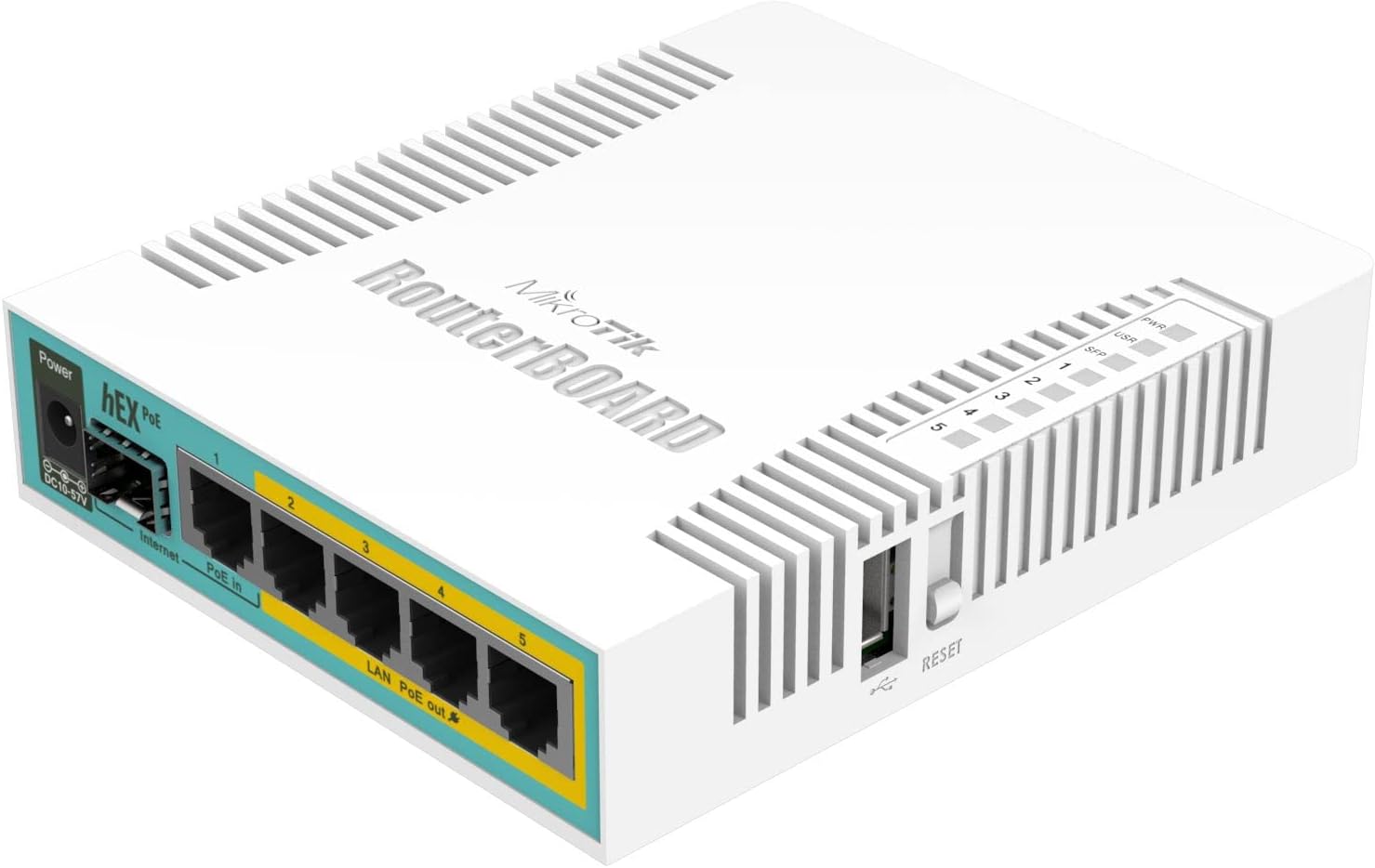
The MikroTik Routerboard hEX PoE RB960PGS is a compact, 5-port gigabit Ethernet router featuring 802.3at PoE output on ports 2-5, an 800MHz CPU for advanced RouterOS configurations, and USB plus SFP ports for fiber connectivity. Designed for wired environments, it offers high security with WPA2/WPA3, full DHCP customization, and reliable power delivery, making it the go-to choice for professionals seeking a powerful, affordable, and flexible network solution.
| ASIN | B01MDUCLVW |
| Antenna Location | Home |
| Best Sellers Rank | #10,511 in Computers & Accessories ( See Top 100 in Computers & Accessories ) #371 in Computer Routers |
| Brand | MikroTik |
| Built-In Media | 24V 2.5A power adapter, IEC cord |
| Color | white |
| Compatible Devices | Personal Computer |
| Connectivity Protocol | Ethernet |
| Connectivity Technology | Ethernet |
| Control Method | App |
| Controller Type | App Control |
| Customer Reviews | 4.4 out of 5 stars 147 Reviews |
| Data Transfer Rate | 1000 Megabits Per Second |
| Frequency | 800 MHz |
| Frequency Band Class | Single-Band |
| Has Internet Connectivity | Yes |
| Has Security Updates | Yes |
| Is Modem Compatible | No |
| LAN Port Bandwidth | 10/100/1000 megabits_per_second |
| Manufacturer | Mikrotik |
| Maximum Upstream Data Transfer Rate | 1000 Megabits Per Second |
| Mfr Part Number | RB960PGS |
| Model Name | RB960PGS |
| Model Number | RB960PGS |
| Number of Ports | 5 |
| Operating System | RouterOS |
| Other Special Features of the Product | WPS |
| Router Firewall Security Level | High |
| Router Network Type | Wired |
| Security Protocol | WPA2-PSK, WPA3 |
| Special Feature | WPS |
| UPC | 708747433654 |
| Voltage | 100 Volts |
| Wireless Communication Standard | 802.11a |
| Wireless Compability | 802.11a |
D**M
Very nice and stable router
Very nice and stable router. It takes a little work to configure but is totally worth it. I had never used a mikrotik product before and wanted to check it out. The only part i struggled with was that it does not handle internal DNS out of the box. I found a script in the forums to set a static DNS entry for each dhcp lease and was good to go.
S**T
Full configurability, up-to-date, secure, simple
I simply wanted a router that would give me free rein over the downstream DHCP addressing. After trying several other "managed" switches that either do not provide this configurability, or offer a limited handful of possible address ranges, I'm thrilled that this thing actually does this one simple thing. One does need to jump through some hoops to find the documentation - I have never seen smaller fine print as the largest font used in a printed manual - but I actually didn't need it, I just checked my local address and went to the .1 of that, found the custom (i.e. not "admin" thank you) admin password on the printed label - it forced admin password reset immediately (good again) and I was off to the races. I updated the firmware, waited for the two beeps to indicate that it had rebooted, rebooted my laptop and cycled power on the router and all was good - although I can now no longer access the admin page since I didn't give the router an IP address in the same range as the DHCP - would have been nice if that happened automatically but I can always factory reset and do it over :)
A**X
Requires some custom configuration
Not a plug and play router. There are simple config walkthroughs for pretty good security, or you can use all your network admin knowledge to create a complex setup. Update: 12/25 Still running strong. Upgraded to 7.20.6
G**I
Awesome, like most MikroTik products.
This is an awesome little router, and for the price, you can't beat the features (GigabitEthernet, PoE, RouterOS L4, etc). The power supply brick is bigger than the router, which makes the compact quality of the MikroTik RouterBoard devices moot. Can be powered by a wall wart with 1.5A output instead of the huge power brick if you aren't using all PoE interfaces.
C**C
They were right - it is complicated to configure
I haven't gotten this configured yet, so I don't quite love it yet, hence for the time being only four stars on the rating. I'm aiming for a secure SOHO gateway and firewall with full IPv6 support (delegated prefix from the ISP). The configuration is indeed complicated, as warned by the review on Small Net Builder where I found out about MikroTik. But the price is right, the potential technical capability appears to be there, and in the past I've configured both Cisco and Ubiquiti routers from the CLI. So it's just a matter of time and effort for the MikroTik.
A**S
Works amazingly well.
Just a heads-up; when you begin configuring the box, upgrade the firmware before you do anything else. Some of the changes to the pre-load settings wouldn't stick. Upgraded firmware and everything worked perfectly. Also, provisioning (h)APs with CAPsMAN is so awesome and makes putting (h)APs around your house so much easier when you don't need to re-do wireless configurations on all of them.
G**Y
Doesnt work with Unifi Access Points.
UniFi uses IEEE 802.3at PoE standard. This doesnt support this new auto negotiation standard. Microtik does make other POE devices that support 802.3at ... The Lite 8-Port Gigabit PoE+ Compliant Managed Switch USW-LITE-8-POE is a good alternative.
N**D
Solid Router-Switch w/ Great Features, But PoE Has Caveats
Solid little router, but the default power supply that comes with the device will not power on devices requiring power greater than 24V such as Reolink cameras (in my situation). I needed to purchase a separate power supply with a minimum of 48V output and 2.1mm barrel connector to power the camera. Mikrotik has a separate power supply for this (Mikrotik 48POW), but I found third-party options that worked. Another note for the Reolink cameras: I found that active PoE (802.3at) was not functioning correctly with the Routerboard. I had to force PoE to be on for the port in order to power the camera. The PoE experience on this appliance is little different than other networking equipment. For the features and options, the appliance is pretty solid, but to leverage the POE capabilities fully, you'll need to spend an extra $30-$50 depending on whether or not you select third-party or official accessories to address the issue.
S**H
good product for lower than 100Mbps
as described, but just as plan setup it dropped my connection from 270Mbps to 70Mbps while it has 1GB ports
F**D
Pour relier en réseau et alimenter 4 appareils en POE
C'est un routeur MikroTik 5 ports. Il faut avoir de bonnes bases pour l'installer et le configurer. Installé en mode commutateur. Chacun des port Ethernet PoE alimente un lien micro-onde. La page WEB de configuration du routeur nous permet d'activer ou désactiver l'alimentation des ces ports. On s'en sert pour faire une RAZ (reset) de l'appareil alimenté.
G**N
Works but only puts out 24V
Probably does what it should do but mind you this only puts out 24V, while a lot of e.g. CCTV cameras require somewhere around 30-50V
S**A
Eccellente prodotto
Ho ordinatoil prodotto perche il mio firewall era andato e quindi eravmo in panne gravissime, la spedizione super rapida in meno di 24 ore!! Complimenti al fornitore, Il prodotto dopo un ora dallp arrivo è stato installato e funziona benissimo, La configurazione dei parametri non è alla portata di tutti come del resto qualunque firewall che si rispetti, ma l'interfaccia è molto semplice e ben strutturat. per me 5 stelle
D**D
La puissance de router OS
ce routeur pilote 3 point d'accès de la même marque (WAP AC) et les alimente via POE. C'est solide, c'est rapide et ça tourne très bien. Je recommande
Trustpilot
1 week ago
1 day ago