Desertcart purchases this item on your behalf and handles shipping, customs, and support to Japan.
🖨️ Print smart, work faster, stay connected — your office’s new MVP!
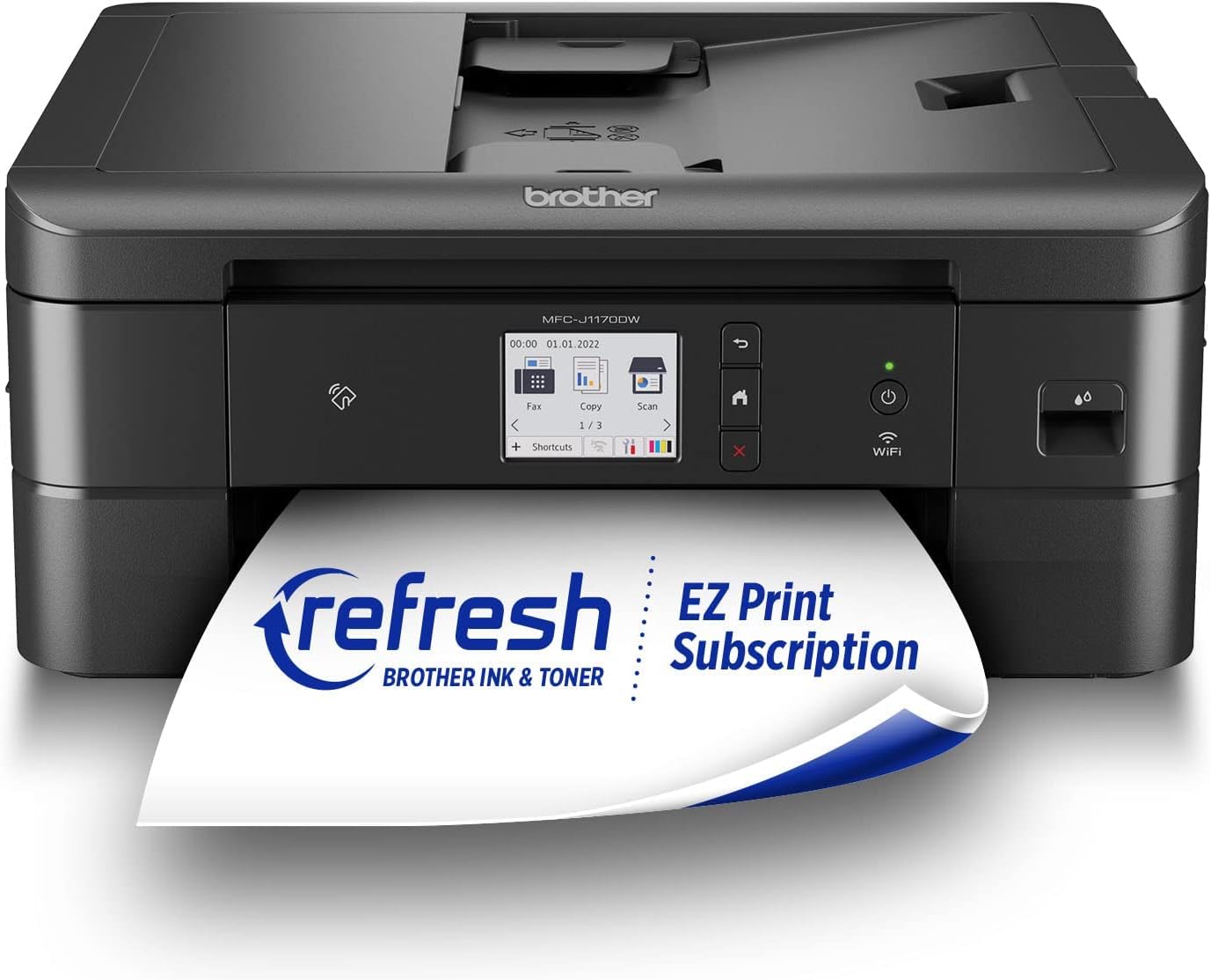
The Brother MFC-J1170DW is a wireless color inkjet all-in-one printer designed for home and small office use. It offers fast print speeds up to 17 ppm (black) and 16.5 ppm (color), automatic duplex printing, and versatile connectivity options including Wi-Fi, Ethernet, USB, NFC, and cloud services. Featuring a 2.7" color touchscreen and mobile app control, it streamlines printing, scanning, and copying tasks. Smart ink monitoring via Brother Page Gauge and Alexa integration ensures hassle-free maintenance, while genuine Brother ink cartridges guarantee high-quality output and reliable yields.


| ASIN | B09WZBX4Z1 |
| Additional Printer Functions | All In One |
| B&W Pages per Minute | 17 pages_per_minute |
| Best Sellers Rank | #5,691 in Office Products ( See Top 100 in Office Products ) #25 in Inkjet Computer Printers |
| Brand | Brother |
| Built-In Media | Brother MFC-J1170dwBlack, Cyan, Magenta, Yellow Starter Ink CartridgesQuick Setup Guide Product Safety Guide Reference Guide Warranty Card Telephone Line Cord |
| Color | Black |
| Color Depth | 24 bpp |
| Color Pages per Minute | 16.5 pages_per_minute |
| Compatible Devices | Smartphones |
| Connectivity Technology | Ethernet, USB |
| Control Method | App, Touch, Voice |
| Controller Type | Android |
| Customer Reviews | 4.2 out of 5 stars 1,279 Reviews |
| Display Type | color touchscreen |
| Duplex | Automatic |
| Hardware Interface | Ethernet, USB 2.0 |
| Initial Page Print Time | 6.9 seconds |
| Ink Color | Color |
| Item Dimensions D x W x H | 13.5"D x 15.7"W x 6.8"H |
| Item Type Name | Inkjet Printer |
| Item Weight | 16.4 pounds |
| Manufacturer | Brother |
| Maximum Copy Resolution Black and White | 1200 x 1200 dpi |
| Maximum Copy Resolution Color | 1200 x 1200 dpi |
| Maximum Copy Speed Black and White | 13 pages_per_minute |
| Maximum Media Size | 8.5 x 14 inch |
| Maximum Print Resolution Black and White | 17 dpi |
| Maximum Sheet Capacity | 150 |
| Maximum print Resolution Color | 6000 x 1200 dpi |
| Model Name | MFC J1170DW |
| Model Number | MFCJ1170DW |
| Model Series | J1170 |
| Number of Ethernet Ports | 1 |
| Number of Licenses | 1 |
| Number of Trays | 2 |
| Other Special Features of the Product | Auto Document Feeder, Auto-Duplex, Display Screen, Network-Ready, Touch Screen |
| Output sheet capacity | 150 |
| Paper Size | 8.5 x 11, 8.5 x 14 inches |
| Power Consumption | 21 watts |
| Print media | Envelopes, Glossy photo paper, Paper (plain) |
| Printer Connectivity Type | Ethernet, USB |
| Printer Output Type | Color, Monochrome |
| Printer Type | Inkjet |
| Printing Technology | Inkjet |
| Processor Count | 1 |
| Resolution | 6000 x 1200 |
| Scanner Type | Sheetfed |
| Series Number | 1170 |
| Special Feature | Auto Document Feeder , Auto-Duplex , Display Screen, Network-Ready, Touch Screen |
| Specific Uses For Product | Home, Office, business, home office |
| Total USB 2.0 Ports | 1 |
| Total Usb Ports | 1 |
| UPC | 012502663966 |
| Unit Count | 1 Count |
| Warranty Description | 2-year limited |
| Warranty Type | Limited Warranty |
| Wattage | 21 watts |
N**R
Good for new 5ghz Wifi connection, good value, sturdy machine
I had to upgrade to a printer with 5ghz wifi capability and shopped around quite a bit before deciding on this one. The printer arrived earlier than scheduled. It was well packaged and all components were wrapped securely. It's sturdy and has some weight to it. After unboxing, total set-up with downloads for the apps/connecting to wifi took a little over an hour. The ink is easy to install, much better than the cartridges of older models. The printer doesn't come with a cable to connect it to your laptop/computer, but I had one from my old printer and was able to use that, making set-up easy. It took a while to find where to plug it in; the illustration was vague. Instructions were cookbook. Print quality is excellent: great colors, crisp, aligned well. The value is excellent for this printer/scanner/fax unit. It comes with a phone cord if you need it for faxing. It was up and running wirelessly with no problem right away. No problems with paper feed. I'm pleased with this printer!
B**D
Easiest setup, worth the cost
I returned an HP model and purchased this Brother one at a much higher price. It was worth the extra cost! This printer was so simple to set up. Basically remove a few packing/shipping things, plug in, add paper, insert ink cartridges (they include enough ink for about 200 pages). Follow the screen messages and connect to your WiFi, set the date/time, etc. If you download the Brother Mobile Connect app, you’ll gain some additional useful features, like scanning directly to your mobile device. The paper tray has good capacity, the machine prints fast and in good quality, you can select to print double-sided (and it does that automatically), it’s quiet, and the NFC printing option works amazingly well. I’m very pleased with this printer and scanner. One caution though - if you’re in the US, you should be registering on the US Brother website. For some reason, the sticker on my printer had a QR code that brought me to the Canadian website (url ends in .ca).
S**S
LOVE IT!! (HELPFUL REVIEW - with 1 year update)
So I just received my Brother printer and so far so good! Set-up was super easy like everyone said! Initially I saw the fold-out paper of the instructions and was like, “UH THAT’S A LOT OF STEPS” …but it actually wasn’t once I started LOL. Literally took me like 5 minutes to setup. The only thing that threw me off is when I tried to get the Remote Print setup connected. It kept saying it wouldn’t connect so I got frustrated. Turns out, it’s not supposed to connect in the app. According to the Brother’s instructions online, you actually are SUPPOSED to select “Activate Later” — and in order to print from your phone, you have to go to Settings on your printer, click Network, click Wifi-Direct (if you’re using your printer and phone wirelessly), select Manual and remember your SSID and Password. Then go to your phone’s wifi settings and select your SSID, enter the password. TADA! You can now print from your phone. So don’t be alarmed if you can’t connect the Remote Print in the Mobile Connect app, it’s not supposed to connect. Follow the steps above! I also added a video of how fast it prints! Along with the print quality for color photos. I will say, if you’re suuuuuper picky about photo quality, this one may not be for you. Though the pictures came out pretty, you can clearly see a little bit of grainy-ness in the video (I tried to zoom in with a clear shot so you can tell during the video - the only reason why I gave this printer 4 stars). But if you’re not too picky and want something that can just get the job done, get it! I’m picky with photo quality but I can definitely deal with this, it’s not that bad. I also don’t understand why the people giving bad reviews on not being able to find the Black ink didn’t just sign-up for the subscription…. I only have to pay $2.50 a month for 40 pages (you can obviously pay more for more pages, $4.50 for 80 pages, $9.99 for 200 pages, or $15.99 for 400 pages a month, and if you use more page outside of the subscription it’s an additional $1 per 10/15 pages — and the ink will auto-deliver to your home once it detects your ink is low. Put it this way: I pay $2.50 a month. I can print super colorful pictures with my 40 pages and run my ink low. They’ll ship me new ink cartridges right away. So I just got 40 pages + ink for $2.50. Get what I’m saying?). The subscription is 100% worth it. I owned an HP printer for 4 and a half years before owning this Brother printer and I was also on the HP subscription - SUPER CONVENIENT PEOPLE!!! You can easily cancel at any time, but I promise you won’t. Thank me later!! Hope my review is helpful! :) Update: Purchased on 03/24/2023, it has malfunctioned around 06/01/2024 :( keeps saying there is a paper jam, but there isn’t a paper jam. Did all of the inspection steps, looked into all of the lil tiniest of areas inside of the printer — no paper jam. System has officially given up and malfunctioned with a paper jam glitch. Luckily my printer is still within warranty, working on getting a replacement.
E**9
This printer works with my Apple Devices!
I had a new HP printer prior to this printer and had trouble printing via iPad and iPhone on an AT&T wireless fiber network. I spent countless hours unplugging re-setting up that printer and it just never would work properly. So I had to go ahead and donate that nine month old printer. So when I looked to get this one, I wanted to make sure it could do mobile printing and that there were no issues reported for Apple devices. I am happy to say that this printer was so easy to set up. I followed the directions on the quick set up guide as well as on the screen. It attached flawlessly to my wireless network. I have had it about a week or two now. I can print so easily and it transmits quickly, then it prints. I have no trouble finding this wireless printer on my network and it just works great. I am so glad that I found this printer and that it works for me. I wanted to make sure I did a review to let anyone who is in search of a good printer, to know that if you have had a printer that had trouble printing from mobile devices such as Apple iPhone, and iPad then this is the printer for you!
K**R
When it works it's ok... so it's pretty much never ok.
I'm printing 100pages a month so hardly a power user and was thrilled to get rid of my super expensive ink cartridge machine when it finally died. I'd heard great things about Brother and this looked wonderful. I can't get mine to stay on the wifi; the machine password changes/resets and the app constant ally wants to update but since I don't know the machine password all the time that's hard. It doesn't wake up from sleep mode well but if the worst of it was I needed to walk over and hit a button every so often I could live with that. I generally have to unplug it and start over. Scanner feed/quality is good if it will actually talk to the computer to push off the scanned documents. Scanner app isn't great. The ink cartridges from brother are nice, the generics definably impact print quality. Final nail in the coffin of this machine is that it's developed a jump in the printed text from the ink cartridge feed after less than a year. It's off to the e-cycle bin and I'm back to a real printer company.
D**N
Worth it
This is the second Brother printer I've purchased and once again I'm very pleased. The first is an black & white laser printer. My daughter is starting to receive Homework/projects from school where teachers are requesting they be printed out in color. Honestly I think we are at a point where a teacher can reasonably expect the kids to have access to a regular printer but expecting a color printer is kinda pushing it cause of how much more they cost....anyway back on topic. The price isn't to bad and I have to admit the print quality is fairly decent. One of the biggest reasons to choice a Brother printer is that they don't gatekeep their toner cartridges and force you to buy first part toner. They recommend it sure but there isn't any physical or software obstacles that exist solely to force you to buy 1st part toner. You are free to buy whatever you wish, at your own risk of toner quality of course but that seems fair trade off. Setup is fairly straight forward as is connecting to the internet. My only complaint is that if you need this for use with a single computer and it'll be located fairly close to the computer you might want to connect via a usb cable for the sake of simplicity and to eliminate the lag that can occur from printing over the network. So while you "can absolutely" connect via usb to a computer you have to buy the cable separately. It doesn't come with it which I found puzzling cause lets be real the cable would cost the manufacturer like a dollar if that so there really isn't a reason not to include the cable. In the end I'd say the next printer I buy will also likely be a Brother.
T**L
Easy setup. Great ink service. Handles legal size paper ok
My previous printer died and I reordered the same brand (which shall remain nameless). It arrived quickly but I was unable to setup as the software in the printer was out of date and the update required too much effort and expense. Back it went. Looking at printer reviews I chose this Brother. Easy to setup. 70+ me had no problem. The ink delivery is fast and on time. My only issue is that the legal size printing is tricky. Sometimes it doesn’t feed well. Since I only print a max of four legal size at a time it’s not a big deal. Would be if you needed to print many legal size pages. Basically. It prints. Easy communication with my Pc and iPad. Does tap to print but I haven’t tried that.
R**E
Fantastic printer!!
Yes, I spent a little more than HP but there are so many advantages to this printer. a. you don't have to sign up to automatic cartridge replacement subscription b. the printer is never dormant; if you don't use it for days, it will stay ready and available when needed. No need to turn on the printer again and again if left unused for long periods. c. Printer is pretty sturdy, although I wish it came in white instead of black d. Connectivity is great. Yes, it took about 30min to install but it's well worth your time. I can print from anywhere at anytime. Install process is somewhat easy via website or via app. e. Print quality is great I would highly recommend it
P**C
Excellent
Super imprimante
Y**.
Producto bueno, mal embalaje
Me llegó con muchos detalles de maltrato como se puede ver en las fotos, sin cintas de embalajes, sin plástico protector en la pantalla, sin tapones de seguridad en dónde van los cables. En dónde escanea estaba un poco tallado de la parte de apoyo. Supongo que porque la compré con descuento. No la devolví porque realmente la necesitaba, al principio se trababa y me aparecía que tenía atascon, la revisaba y seguía con el mismo problema, hasta que la voltie y vi que en el riel había un tapón anaranjado de una entrada de cable. Sin contar todo lo anterior funciona perfecto, más rápida que la que tenía, imprime perfecto a doble cara, la calidad de las copias y escaneo tu las eliges, la pantalla touch es genial. Lo malo es el material de dicha pantalla es muy sensillo. La tinta de los cartuchos que vienen en la caja me alcanzó para muchas impresiones y copias. Si no hubiera sido por los detalles con lo que llegó yo le pondría 5 estrellas, realmente vale la pena.
A**S
No hay cartuchos en venta por ningún lado. Se vuelve inservible sin sin tinta..
No hay cartuchos a la venta y sin tinta se vuelve solo una basura porque ni escanear se puede. Sólo tiré mi dinero a la basura.
J**A
OMG... PERFECT!
I have been "fighting" with my previous brand of printer to make it wireless. We moved and I needed to set it up elsewhere. Also, I didn't like filling the cartridges. So, I bought this FABULOUS Brother MFC-J1170DW !! It arrived in a day and a half. (Congratulations, Amazon!) I had it set up and printing in no time flat. It is totally wireless and it prints from our desktop, two I-pads, and two I-phones. It is not a huge footprint which i really appreciate in this 'new-to-us' house. I have had Brother printers years ago. I should have stayed with the Brand. I heartily recommend this printer.
A**E
I really like Brother printers, but this one gave me a bit of a glitch at setup...
Don't get me wrong.. it's a terrific printed,. and compared to my old Brother that has lasted me over 10 years and is still working fine, this one is a lot faster.. like super fast. The glitch was that when I tested out the scanner, it would only work in one direction.. If I used the computer option to scan, it worked great, but when I used the button on the printer's LCD, it would not work. There was an obscure message to check the firewall in the settings if there was a problem (what settings?? on the computer or printer? where, how?) I checked both and didn't see anything out of wack. Then I thought, maybe it's because I'm using Chrome to download? or maybe it's because I accepted some free software from Brother when I was setting up?? Anyhow, this took me the better part of the afternoon. I ended up re-downloading using Firefox, and did not accept the free software. It still didn't work... but then... I tried it two more times not changing anything and the third time it recognized my computer and worked. I wish I could tell you why, but I have no idea. I had tried to Google a solution and there were a lot of hits so definitely I'm not the only one that has had this problem, but it's all good now. Oh Brother!
Trustpilot
2 months ago
1 week ago