Buy anything from 5,000+ international stores. One checkout price. No surprise fees. Join 2M+ shoppers on Desertcart.
Desertcart purchases this item on your behalf and handles shipping, customs, and support to Japan.
⌨️ Elevate your desk game with the ultra-slim, multi-device Keychron K3 — productivity never looked this sleek!
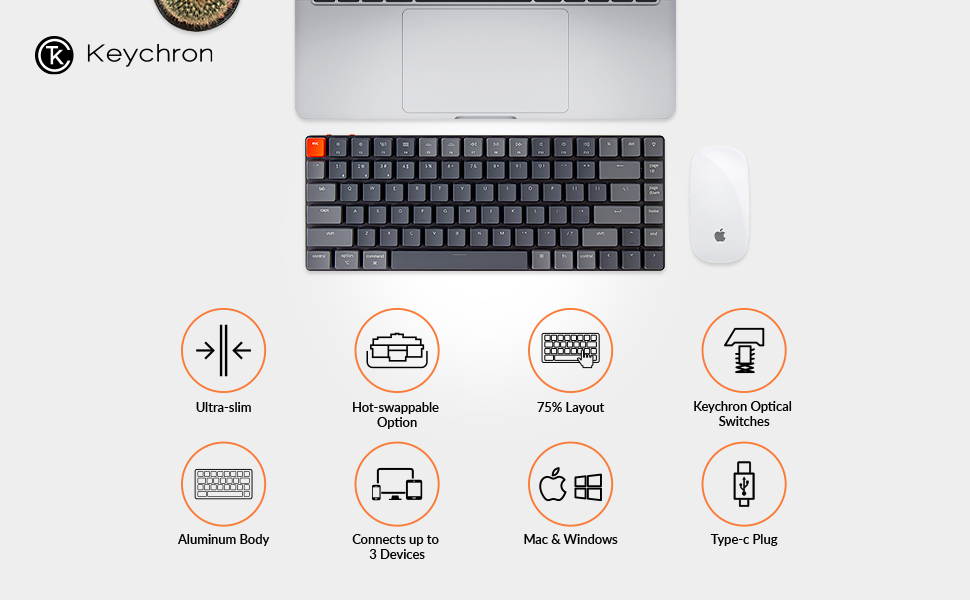
The Keychron K3 Version 2 is a premium 75% layout mechanical keyboard featuring 84 ultra-slim, hot-swappable low-profile optical brown switches. Designed for professionals, it offers seamless Bluetooth 5.1 connectivity to up to 3 devices, a reinforced aluminum body for durability, and a white LED backlight for subtle style. Compatible with both Mac and Windows, it delivers a tactile yet quiet typing experience with up to 70 million keystrokes lifespan and a battery life that lasts a full workweek on a single charge.


| ASIN | B09GG1ZD6V |
| Additional Features | Reinforced body structure, Two level adjustable rubber feet, Wireless & Wired |
| Antenna Location | Gaming, Office |
| Best Sellers Rank | #16,199 in Video Games ( See Top 100 in Video Games ) #103 in Mac Gaming Keyboards #1,000 in PC Gaming Keyboards #1,610 in Computer Keyboards |
| Brand | Keychron |
| Built-In Media | Keycap Puller, USB Cable |
| Button Quantity | 84 |
| Color | Low-profile Keychron optical brown switch |
| Compatible Devices | macOS/Windows |
| Compatible Operating System Family | MacOS, Windows |
| Connectivity Technology | Bluetooth and Type-C cable |
| Customer Reviews | 4.3 out of 5 stars 580 Reviews |
| Enclosure Material | Aluminum |
| Generation | 2nd Generation |
| Hand Orientation | Ambidextrous |
| Item Dimensions L x W x H | 12.05"L x 4.57"W x 0.87"H |
| Keyboard Backlighting Color Support | Single Color |
| Keyboard Description | Hot-swappable Wireless Bluetooth Mechanical Keyboard, 75% layout, low-profile optical brown switch |
| Keyboard Layout | QWERTY |
| Manufacturer | Keychron |
| Mechanical Keyboard Switch Model | Low Profile Keychron Optical |
| Mfr Part Number | K3-D3 |
| Model Name | Keychron K3 |
| Model Number | K3-D3 |
| Number of Keys | 84 |
| Number of Sections | 5 |
| Power Source | Corded Electric |
| Recommended Uses For Product | Gaming, Office |
| Special Feature | Reinforced body structure, Two level adjustable rubber feet, Wireless & Wired |
| Style Name | Contemporary |
| Switch Type | Low Profile Keychron Optical (Hot-swappable), Brown |
| Theme | Productivity |
| Unit Count | 1.0 Count |
| Water Resistance Level | Not Water Resistant |
J**.
Attractive, lightweight, quality, recommended at the price
Having used the Keychron K3 for the past four months in a professional office environment, I've come to appreciate this compact, portable mechanical keyboard for its functionality, aesthetics, and the comfortable typing experience it provides. Firstly, the optical brown switch configuration lends a significantly quiet yet tactile typing experience, ideal for shared workspaces where noise can be a concern. The auditory feedback is negligible, but the feel under your fingertips will assure you of each keystroke. The battery life on the Keychron K3 is another big win. With regular usage, I found that a single charge could easily sustain me through a full five-day workweek, eliminating the need for constant charging or battery swaps. It's a reliable companion for a busy work schedule. In terms of aesthetics, the Keychron K3 is impressive. Its look is understated and professional without screaming 'gaming keyboard.' In fact, I've received numerous compliments on its look during my usage at work. The The compact design also adds to its portability, making it easy to transport between locations, a must-have feature for anyone on the move. Multi-device Bluetooth connectivity is a standout feature. The keyboard was able to seamlessly connect and switch between different devices. This functionality proved invaluable, allowing me to quickly move between different work laptops without having to set up the Bluetooth connection each time. However, no product is without its flaws, and the Keychron K3 is no exception. Initially, the Bluetooth connection would drop after just a few minutes of inactivity. I resolved this issue by disabling sleep mode, using the keyboard shortcut provided on the manufacturer's website. Additionally, I noticed a slight wiggle with the keys. This didn’t affect typing performance, although it could be a point of concern for those who prefer a solid, immovable keycap feel. To conclude, despite its minor issues, the Keychron K3 has proven to be an excellent addition to my workspace. For a price tag of $69.00, it provides a high-quality, quiet, and tactile typing experience that I highly recommend, especially for those seeking to improve their productivity in an office setting. It's lightweight, portable, and exudes a professional appeal, all the while delivering on performance and battery life. However, potential buyers should be aware of its initial Bluetooth connectivity issues and slight keycap instability.
J**S
THIS KEYBOARD IS AMAZING!
This Keychron K3 V2 is HANDS DOWN, the best keyboard I've EVER used, let alone owned. Switched to this Keychron K3 With Brown Switches, from a RK61 Mechanical Keyboard with red switches and couldn't go back if I wanted to. I would easily recommend this, and if this isn't your cup of tea, go check out a Numphy Air 75 for $130 USD. Will update if ANYTHING changes or wears out, but as of today I can HIGHLY recommend this keyboard over almost every other 75% keyboard. Also the Brown Switches have more of a tactile bump and a like 25% stiffer spring, and the reds have a little more of a click, but Press very easy from what I hear. If you're looking for your first, 10th, or 500th Mechanical Keyboard, Then this Low Profile, Hot swap able, 75% TKL Keyboard I can 110% recommend The ONLY downside IMO, Is that it doesn't have extra Key Caps sets, the keys you get are the only ones you'll find, and they aren't PBT so they could shine after awhile. Definitely not a deal breaker, but just keep that in mind. Will update if mine start to shine, or anything goes wrong!
L**C
Good keyboard with some caveats
I bought this keyboard on Prime day, at ~$70 is hard to beat given there is no competitors at this price (Nuphy Air 75 cost ~$130 and Logi MX Mech Mini cost $150+) Thanks to Amazon's generous return policy I was able to test other switches as well, below are pros/cons: Pros: 1. Good price. At $70, as a low profile hot swappable Mech keyboard, it has no competitors. 2. Decent layout. It is much smaller than a regular keyboard or a TKL keyboard, the right shift key is a bit small but I got used to it quickly 3. Good ergo. Thanks to its low profile nature, it is much lower than the regular keyboard which your wrist can rest on the desk naturally. The key distance is much shorter which is good for people typed a lot 4. Good switch: It seems the Brown switch issue was fixed, as I don't have typos when rest my fingers on the keyboard. The mint switches are even better. Cons: 1. No White color (it's only available on keychron.com, which you need to pay $20 shipping and they have poor customer service) 2. Non-standard keycaps. The long keycaps (Enter / Backspace / Right Shift / Space key) has non-standard layout so you can not use your own keycaps. 3. Backlight button on top-right, and you can't customize it. It would be much better use combo key to enable backlight, almost all other brands are doing that. 4. Poor customer support: Don't get me wrong, Amazon has great customer service and the return policy is great, however customer support from keychron.com is another story, it's email only and it took 4~5 days for them to respond 5. No good clicky/linear switches: Due to its low-profile nature, linear switches lead to tons of typos (even for Black switches), and click switches (K3 only support hotswappable optical) sound weird, I tried both blue and orange and they all have the strange mush sound when typing. The gateron low profile blue ones sound much better but they are not supported. Overall, if you are looking for a good low profile hotswappable Mech Keyboard, and you like tactile switches, K3 is a good choice. If you like clicky switches, go with Gateron low profile blue. If you like linear switches, go with regular profile keyboard, low profile + linear switches is a weird combo and it's a typo hell.
R**D
Great keyboard, but not for beginners
TL;DR: I REALLY like this keyboard, especially once you add different switches and keycaps, but it didn't work out because my accuracy sucks. Definitely not for beginners. Long review: I got the optical reds with this keyboard and it's definitely not for me since I'm a heavy typist. It's just too sensitive so I got the orange and bananas (yellow) optical switches to try them out. I do like the oranges but the ping on some of the switches is too dang loud and annoying so I settled with the bananas (yellow). Once I got them to my liking, it's time to test drive the keyboard. I'm not a typist per day but I can type. Not 100% accurate though, and that's where my problems arose. When I do make a mistake, I will almost 50% of the time would hit the "page up" instead of the backspace.. I do use "del" a lot as well and would hit the light switch instead.. If you're competent and have 99% accuracy when you type, it may work for you. Otherwise, get the K1 DE (what I did instead).
S**Y
Smooth and has improved my typing
Context: I heavily use this for office work and am a heavy typer - use it for notes, document writing and also taking notes during interviews I am writing this review after using this for 2 months so that I know that this is the right product and that it really helps me in my work. And I can definitely say it does. This is my first mechanical keyboard and I purchased one after a year of deliberation. I always used to type on my laptop keyboard even while using a separate monitor just so that I could become faster in my typing. I use a Mac and right off the bat this comes with a Mac oriented layout. The keys click but but as much to make the experience too loud. When I talk to people and type they are not disturbed when on video calls. I used it in a office setting the noise was not too loud at all for people around me to be bothered by it. The keyboard is smooth and it took me a week to get used to the actuation force but once done my sped definitely improved. The base is aluminum and it gives off a really premium feel and helps with the stability of the product. There are 2 levels of lift in the keyboard, which is a huge plus for me - if I stand and work there is a different inclination versus when I sit and type and this keyboard helps in both. The lights on this one are white and I am quite ok with that. One thing to note - the intensity or backlights is less when on bluetooth mode versus directly being connected (I have attached 2 photos for reference). I prefer smaller keyboards as travel times to keys are less and the fact that I have been typing on laptop keyboards for a long time. The keyboard is sleek and great in transporting and carrying around.
E**S
Bad Quality. Sounds terrible.
Bad quality. Weird vibration when pressing any key that completely ruins the sound of the switch. Definitely regretting buying this and will be returning it. Not worth the price at all.
B**N
shifty red switch
Keyboard quality is great. The red switch is very easy to activate and also slow to spring back (muddy?) Tried mint switches as well which felt great but at the end of the day had to return it because I couldn't get used to the layout. The keycap is spread out but is very flat, which makes it easy to hit the adjacent keys even with mint switches. The extra row and indented shift really goes against my typing instinct.
C**H
Will buy more from keychron
Quiet keys. Heavy for being small form factor keyboard. Layout is great for MacOS.
W**L
No regrets
I really enjoy this keyboard, the switches are better in general vs the ROG Falchion red and Huntsman Mini purple. I thought by spending a lot I would get a lot. The feel and sound of the keys and switches on the mentioned gaming boards are terrible in comparison to the K3. However, I dislike how easily the keycaps show fingerprints. The white LEDs are bright enough and have a decent temp for me. I have no idea what the temp is but it looks to be slightly on the warmer side vs a cool blue temp. Paired with a tablet to get some light work done, excellent purchase. As for gaming, I'm a little more than a casual gamer. Mostly FPS, PUBG, Val, COD etc. I haven't wanted to switch back to the gaming boards but would not cheap out on the mouse I use. If it matters I use: Wireless Model D 3700x OC'd to 4.21 2080 Ti M.2 for the OS and SSDs for games 64GB of ram @3200, Corsair Vengeance PRO RGB (excessive but only $100 CAD) Lian Li Galahad AIO
A**N
Classy and minimal
Typing is smooth and quite enjoyable. Would definitely recommend for a home office.
A**A
Excelente teclado
Lo único que podría mejorar este teclado es que estuviera en español. Es bonito, de buenos materiales, responde rápido y apenas hace ruido. Tiene funciones muy interesantes como funcionar tanto alámbrico cómo inalámbrico y modo Windows/Macos
X**Z
Teclado de calidad sólida
Esta Perfecto, no hace tanto escándalo al escribir y tiene buen tacto. Su tecnología de Bluetooth es muy estable y no se percibe la latencia. El cable es de buena calidad y mejor que sea tipo C. Tiene sus ángulos para la inclinación buena. Sin ningún pero que reportar después de 6 meses de uso.
G**W
Battery life kills an otherwise excellent product
Firstly, what I like. The product is obviously build to last. The feel is good when I’m typing with it. It’s compact but includes the four important keys, page up, page down, home and end. Then what I don’t like. I would give it a five star if not for the short battery life. The keyboard can only last one week even though I turn off the backlit because I have no use of that function. I can live with that by charging it whenever I remember but it’s really annoying to have yet another device to charge frequently.
Trustpilot
2 days ago
1 week ago