⚡ Work smarter, print faster — the all-in-one powerhouse your office deserves!
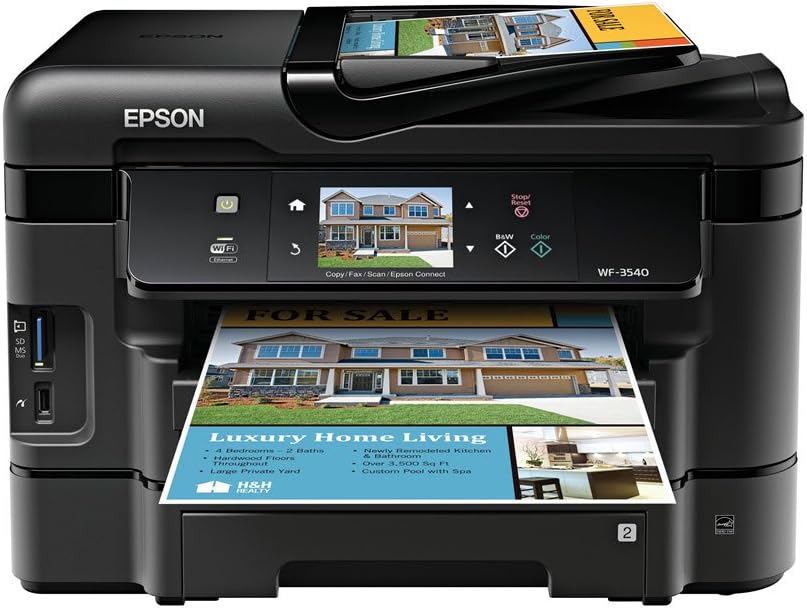
The Epson WorkForce WF-3540 is a high-performance wireless all-in-one inkjet printer designed for busy professionals. It delivers the world’s fastest duplex printing speeds, supports a hefty 500-sheet paper capacity, and offers versatile media handling with dual trays and rear feed. Featuring a 3.5-inch touchscreen with gesture navigation, built-in Ethernet and Wi-Fi connectivity, plus mobile printing via Epson Connect and AirPrint, it streamlines office workflows. With up to 40% lower printing costs compared to color lasers and ENERGY STAR certification, it’s an economical and eco-conscious choice for modern workspaces.
| ASIN | B0091DPYDU |
| Additional Printer functions | Copy |
| Best Sellers Rank | #1,027,803 in Office Products ( See Top 100 in Office Products ) #514 in Ink Tank Printers |
| Compatible Devices | Laptops, PC, Smartphones |
| Control Method | Voice |
| Controller Type | Amazon Alexa, Vera |
| Customer Reviews | 4.0 4.0 out of 5 stars (1,918) |
| Date First Available | October 2, 2012 |
| Dual-sided printing | Yes |
| Duplex | Yes |
| Global Trade Identification Number | 00010343900394 |
| Hardware Interface | Ethernet |
| Ink Color | Black |
| Is Discontinued By Manufacturer | No |
| Item Weight | 24 pounds |
| Item model number | C11CC31201 |
| Manufacturer | Epson |
| Max Copy Speed (Black & White) | 15 ppm |
| Max Input Sheet Capacity | 500 |
| Max copy resolution black-white | 5760 x 1440 dpi |
| Max copy resolution color | 5760 x 1440 dpi |
| Maximum Black and White Print Resolution | 5760 dots_per_inch |
| Maximum Color Print Resolution | 5760 x 1440 |
| Maximum Media Size | 8.5 x 11 inch |
| Memory Storage Capacity | 256 MB |
| Model Series | WorkForce |
| Number of Trays | 3 |
| Print media | Card stock, Envelopes, Glossy photo paper, Labels |
| Printer Ink Type | ink |
| Product Dimensions | 16.8"D x 17.7"W x 12.1"H |
| Scanner Type | Sheetfed |
| Sheet Size | 4 inch x 6 Inches, 8.5 inch x 11 Inches |
| Specific Uses For Product | business |
| Supported Media Sizes | 4 x 6 inches |
| Total USB Ports | 1 |
| UPC | 010343900394 |
| Warranty Type | One-Year 100% Quality Satisfaction Product Guarantee |
A**S
Like a Professional Work Printer...
I just got this printer today. Until recently, I had an Epson WorkForce 610. I liked it quite a bit, but due to an usual issue, anything I printed would become jammed really bad. (A glass shelf shattered, and glass fell down inside the printer.) After not being able to fix it...and actually breaking my printer more, I decided on a new one. I chose this one because of the price. A new Epson WorkForce 610 would cost $400.00, but this one was only $129. I've always owned Epson printers, and I've enjoyed them very much. I had a Lexmark once, but I HATED it. Epson printers are wonderful quality, while the problem is the cost of the ink cartridges. But, EBay usually fixes THAT problem. On to the actual product itself. I purchased this product for home use, with occasional work use. I wanted a printer with a scanner, as I'd rather have extras and not need them, than need them and not have them. When I purchased the Epson WorkForce 3540, I was expected it to be about the size of the Epson WorkForce 610. The WF 3540 is about double the size of the WF 610, but mostly due to the two paper trays in the WF 3540. As I said, I just got it today, and I haven't tested it out too much yet, but will update my review after some use. The touchscreen is nice and very responsive. Most people don't understand, touchscreen usually doesn't require too much pressure to work...and I imagine too much pressure may damage it, but not 100% sure on that. Setup is a breeze. Just follow the onscreen instructions when you first turn on the printer, and use the included CD to ensure your printer is connected to your wireless (or wired) network properly and that your firmware is up to date. The two paper trays are adjustable, while only one tray can fit paper than is longer than 8x11 (normal sized paper). I really like how the output tray is above the paper trays. Since my printer is on my floor in the corner of the room, I don't have to worry about accidentally stepping on the output tray. It is easy to push back into the printer itself, as well. I don't have a phone line, so I can't say how the fax capability works. The only complaint I have, and it may be due to any number of reasons (i.e., my network setup, an issue with the printer, an issue with my router, etc.), but I was unable to set up the WF 3540 on my wireless network using either push-button wi-fi protected setup (WPS) or PIN WPS. I was able to enter the wireless network wizard, select my network SSID, and enter my password. Or rather, I would have entered my password but I chose to connect via ethernet cable because my password is a 63 digit random alpha-numeric passkey. My WF 610 had no issues with wireless conectivity to my router ( D-Link DIR-655 N+300 Extreme-N Gigabit Wireless Router ). In all, I'm giving it 5 stars. Being unable to connect wirelessly is a small issue, and I'm not sure what the cause was. If I could prove it was an issue with the printer, and not my setup, I MIGHT give it 4 stars, but probably not. I would definitely recommend the Epson WorkForce 3540 to anyone who is looking for a great, cost effective printer. I've used Epson printers for over 10 years, and I have friends who use only Epson. If you don't mind the somewhat high cost of ink, and as I said EBay often has high quality ink for cheaper than elsewhere. Also, the ability to only purchase the colors you need help with the cost of replacing cartridges. If you only need yellow, then you don't need to replace blue. Again, I will update my review after some use, although I doubt I will find anything negative. UPDATE 3/11/2013: I found out there is a way to print without being on the same network as the printer itself. It's called EpsonConnect, and it could be VERY useful for smartphones that can't connect over WiFi, or at all if your network is wired only, or even if you're not home (although I have not tested this). When you set up EpsonConnect, your printer is assigned an email address. When you send something to the email address, it prints. Since it's through email, I would think it would work if you are on one side of the world, and your printer is on the other side. Also, it prints very fast and very nicely. The speed reminds me of the "draft" option on older printers, but with the quality of the "text" option.
T**E
Great Printer
After being a career HP Printers user at home, we jumped ship and went looking for something else (our HP Photosmart Plus printer ink carriage clogged up and was no longer usable so we needed a new printer). We initially wanted go the color LASER route, but the toner cost of those types were unreal. So after weeks of online research based on Mac compatibility, home network connectivity, wireless capability, ink cost, print speed, copy/scan functions, and other user reviews, we were sold on this one. This one was a breath of fresh air when we learned that it could stay connected to our network and reconnect even if our DSL modem went down and back up again (unplugged, power outage, reset). Our old HP Photosmart only could connect via WPS and would ALWAYS loose connection to our network so that you would have to go to the modem webpage and initiate WPS and then go to the printer to enter WPS pin, ...GOOD RIDDANCE to that printer. You have to install the Epson Manager software on all your MacBooks so that you can scan from the printer and choose what computer to send the scan file to. Not an issue, it was easy to install. And after you do this, the printer sees your computers on the network and when you scan, you can choose your computer name from the list of available MacBooks/iMacs to send it to. - I imagine it works just as well or better with PCs. My wife prints from her iPhone religiously. From her grocery list, to recipes found on her iPhone Safari browser, to even notes written in the iPhone Notes app. The iPhone (when it's connected to our home WiFi) sees the printer no problem and prints right to it, and quickly. I have yet to try it with my 3rd gen. iPad. The ink usage seems pretty normal to me, nothing like our old HP that would eat up ink as if it were incessantly thirsty. The color pictures/brochures I've printed on it are good, not great and not bad, but just good. I used the correct photo paper and brochure paper during printing. It does have a big footprint on our desk (about the size of a personal B/W LASER printer), but do you expect from an all-in-one. I don't care about the Fax options that are a part of the printer, who faxes anything anymore? On just a couple occasions the Printer did lose our MacBooks from its device list for scanning to, I'm not sure why, but I think it had to deal with not having the Epson software started up on our computers. Overall a great printer with easy setup.
S**S
It really is a workhorse and connects very easily
Trustpilot
2 weeks ago
1 day ago