
DOWNLOAD THE APP


Customer Services
Copyright © 2025 Desertcart Holdings Limited
DOWNLOAD THE APP






🚀 Double your network speed, halve your downtime!
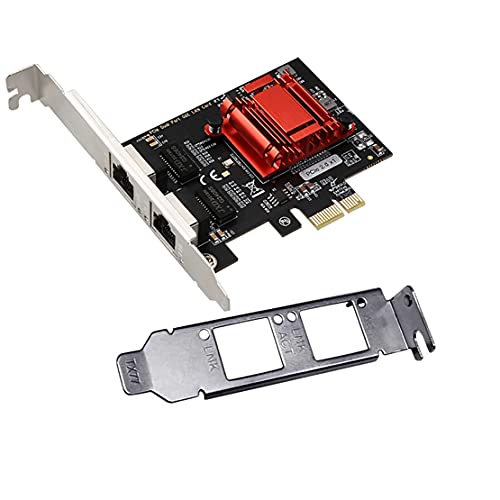
The ULANSeN Dual-Port PCIe Gigabit Network Card is a high-performance Ethernet adapter featuring dual 1Gbps RJ45 ports, PCIe 2.1 interface with 2.5 GT/s speed, and an imported alloy heat sink for optimal thermal management. Compatible with a wide range of operating systems including Windows, Linux, and FreeBSD, it supports advanced networking protocols like VLAN tagging, PXE boot, and SNMP, making it ideal for professional and server environments seeking reliable, scalable connectivity.


| ASIN | B09D3JL14S |
| Batteries Included | No |
| Batteries Required | No |
| Best Sellers Rank | #799,982 in Electronics ( See Top 100 in Electronics ) #237 in Network Interface Cards |
| Brand | ULANSeN |
| Compatible Devices | Desktop |
| Connector Type | Ethernet |
| Country of Origin | USA |
| Customer Reviews | 4.5 4.5 out of 5 stars (757) |
| Data Link Protocol | Gigabit Ethernet, IEEE 802.1Q |
| Data Transfer Rate | 2000 Megabits Per Second |
| Date First Available | 12 September 2021 |
| Hardware Interface | PCI Express 3.0 |
| Includes Rechargeable Battery | No |
| Item Dimensions LxWxH | 9 x 7 x 1.8 Centimeters |
| Item Weight | 80 g |
| Item part number | TXA094 |
| Manufacturer | ULANSON |
| Operating System | linux,vista,windows,windows 7 |
| Product Dimensions | 9 x 7 x 1.8 cm; 80 g |
| Type of cable or wire | ethernet |
B**A
Nothing wrong with this. Very affordable and does what is meant to do. Works fine with windows 10, 11 and Linux. Currently using it with pfsense running on Proxmox.
D**.
Good value, good performance Easy to install and team it
A**A
Funciona correctamente con proxmox
A**N
very easy to install, and no need for any modification in software. Just mount it while pc is turned off. Duhh
R**B
So far it's working great on Linux Mint 22.1 and Windows 11. I was having problems with the on board Realtek chips on my new MB mainly with Linux so I switched to this Intel based card and no more problems. I didn't have to install any drivers in either OS. Plug it in, disable the onboard ones and reboot. Simple.
Trustpilot
3 weeks ago
2 days ago