Desertcart purchases this item on your behalf and handles shipping, customs, and support to Japan.
๐ฅ๏ธ Elevate your workspace with clarity and comfort โ donโt just work, thrive!
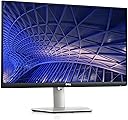
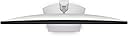
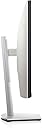
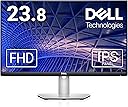
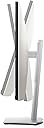
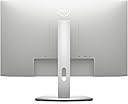
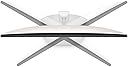
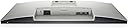
The Dell S2421HS is a 24-inch Full HD (1920x1080) LED monitor featuring IPS technology for vibrant colors and wide viewing angles. It offers a fast 4ms response time and a smooth 75Hz refresh rate with AMD FreeSync for tear-free visuals. Designed for ergonomic flexibility, its adjustable stand supports height, tilt, swivel, and pivot movements. Connectivity includes HDMI and DisplayPort, with an included HDMI cable for quick setup. Certified flicker-free with ComfortView to reduce blue light, itโs ideal for long work sessions. Backed by Dellโs 1-Year Advanced Exchange and Premium Panel Exchange warranty, it guarantees reliable performance and peace of mind.

| ASIN | B09SQYR4MM |
| Adaptive Sync | FreeSync |
| Additional Features | Anti Glare Screen, Flicker-Free, Height Adjustment, Pivot Adjustment, Swivel Adjustment |
| Aspect Ratio | 16:9 |
| Best Sellers Rank | #56,979 in Electronics ( See Top 100 in Electronics ) #1,443 in Computer Monitors |
| Brand | Dell |
| Brightness | 250 |
| Color | Silver |
| Color Gamut | 99 |
| Compatible Devices | Desktop |
| Connectivity Technology | USB |
| Contrast Ratio | 1000:1, |
| Customer Reviews | 4.6 out of 5 stars 754 Reviews |
| Display Resolution Maximum | 1920 x 1080 |
| Display Technology | IPS |
| Display Type | Height Adjustable |
| Hardware Connectivity | 3.5mm Audio, DisplayPort, HDMI |
| Image Contrast Ratio | 1000:1, |
| Included Components | HDMI cable, Monitor panel, Power cable, Stand base, Stand riser |
| Item Dimensions D x W x H | 6.29"D x 21.17"W x 17.59"H |
| Item Type Name | Monitors |
| Item Weight | 10 pounds |
| Manufacturer | Dell |
| Model Name | Dell 24 Monitor - S2421HS |
| Model Number | S2421HS |
| Mounting Type | Desk Mount |
| Native Resolution | 1920x1080 |
| Number of Component Outputs | 2 |
| Picture Quality Enhancement Technology | Low Blue Light technology and AMD FreeSync |
| Pixel Pitch | 0.27 |
| Power Consumption | 18 watts |
| Refresh Rate | 75 hertz |
| Resolution | FHD 1080p |
| Response Time | 4 milliseconds |
| Screen Finish | Matte |
| Screen Size | 24 inches |
| Screen Surface Description | Matte |
| Shape | Rectangular |
| Specific Uses For Product | Business, Education, Programming |
| Total Number of HDMI Ports | 1 |
| UPC | 884116417088 |
| Viewing Angle | 178 degrees |
| Voltage | 240 volts_of_alternating_current |
| Warranty Description | 1-year Advanced Exchange Service & Premium Panel Exchange |
| Warranty Type | 3-Year Limited Warranty |
N**N
Great value monitor!
Summary: A perfect budget monitor for someone looking to have a bigger screen to work on than their laptop This is an excellent monitor to purchase if you want to functionally create a desktop without spending a large amount of money on a brand new computer. I used purchased this to connect to my laptop to create a functioning pseudocomputer for studying/working. Pros: - Very affordable compared to other monitors of similar quality - Simple assembly and attachment to the stand - video quality is great. (it was a little bright for my taste so i reduced the brightness to 40% to limit eye strain - There is no delay between the input on my laptop and what i am seeing on the monitor Cons - you could definitely find better picture quality at higher price points Disclaimer: I only use this for working so this review is based on that. I cannot comment on how good this would be for gaming or graphic design.
A**R
Exactly what I needed
I was using a 19 inch TV as a second display, and it was a terrible choice. After a lot of research and review reading, I found this gem. It is a perfect second display to my MacBook 14 Pro, as I work from home. Setup was easy peasy, took maybe five minutes and it perfectly compliments the imaging and windows from my macbook. The quality is on point, like its an apple display (without the insane price...). Would definitely purchase again!
P**^
Lightweight, high-quality matte display, instant set up
Using this as a main screen, with a MacBook Pro connected via HDMI cable. (The monitor comes with this cable.) It's instant setup. There are no instructions for getting your Mac laptop screen to display on this. You'll need to: 1) Go to Apple icon > System Preferences > Displays > Arrangement 2) Then tick the tiny box marked "Mirroring" As a boomer, I love the fact fonts look larger on this monitor. I'd been working for years on a 15-inch MacBook Pro - + there's a big difference. There's also plenty of room to open 1-3 documents + have them display (by resizing) side-by-side. High def videos look amazing too. Thanks, Dell!
A**.
Great Value Monitor with Clean Design and Adjustable Stand
Iโve been using the Dell S2421HS 24-inch monitor for both work and casual use, and itโs been a solid addition to my desk setup. The Full HD (1920x1080) resolution looks sharp on a 24-inch screen, and the IPS panel delivers vibrant colors and wide viewing angles. Text appears crisp for documents and spreadsheets, and videos look clear without noticeable distortion. The thin bezels also give it a modern, clean appearance that works well in a dual-monitor setup. One of the standout features is the fully adjustable stand. The height, tilt, swivel, and pivot adjustments make it easy to customize for a comfortable ergonomic position. This is especially helpful during long study or work sessions. The 75Hz refresh rate combined with AMD FreeSync provides smooth visuals for light gaming and everyday scrolling, and the 4ms response time feels responsive enough for most general users.
B**R
Works and Looks Great When You Can Get it to Wake Up
Would rate this 5 stars except for a quirk that seems to be plaguing of Dell monitors like this. Mine is plugged into my laptop via HDMI through a hub. After logging off and shutting down my laptop, if I don't also turn the monitor off it goes into power saving mode. When I power the laptop back up, the monitor will claim there is no HDMI device plugged in. Get the same message if I turn the monitor off and then back on. The only work-around is to either unplug the HDMI cable and then plug it back in, or make sure the monitor is turned off when I boot the laptop up. This second method only works sporadically. I've checked multiple forums online and this seems to be a persistent problem with no clear solution.
D**L
Night and Day From Previous Samsung Monitor
This monitor is truly terrific. Good sharp quality, much brighter, and a few more features. Spreadsheets are crisp and easy to read now, and photos are night and day from my old Samsung monitor that I spent the same amount of money on a year and a half ago. The old monitor developed some bright pinpoints of light, so I bought this new Dell one. I should have done it many months ago. I spend many hours a day in front of my monitor, like many other people do, and even after two hours of using this new monitor I notice the difference in how my eyes feel. Buy yours now if you are not getting a sharp and bright view, do not wait like I did.
T**D
Size delivers optimal clarity
After much research landed on this Dell size is great and the tilt and raising and lowering works quite well. The alphabet soup that describes the monitor takes a fair amount of research to make sure you know what youโre getting. Column supporting the monitor does a good job of managing electrical cords. Had it about a month. So far so good.
M**T
A good screen with a very versatile stand
I needed a monitor that could sit very low to the desk surface in order to fit an old secretary's desk. The factory stand for this monitor can go so low the monitor almost touches the desk. It can also raise up very high, switch to vertical orientation easily as well. The value for the screen is great! The price I paid was considerable less on amazon vs microcenter, too! 24" is probably pushing it for a 1920x1080 screen. The only thing that would have made this better is to find the same formfactor in 1440 for extra crispness.
K**R
Seems good
Have been using for a while and no issues. Easy to set up
V**A
Very good screen
Fantastic screen. Very easy to install by hand without tools. Works very well. Came in nice white colour. Very happy with it
B**.
Perfect just what I wanted
Delivered on time and in good condition well packaged. It was so easy to set up and great picture and best of all the price was very fair plus Dell has a good name.
L**T
good and inexpensive
Works well for home office, nice and bright, and good color filters for lowering amount of blue light. Very good small stand which can be adjusted in height, tilt and orientation (landscape, portrait). And it has DisplayPort and HDMI input.
K**A
Very good
Very good as a working monitor.
Trustpilot
1 month ago
1 week ago