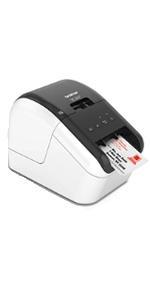
⚡ Label like a pro, stand out like a boss.
The Brother QL-800 is a high-speed thermal label printer delivering 93 labels per minute at 300 dpi resolution. Featuring innovative dual-color printing in black and red, it supports seamless USB connectivity with Windows and Mac via Plug & Label technology, enabling direct printing from Microsoft Office apps without extra software. Its built-in auto-cutter and compatibility with continuous-length tapes up to 3 feet make it ideal for professional shipping, organizational, and branding labels. Backed by a 2-year warranty, it’s the ultimate productivity tool for small businesses aiming to streamline labeling with precision and style.


| ASIN | B01N49R9KP |
| Additional Printer Functions | Print Only |
| B&W Pages per Minute | 40 ppm |
| Best Sellers Rank | #11,146 in Office Products ( See Top 100 in Office Products ) #44 in Desktop Label Printers |
| Brand | Brother |
| Built-In Media | Brother QL800 Label Printer, P-touch editor software and driver, AC power cable, USB cable, DK1201 and DK2251 starter rolls |
| Color | Black/White |
| Color Depth | 2 bpp |
| Compatible Devices | PC |
| Connectivity Technology | USB |
| Control Method | App |
| Controller Type | Android |
| Customer Reviews | 4.3 out of 5 stars 1,983 Reviews |
| Dual-sided printing | Yes |
| Duplex | auto |
| Hardware Interface | USB |
| Ink Color | Multicolored |
| Item Dimensions D x W x H | 4.9"D x 8.4"W x 5.6"H |
| Item Type Name | Color Laser Printer |
| Item Weight | 2.5 Pounds |
| Manufacturer | Brother Printer |
| Maximum Copy Resolution Black and White | 300 dpi |
| Maximum Copy Speed Black and White | 93 ppm |
| Maximum Media Size | Roll - 2.44" |
| Maximum Print Resolution Black and White | 300 dpi |
| Maximum Sheet Capacity | 800 |
| Model Name | Brother QL800 |
| Model Number | QL800 |
| Model Series | QL |
| Other Special Features of the Product | High-Speed |
| Output sheet capacity | 100 |
| Paper Size | 2.4-inch wide Inches |
| Print media | Labels |
| Printer Connectivity Type | USB |
| Printer Output Type | Monochrome, Black and Red |
| Printer Type | Thermal |
| Printing Technology | Thermal |
| Processor Count | 1 |
| Resolution | 300 x 300 |
| Scanner Type | Sheetfed |
| Special Feature | High-Speed |
| Specific Uses For Product | Name Badges, Food Labels, Paper Label, Office Labels, Warehouse Labels |
| Total USB 2.0 Ports | 1 |
| Total Usb Ports | 1 |
| UPC | 012502647454 012502646327 |
| Unit Count | 1.0 Count |
| Warranty Description | 2 Years Manufacturer's Labor + Parts Warranty |
| Warranty Type | limited warranty |
| Wattage | 50 watts |
G**.
Excellent Label Printer
Excellent label printer! I use it mainly for my business, to print UPC labels. The only fault I can find is with the P-Touch editor software. The software will not allow the printing of the entire label because of its margins settings, and it would be nice to be able to add additional barcode formats to the software, if that is an option I haven't learned how to do it yet. Both could be fixed with a software and firmware update. The ability to print labels in red is neat, and adds to the professional look of some labels, but I wouldn't call it a must-have feature. The ability to change label rolls and sizes quickly and easily is a great benefit.
P**T
Best product for print labels
This printer is very easy to use. I’m like
J**R
Work printer
Got this for work. Does great if you have the right software.
N**N
Poorly designed
Failed catastrophically within the first hour of use from a jammed label where adhesive got stuck on the inside. Labels jam easily, and it's impossible to clean out since it is a solid body and cannot be disassembled.
T**H
Fast & Clear Printing – Perfect for Office Use
The Brother QL-800 is an excellent label printer with outstanding print quality. Text comes out sharp and professional, and the printing speed is impressively fast—perfect for handling large volumes of labels. Setup was easy, and it’s very user-friendly. I especially like the option to print in both black and red, which makes labels stand out more. Overall, this printer has greatly improved my workflow and is highly recommended for business or office use.
C**A
Printer QL 800
This is a great product for checking in students and families to event programs at the church
M**S
Brother QL-800 — Great Printer, Software Could Be Better
The Brother QL-800 label printer has been working very well with our POS system, which actually recommends this brand and includes built-in label templates. Because of that integration, printing price tags and labels for the business is fast, consistent, and reliable. The printer hardware itself is excellent. It’s fast, prints clean labels, and has been dependable and compatible in daily use. Once set up through the POS, it does exactly what it’s supposed to do. My main issue was the Brother software when I initially tried using the printer directly with my computer. The software that needs to be downloaded is not very intuitive, and designing custom price tags or labels wasn’t as easy as it should be. The software could definitely benefit from updates and a more user-friendly interface. Another limitation is that I did not purchase the Wi-Fi version, so labels can only be printed when I’m physically at the business. That’s something buyers should consider if remote printing is important. Overall, this is a great label printer, especially when paired with a POS system. The hardware is solid, but the standalone software experience and lack of Wi-Fi (on this model) hold it back slightly.
A**Y
Good printer, but frustrating software issues
The printer itself is good—fast, reliable hardware, and the print quality is solid. Setup is straightforward, and the Plug & Label feature is a nice idea. However, the software is buggy and frustrating to use. Every time I try to print a label, I get an error saying “cannot print – Black/Red on white paper installed, change it to monochrome media.” Even when everything is set correctly. I contacted support, but they weren’t able to resolve the issue, which makes it even more disappointing. Overall, the hardware is great, but the software seriously holds it back.
Trustpilot
1 month ago
5 days ago