





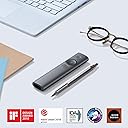


Logitech Spotlight Advanced Presentation Remote
Product ID: 40428247
Details
- BrandLogitech
- ColorSlate
- Compatible DevicesLaptop
- Max Number of Supported Devices1
- Special FeatureUniversal
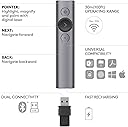
📶30m wireless range
🔄Dual USB & Bluetooth
🔋3 months battery life
Desertcart purchases this item on your behalf and handles shipping, customs, and support to Japan.
🎤 Own the room, even from 30 meters away!
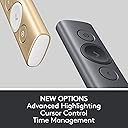
The Logitech Spotlight Presentation Remote redefines professional presentations with its advanced digital highlighting, dual connectivity options, and smart timer alerts. Compatible with all major platforms and boasting a 30-meter range plus up to three months of battery life, it’s the ultimate tool for millennial managers who demand precision, control, and seamless performance.


| Additional Features | Universal |
| Asin | B01N9X3DBQ |
| Battery Type | Lithium |
| Best Sellers Rank | #1,383 in Computer Keyboard & Mouse Combos |
| Brand | Logitech |
| Built In Media | presenter remote: quickstart user guide |
| Button Quantity | 3 |
| Color | Slate |
| Compatible Devices | Laptop |
| Connectivity Technology | Bluetooth |
| Controller Type | Button Control |
| Customer Reviews | 4.5 4.5 out of 5 stars (1,025) 4.5 out of 5 stars |
| External Testing Certification | Não aplicável |
| Global Trade Identification Number | 10097855127751 |
| Item Dimensions L X W X H | 5.2"L x 1.1"W x 0.5"H |
| Item Type Name | Logitech Spotlight Advanced Presentation Remote (Slate) - 910-004654 |
| Item Weight | 2.56 ounces |
| Manufacturer | Logitech |
| Maximum Number Of Supported Devices | 1 |
| Maximum Range | 30 meters |
| Mfr Part Number | 910-004654 |
| Model Name | Slate Remote |
| Model Number | 910-004654 |
| Number Of Batteries | 1 Lithium Polymer batteries required. (included) |
| Number Of Items | 1 |
| Unit Count | 1 Count |
| Upc | 097855127754 |
| Warranty Description | 1 - year limited warranty. |
User
The Remote That Makes You Feel Like a Professional (Even If You’re Sweating Inside)
This presentation remote works so well — I honestly don’t know how I ever presented without it. The cursor control alone is a game changer. Being able to move around the screen, play videos, click links, and highlight key points without running back to my laptop makes everything feel smoother and more professional.The highlighting feature is my favorite part — instead of a shaky little laser dot, you can actually spotlight and magnify exactly what you want people to look at. It’s perfect for in-person, virtual, and hybrid presentations.The vibration timing alerts are also clutch. I program my time markers and get subtle reminders right in my hand so I know when it’s time to move on or wrap it up — without awkwardly checking the clock.It connects easily with Bluetooth or the USB receiver, works with every platform I use (PowerPoint, Google Slides, PDFs), and the battery life is solid with quick charging.Bottom line:If you present even semi-regularly, this remote instantly levels you up. It’s one of those tools that quietly makes everything look more polished and under control — even when you’re absolutely winging it on the inside. 😌
User
It works with macOS High Sierra
This is a great remote for presenters. It has three modes: highlight, magnify, and pointer. The highlight mode is spectacular and allows the presenter to have the audience focus on a highlighted circular region of their slide with a darker mask over the balance of the slide. Similarly, the magnify option zooms on a circular region. The pointer mode has been updated to allow for selectable color pointers.Logitech recommends using two of the three modes for a presentation and this is very good advice. I also recommend practicing a few times before your first presentation and adjusting the size of the figures, text, and the Spotlight pointers to give the best fit with the different modes.Spotlight and the Logitech Presentation software worked well on my MacBook Pro (mid 2014). until Apple released the macOS High Sierra supplemental update. The presentation software does not run after the update and now the only functions of the Spotlight are to advance one slide or go back one slide. Effectively it became a very elegant set of arrow keys. It was very difficult to deal with the Logitech customer support. Their phone system is terrible and suffers from very poor audio connections. Register the device and then use the online chat for product support. After a very long wait (45 minutes) and then another 20 minutes of chat exchanges, I was asked to upload a system report to Logitech. Miraculously the next day a new software version (1.30.60) appeared on their website and the Logitech Spotlight and Presentation software are again working flawlessly on my MacBook Pro.It is a five star product with poor direct customer support, but the software team is great.The good...Great remote for presentationsBluetooth connectivity provides fantastic range between presenter and the computerPresentation effects have great impact. The Spotlight feature is fantastic,Software updates have made the "pointer" customizableSuperior to the other Logitech multi-button pointersThe bad...Product support is sketchy and extremely slow
User
Close to perfect
I just picked one up to teach some classes that rely on PowerPoint presentations and I’m very impressed with the Logitech Spotlight — I actually bought a second one as a gift for my training counselor.I was originally looking for a presenter with a laser, but the added functionality of a digital presenter outweigh a laser’s ability to work with non-screen mediums. I haven’t had any issues with the device or software. One of the more popular reviews indicates that the software doesn’t work well with a wireless projector — I’m using a Microsoft Wireless Display Adapter with my Logitech Spotlight, and while there is some lag, it is a very usable setup and I love not needing another wire plugged into my laptop. Since I prefer not having wires and dongles, I am using Bluetooth to connect to the Spotlight, which hasn’t had any range or responsiveness issues.I wish there was better, printed Getting Started documentation. One thing that will likely confuse new users is that there is no ON/OFF switch or button combination. Also, the buttons could be softer and quieter — they make a clicking sound that is very noticeable in a small room.On the software side, I wish the “laser pointer” emulation had an option for a solid shape instead of a colored outline, a dot would be easier to pick up by the audience. The magnifier has exceeded my expectations by rendering higher quality details than I thought it would, I expected a blockier magnification.I’m torn about the usefulness of the included soft case. It only accommodates the Spotlight itself and not the charging cable, if you try to stuff the cable in there as well you will undoubtedly scratch the finish of the presenter. Since a full charge is expected to last several months you shouldn’t need the cable often, but if you separate the two you will eventually misplace the cable or not have it when you really need it (the recessed nature of the USB-C port on the Spotlight makes it difficult to use a standard cable for charging).
User
Advancing the Art of Presenting
My "go to" remote for many years has been the Keyspan Presentation Remote Pro. Its small, works at great distances and has a load of buttons. Just as smartphones with touch screens have replaced mobile phones with rows of buttons, the Logitech Spotlight has replaced current design remotes. The internal lithium polymer battery recharges in minutes for hours of presenting. The three buttons can be customized with the included app. You can even change the volume level of a video with your wrist while its playing in a presentation. Its a big step up from previous remotes. Don't let the price be a barrier. The spotlight highlighter function is a key feature for those who present in board rooms with LCD monitors where a laser pointer won't show up. It even works flawlessly to control presentations made with an iPad by pairing the remote using Bluetooth. Its comfortable to hold with very high quality machining of the aluminum body.Recommendations for improvement: (1) allow the adjustment of the size of the spotlight highlighter to be larger (2) create an iOS app to configure this remote to work with all custom functions when presenting with an iPad.Logitech has advanced the art of presenting with this remote on multiple levels. Highly recommended.RJC
User
Great device for a price.
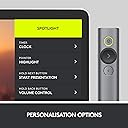
I first saw this device a while ago and while very interesting, the $129 price tag effectively kept me from even considering the purchase. This is when most other devices cost a fraction of the Spotlight, and that includes gyroscopic mice which are essentially not that different. Recently Logitech dropped the price to $99, and that's more interesting even if it's still one of the most expensive devices on the market.WITHOUT SPOTLIGHT APP: The remote does work without the Spotlight app. In that case, the operating system installs the proper driver once the Bluetooth connection is established. The gyroscopic presenter simulates a mouse and controls the cursor, while the pointer button acts as a left mouse button. In a PowerPoint presentation, the "next" and "previous" slide work as expected. The special functionality of the spot light is of course not available since the special functionality is not in the operating system or the application (PowerPoint).WITH SPOTLIGHT APP: The Spotlight app requires admin rights and once installed allows to extend functionality. That's not really a whole lot more, but quite useful to dim the presentation and keeping an area of interest bright, hence the name spotlight (or think of a flashlight). Equally interesting and useful is the magnifier function which does what the name suggests. That's almost more useful when you have detailed drawings and large venue. Depending on which functions are enabled, a double click on the highlight button switches between Spotlight, Magnifier and Cursor. The latter is closest to a laser pointer and far less innovative.The HARDWARE of the Spotlight is simple and sturdy. The metal housing isn't difficult to hold, although the slick, featureless body is also not the easiest to hold on to. The prominent forward button (middle) is larger and ensures "blind" orientation. The other two buttons are smaller but easy to use. Often criticized is the lack of an actual laser pointer. I can see the argument for cases when the app isn't loaded. However, that kind of negates the point of the spotlight feature and good luck trying to point with the laser in spotlight area.The possibly most impressive feature of the Spotlight is battery life and charge time. Depending on your use, you have potentially months between charges. That makes the charging cable one of those rare utilities that you may forget where you stored it between times of need. The included sleeve is a good home for the presenter, but not the cable. So I opted for a hard case that allows to store the cable. Should you forget to charge until shortly before prime time, the Spotlight needs only 1 minute to be charged for up to 3 hrs (typical) presentation use.Please note that the implied loop on the USB receiver is not a reliable method to attach the remote via lanyard or similar ways. It holds in the remote is a good snap fit, but cannot guarantee that you won't lose the hardware when holding it on the loop only (i.e. when hooked to a key chain etc.).The device comes in a large box, but without manual. Okay, most functionality is intuitive, although I have yet to find out how the Clock function works that supposedly displays a timer on the presentation screen. (Which I have yet to see.) Also, the size of the spotlight area can be pre-set, but during a presentation there is no way to change it from the remote (if that's needed).So overall it's a great addition to your presentation to help your audience focus. Unlike PowerPoint animations, I can't see the spotlight function to grow old too quickly, and for now they're not everywhere. Even if it was, I think it's a great addition to your presentation.
User
this is a game changer for upping your presentation style and effectiveness
My experience was the dongle that comes with it is terrible for range / response on my Maxbook. You can pair it with bluetooth though which is way easier, simpler, no dongle, etc, etc, nd just worked a thousand times better. There may be cases where the donge gives you better range than bluetooth, but honestly if bluetooth only works for 30 feet, how often is that going to matter? I was 6 feet away and the dongle was misbehaving.That's all the negatives...Having the ability to zoom and highlight a spot to bring people's attention to places in busy slides (which you should try not to have anyway) is a huge deal. The magnifier is essential for highlighting figures in charts as really many people can't read them. If its important you want people to be able to read it right??? Forwards, backwards, blanking the slide, all to be expected out of a "clicker" work great as well. There's a time function I haven't used yet but will be soon. Love it love it love it!
User
Works to control PPT via bluetooth on a Mac
I just got this, because my new Macbook Pro only has USB-C connectors (#$!!#!) and didn't want more dongles. Other reviews were inconsistent, so for the record: i'm running High Sierra 10.13.6 with Powerpoint version 16.20. Installation was simple and clear. Bluetooth connection seems fine (based on short experience) and the device let's me start and control the presentation, gives vibration-based time warnings, and allows me to use the spotlight feature - all with the bluetooth connection. Plus it feels nice in the hand (high quality). It's expensive, but worth it to me.
User
Perfect Remote/Pointer - works with keynote!
This Remote is my first ever remote and it's just amazing. Everyone is amazed by its features especially the "spotlight" one.I purchased this remote for my senior project presentation and I nailed it. The color matches my 2016 MacBook Pro 15-inch space gray.If you are wondering whether it works with Keynote, IT DOES. I tested it on version 7.3.1 (Latest at the time of writing).The setup process is cool as well. It teaches you how to use it. Some high-quality stuff. Almost forgot, the packaging is good looking too.All in all, its worth every penny and would recommend it to everyone.
User
Versatil
Es muy práctico y versátil, para mi caso fue un buena elección.
User
Excelente
Muito bom mesmo, o melhor. Que já comprei.
User
The best
Worked perfectly with keynote presentation
User
Logitech spotlight is a great presenter
When one is using LED displays, or is presenting in well lit room or presenting to a large audience, the laser pointers are not a great pointer to use. With the Logitech spotlight, one can present effectively on any screen and it is very easy to do. Now a days with the Video meetings and webinar, this is excellent tool as it comes with the ppt so you have no problem in changing the slide as well as pointing the attention to a particular place. It is very easy to use and the battery life is very long. It also has possibility to time the talk too. A great buy.
User
Não é fácil de usar e nem prático
Mais difícil e complicado que eu imaginava pelos anúncios. Não funciona em um computador que não tem o software instalado. Ou seja, não é tão prático como os apontadores a laser habituais. Arrependi-me
Trustpilot
5 days ago
2 months ago