Buy anything from 5,000+ international stores. One checkout price. No surprise fees. Join 2M+ shoppers on Desertcart.
Desertcart purchases this item on your behalf and handles shipping, customs, and support to Japan.
🚀 Elevate your storage game with pro-speed and rock-solid reliability!
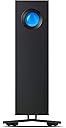
The LaCie d2 Professional 16TB external hard drive combines a massive 16TB capacity with ultra-fast 260 MB/s transfer speeds via USB-C and USB 3.0. Built with Seagate IronWolf Pro enterprise-class drives inside a sleek aluminum enclosure, it offers reliable, low-noise performance for PC, Mac, and iPad users. Plus, it includes a 1-month Adobe Creative Cloud subscription to fuel your creative workflow from day one.


| ASIN | B08C8CHZTY |
| Additional Features | USB-C connector, Works with iPad (USB-C) |
| Best Sellers Rank | #19,115 in Computers ( See Top 100 in Computers ) #98 in External Hard Drives |
| Brand | Seagate |
| Built-In Media | LaCie d2 Professional |
| Cache Memory Installed Size | 16 |
| Color | d2 Professional |
| Compatible Devices | Desktop, Ipad, Laptop |
| Connectivity Technology | USB |
| Connectivity technology | USB |
| Customer Package Type | Standard Packaging |
| Customer Reviews | 4.3 out of 5 stars 970 Reviews |
| Data Transfer Rate | 260 Megabits Per Second |
| Digital Storage Capacity | 16 TB |
| Digital storage capacity | 16 TB |
| EU Spare Part Availability Duration | 5 Years |
| Enclosure Material | Aluminum |
| Form Factor | 3.5-inch |
| Global Trade Identification Number | 03660619409051 |
| Hard Disk Average Latency | 4.17 Milliseconds |
| Hard Disk Description | Mechanical Hard Disk |
| Hard Disk Form Factor | 3.5 Inches |
| Hard Disk Interface | USB 3.0 |
| Hard Disk Rotational Speed | 7200 |
| Hard disk form factor | 3.5 Inches |
| Hard disk interface | USB 3.0 |
| Hard-Drive Size | 16 TB |
| Hardware Connectivity | USB Type C |
| Hardware Platform | Mac, PC |
| Installation Type | External Hard Drive |
| Item Length | 188.5 Millimeters |
| Item Type Name | LaCie d2 Professional 16TB external hard drive 8.9cm (3.5") USB-C™ USB 3.2 (Gen 2) Black STHA |
| Item Weight | 1.4 Kilograms |
| Item Width | 60 Millimeters |
| Manufacturer | Lacie |
| Media Speed | 260 |
| Mfr Part Number | STHA16000800 |
| Model Name | d2 Professional |
| Model Number | STHA16000800 |
| Number of Items | 1 |
| Read Speed | 260 Megabytes Per Second |
| Special features | USB-C connector, Works with iPad (USB-C) |
| Specific Uses For Product | Multimedia, Gaming |
| UPC | 763649148129 |
| Warranty Description | 1 YEAR |
M**S
not durable
stopped working in few month dispite very minimal usage
M**D
Perfect for Videos FCPX
I sailed from the Gold Coast, Qld with video cameras, drojnes and a macbook, plus this HDD. It worked flawlessly and stored all my FCPX libraries, edited footage, fast and flawless. Great !
F**P
Works great
It is really good itself. Quiet. Does not get warm. Does not vibrate etc. It comes in with all possible plugs I could think of as well which can be easily changed which is AMAZING. The software is simple to understand and so far, worked well. It has 1 semi-con and one real con. Semi-con - It is really heavy for how small it is. Not that you wont be able to lift it but surprisingly heavy. REAL con is the BLUE LIGHT on the front. It is extremely strong and cannot be turned off. You either have to cover it, paint it over or disassemble the device and somehow remove the led. Not only its constantly ON but it also rapidly flashes every now and then and when PC/Laptop is off, it will be off BUT it will still do that occasional flashing for no reason. So far it worked without any problems and the storage is big so that is fine. It mostly just comes to that damn light. It has its own software but you cannot disable the light which is sort of silly. Would be little better if it was not for the BRIGHT BLUE colour of it...
E**.
Rápido y estable.
Con la membresía de 30 días paga por si mismo la mitad de su valor.
F**A
No sirve para macOS
No es compatible con macOS Secuoya ni Tahoe en Macbook M4 pro 2024. Congela aleatoriamente el sistema o fuerza un reinicio inmediato.
マ**ン
質感がいい感じ(^o^)
Macmini2018の外付けとして購入。 複数台つないでいるHDDを できるだけコンパクトにしようと 6TBモデルを購入しました。 Seageteの現行のUSB3.0 HDD4TBを 2台繋いでいるので、同じモノに しようかと悩みましたが、 USB3.1 gen2のLacieで 少しでも速さを得ようと、 このd2 Professionalに してみました。 結論、速さの件は よくわかりません。 主な使用ソフトは IllustratorやPhotoshopです。 数字上は、USB3.1gen1の Seagateより少し速いみたいです。 Macmini2018は、 外付けSSDで起動しています。 Samsun T5(SSD 500GB)です。 作業スペースとして 内蔵SSD128GBの場所を 使っています。 終わったジョブを Lacie d2 Proに移動して保管。 もっと開く頻度の少ないものを Seageteへ。という使用です。 写真左より Seagete 3.1 gen1 Lacie 3.1 gen2 内蔵純正SSD と、数字上はかなりの 差があるんですが、 あまり体感できていません....(^_^;) というのも、 開くファイルの条件が 写真点数やレイアウトで バラバラだからです。 多分、おそらく 少し速いんだろうな〜 が、感想です。 Seageteやバッファローなどの 廉価版HDDと違い、 アルミ筐体のLacie d2は 質感がすごくいい感じです。 重さもあって....^_^ 個人的な感想として思うのは、 速さのみを求めるならSSDタイプで 少し、速くて見た目や作りの良さを 求めるなら、このLacieなど.... そんな選択基準になるんでは ないでしょうか。 いずれにせよ、 僕にとっては満足です(^o^)
Trustpilot
3 weeks ago
2 months ago