🎬 Elevate your storytelling with every frame — don’t just record, captivate!
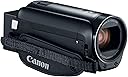
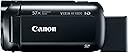
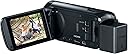
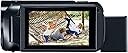
The Canon VIXIA HF R800 is a lightweight, portable camcorder featuring a 3.0-inch capacitive touch LCD, 57x advanced zoom, and a Full HD CMOS sensor. It offers superior image stabilization and low-light performance, making it ideal for capturing sharp, vivid videos on the go. With clean HDMI output, it doubles as a high-quality webcam, perfect for modern content creators and professionals.


| ASIN | B01N7OAH3I |
| Antenna Location | High-quality video recording, home videos, events, and recitals |
| Battery Average Life | 3 hours |
| Best Sellers Rank | #319,124 in Electronics ( See Top 100 in Electronics ) #1,025 in Camcorders |
| Brand | Canon |
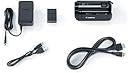
| Built-In Media | Battery, Compact Power Adapter CA-110, Mini-HDMI Cable HTC-100, USB Interface Cable IFC-300PCU/S, VIXIA HF R800 Camcorder |
| Camcorder Type | Video Camera |
| Color | Black |
| Connectivity Technology | HDMI |
| Customer Reviews | 4.5 out of 5 stars 1,750 Reviews |
| Digital Zoom | 1140 x |
| Display Resolution Maximum | 230000 |
| Effective Still Resolution | 3.28 mp |
| Effective Video Resolution | 1080 pixels |
| Exposure Control Type | Automatic |
| File Format | MP4 |
| Flash Memory Type | SDXC |
| Flash Memory Video Speed Class | V60 |
| Focus Type | Manual Focus |
| Form Factor | rotating |
| Global Trade Identification Number | 00013803288520 |
| Image Aspect Ratio | unknown_aspect_ratio |
| Image Capture Speed | 60 frames_per_second |
| Image stabilization | true |
| Item Dimensions D x W x H | 4.6"D x 2.1"W x 2.3"H |
| Item Weight | 8.48 ounces |
| Lens Type | Prime |
| Manufacturer | Canon Video |
| Maximum Aperture | 2.8 f_stop |
| Maximum Focal Length | 1853 |
| Minimum Focal Length | 32.5 |
| Model Name | Canon VIXIA HF R800 Camcorder (Black) |
| Model Number | 1960C002 |
| Number of Batteries | 1 Lithium Ion batteries required. (included) |
| Operating System | Proprietary Firmware/Embedded Os |
| Optical Zoom | 32 x |
| Photo Sensor Technology | CMOS |
| Screen Size | 3 inches |
| Sensor Type | CMOS |
| Shooting Modes | Slow Motion |
| Special Feature | Portable,Lightweight |
| Style Name | R800 |
| Supported Audio Format | AAC |
| Supported Image Format | MP4 |
| UPC | 013803288520 |
| Unit Count | 2.4 Ounce |
| Video Capture Format | MPEG-4 |
| Video Capture Resolution | 1080p |
| Video Resolution | 1080p |
| Warranty Description | 1 year limited warranty |
| Water Resistance Level | Not Water Resistant |
| Wireless Compability | Bluetooth |
| Zoom | Optical |
C**9
Amazing For the Price!
I am a professional broadcast video engineer with more decades of experience than I care to think about. Canon has done a lot of things right with this camera. It is amazing given its price. There isn't much to complain about, just a few nits to pick. It would be unfair to give it less than five stars. I would give it 6 stars if I could. The touch screen is rather fiddly. Someone with large fingers could have trouble with it. My fingers are fairly slender and I'm a little bit challenged to navigate the menus on its small screen. I tried to operate the touch screen using a toothpick as a stylus, but no joy. Canon has loaded up this camera with a lot of consumer-y gimmicks but you can ignore those or disable them. The documentation omits a couple of neat tricks, but thankfully people have made videos documenting some of them. The documentation doesn't cover this, but he camera can be used for live streaming. I use an Elgato Cam Link which goes between the HDMI output and a host computer's USB 3 input. You can then use an application such as OBS to record or stream your video. You do need to disable the icon display on the HDMI output to see your picture over HDMI without icons. There is a video on YouTube that show you how. You can also export videos over USB without installing Canon's app to do this. Once you make the USB connection, press the "playback mode" button (on the left below the on-off button) and it should show up as a device on your computer, at least it does in Windows 10. The external mic input is truly amazing. Somebody at Canon really understands audio and they got it right with these camcorders. They use a mic preamp which actually provides enough gain for a microphone, unlike many dedicated audio interfaces. A mic can require up to 60 dB of gain and this camcorder doesn't disappoint. I have connected a Shure SM 63 dynamic mic using a Hosa MIT-156 to go from XLR to mini-plug. Listen to the voice of experience: this is really the correct way to do it. You will then have a trainsformer-balanced mic input, greatly reducing the chances that you'll pick up the local 50-kilowatt AM station (been there, done that). This solution costs all of $21. You could then use an E-V 635A or a Shure SM 58 or even a ribbon mic. After putting it through its paces, I have to say the auto white balance mode is poor. It puts in too much red and too little blue. The tungsten white balance mode works much better. My plan is to leave it in "tungsten" mode and use an 85B filter when I use it outdoors -- just like film! Having owned this camera for a few months, I will add that the DC connector from the AC power supply is very flimsy and does not mate well with the camera. In addition, the camera does not do 59.94 frames per second at all. The maximum frame rate is 29.97 fps.
U**6
Great camera!
Used inside and outside for recording. I am very pleased with the outcome. The built in mic works fine but does give you wind noise in windy conditions. If you use an auxiliary mic it has an on-screen meter to let you know that it is recording and at what level. Worked perfectly. The touch screen monitor allows you to take a still photo of whatever is on the screen at that moment. It stores the photo on the memory card and these stills pop up as a separate section when reviewing the card. It is very easy and comfortable to hold (in your right hand) and click the record button on/off with your thumb. The strap is Velcro for easy adjustment for the hand. The zoom button is also easily accessed with your index finger on the top rear. Excellent zoom features. The stabilization feature also works great. The battery life indicator jumps around depending on if you are in record mode or playback. I purchased an extra battery but found that I could record on and off for 4 hours without issue. Excellent value.
D**L
If you need an affordable version of the Vixia G20/G40, then this is a very decent alternative on a budget.
Before I sing praises of the Canon Vixia HF R800, lemme give some perspective on this review: I work as a professional videographer, typically for local bands and music events, fundraiser charities, musician EPKs, etc. I have been using a Canon Vixia G30 for almost 4 years now, and it's literally the best prosumer camera anyone can buy. While it only goes up to 1080/60p, the image quality is superior to anything else I've seen thanks to the CMO sensor (which does VERY well in the low-light bar settings I often encounter). And it has the superior optics that typifies Canon products. The setup options allow videographers the ability to get a near-perfect set up for each gig I video, and even the internal microphone sound quality is top-notch, considering it's only a video camera. The only drawback with the Vixia line (so far) is that they don't offer 4K quality video...but frankly, the 4K videos I get filming in low-light settings with other cameras end up looking NO BETTER than 1080/60p...and when the file sizes explode to 5-6 times what I get with 1080/60p, you effectively max out computer memory after just one gig!! So for now, the Canon Vixia G30/G40 is the benchmark for what I do. So, I had a gig come up where I really needed a 3rd camera (or really 7th camera, if you include GoPros), and I was torn between getting this Vixia HF R800, or the Vixia G20, which I call the poor-man's G40. There's a $500 price difference, so given my budget constraints, I opted for this R800. And boy, that was easily the best $250-or-less camera investment I've ever made. It's setup and user options interface is basically a simplified version of the G30 I already have, it records in the SAME 1080/60p format (and has most of the same video quality-level options). It uses the CMO sensor (or a version of it), so low-light quality was fairly crisp...except with dreaded red/pink lighting, then the fuzziness starts to come through...but again, we are talking very dark bars/stages here. Autofocus works well too, it doesn't spend a lot of time wandering around trying to focus. And damn, the sound quality was also extremely good, comparable to the G30 I have, but requiring a lot less work to get it setup for this kind of audio recording. For this gig, it was a static tripod camera, and it work exactly how I needed it to. It's so light and affordable, I might just buy another one, rather than get a GoPro for almost $100-$200 more. Again, you CANNOT go wrong with the Canon Vixia line, it's pretty good, yawl!!
A**E
Great battery life, Great 60p video, but transfering from camera takes forever.
Updated Review 6/5/2017: I updated my review from 2 stars as I had initiated a return, but the shipping didn't work for me. I decided to cancel the return and try to work on the issue of extremely long transfer times. Seriously, if you're going to buy this camera, make sure you have a card reader. Transferring 10 GB of footage from the camera will take about 25 minutes, LONGER if you use the Cannon transfer software. I bought an external USB 3 card reader, and 10GB file transfers now take about 90 seconds. I had also previously complained about not having AVCHD recording for smaller file sizes. However, the Highest quality MP4 60p recording makes it so much easier to Edit in Sony Vegas. Rendering times are faster than real-time. a 30 minute video will render in about 16 minutes in Vegas. I use these for shooting pinball video's with a 2 camera setup, which I upload to YouTube at a very high quality. I edit these in Vegas, as mentioned, and they come out stunning and with the 2 videos combined, Picture in picture, it takes close to the actual amount of time to render. Again, a 30 minute video will render in about 34 minutes, keeping the MP4 settings as close to the original footage specs as possible. With the AVCHD files from my other cameras, it took more than twice as long to render - about an hour for a 30 minute video. Plus, this MP4 format uses my Intel graphics chip to aid in rendering. I previously mentioned the indoor quality was not so great, but a few lighting adjustments and the picture is perfectly fine. I still wish that you could record 60p at lower bitrates. These files takes up a TON of space. However, with being able to transfer the files much faster, this isn't so much of an issue. Again, if you want 60p recording, you have to use the highest setting of 35Mbps recording. This will only allow a maximum of 16 minutes and a few seconds, after which a new file is created. They appear as 1 video in the camera, but if transferring to a computer, there will be multiple files that have to be edited together. While the video is seamless, there will be a slight glitch in the audio track. One other thing, as far as audio, it's stereo only. No 5.1 surround. But I can live with that. Battery life is where this camera really shines. The battery lasts significantly longer than my previous cameras. Kudos to Cannon for including a larger battery in the box, and a charging unit with a long enough cord so I can record while using the charger. I'm glad I decided to give this camera second chance, and that I got the transfer issues sorted out.
M**S
Awesome little camcorder
For the money this is a amazing little camcorder. As someone else wrote, "READ THE MANUAL", because there's a ton of features that aren't obvious at first. The manual is 288 pages long and there's no wasted space. You don't need to read the manual to get started but you'll find all sorts of cool features and settings inside. (I printed the manual in double-sided, four pages to a sheet, and it ends up being only 32 pages long (but still readable). The PROS: The R800 is super compact- it would easily fit inside a standard pop can with room to spare- easily fits in a coat pocket. The camcorder is very light weight; no problem to hold it for extended periods of time. The screen is bright and clear the video seems very crisp. The onscreen menus are pretty intuitive and easy to navigate. You won't really need to use them much after the initial setup unless you want to do some fancy stuff or change modes. Quick startup, about 2 to 3 seconds from opening the screen and it's ready. A 64GB SD card will provide more than ~6 hours of recording at 24Mbps, or 34 hours at 4Mbps. For most uses 35Mbps and 24 Mbps will give you plenty of detail in the video. (35, 24, and 17Mbps record at 1920x1080 resolution, 4Mbps records at 1280x720). You can take still images (even while recording video) and a 64Gb SD card will let you store about 97,600 images at 1280x720. That's right: NINETY-SEVEN THOUSAND IMAGES!! (Not to be morbid, but at my age that could easily be a lifetime supply for me. lol) Slow-motion and time-lapse recording are built in, as are some basic fades and transitions. There are also some fancier photo effects (graphics, stamps, etc). The zoom is smooth and very controllable and the zoom speed is adjustable. I wish the zoom rocker-control went front-to-back instead of side-to-side. A front-to-back zoom control is much more intuitive than side-to-side. Shame on you, Canon, you're supposed to know something about how to design cameras. Not a deal-breaker, but a minor complaint. Face detection and tracking are built in. That may or may not be useful to you. The camera can convert video clips into time-lapse video (after they're taken). That's pretty cool. The camcorder can also take short video clips of variable length (e.g. take a 3-second clip with each button press). You can save parts of the video as still images. Also very handy. (page 15 in the manual) Framing assistance is a built-in feature. Check out what it does in the manual (page 59 in the manual) There's a built-in "lock video" feature to prevent anyone from deleting a video (think kids, cops, etc). The camcorder also has an optional 3-second "pre-record" feature that can capture 3 seconds of video *before* you press the record button. I suspect that will come in very handy. It records stereo sound, although the two microphones are only about an inch apart so I'm not sure how much actual left/right separation there will be. The built in lens shield (a mechanical shutter) is a good feature. The shutter is opened and closed with a small lever near the front of the camera. (I'll be attaching UV filter which will also act as a lens protector, but having one built in is good. (You always want to have something between the lens and the outside world. It keeps dust, water, bugs, etc off the lens and prevent scratches. You can either let the lens get scratched (which means a lot of time and $$$$ to fix) or let an inexpensive filter take the hit (~$20 to replace with a brand new one). The CONS: I sometimes find the record button a little difficult to reach depending upon how I hold it, but this is a minor issue. You cannot set what to use as the default memory to record to. Some of the Vixias allow you to set this, but not the R800. There's no WiFi capability so you can't stream to the internet (e.g. Bambuser, Camfrog, UStream, etc). The lack of WiFi capability is a real deficit. This camcorder is not meant for low light recording, but as long as there's some light you'll probably get usable video. If in doubt, use a lamp to help illuminate the scene. The LCD screen sensitivity could be a little better, but that's a personal preference; you may find it's just fine. The onscreen buttons could also be a little bigger in my opinion but you can use the eraser end of a pencil to tap stuff if you have big fingers or are wearing gloves. The various input/output ports (mic, USB, HDMI, etc) can only be used with the screen open; it would have been great if they could have placed them so they were accessible without having to open the screen. (Not really a big deal, but worth mentioning.) It can take a looooooooong time to charge the battery- almost 8 hours for the BP-727 battery, about 5.5 hours for the BP-718. Might wanna get an extra battery or two. The Canon manual says that before using the camera the first time, you should fully charge the battery and then let it run all the way down until it's dead. The batteries cost about $25 to $50 each depending on where you get them. That's not exorbitant but it's not cheap, either. (I've seen them as low as $15 apiece but who knows if they're any good.) Make sure you get batteries marked as "Decoded" or you won't get the "time remaining" display.) It's unclear if you can run power the camcorder from a powerbank gadget or not, and I'm hesitant to try it for fear of zorching the camera. With all that said, there's not much to complain about. I think this is an amazing little gadget for the price. If it broke, I'd probably go right out and get another one. (I got mine for $160 during Black Friday, but even at the usual price of $199 it's still an excellent deal in my opinion.) Finally, READ THE MANUAL- it's time well spent.
J**.
An honest review from a complete newbie looking for a youtube camera...
I am new to the handy-cam/camcorder market and knew nothing about any of them when decided to buy this, I just wanted one that I could point and record without manually adjusting anything. I wanted clean and crisp without the grain. I ended up spending hours researching different models and look at reviews. Almost everywhere you look, they say its a good "youtube" camera but compared to what? I wanted to know the difference between this camera and the next level up and not the same level of camera. Not being able to find the info I was looking for, I purchased this camera and a Panasonic HC-V770 camera. took some side by side videos for comparison and because amazon does not allow high quality uploads... I uploaded to youtube: search for Panasonic HC-V770 vs Canon Vixia HF R800 to see the 1080@60fp videos. If you are like me and you are interested in maybe spending a bit more coin for a next level camera... then check out the video. (I used max quality full auto settings for my test : 1080@60fps) VIDEO QUALITY: I think this camera has pretty good video quality for the price, but almost every video I recorded with it was grainy. The camera recorded much better with short depth of field, like recording working at a workbench.. The grainy videos are less obvious with panning and movement but with tripod shots its the most noticeable. STABILIZATION: The stabilization is good but not as good as the next level up camera ($500 range). The Panasonic HC-V770 has much better stabilization. LIGHTING: Having enough light is a concern for all consumer grade handy-cams and this camera is no exception. If you are recording in low light situations, this might not be the camera for you. This camera will have some graininess even in full light situations. COLOR: On full auto out door shots the colors seemed yellowish compared to the real thing. I recorded snowy scenery on a sunny day and it came out looking a bit yellow. Indoor low light recording, the colors looked much better OPTIONS: The options are very limited on this camera which I think is great for someone who just wants to produce some videos and not be messing with settings all the time. The Panasonic HC-V770 has so many options I get lost trying to figure them all out. The reason for 3 stars is because the camera records a faint fluttering sound when recording. I'm not sure if this is a defect or not but it can be heard in almost all videos I have recorded with it. Also because the amount of graininess produced by this camera even in full light situations. FINAL THOUGHTS: Aside from grainy videos and a mic that has no wind shielding. This camera is good for newbies at a reasonable $200 price range as long as you don't expect perfect HD videos. I hope this helps someone out there!
I**S
Love it
So much utility for so little money, and in such a small form. I'm using it to record music jam sessions, so I love its external microphone input. The mic preamp is adjustable, has tons of gain available, and does not apply compression or other nonsense; just nice, clean 48K AAC stereo sound. Picture quality is perfectly adequate for a $200 pocket camcorder; hey, it's not a $30,000 broadcast camera, so be fair! I'm getting almost 3 hours of recording time with the supplied battery. Battery takes a long time to charge (up to 8 hours), so plan ahead. Conclusion: I can't find anything to complain about. I like this thing so much that I might buy a 2nd just to have a spare, or for multiple camera angles.
C**E
Great Little Camera to Capture Family Memories
Perfect little companion to my Canon DSLR for my family videos. I was sick of switching between video and photo and also going without autofocus or zoom on my DSLR when trying to capture my toddlers' antics, so I got this for our family videos and I am SO happy. This little camera is so small and lightweight, easy to use and carry around (I just throw it in my purse when we go out). I would HIGHLY recommend this to families who want to take nice videos on the fly. However, be aware the quality is not great in indoor low light even at highest the res setting, but otherwise its great. I would NOT recommend this for anyone tying to get in to professional videography, it's just not strong enough. Another con, the USB cord does not communicate with my 2017 iMac (my 2012 Canon DSLR does) so I have to manually remove the memory card to transfer videos each time, but this isn't a huge deal. I love this little camera to capture my precious family moments!
C**O
Fait du travail très honnête pour le prix
Elle est facile à configurer, la qualité d'images est bonne, petit format qui est facile à transporter et on peut brancher un micro externe et des écouteurs lors des prises de vues.
M**L
Five Stars
Fantastic camera for money use it for teaching . Amazing fast delivery
C**A
Simples e eficiente
Achei ela muito fácil de configurar e gravar. Ótima imagem e captura de som. Excelente custo X benefício
N**C
Its a good buy.
Lightweight, clear, good facial tracking, zoom is not shaky even without tripod. Though audio capture directly is not at the same level as video. But loving it.
V**.
excelente camara
Estoy muy contento con los resultados en el material que pudo generar con esta camara, ideal para exteriores y situaciones con luz de día, en condicioones de poca luz ya mete un poco mas de ruido pero en general gran calidad
Trustpilot
2 weeks ago
2 months ago